github.com/bnomei/nereid @v0.5.0
Chat with this repoWhat it actually does AI analysis from the code graph — generated when you open this
README
nereid





Create and explore Mermaid diagrams in collaboration with AI agents in a terminal-first workspace, including ASCII art export. Nereid is source-available for noncommercial use only; commercial or product use requires separate written permission.
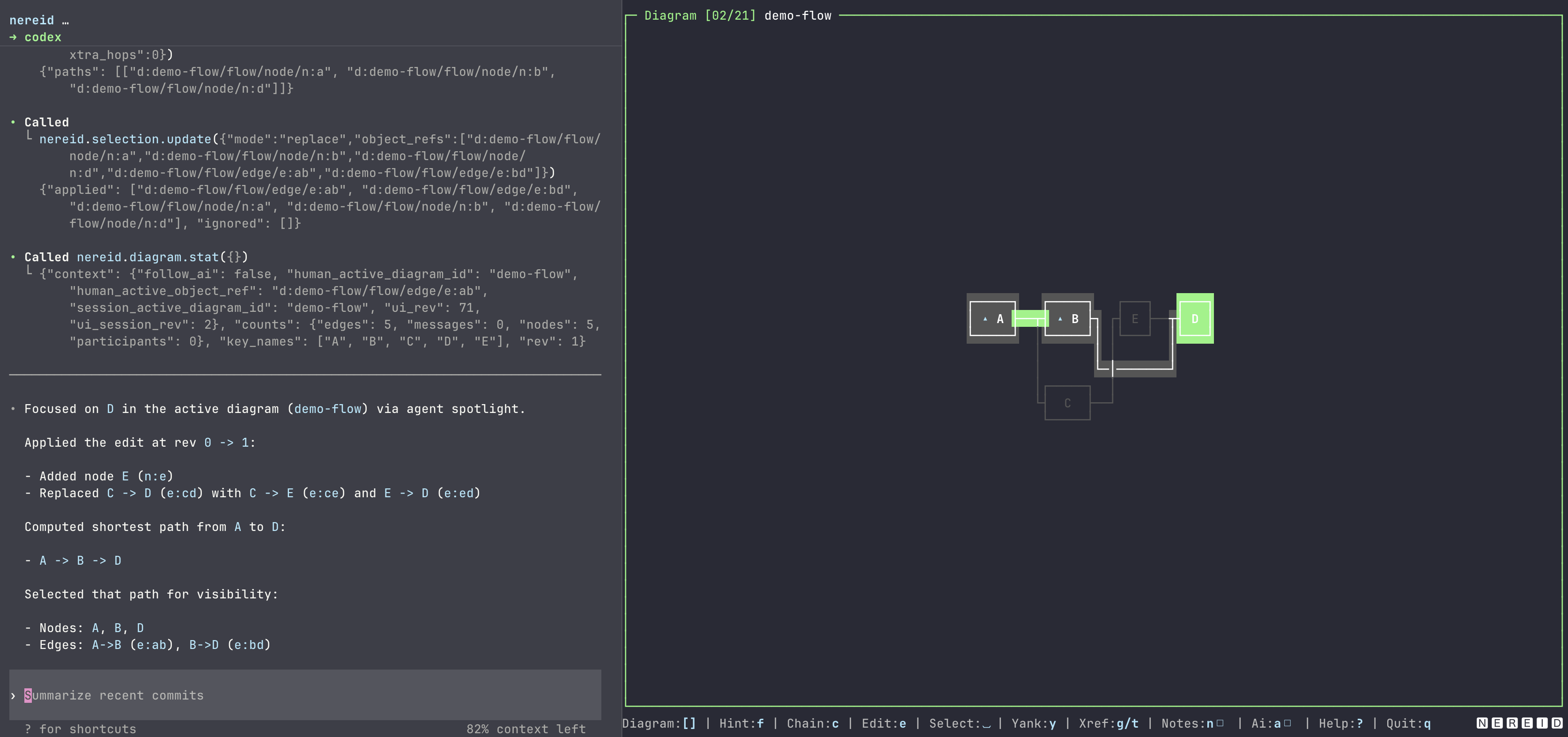
Terminal-first diagram workspace with: - a ratatui TUI for browsing and editing Mermaid-backed diagrams, - an MCP server (stdio and Streamable HTTP), - persistent session folders (diagrams, walkthroughs, xrefs, selections).
Nereid is: - CLI-first: one binary, local-first defaults. - MCP-first: typed tools for diagram, xref, walkthrough, and query workflows. - Keyboard-first: fast panel navigation, hint jumps, chaining, and search.
Installation
License notice: Installing Nereid from crates.io, Homebrew, GitHub Releases, or source does not grant unrestricted use. Nereid is source-available for noncommercial use only. Commercial use, product use, redistribution, sublicensing, and modified distribution require separate written permission from the copyright holder. See
LICENSE.
Cargo (crates.io)
The crates.io package is provided under the same source-available noncommercial terms.
cargo install nereid
Homebrew
The Homebrew formula installs the binary but does not change the noncommercial usage restrictions.
brew install bnomei/nereid/nereid
GitHub Releases
Download a prebuilt archive from the GitHub Releases page, review the included license notice, extract it, and place nereid on your PATH.
From source
Building from source is allowed for noncommercial use under the license terms.
git clone https://github.com/bnomei/nereid.git
cd nereid
cargo build --release
Quickstart
Run TUI (default)
cargo run
If nereid is installed and on your PATH, run it directly in your intended session folder:
cd path/to/session
nereid .
By default, TUI mode also serves MCP over Streamable HTTP on:
- http://127.0.0.1:27435/mcp
Run with a persisted session folder
cargo run -- path/to/session
# equivalent:
cargo run -- --session path/to/session
If the folder does not contain a session yet, Nereid initializes it automatically.
Persisted sessions use:
- nereid-session.meta.json
- diagrams/*.mmd
- walkthroughs/*.wt.json
Demo mode
cargo run -- --demo
MCP over stdio (no TUI)
cargo run -- --mcp
# with persistent session
cargo run -- --mcp --session path/to/session
TUI + MCP HTTP on a custom port
cargo run -- --mcp-http-port 27500
CLI
nereid [<session-dir>] [--durable-writes] [--mcp-http-port <port>]
nereid [--session <dir>] [--durable-writes] [--mcp-http-port <port>]
nereid --demo [--mcp-http-port <port>]
nereid [<session-dir>] [--durable-writes] --mcp
nereid [--session <dir>] [--durable-writes] --mcp
nereid --demo --mcp
Notes:
- --mcp-http-port is only valid in TUI mode.
- --demo cannot be combined with session-dir/--session.
- session-dir and --session are equivalent; use one.
- --durable-writes enables slower best-effort fsync/sync persistence.
MCP
Tool groups:
- diagram.*: diagram.list, diagram.current, diagram.open, diagram.delete,
diagram.create_from_mermaid, diagram.stat, diagram.get_slice, diagram.diff,
diagram.read, diagram.get_ast, diagram.render_text, diagram.apply_ops,
diagram.propose_ops
- walkthrough.*: walkthrough.list, walkthrough.open, walkthrough.current,
walkthrough.read, walkthrough.stat, walkthrough.diff, walkthrough.get_node,
walkthrough.render_text, walkthrough.apply_ops
- collaboration: attention.human.read, attention.agent.read, attention.agent.set,
attention.agent.clear, follow_ai.read, follow_ai.set, selection.read,
selection.update, view.read_state
- xref/object: xref.list, xref.neighbors, xref.add, xref.remove, object.read
- queries: route.find, seq.messages, seq.search, seq.trace, flow.reachable,
flow.paths, flow.cycles, flow.unreachable, flow.dead_ends, flow.degrees
MCP schema snapshot
The reviewable MCP tool schema snapshot lives at src/mcp/server/tool_schema.snapshot.json.
Regenerate it after changing MCP tool names, descriptions, input schemas, or output schemas:
cargo run -- --dump-mcp-tool-schema > src/mcp/server/tool_schema.snapshot.json
The snapshot check runs as part of the MCP server tests and does not require external services:
cargo test mcp_tool_schema_snapshot_is_current
Tool schemas (Input/Output):
diagram.get_slice
Input:
{
  "diagram_id": "d-flow",
  "center_ref": "d:d-flow/flow/node/n:a",
  "radius": 1,
  "depth": 1,
  "filters": {
    "include_categories": ["flow/node", "flow/edge"],
    "exclude_categories": []
  }
}
Output:
{
  "objects": ["d:d-flow/flow/node/n:a", "d:d-flow/flow/node/n:b"],
  "edges": ["d:d-flow/flow/edge/e:ab"]
}
diagram.apply_ops
Input:
{
  "diagram_id": "d-seq",
  "base_rev": 3,
  "ops": []
}
Output:
{
  "new_rev": 4,
  "applied": 1,
  "delta": { "added": [], "removed": [], "updated": [] }
}
walkthrough.apply_ops
Input:
{
  "walkthrough_id": "w:1",
  "base_rev": 0,
  "ops": []
}
Output:
{
  "new_rev": 1,
  "applied": 1,
  "delta": { "added": [], "removed": [], "updated": [] }
}
object.read
Input:
{ "object_ref": "d:d-seq/seq/block/b:0000" }
Output:
{
  "objects": [
    {
      "object_ref": "d:d-seq/seq/block/b:0000",
      "object": {
        "type": "seq_block",
        "kind": "alt",
        "header": "guard",
        "section_ids": ["sec:0000:00", "sec:0000:01"],
        "child_block_ids": []
      }
    }
  ],
  "context": {}
}
TUI
Press ? in-app for the full, scrollable help panel.
Common keys:
- 1 focus Diagram
- 2 toggle+focus Objects
- 3 toggle+focus XRefs
- 4 toggle Inspector
- Tab / Shift-Tab cycle focus
- [ / ] previous/next diagram
- / regular search, \ fuzzy search, n/N next/previous result
- f hint jump, c chain hint mode
- g/t jump inbound/outbound xref
- Space toggle selection
- d deselect all objects in current diagram
- e edit active diagram in $EDITOR
- a toggle follow-AI attention
- q quit
Theming
Nereid sticks to the terminal's ANSI palette (16 colors + text attributes like bold/dim/reverse), so it inherits your terminal theme (light/dark, base16, etc)without implementing full app theming. You can also enforce a set of colors via an NEREID_TUI_PALETTE environment variable.
Demo Playbooks
- Playbooks directory: https://github.com/bnomei/nereid/tree/main/tests/playbooks
Prompts:
From the demo index, the story node for the marlin fight — where does its nav link go? Return target diagram_id and target object_ref.In the terrace dialogue where the boy mentions the Yankees, find the DiMaggio line and return the message object_ref plus exact text.In the routing demo with crossings, can Start reach Done? Return yes/no and one shortest path as node refs.From the DiMaggio motif in the motifs diagram, find the baseball quote that says "makes the difference" and read it. Return the route and the quote.Enable follow-AI and spotlight d:om-12-sharks/seq/participant/p:mako. Then confirm follow_ai and current agent attention.From the demo index, list every nav xref that lands in a sequence diagram (not flowchart). Return target diagram_id and target object_ref for each.In the flowchart demo with alpha/beta edges, find the edge labeled "beta" and return its edge object_ref plus from/to node refs.In the dialogue where the boy asks to go fishing again, starting from message id m:ask_go, return the next two messages after it (object_ref + text).Find the shortest route from d:demo-flow/flow/node/n:a to d:demo-flow/flow/edge/e:cd. Return the full route as object_refs in order.Starting from the "Lions" node in the cast map, find the shortest route to the Lions participant in the dreams sequence. Return the full route as object_refs in order.On the demo index, find the node whose note says "routing + tees". Use that node to follow its nav xref to the target diagram. Then answer: can n:start reach n:done, and return one shortest path as node refs. Include the source node object_ref and the target diagram_id.In the ambiguous OK demo, multiple messages say "OK". Return the object_ref for the OK message in the "cache miss" else branch where api talks to db, and include its from/to participant IDs and message_id.Without changing anything, tell me the active diagram id and the number of selected objects.In the flowchart demo with alpha/beta labels, give me the local neighborhood (radius 1) around the node labeled "A", including node refs and edge refs.On the flowchart demo with alpha/beta edges, tell me: cycles (if any), dead-end nodes, the top out-degree node, and unreachable nodes when starting from n:b.Create a new sequence diagram pb-16-seq with a->>b: Ping, then add another message a->>b: Extra, and report the diff, current counts, and a rendered text preview.Create a temporary flowchart diagram pb-17-flow, then delete it and confirm it is gone from diagram.list.List walkthroughs, open wt-demo, then report current walkthrough id, node/edge counts, and a short render preview.On walkthrough wt-demo, add a node n:wrap titled "Wrap up" that references the Sail home node in the return diagram, then show the diff since the previous rev and read back that node.Show me the raw Mermaid source for the flowchart demo with alpha/beta edges, and point to the exact line that encodes the beta edge.Switch to the routing demo with crossings, then list every node reachable from Start.Do a quick protocol audit of the terrace dialogue: list only the lines spoken by the boy to the old man, returning message refs and text.From the DiMaggio motif node, list all outbound xref neighbors as object refs.
Configuration
Environment variables:
| Variable | Default | Meaning |
|---|---|---|
NEREID_TUI_PALETTE |
unset | Optional palette override. |
NEREID_PALETTE |
unset | Alias for NEREID_TUI_PALETTE. |
VISUAL/EDITOR |
system | Editor used by e to edit Mermaid. |
Development
cargo fmt
cargo clippy --all-targets --all-features
cargo test
Benchmarks:
./scripts/bench-criterion save
./scripts/bench-criterion compare
Local Pre-commit
prek validate-config prek.toml
prek run --all-files
prek install
License
Nereid Source-Available Noncommercial License v1.0. Noncommercial use is allowed under the license terms. Commercial use, product use, redistribution, sublicensing, or modified distribution require separate written permission. See LICENSE.
Core symbols most depended-on inside this repo
Shape
Languages
Modules by API surface
For agents
$ claude mcp add nereid \
  -- python -m otcore.mcp_server <graph>