github.com/bkryza/clang-uml @0.6.3
Chat with this repoBrowse by type
What it actually does AI analysis from the code graph — generated when you open this
README
[

](https://github.com/bkryza/clang-uml/releases)
C++ UML diagram generator based on Clang






clang-uml is an automatic C++ to UML class, sequence, package and include diagram generator, driven by
YAML configuration files. The main idea behind the
project is to easily maintain up-to-date diagrams within a code-base or document
legacy code. The configuration file or files for clang-uml define the
types and contents of each generated diagram.
The diagrams can be generated in the following formats: * PlantUML * MermaidJS * GraphML * JSON
clang-uml currently supports C++ up to version 20, as well as C and Objective-C.
Full documentation can be found at clang-uml.github.io.
To see what clang-uml can do, check out the diagrams generated for unit
test cases here, examples in
clang-uml-examples repository
or my blog.
Features
Main features supported so far include:
- Class diagram generation
- Class properties and methods including access scope - example
- Class inheritance - example
- Other class relationships including associations, aggregations, dependencies and friendship - example
- Template instantiation relationships - example
- Template specialization and instantiation based on deduced context - example
- Relationship inference from C++ containers and smart pointers - example
- Diagram content filtering based on namespaces, elements and relationships - example
- Optional package generation from namespaces (only PlantUML) - example
- Optional package generation from subdirectories (only PlantUML) - example
- Optional package generation from C++20 modules (only PlantUML) - example
- Interactive links to online code or docs for classes, methods and class fields in SVG diagrams - example
- Support for plain C99/C11 code (struct, units and their relationships) - example
- C++20 concept constraints - example
- C++20 coroutines - example
- Diagram content filtering based on C++20 modules - example
- Objective-C class diagrams - example
- Sequence diagram generation
- Generation of sequence diagram from specific method or function - example
- Generation of loop and conditional statements - example
- Generation of switch statements - example
- Generation of try/catch blocks - example
- Handling of template code including constexpr conditionals - example
- Handling of lambda expressions - example
- Interactive links to online code to classes and call expressions - example
- Support for CUDA Kernel and CUDA Device function calls - example
- Objective-C sequence diagrams - example
- C++20 coroutines support - example
- Package diagram generation
- Generation of package diagram based on C++ namespaces - example
- Generation of package diagram based on subdirectories - example
- Generation of package diagram based on C++20 modules - example
- Dependencies between packages based on symbols used in the code - example
- Interactive links to online code to packages - example
- Objective-C package diagrams based on subdirectories - example
- Include graph diagram generation
- Show include graph for selected files - example
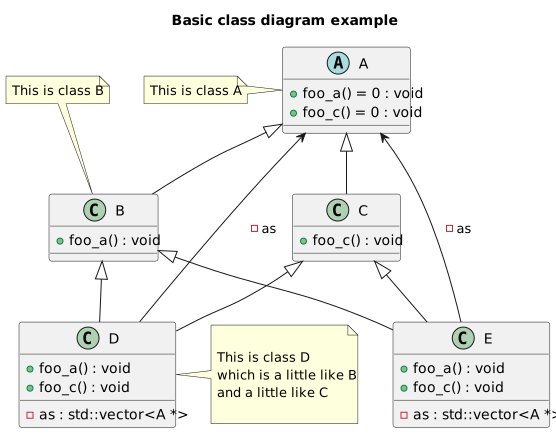


More comprehensive documentation can be at clang-uml.github.io.
Installation
Installation instructions for Linux, macos and Windows can be found
here.
Usage
Generating compile commands database
clang-uml requires an up-to-date
compile_commands.json
file, containing the list of commands used for compiling the source code
or alternatively a list of compilation flags in a file called
compile_flags.txt
(see here.
See also here
for instructions on how to generate compile_commands.json using some of the
existing C++ build systems.
Invocation
By default, clang-uml will assume that the configuration file .clang-uml
and compilation database compile_commands.json files are in the
current directory, so if they are in the top level directory of a project,
simply run:
clang-uml
The output path for diagrams, as well as alternative location of
compilation database can be specified in .clang-uml configuration file or
through command line parameters.
For other options see help:
clang-uml --help
Configuration file format and examples
Configuration files are written in YAML, and provide definition of diagrams
which should be generated by clang-uml. Basic example is as follows:
compilation_database_dir: .
output_directory: diagrams
diagrams:
  myproject_class:
    type: class
    glob:
      - src/*.cc
    using_namespace: myproject
    include:
      namespaces:
        - myproject
    exclude:
      namespaces:
        - myproject::detail
    plantuml:
      after:
        - 'note left of {{ alias("MyProjectMain") }}: Main class of myproject library.'
See here for detailed configuration file reference guide.
Examples
To see what clang-uml can do, browse the test cases documentation here.
In order to see diagrams for the clang-uml itself, based on its own config run
the following:
make clanguml_diagrams
and open the SVG diagrams in docs/diagrams folder.
Class diagrams
Example
The following C++ code:
template <typename T, typename P> struct A {
    T t;
    P p;
};

struct B {
    std::string value;
};

template <typename T> using AString = A<T, std::string>;
template <typename T> using AStringPtr = A<T, std::unique_ptr<std::string>>;

template <typename T>
using PairPairBA = std::pair<std::pair<B, A<long, T>>, long>;

template <class T> using VectorPtr = std::unique_ptr<std::vector<T>>;
template <class T> using APtr = std::unique_ptr<A<double, T>>;
template <class T> using ASharedPtr = std::shared_ptr<A<double, T>>;

template <class T, class U>
using AAPtr = std::unique_ptr<std::pair<A<double, T>, A<long, U>>>;

template <typename T> using SimpleCallback = std::function<void(T, int)>;
template <typename... T> using GenericCallback = std::function<void(T..., int)>;
using VoidCallback = GenericCallback<void *>;

using BVector = std::vector<B>;
using BVector2 = BVector;

using AIntString = AString<int>;
using ACharString = AString<char>;

using AStringString = AString<std::string>;
using BStringString = AStringString;

template <typename T> class R {
    using AWCharString = AString<wchar_t>;

    PairPairBA<bool> bapair;

    APtr<bool> abool;
    AAPtr<bool, float> aboolfloat;
    ASharedPtr<float> afloat;
    A<bool, std::string> boolstring;
    AStringPtr<float> floatstring;
    AIntString intstring;
    AStringString stringstring;
    BStringString bstringstring;
    AAPtr<T, float> atfloat;

protected:
    BVector bs;

public:
    BVector2 bs2;
    SimpleCallback<ACharString> cb;
    GenericCallback<AWCharString> gcb;
    VoidCallback vcb;
    VectorPtr<B> vps;
};
results in the following diagram (via PlantUML):

Design patterns examples
The following list references test cases representing some of design patterns: * Factory - t00020 (virtual polymorphism) and t00059 (static polymorphism) * Bridge - t00093 (virtual polymorphism) and t00099 (static polymorphism) * Builder - t00094 (virtual polymorphism) and t00100 (static polymorphism) * Prototype - t00095 (virtual polymorphism) and t00096 (static polymorphism) * Decorator - t00097 (virtual polymorphism) and t00098 (static polymorphism) * Strategy - t00023 (virtual polymorphism) and t00101 (static polymorphism)
Sequence diagrams
Example
The following C++ code:
#include <atomic>
#include <functional>
#include <iostream>
#include <memory>
#include <string>

namespace clanguml {
namespace t20029 {
std::string encode_b64(std::string &&content) { return std::move(content); }

template <typename T> class Encoder : public T {
public:
    bool send(std::string &&msg)
    {
        return T::send(std::move(
            // Encode the message using Base64 encoding and pass it to the next
            // layer
            encode(std::move(msg))));
    }

protected:
    std::string encode(std::string &&msg) { return encode_b64(std::move(msg)); }
};

template <typename T> class Retrier : public T {
public:
    bool send(std::string &&msg)
    {
        std::string buffer{std::move(msg)};

        int retryCount = 5;

        // Repeat until send() succeeds or retry count is exceeded
        while (retryCount--) {
            if (T::send(buffer))
                return true;
        }

        return false;
    }
};

class ConnectionPool {
public:
    void connect()
    {
        if (!is_connected_.load())
            connect_impl();
    }

    bool send(const std::string &msg) { return true; }

private:
    void connect_impl() { is_connected_ = true; }

    std::atomic<bool> is_connected_;
};

int tmain()
{
    auto pool = std::make_shared<Encoder<Retrier<ConnectionPool>>>();

    // Establish connection to the remote server synchronously
    pool->connect();

    // Repeat for each line in the input stream
    for (std::string line; std::getline(std::cin, line);) {
        if (!pool->send(std::move(line)))
            break;
    }

    return 0;
}
}
}
results in the following diagram (via PlantUML):

Open the raw image here, and check out the hover tooltips and hyperlinks to participants and methods.

Package diagrams
Example
The following C++ code:
namespace clanguml {
namespace t30003 {

namespace ns1 {
namespace ns2_v1_0_0 {
class A {
};
}

namespace [[deprecated]] ns2_v0_9_0 {
class A {
};
}

namespace {
class Anon final {
};
}
}

namespace [[deprecated]] ns3 {

namespace ns1::ns2 {
class Anon : public t30003::ns1::ns2_v1_0_0::A {
};
}

class B : public ns1::ns2::Anon {
};
}
}
}
results in the following diagram (via PlantUML):

Include diagrams
In case you're looking for a simpler tool to visualize and analyze include graphs check out my other tool - clang-include-graph
Example
The following C++ code structure:
tests/t40001
├── include
│   ├── lib1
│   │   └── lib1.h
│   └── t40001_include1.h
└── src
    └── t40001.cc
results in the following diagram (via PlantUML) based on include directives in the code:

Default mappings
| UML | PlantUML | MermaidJS |
|---|---|---|
Core symbols most depended-on inside this repo
Shape
Languages
Modules by API surface
For agents
$ claude mcp add clang-uml \
  -- python -m otcore.mcp_server <graph>