hub / github.com/betta-cyber/netease-music-tui
github.com/betta-cyber/netease-music-tui @v0.1.5
Chat with this repo
260 symbols
628 edges
39 files
51 documented · 20%
● updated 4y agov0.1.5 · 2022-03-15★ 42810 open issues
What it actually does AI analysis from the code graph — generated when you open this
loading…
README
NETEASE CLOUD MUSIC TUI

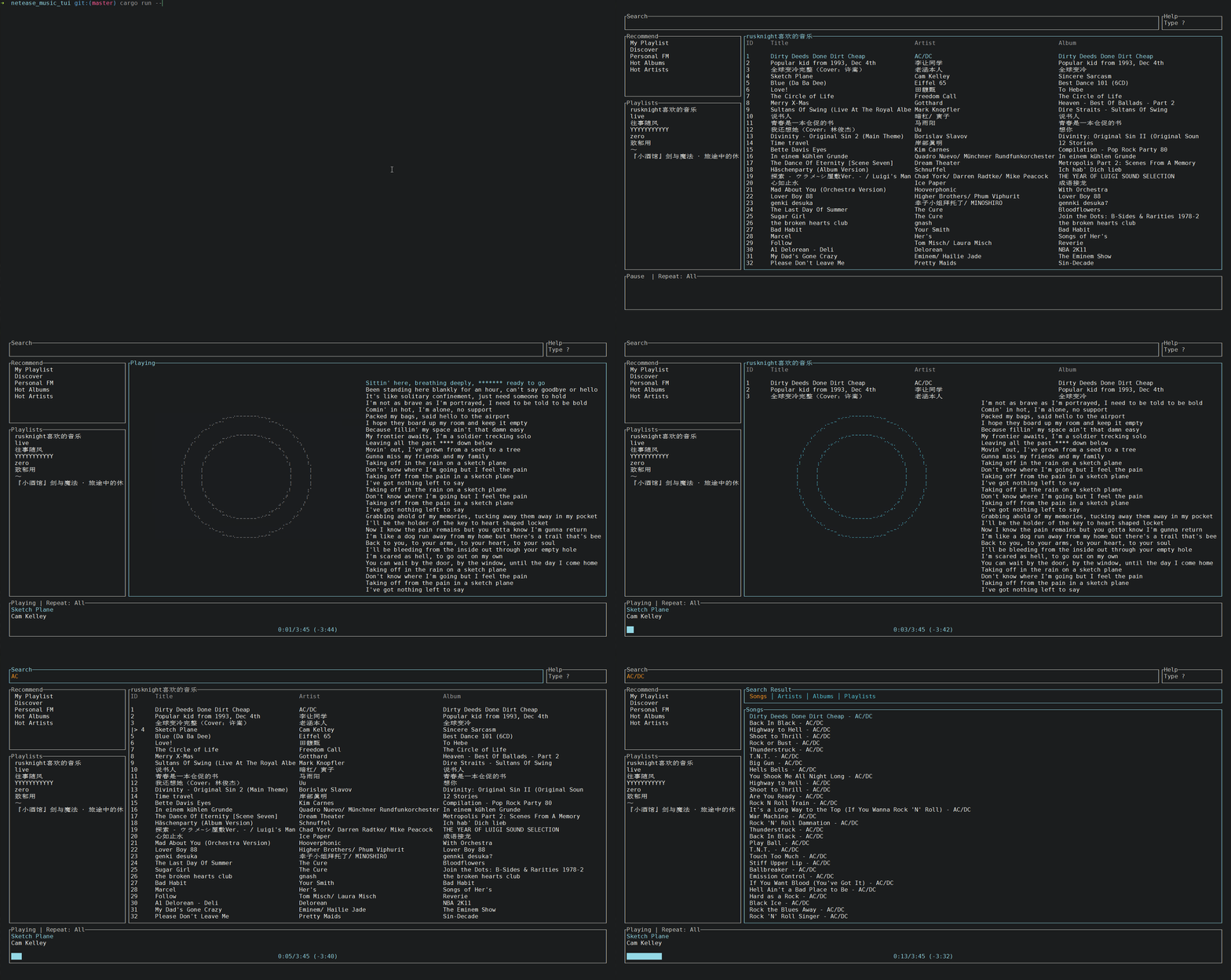
A netease cloud music client for the terminal written in Rust.
Installation
Manual
- you can download the latest binary
ncmtfor your OS cdto the file you just downloaded and unzipcdto folder and run with./ncmt
Cargo
First, install Rust (using the recommended rustup installation method) and then
git clone https://github.com/betta-cyber/netease-music-tui.git
cd netease-music-tui

// build release and install
make && make install
and then you can make some soft link to the binary and use it.
Arch Linux
for Arch based distributions, users can install from AUR
// build and install from source
yay -S netease-music-tui

// install from release binary file
yay -S netease-music-tui-bin
Configuration
A configuration file is located at ${HOME}/.config/netease-music-tui/Settings.toml
The following is a sample Settings.toml file:
# Your account username (email/cellphone).
username = "username"
# Your account password.
password = "password"
Fill your account info to the config file.
Usage
The binary is named ncmt
When running netease-music-tui press ? to bring up a help menu that shows currently implemented key events and their actions.
This table shows some key binds
| Description | Event | Context |
|---|---|---|
| Increase volume | + | General |
| Decrease volume | - | General |
| Skip to next track | n | General |
| Skip to previous track | p | General |
| Toggle repeat mode | r | General |
| Move selection left | h | \ | General |
| Move selection down | j | \ | General |
| Move selection up | k | \ | General |
| Move selection right | l | \ | General |
| Jump to currently playing album | a | General |
| Enter Search | / | General |
| Pause/Resume playback | \ | General |
| Fullsize playbar | f | General |
| Go back or exit when nowhere left to back to | q | General |
| Enter hover mode | \ | General |
| like current playing track | \ | General |
| dislike current playing track | \ | General |
| move track to trash | \ | Fm block |
| Enter active mode | \ | Hover mode |
| Delete entire input | \ | Search input |
| Search with input text | \ | Search input |
| Jump to start of input | \ | Search input |
| Jump to end of input | \ | Search input |
| Subscribe current hover playlist | \ | Playlist block |
| Unsubscribe current hover playlist | \ | Playlist block |
| Jump to next page | \ | Search result | top list |
| Jump to previous page | \ | Search result | top list |
Dev plan
- [x] Djradio and djprogram
- [ ] User page
- [ ] Spectrum effect
- [ ] Comment function
- [ ] mpris support
- [x] remove gstreamer (but current player no seek function)
Features
dbus mpris
cargo run --features dbus_mpris
License
MIT
Core symbols most depended-on inside this repo
as_ref
called by 41
src/player/track.rs
set_current_route_state
called by 36
src/app.rs
get_current_route
called by 32
src/app.rs
get_percentage_width
called by 26
src/ui/util.rs
get
called by 23
src/api.rs
handle_error
called by 21
src/app.rs
post
called by 21
src/api.rs
get_color
called by 21
src/ui/util.rs
Shape
Languages
Rust100%
Modules by API surface
src/app.rs43 symbols
src/api.rs41 symbols
src/ui/mod.rs27 symbols
src/player/mod.rs17 symbols
src/player/player.rs15 symbols
src/model/playlist.rs11 symbols
src/player/track.rs10 symbols
src/model/search.rs10 symbols
src/ui/util.rs8 symbols
src/ui/circle.rs8 symbols
src/handlers/common_events.rs8 symbols
src/util/event.rs7 symbols
For agents
$ claude mcp add netease-music-tui \
  -- python -m otcore.mcp_server <graph>