github.com/bep/s3deploy @v2.16.0
Chat with this repoWhat it actually does AI analysis from the code graph — generated when you open this
README
s3deploy





A simple tool to deploy static websites to Amazon S3 and CloudFront with Gzip and custom headers support (e.g. "Cache-Control"). It uses ETag hashes to check if a file has changed, which makes it optimal in combination with static site generators like Hugo.
- Install
- Configuration
- Global AWS Configuration
- Example IAM Policy
- CloudFront CDN Cache Invalidation
- Background Information
- Alternatives
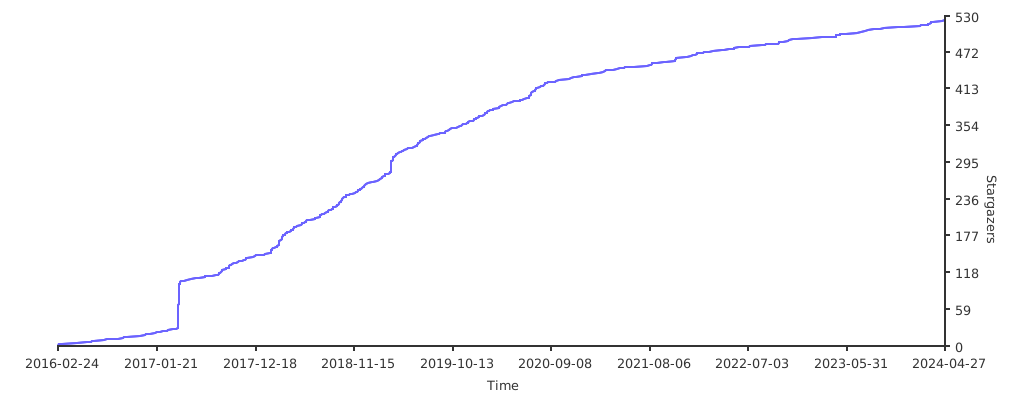
- Stargazers over time
Install
Pre-built binaries can be found here.
s3deploy is a Go application, so you can also install the latest version with:
 go install github.com/bep/s3deploy/v2@latest
 ```

 To install on MacOS using Homebrew:

 ```bash
brew install --cask bep/tap/s3deploy
 ```

**Note** The above requires `sudo` (see [this issue](https://github.com/gohugoio/hugoreleaser/issues/48) for more context) and installs a signed and notarized package.

Note that `s3deploy` is a perfect tool to use with a continuous integration tool such as [CircleCI](https://circleci.com/). See [this](https://mostlygeek.com/posts/hugo-circle-s3-hosting/) for a tutorial that uses s3deploy with CircleCI.

## Configuration

### Flags

The list of flags from running `s3deploy -h`:
-V print version and exit -acl string provide an ACL for uploaded objects. to make objects public, set to 'public-read'. all possible values are listed here: https://docs.aws.amazon.com/AmazonS3/latest/userguide/acl-overview.html#canned-acl (default "private") -bucket string destination bucket name on AWS -config string optional config file (default ".s3deploy.yml") -distribution-id value optional CDN distribution ID for cache invalidation, repeat flag for multiple distributions -endpoint-url string optional endpoint URL -force upload even if the etags match -h help -ignore value regexp pattern for ignoring files, repeat flag for multiple patterns, -key string access key ID for AWS -max-delete int maximum number of files to delete per deploy (default 256) -path string optional bucket sub path -public-access DEPRECATED: please set -acl='public-read' -quiet enable silent mode -region string name of AWS region -secret string secret access key for AWS -skip-local-dirs value regexp pattern of files of directories to ignore when walking the local directory, repeat flag for multiple patterns, default "^\/?(?:\w+\/)(\.\w+)" -skip-local-files value regexp pattern of files to ignore when walking the local directory, repeat flag for multiple patterns, default "^(./)?/?.DS_Store$" -source string path of files to upload (default ".") -strip-index-html strip index.html from all directories expect for the root entry -try trial run, no remote updates -v enable verbose logging -workers int number of workers to upload files (default -1)
The flags can be set in one of (in priority order):

1. As a flag, e.g. `s3deploy -path public/`
1. As an OS environment variable prefixed with `S3DEPLOY_`, e.g. `S3DEPLOY_PATH="public/"`.
1. As a key/value in `.s3deploy.yml`, e.g. `path: "public/"`
1. For `key` and `secret` resolution, the OS environment variables `AWS_ACCESS_KEY_ID` and `AWS_SECRET_ACCESS_KEY` (and `AWS_SESSION_TOKEN`) will also be checked. This way you don't need to do any special to make it work with [AWS Vault](https://github.com/99designs/aws-vault) and similar tools.


Environment variable expressions in `.s3deploy.yml` on the form `${VAR}` will be expanded before it's parsed:

```yaml
path: "${MYVARS_PATH}"
max-delete: "${MYVARS_MAX_DELETE@U}"
Note the special @U (Unquoute) syntax for the int field.
Skip local files and directories
The options -skip-local-dirs and -skip-local-files will match against a relative path from the source directory with Unix-style path separators. The source directory is represented by ., the rest starts with a /.
Strip index.html
The option -strip-index-html strips index.html from all directories expect for the root entry. This matches the option with (almost) same name in hugo deploy. This simplifies the cloud configuration needed for some use cases, such as CloudFront distributions with S3 bucket origins. See this PR for more information.
Routes
The .s3deploy.yml configuration file can also contain one or more routes. A route matches files given a regexp. Each route can apply:
header
: Header values, the most notable is probably Cache-Control. Note that the list of system-defined metadata that S3 currently supports and returns as HTTP headers when hosting a static site is very short. If you have more advanced requirements (e.g. security headers), see this comment.
gzip
: Set to true to gzip the content when stored in S3. This will also set the correct Content-Encoding when fetching the object from S3.
Example:
routes:
    - route: "^.+\\.(js|css|svg|ttf)$"
      #  cache static assets for 1 year.
      headers:
         Cache-Control: "max-age=31536000, no-transform, public"
      gzip: true
    - route: "^.+\\.(png|jpg)$"
      headers:
         Cache-Control: "max-age=31536000, no-transform, public"
      gzip: false
    - route: "^.+\\.(html|xml|json)$"
      gzip: true
Global AWS Configuration
See https://docs.aws.amazon.com/sdk-for-go/api/aws/session/#hdr-Sessions_from_Shared_Config
The AWS SDK will fall back to credentials from ~/.aws/credentials.
If you set the AWS_SDK_LOAD_CONFIG environment variable, it will also load shared config from ~/.aws/config where you can set the global region to use if not provided etc.
Example IAM Policy
{
   "Version": "2012-10-17",
   "Statement":[
      {
         "Effect":"Allow",
         "Action":[
            "s3:ListBucket",
            "s3:GetBucketLocation"
         ],
         "Resource":"arn:aws:s3:::<bucketname>"
      },
      {
         "Effect":"Allow",
         "Action":[
            "s3:PutObject",
            "s3:PutObjectAcl",
            "s3:DeleteObject"
         ],
         "Resource":"arn:aws:s3:::<bucketname>/*"
      }
   ]
}
Replace with your own.
CloudFront CDN Cache Invalidation
If you have configured CloudFront CDN in front of your S3 bucket, you can supply the distribution-id as a flag. This will make sure to invalidate the cache for the updated files after the deployment to S3. Note that the AWS user must have the needed access rights.
Note that CloudFront allows 1,000 paths per month at no charge, so S3deploy tries to be smart about the invalidation strategy; we try to reduce the number of paths to 8. If that isn't possible, we will fall back to a full invalidation, e.g. "/*".
Example IAM Policy With CloudFront Config
{
    "Version": "2012-10-17",
    "Statement": [
        {
            "Effect": "Allow",
            "Action": [
                "s3:ListBucket",
                "s3:GetBucketLocation"
            ],
            "Resource": "arn:aws:s3:::<bucketname>"
        },
        {
            "Effect": "Allow",
            "Action": [
                "s3:PutObject",
                "s3:DeleteObject",
                "s3:PutObjectAcl"
            ],
            "Resource": "arn:aws:s3:::<bucketname>/*"
        },
        {
            "Effect": "Allow",
            "Action": [
                "cloudfront:GetDistribution",
                "cloudfront:CreateInvalidation"
            ],
            "Resource": "*"
        }
    ]
}
Background Information
If you're looking at s3deploy then you've probably already seen the aws s3 sync command - this command has a sync-strategy that is not optimised for static sites, it compares the timestamp and size of your files to decide whether to upload the file.
Because static-site generators can recreate every file (even if identical) the timestamp is updated and thus aws s3 sync will needlessly upload every single file. s3deploy on the other hand checks the etag hash to check for actual changes, and uses that instead.
Alternatives
Stargazers over time
Extension points exported contracts — how you extend this code
—
Core symbols most depended-on inside this repo
StringShape
Languages
Modules by API surface
For agents
$ claude mcp add s3deploy \
  -- python -m otcore.mcp_server <graph>