hub / github.com/benwinding/quill-html-edit-button
github.com/benwinding/quill-html-edit-button @v3.0.0
Chat with this repo
22 symbols
52 edges
20 files
0 documented · 0%
1 cross-repo links
● updated 22mo ago★ 17415 open issues
What it actually does AI analysis from the code graph — generated when you open this
loading…
README
quill-html-edit-button





Quill.js Module which allows you to quickly view/edit the HTML in the editor
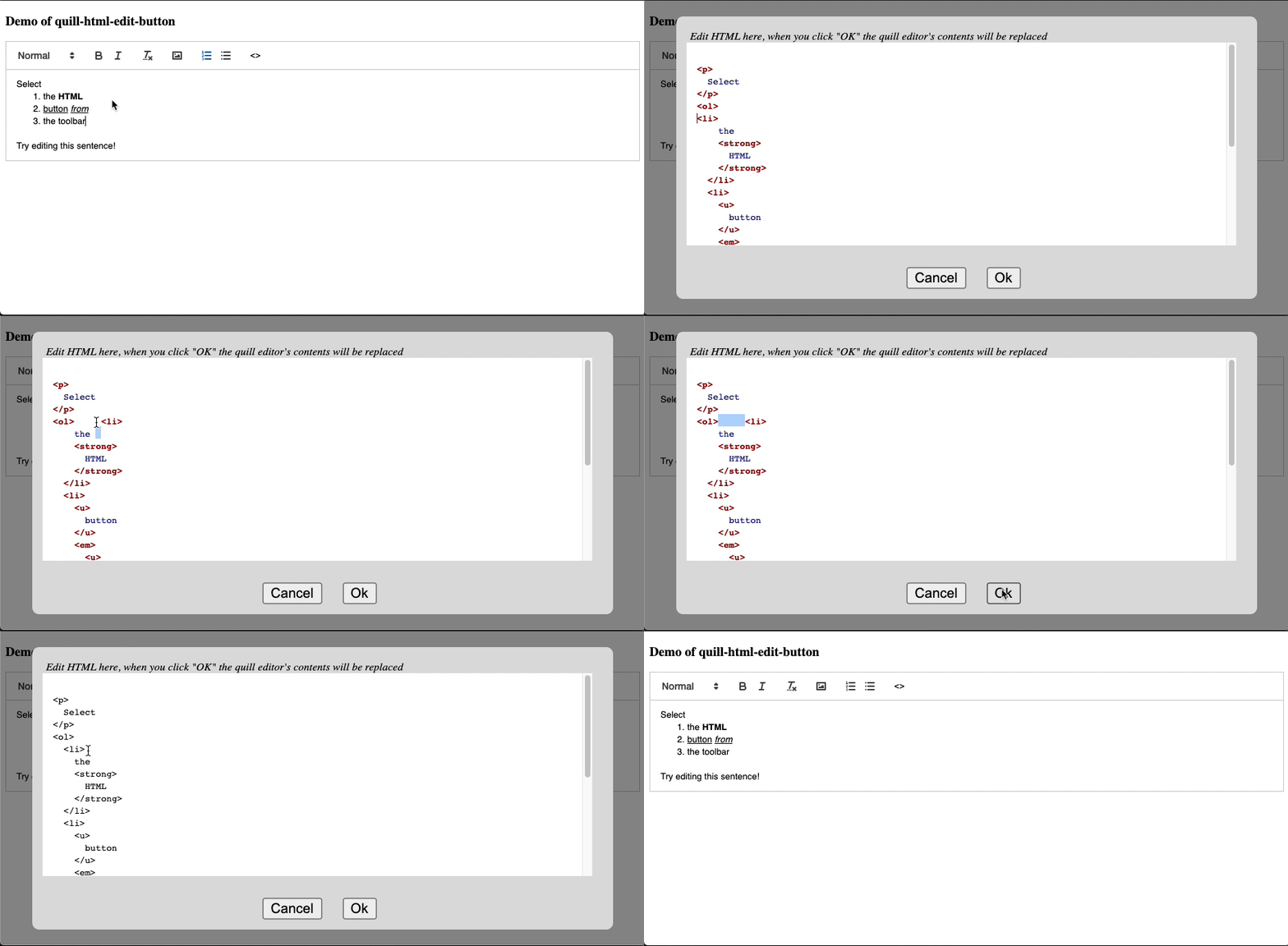
- Live Demo (webpack javascript) - also > Source Code
- Live Demo (webpack typescript) - also > Source Code
- Live Demo (webpack vue) - also > Source Code
- Live Demo (script tags quill-1.x) - also > Source Code
- Live Demo (script tags quill-2.x) With Tables! - also > Source Code
Install
yarn add quill-html-edit-button
Quickstart (Javascript)
import Quill from 'quill/core';
import Toolbar from 'quill/modules/toolbar';
import Snow from 'quill/themes/snow';

import htmlEditButton from "quill-html-edit-button";

Quill.register({
  'modules/toolbar': Toolbar,
  'themes/snow': Snow,
  "modules/htmlEditButton": htmlEditButton
})

const quill = new Quill(editor, {
  // ...
  modules: {
    // ...
    htmlEditButton: {}
  }
});
Quickstart (typescript)
Due to Quill's implementation, typescript integration is not trivial:
- Follow the demo example here
demos/typescript/src/index.ts - The file
setup.jsis to use the library without types (as they aren't implemented with quill modules). - Your
tsconfig.jsonneeds the following properties, to prevent errors:
  "compilerOptions": {
    "allowJs": true,
    "checkJs": false
  }
Quickstart (script tag)
<script src="https://unpkg.com/quill@1.3.7/dist/quill.js"></script>
<script src="https://unpkg.com/quill-html-edit-button@2.2.7/dist/quill.htmlEditButton.min.js"></script>
<script>
  Quill.register("modules/htmlEditButton", htmlEditButton);
  const quill = new Quill(editor, {
    // ...
    modules: {
      // ...
      htmlEditButton: {}
    }
  });
</script>
Options
modules: {
// ...
htmlEditButton: {
debug: true, // logging, default:false
msg: "Edit the content in HTML format", //Custom message to display in the editor, default: Edit HTML here, when you click "OK" the quill editor's contents will be replaced
okText: "Ok", // Text to display in the OK button, default: Ok,
cancelText: "Cancel", // Text to display in the cancel button, default: Cancel
buttonHTML: "<>", // Text to display in the toolbar button, default: <>
buttonTitle: "Show HTML source", // Text to display as the tooltip for the toolbar button, default: Show HTML source
syntax: false, // Show the HTML with syntax highlighting. Requires highlightjs on window.hljs (similar to Quill itself), default: false
prependSelector: 'div#myelement', // a string used to select where you want to insert the overlayContainer, default: null (appends to body),
editorModules: {} // The default mod
}
}
Syntax Highlighting
By default syntax highlighting is off, if you want to enable it use syntax: true in the options (as shown above) and make sure you add the following script tags:
<link
  rel="stylesheet"
  href="https://cdnjs.cloudflare.com/ajax/libs/highlight.js/10.1.2/styles/github.min.css"
/>
<script src="https://cdnjs.cloudflare.com/ajax/libs/highlight.js/10.1.2/highlight.min.js"></script>
<script
  charset="UTF-8"
  src="https://cdnjs.cloudflare.com/ajax/libs/highlight.js/10.1.2/languages/xml.min.js"
></script>
Alternatively, include these scripts in your package bundler, as long as highlightjs is available in the global space at window.hljs.
Customising The HTML Editor
The editor itself is actually a Quill Editor instance too! So you can pass in custom modules like this:
  // options
  htmlEditButton: {
    // Flags
    debug?: boolean;              // default:  false
    syntax?: boolean;             // default:  false
    // Overlay
    closeOnClickOverlay: boolean; // default:  true
    prependSelector: string;      // default:  null
    // Labels
    buttonHTML?: string;          // default:  "<>"
    buttonTitle?: string;         // default:  "Show HTML source"
    msg: string;                  // default:  'Edit HTML here, when you click "OK" the quill editor\'s contents will be replaced'
    okText: string;               // default:  "Ok"
    cancelText: string;           // default:  "Cancel"
    // Quill Modules (for the HTML editor)
    editorModules?: {             // default:  null
      // Any modules here will be declared in HTML quill editor instance
      keyboard: {
        bindings: {
          custom: {
            key: 'a',
            handler: function(range, context) {
              console.log('A KEY PRESSED!');
            }
          },
        },
      },
    },
  },
Thanks
This project is based on quill-image-uploader, thanks mate!
Extension points exported contracts — how you extend this code
QuillHtmlEditButtonOptions (Interface)(no doc)
src/options.ts
Core symbols most depended-on inside this repo
$createcalled by 11
src/quill.htmlEditButton.ts
$setAttr
called by 10
src/quill.htmlEditButton.ts
log
called by 5
src/logger.ts
ConvertMultipleSpacesToSingle
called by 3
src/html-parser.ts
PreserveNewlinesBr
called by 3
src/html-parser.ts
FixTagSpaceOpenTag
called by 2
src/html-parser.ts
setDebug
called by 1
src/logger.ts
prefixString
called by 1
src/logger.ts
Shape
Languages
TypeScript100%
Modules by API surface
src/quill.htmlEditButton.ts7 symbols
src/html-parser.ts7 symbols
src/logger.ts5 symbols
src/options.ts1 symbols
src/html-formatter.ts1 symbols
demos/react/src/app.jsx1 symbols
Used by 1 indexed graphs manifest dependencies, hub-wide
For agents
$ claude mcp add quill-html-edit-button \
  -- python -m otcore.mcp_server <graph>