github.com/benkuper/Chataigne @1.10.3
Chat with this repoBrowse by type
What it actually does AI analysis from the code graph — generated when you open this
README
Chataigne
Artist-friendly Modular Machine for Art and Technology Official website : http://benjamin.kuperberg.fr/chataigne
Intro
Chataigne is made with one goal in mind : create a common tool for artists, technicians and developers who wish to use technology and synchronize softwares for shows, interactive installations or prototyping. It aims to be as simple as possible for basic interactions, but can be easily extended to create complex interactions.
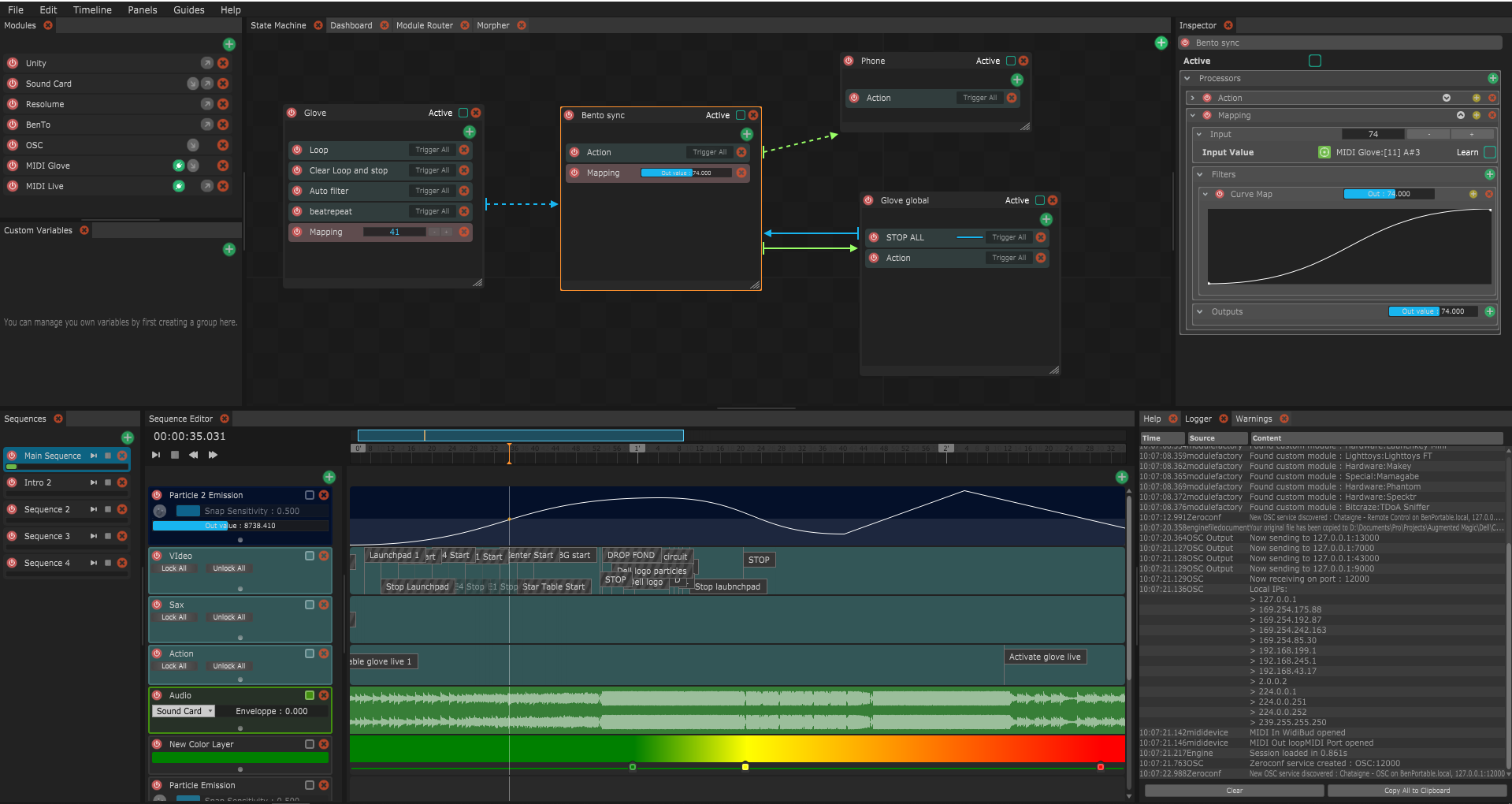
Okay, but what does it do exactly ?
While Chataigne won't do much by itself, its purpose is to be the central hub in a project involving multiple interfaces, softwares, devices and sensors. You can see it as a Conductor, which will control all the softwares with the big picture in mind. Chataigne as been designed to fit both linear shows and realtime/interactive project needs.
Seems cool, tell me more !
You can check the tutorials to better understand what and how you can use Chataigne for your projects.
Features
-
Supports communication and synchronization of the following protocols :
- OSC
- OSCQuery
- MIDI
- DMX (Enttec OpenDMX, Enttec DMXPro, Enttec DMX-MkII, Art-Net, sACN/E1.31)
- Serial
- UDP
- TCP
- HTTP
- MQTT
- WebSockets
- PJLink
- Ableton Link
- PosiStageNet
-
Supports communication and synchronization of the following hardware :
- KinectV2 (Windows only)
- StreamDeck
- Joystick
- Gamepad
- Mouse
- Keyboard
- Wiimote
- Joycon
- Sound card
- Loupedeck
- GPIO (Raspberry only)
-
Pre-configured modules for controlling softwares :
- Resolume
- Madmapper
- Millumin
- TouchDesigner
- Unity
- QLab
- HeavyM
- D::Light
- Reaper
- Ableton Live (through a M4L patch)
- Powerpoint
- Watchout
-
Community-powered modules :
- Leap Motion
- EOS-OSC
- OBS
- X-Touch
- Novation Launchkey
- D&B DS100
- Blackmagic Atem-OSC
- Flowtoys Vision and Creators
- Lighttoys FT Props
- VPT8
- LightShark
- Midas M32
- MPC1005-6
-
State Machine : Create both simple and complex real-time interactions and automations.
- Time Machine : Create sequence based value and colors animations, trigger events, play audio...
- Module Router : Easily route multiple values at once from one software to another, independent of the protocol
- Custom Variables : Store and manipulate values, use presets and interpolate group of values.
- Dashboard : Create your own UI and controls, customize colors and labels and control it from a web interface
- Detective : Analyse the evolution of a parameter in time to fully understand what's going on
- Parrot : Easily record and playback datasets of any parameter animation across the whole software to simulate input and behaviours
- Outliner : See in one place the whole hierarchy of your session
Using the software
Compiled versions for Windows, Mac OSX and Linux are available at : http://benjamin.kuperberg.fr/chataigne/#download
If beta versions are available, they will show up on this page.
If you wish to test the latest features and commits, the bleeding-edge section is generated at each commit.
Getting Started
You can start by checking the Amazing Chataigne Documentation, made with love ! https://benjamin.kuperberg.fr/chataigne/docs
Also you can watch tutorials from the website and follow the interactive guide from withing the application.
Building the software
Chataigne is built on top of the JUCE frameworks. You can find more infos about it there : http://www.juce.com Chataigne is using a modified version of JUCE. So you first need to compile the Projucer from the modified version of JUCE instead of downloading JUCE :
- Clone the develop-local branch from the JUCE git here : http://github.com/benkuper/JUCE
git clone --branch=develop-local http://github.com/benkuper/JUCE -
In the JUCE/extras/Projucer/Builds folder, choose the folder depending on you system, open the solution with your IDE and compile it or make in linux. You can then open the new Projucer app that you just built.
-
Clone Chataigne with --recursive options to integrate organicUI and timeline modules
git clone --recursive http://github.com/benkuper/Chataigne - Launch the Projucer and open Chataigne.jucer
- Set your Global Paths (see picture below)
- Save the jucer
- Open the solution for you platform in the Builds folder
- Build the solution from your IDE and compile it or make in linux
- Check the dependency section below if you have dependency problems when running Chataigne
- Enjoy !
Linux specific tips
You'll need to build this lib to run the app: https://github.com/HBPVIS/servus
You'll need at least these libs to compile the app:
apt-get install build-essential libbluetooth-dev libcurl4-gnutls-dev libfreetype-dev libfreetype6 libfreetype6-dev libwebkit2gtk-4.0-dev libhidapi-dev
Compile it with the JUCE modules specified:
Chataigne/Builds/LinuxMakefile$ CXXFLAGS="-I../../../JUCE/modules -I" make -j8
To start the built binary:
LD_LIBRARY_PATH=/path/to/Servus/build/lib/:$LD_LIBRARY_PATH ./build/Chataigne
Alternatively put export LD_LIBRARY_PATH=/path/to/Servus/build/lib/:$LD_LIBRARY_PATH into your .bashrc, and open a new terminal to make it work.
Setting JUCE Global Paths

Dependencies
Windows running instructions
DLL dependencies : - For Release, you can just copy the dll files from there : http://benjamin.kuperberg.fr/chataigne/user/data/Chataigne-win-x64-release-dependencies.zip and paste them in the same folder as the generated executable (in the Binaries folder)
- For Debug, you can get a dependency pack there http://benjamin.kuperberg.fr/chataigne/user/data/Chataigne-win-x64-debug-dependencies.zip and do the same in the Binaries/Debug folder
Linux running instructions
- Before running Chataigne, you just need to do a chmod a+x on the .AppImage file, or right-click on it and allow execution, then you're ready to play !
- If you're running Arch Linux, you can now just do
yay -S chataigne-stable-binorparu -S chataigne-stable-bin(Thanks Stephan !) - If you're running Raspberry Pi 4, you may need to install some more dependencies :
sudo apt install libbluetooth-dev libx11-dev
Troubleshooting
If you have any issue regarding the software, you can post an issue on github (preferred for code-related problems and features), there is also the official forum here : http://benjamin.kuperberg.fr/chataigne/forum more suited for questions, wishes and user-level issues.
Chataigne is now on Discord, join and meet the community !

The Badge Zone
Windows 7 x64 / Windows 10 x64 / MacOS / Linux x64 / Raspberry Pi :




Libraries uses, references and other kudos
This list contains all the references to projects and libraries that Chataigne uses, either as an external libraries, or merged with and modified for Chataigne's source code.
- JUCE : https://www.juce.com
- Serial Library : https://github.com/wjwwood/serial
- MIDI Timecode, from MStarPlayer : https://github.com/ServiusHack/MStarPlayer
- Wiimote library Wiiuse : https://github.com/wiiuse/wiiuse
- JoyShockLibrary : https://github.com/JibbSmart/JoyShockLibrary
- Zeroconf library Servus : https://github.com/HBPVIS/Servus
- Joystick Library SDL : https://www.libsdl.org/
- HIDAPI : https://github.com/signal11/hidapi
- Microsoft Kinect SDK 2.0 : https://developer.microsoft.com/en-us/windows/kinect
- Pitch Detection (YIN/MPM) : https://github.com/adamski/pitch_detector
- Ableton Link : https://github.com/Ableton/link
Thanks to Manuel Mitasch, Norbert Rostaing, David-Alexandre Chanel, Tom Magnier, Emerick Herve and many more for their contributions and very helpful presence in the community !
Perhaps the most important
I do this on my own free time, feel free to buy me a beer :)


Donate with Metamask ! Public key : 0x236F32251cD85745006353f9C61b49519412D5d5
Are you using Chataigne on a regular basis ? Then why not support me accordingly, so I can have a more stable way to work on it !
Choose your angel weapon :


Star History
Core symbols most depended-on inside this repo
Shape
Languages
Modules by API surface
For agents
$ claude mcp add Chataigne \
  -- python -m otcore.mcp_server <graph>