github.com/bencbartlett/Overmind @v0.5.2.1
Chat with this repoWhat it actually does AI analysis from the code graph — generated when you open this
README

Overmind Screeps AI 


Current release: Overmind v0.5.2 - Evolution
- See the changelog for patch notes
- Documentation is available in the wiki
- Join the discussion in the #overmind Slack channel!
- Read blog posts about development
- Submit an issue here or request a feature here
- Find me in game here
About Overmind

What is Screeps?
Screeps is an MMO strategy game for programmers. The core objective is to expand your colony, gathering resources and fighting other players along the way. To control your units, you code an AI in JavaScript; everything from moving, mining, building, fighting, and trading is entirely driven by your code. Because Screeps is an MMO, it takes place on a single server that runs 24/7, populated by every other player and their army of creeps. When you log off, your population continues buzzing away with whatever task you set them. Screeps pits your programming prowess head-to-head with other people to see who can think of the most efficient methods of completing tasks or imagine new ways to defeat enemies.
What is Overmind?
Overmind is my personal codebase that I run on the public server. The structure of the AI is themed loosely around the Zerg's swarm intelligence from Starcraft. Overlords orchestrate Creep actions within each Colony, and the colony Overseer places Directives to adapt to stimuli. Finally, the Assimilator allows all players running Overmind to act as a collective hivemind, sharing creeps and resources and responding jointly to a master ledger of all directives shared by all players.
The AI is entirely automated, although it can also run in manual or semiautomatic mode. The latest release should work right out of the box; however, if you find something broken, please submit an issue and I'll try to fix it.
Can I use Overmind as my bot?
If you're new to Screeps, I would definitely recommend writing your own AI: most of the fun of the game is programming your own bot and watching your little ant farm run! However, I've tried to make the codebase readable and well-documented, so feel free to fork the project or use it as inspiration when writing your AI.
If you still want to use Overmind on the public server, that's okay too - there are a number of people already doing this. But please realize that using a mature AI like this gives you a huge advantage over other new players, so don't go out of your way to ruin someone else's fun. In the future, I will be implementing methods for novice players to opt out of excessive aggression by Overmind bots (as long as they don't start a conflict and stay out of its way).
Installation
Out of the box
If you just want to run Overmind without modification, you can copy the compiled main.js file attached to the latest release into your script. While Overmind is fully automated by default, it can be run with varying levels of autonomy; refer to the Overmind wiki for how to configure and operate the bot.
Compiling from source
To install the full codebase, download or clone the repository. (Please note that while the latest release of Overmind should always be stable, the latest commit may contain unstable features.) Navigate to the Overmind root directory and run npm install. To compile and deploy the codebase, create a screeps.json file from the example file, then do one of the following actions:
- Compile and deploy to public server:
npm run push-main - Compile and deploy to private server:
npm run push-pserver - Compile without deploying:
npm run compile
Overmind uses rollup to bundle the compiled TypeScript into a single main.js file. The codebase includes functionality to compute checksums for internal validation - if you have a different version of rollup installed globally, different checksums may be computed and some functionality will be disabled. Please ensure the local installation of rollup found in node_modules is used.
Setting up the Grafana dashboard
Overmind includes a Grafana dashboard (shown below) which tracks detailed operating statistics. To set up the dashboard:
- Register for grafana service at screepspl.us
- Setup the Grafana agent. I would suggest running it on a free micro instance of Google Compute.
- Import the dashboard from Overmind.json and change
$Userto your username.

Design overview
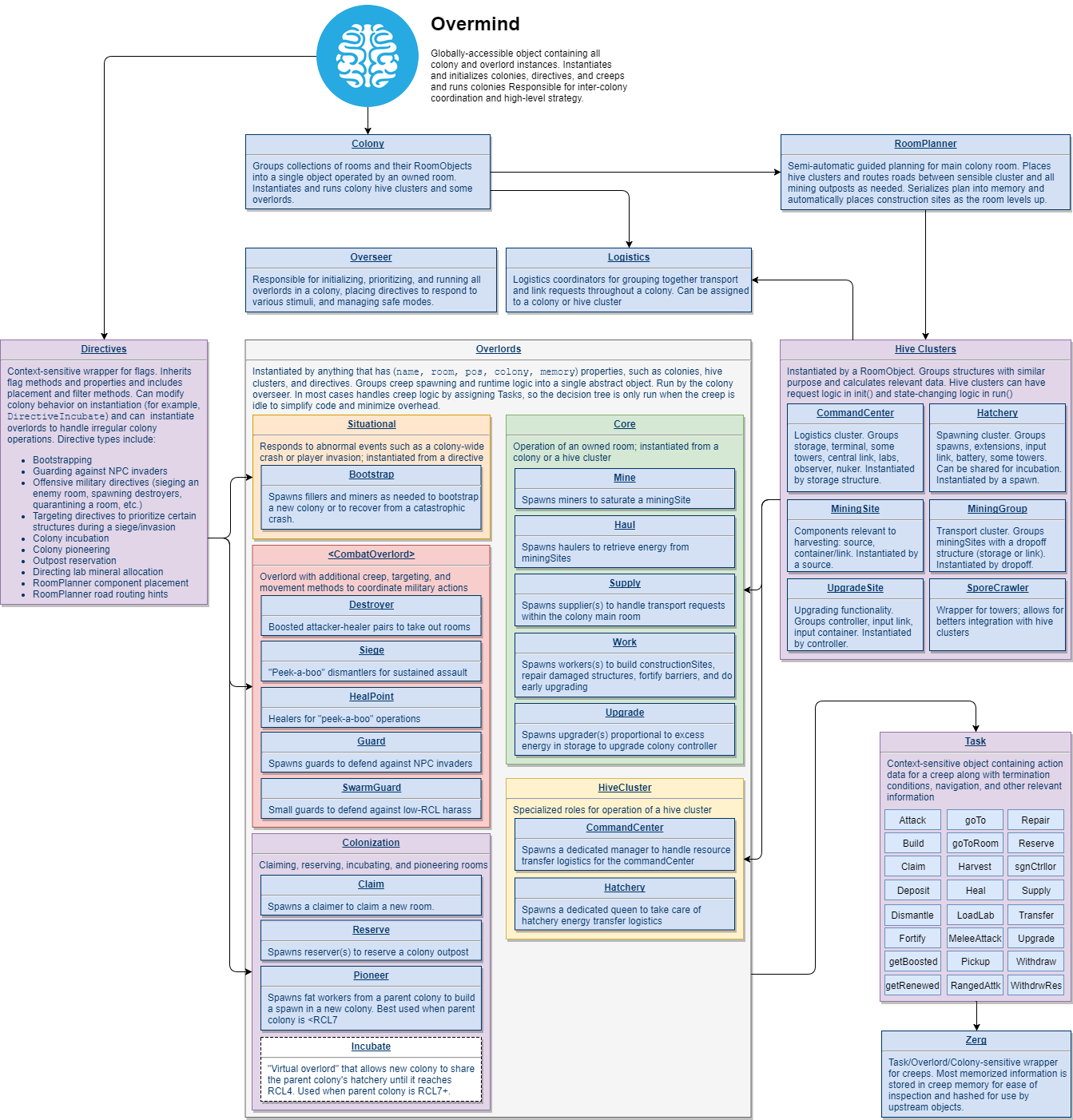
Check out the Overmind wiki for in-depth explanations of parts of the design of the AI. (Click the diagram below to see a higher-resolution version.)
Extension points exported contracts — how you extend this code
IStrategist (Interface)Core symbols most depended-on inside this repo
_0x3f52Shape
Languages
Modules by API surface
For agents
$ claude mcp add Overmind \
  -- python -m otcore.mcp_server <graph>