hub / github.com/baffler/OBS-OpenVR-Input-Plugin
github.com/baffler/OBS-OpenVR-Input-Plugin @v1.11
Chat with this repo
21 symbols
40 edges
1 files
⚖ GPL-2.0
0 documented · 0%
● updated 3y agov1.5 · 2020-08-24★ 44232 open issues
Browse by type
What it actually does AI analysis from the code graph — generated when you open this
loading…
README
OpenVR Capture plugin for OBS source code
This OBS plugin provides an input plugin to 64bit OBS that allows capturing directly from OpenVR/SteamVR mirror surface in full resolution.
by Keijo "Kegetys" Ruotsalainen, http://www.kegetys.fi
Compiling: - Extract over OBS source - Put OpenVR SDK (openvr-master) under deps - Add add_subdirectory(win-openvr) to plugins/CMakeLists.txt after win-capture - Compile with visual studio. Only 64bit version has been tested.
Installation
- Download latest zip release from https://github.com/baffler/OBS-OpenVR-Input-Plugin/releases (make sure not to download one labled "Source Code")
- Close OBS if it's open
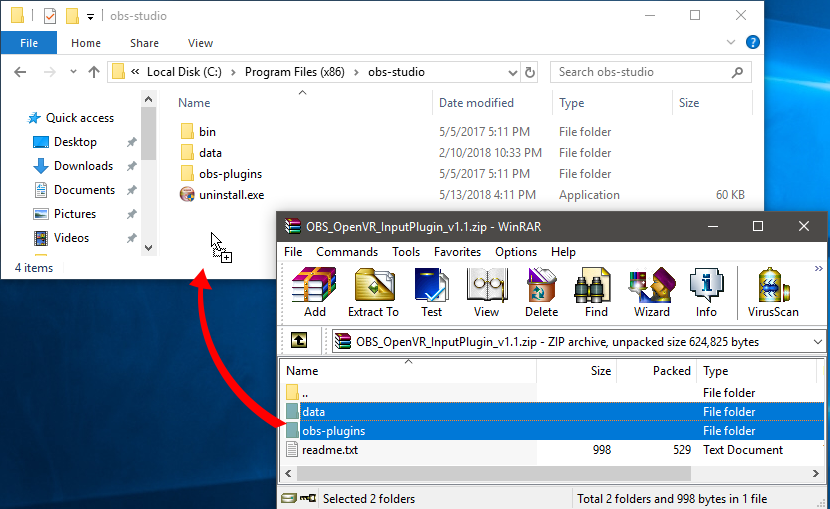
- Your zip file should contain a "data" folder, "obs-plugins" folder and a readme file. If not, make sure you downloaded a release zip file and not the actual source code.
- Extract the zip file into your OBS studio directory (typically installed in "C:\Program Files (x86)\obs-studio"). Choose Replace Files if prompted.
- Launch OBS and add a new source to one of your scenes, the source name is "OpenVR Capture"

Core symbols most depended-on inside this repo
win_openvr_deinit
called by 4
plugins/win-openvr/win-openvr.cpp
win_openvr_init
called by 3
plugins/win-openvr/win-openvr.cpp
win_openvr_update
called by 1
plugins/win-openvr/win-openvr.cpp
crop_preset_changed
called by 1
plugins/win-openvr/win-openvr.cpp
load_presets
called by 1
plugins/win-openvr/win-openvr.cpp
win_openvr_get_name
called by 0
plugins/win-openvr/win-openvr.cpp
Shape
Languages
C++100%
Modules by API surface
plugins/win-openvr/win-openvr.cpp21 symbols
For agents
$ claude mcp add OBS-OpenVR-Input-Plugin \
  -- python -m otcore.mcp_server <graph>