hub / github.com/aws-samples/hardeneks
github.com/aws-samples/hardeneks @v1.1.0
Chat with this repo
210 symbols
850 edges
45 files
3 documented · 1%
What it actually does AI analysis from the code graph — generated when you open this
loading…
README
Hardeneks



Runs checks to see if an EKS cluster follows EKS Best Practices.
Quick Start:
python3.10 -m venv /tmp/.venv   # Or any other supported Python version listed above.
source /tmp/.venv/bin/activate
pip install hardeneks
hardeneks
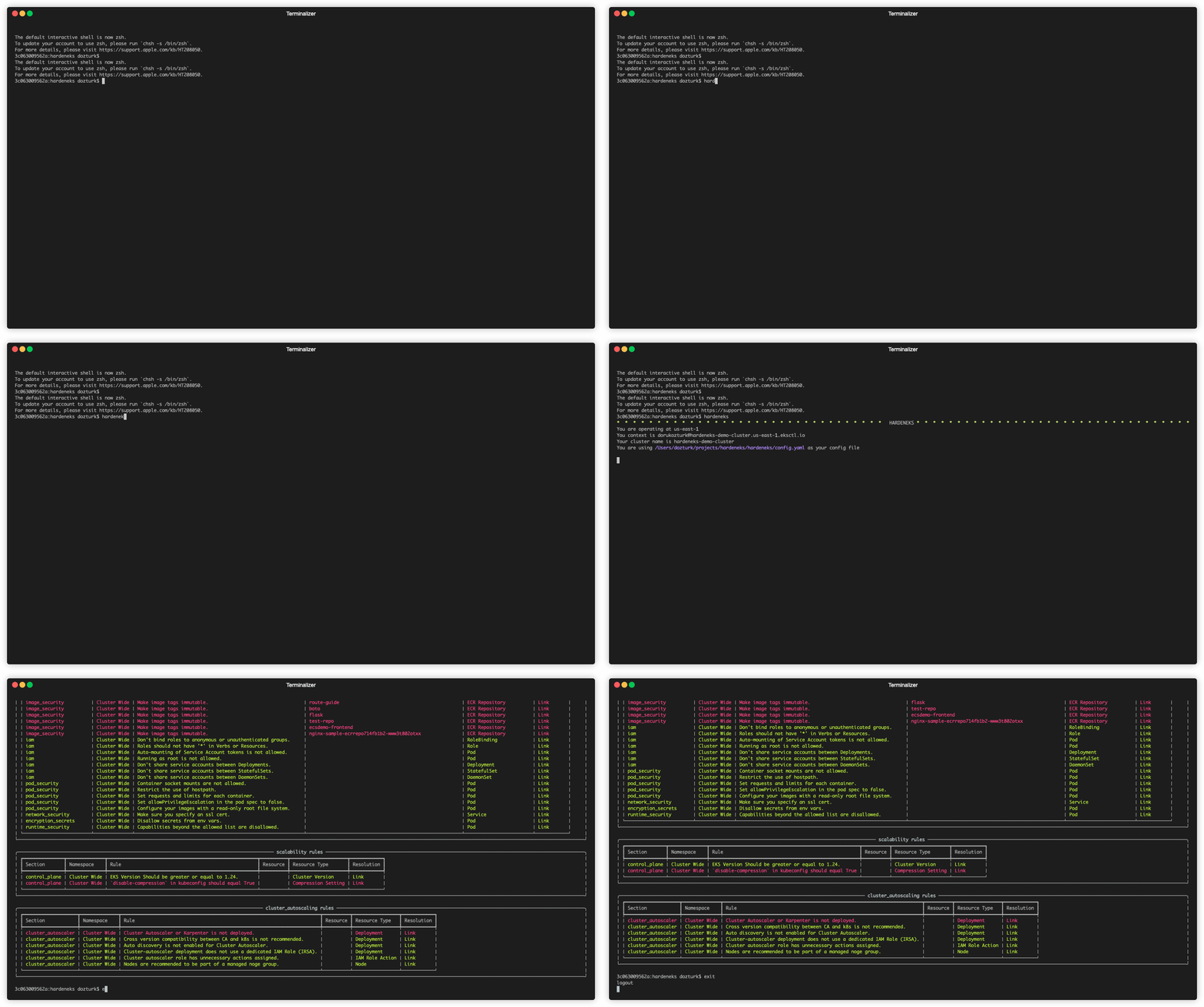
Usage:
hardeneks [OPTIONS]
Options:
--region TEXT: AWS region of the cluster. Ex: us-east-1--context TEXT: K8s context--cluster TEXT: EKS Cluster name--namespace TEXT: Namespace to be checked (default is all namespaces)--config TEXT: Path to a hardeneks config file--export-txt TEXT: Export the report in txt format--export-csv TEXT: Export the report in csv format--export-html TEXT: Export the report in html format--export-json TEXT: Export the report in json format--export-security-hub: Export failed checks to AWS Security Hub--insecure-skip-tls-verify: Skip TLS verification--width: Width of the output (defaults to terminal size)--height: Height of the output (defaults to terminal size)-
--help: Show this message and exit. -
K8S_CONTEXT
You can get the contexts by running:
kubectl config get-contextsor get the current context by running:kubectl config current-context -
CLUSTER_NAME
You can get the cluster names by running:
aws eks list-clusters --region us-east-1
Configuration File:
Default behavior is to run all the checks. If you want to provide your own config file to specify list of rules to run, you can use the --config flag.You can also add namespaces to be skipped.
Following is a sample config file:
ignore-namespaces:
  - kube-node-lease
  - kube-public
  - kube-system
  - kube-apiserver
  - karpenter
  - kubecost
  - external-dns
  - argocd
  - aws-for-fluent-bit
  - amazon-cloudwatch
  - vpa
rules:
  cluster_wide:
    security:
      iam:
        - disable_anonymous_access_for_cluster_roles
        - check_endpoint_public_access
        - check_aws_node_daemonset_service_account
        - check_access_to_instance_profile
        - restrict_wildcard_for_cluster_roles
      multi_tenancy:
        - ensure_namespace_quotas_exist
      detective_controls:
        - check_logs_are_enabled
      network_security:
        - check_vpc_flow_logs
        - check_awspca_exists
        - check_default_deny_policy_exists
      encryption_secrets:
        - use_encryption_with_ebs
        - use_encryption_with_efs
        - use_efs_access_points
      infrastructure_security:
        - deploy_workers_onto_private_subnets
        - make_sure_inspector_is_enabled
      pod_security:
        - ensure_namespace_psa_exist
      image_security:
        - use_immutable_tags_with_ecr
    reliability:
      applications:
        - check_metrics_server_is_running
        - check_vertical_pod_autoscaler_exists
    cluster_autoscaling:
      cluster_autoscaler:
        - check_any_cluster_autoscaler_exists
        - ensure_cluster_autoscaler_and_cluster_versions_match
        - ensure_cluster_autoscaler_has_autodiscovery_mode
        - use_separate_iam_role_for_cluster_autoscaler
        - employ_least_privileged_access_cluster_autoscaler_role
        - use_managed_nodegroups
    scalability:
      control_plane:
        - check_eks_version
        - check_kubectl_compression
  namespace_based:
    security:
      iam:
        - disable_anonymous_access_for_roles
        - restrict_wildcard_for_roles
        - disable_service_account_token_mounts
        - disable_run_as_root_user
        - use_dedicated_service_accounts_for_each_deployment
        - use_dedicated_service_accounts_for_each_stateful_set
        - use_dedicated_service_accounts_for_each_daemon_set
      pod_security:
        - disallow_container_socket_mount
        - disallow_host_path_or_make_it_read_only
        - set_requests_limits_for_containers
        - disallow_privilege_escalation
        - check_read_only_root_file_system
      network_security:
        - use_encryption_with_aws_load_balancers
      encryption_secrets:
        - disallow_secrets_from_env_vars
      runtime_security:
        - disallow_linux_capabilities
    reliability:
      applications:
        - check_horizontal_pod_autoscaling_exists
        - schedule_replicas_across_nodes
        - run_multiple_replicas
        - avoid_running_singleton_pods
        - check_readiness_probes
        - check_liveness_probes
Permissions
In order to run hardeneks we need to have some permissions both on AWS side and k8s side.
Minimal IAM role policy for all checks
{
    "Version": "2012-10-17",
    "Statement": [
        {
            "Effect": "Allow",
            "Action": [
                "eks:ListClusters",
                "eks:DescribeCluster",
                "eks:ListPodIdentityAssociations",
                "eks:DescribePodIdentityAssociation",
                "eks:DescribeClusterVersions",
                "ecr:DescribeRepositories",
                "inspector2:BatchGetAccountStatus",
                "ec2:DescribeFlowLogs",
                "ec2:DescribeInstances",
                "iam:ListAttachedRolePolicies",
                "iam:ListRolePolicies",
                "iam:GetPolicy",
                "iam:GetPolicyVersion",
                "iam:GetRolePolicy"
            ],
            "Resource": "*"
        }
    ]
}
Minimal ClusterRole for all checks
kind: ClusterRole
apiVersion: rbac.authorization.k8s.io/v1
metadata:
  name: hardeneks-runner
rules:
- apiGroups: [""]
  resources: ["namespaces", "resourcequotas", "persistentvolumes", "pods", "services", "nodes"]
  verbs: ["list"]
- apiGroups: [""]
  resources: ["serviceaccounts"]
  verbs: ["get"]
- apiGroups: ["rbac.authorization.k8s.io"]
  resources: ["clusterroles", "clusterrolebindings", "roles", "rolebindings"]
  verbs: ["list"]
- apiGroups: ["networking.k8s.io"]
  resources: ["networkpolicies"]
  verbs: ["list"]
- apiGroups: ["storage.k8s.io"]
  resources: ["storageclasses"]
  verbs: ["list"]
- apiGroups: ["apps"]
  resources: ["deployments", "daemonsets", "statefulsets"]
  verbs: ["list", "get"]
- apiGroups: ["autoscaling"]
  resources: ["horizontalpodautoscalers"]
  verbs: ["list"]
For Developers
Prerequisites:
- This cli uses poetry. Follow instructions that are outlined here to install poetry.
Installation:
git clone git@github.com:aws-samples/hardeneks.git
cd hardeneks
poetry install
Running Tests:
poetry shell
pytest --cov=hardeneks tests/ --cov-report term-missing
Core symbols most depended-on inside this repo
checkcalled by 55
hardeneks/rules.py
_config_callback
called by 4
hardeneks/__init__.py
_get_current_context
called by 3
hardeneks/__init__.py
set_resources
called by 2
hardeneks/resources.py
_get_cluster_name
called by 2
hardeneks/__init__.py
_process_security_hub_response
called by 2
hardeneks/__init__.py
harden
called by 2
hardeneks/harden.py
_get_role_arn_for_service_account
called by 2
hardeneks/cluster_wide/cluster_autoscaling/cluster_autoscaler.py
Shape
Languages
Python100%
Modules by API surface
tests/test_security_iam.py17 symbols
hardeneks/namespace_based/security/iam.py14 symbols
hardeneks/cluster_wide/cluster_autoscaling/cluster_autoscaler.py14 symbols
hardeneks/__init__.py13 symbols
hardeneks/namespace_based/reliability/applications.py12 symbols
tests/test_cluster_autoscaling_cluster_autoscaler.py11 symbols
hardeneks/namespace_based/security/pod_security.py10 symbols
hardeneks/cluster_wide/security/iam.py10 symbols
tests/test_cli.py9 symbols
tests/test_reliability_applications.py8 symbols
tests/test_security_pod_security.py6 symbols
tests/test_security_network_security.py6 symbols
For agents
$ claude mcp add hardeneks \
  -- python -m otcore.mcp_server <graph>