github.com/aws-samples/aws-dev-hour-backend @main
Chat with this repoBrowse by type
What it actually does AI analysis from the code graph — generated when you open this
README
AWS Dev Hour - Series 1 Demo Application (Backend)
Type: Demo
Repository: https://github.com/aws-samples/aws-dev-hour-backend
AWS Dev Hour - On Twitch
Do you have the skills it takes to build modern applications that are distributed and designed for scale and agility? If you’re interested in learning to build cloud native applications and architecture practices, join us for AWS Dev Hour: Building Modern Apps, a weekly Twitch show presented by AWS Training and Certification. Built by developers for developers, the series offers a hands-on approach. Over the course of 8 episodes, AWS expert hosts Ben Newton and May Kyaw will take you through the end-to-end build of a serverless application in the AWS cloud. You’ll have the chance to learn by doing, following along with the hosts and developing a cloud-native application using the AWS free tier. You’ll learn best practices for modern applications and better understand how AWS cloud-native applications differ from on-premises. Throughout the series, you’ll receive code, white papers, links to documentation, and other resources to help you progress.
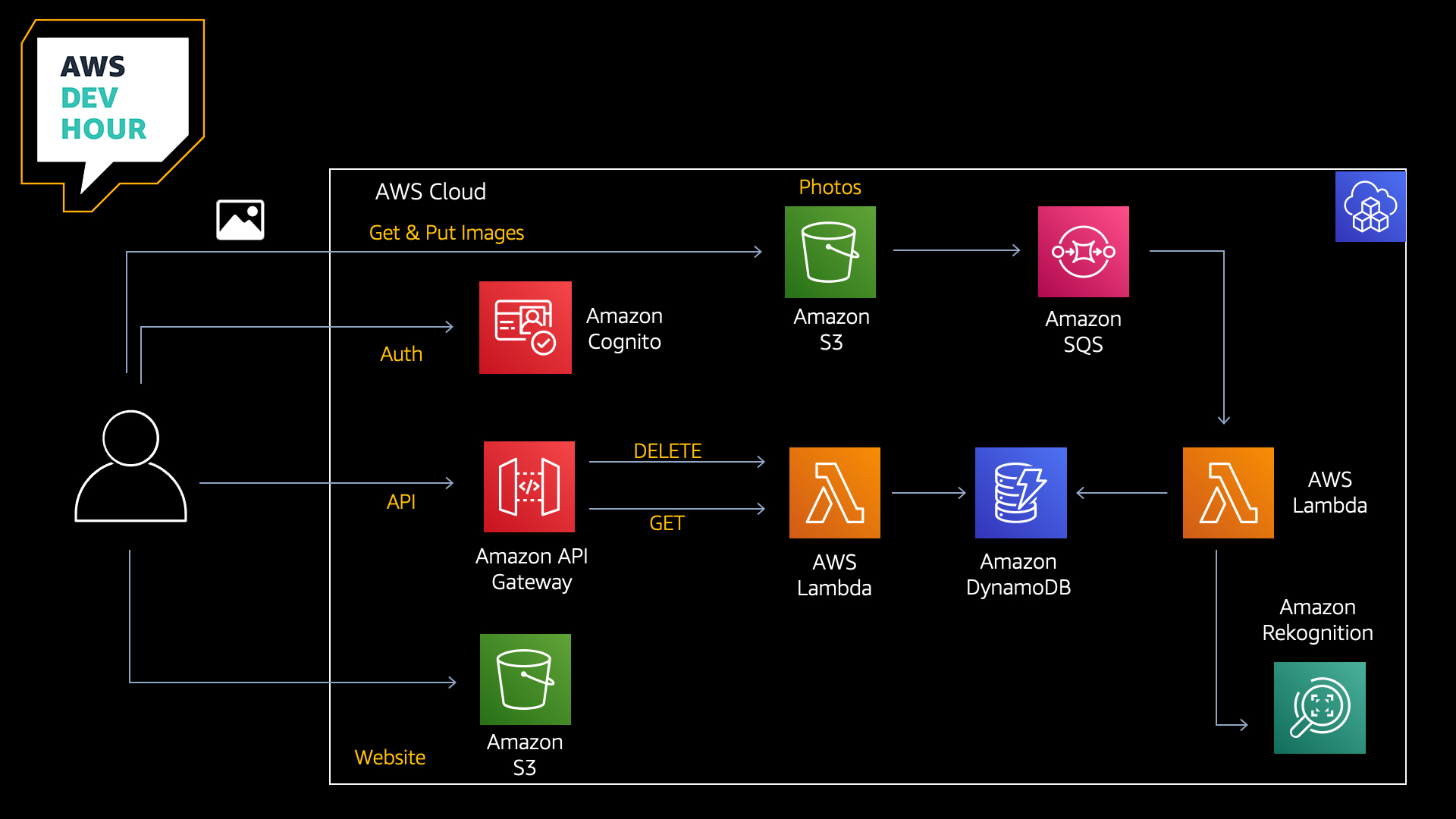
Architecture
Episodes
During each episode, we will be progressively building this full-stack application together. Please see the following URL for schedule and episode details:
Git branch
Episode 2: AWS Lambda & Amazon DynamoDB
Episode 4: AWS IAM & Amazon Cognito
Episode 7: Deployment Pipeline
Services used during the series:
- Amazon Cognito
- Amazon S3
- Amazon Simple Queue Service
- AWS Lambda
- Amazon DynamoDB
- Amazon Rekognition
- AWS Cloud Development Kit
- Amazon API Gateway
- AWS CodeBuild
- AWS CodePipeline
Useful commands
npm installinstall packagescdk synthemits the synthesized CloudFormation templatecdk deploydeploy this stackcdk diffcompare deployed stack with current state
The cdk.json file tells the CDK Toolkit how to execute your app.
Prerequisites
All CDK developers need to install Node.js 10.3.0 or later, even those working in languages other than TypeScript or JavaScript. The AWS CDK Toolkit (cdk command-line tool) and the AWS Construct Library run on Node.js. The bindings for other supported languages use this back end and tool set. We suggest the latest LTS version.
aws configure
npm -g install typescript
npm install -g aws-cdk
If you have not yet done so, you will also need to bootstrap your account:
cdk bootstrap aws://ACCOUNT-NUMBER-1/REGION-1
for example:
cdk bootstrap aws://123456789012/us-east-1
For further information, please see:
https://docs.aws.amazon.com/cdk/latest/guide/getting_started.html
https://docs.aws.amazon.com/cdk/latest/guide/bootstrapping.html
AWS Lambda - Creating assets for your AWS Lambda Layer
Our AWS Lambda function uses the Pillow library for the generation of thumbnail images. This library needs to be added into our project so that we can allow the CDK to package it and create an AWS Lambda Layer for us. To do this, you can use the following steps. (Please note, creating these resources in your AWS account could incur costs, although we have tried to select free-tier eligble resources here).
- Launch an Amazon EC2 Instance (t2-micro) using the Amazon Linux 2 AMI
- SSH into your instance and run the following commands:
sudo yum install -y python3-pip python3 python3-setuptools
python3 -m venv my_app/env
source ~/my_app/env/bin/activate
cd my_app/env
pip3 install pillow
cd /home/ec2-user/my_app/env/lib/python3.7/site-packages
mkdir python && cp -R ./PIL ./python && cp -R ./Pillow-8.1.0.dist-info ./python && cp -R ./Pillow.libs ./python && zip -r pillow.zip ./python
- Copy the resulting archive 'pillow.zip' to your development environment (we used an Amazon S3 bucket for this)
- Extract the archive into the 'reklayer' folder in your project directory
Your project structure should look something like this:
project-root/reklayer/python/PIL
project-root/reklayer/python/Pillow-8.1.0.dist-info
project-root/reklayer/python/Pillow.libs
- Remove the python.zip file to clean up
- Terminate the Amazon EC2 Instance that you created to build the archive
Getting Started
-
npm install -
cdk deploy
A 'cdk deploy' will deploy everything that you need into your account
- You may now test the backend by uploading an image into your Amazon S3 bucket.
Prerequisites for Episode 7
In episode 7, we are building a deployment pipeline for our application. Before we start working on our pipeline, there are a few things to point out. For this tutorial, you will need:
- Github account
- Github personal access token. Token should have the scopes
repoandadmin:repo_hook - Github owner, repository name, branch name set up in AWS Systems Manager - Parameter Store
- Github personal access token set up in AWS Secrets Manager
Parameter Store Examples
- devhour-backend-git-repo Value: aws-dev-hour-backend
- devhour-backend-git-branch Value: main (Or whichever branch you would like your webhook)
- devhour-backend-git-owner Value: your-github-username
Episode 7 Notes
In this tutorial, we are using @aws-cdk/pipelines module to build a deployment pipeline. As of 11 March 2021, @aws-cdk/pipelines module is in Developer Preview. So you will need to set a feature flag in cdk.json as below to use new features of the CDK framework.
"@aws-cdk/core:newStyleStackSynthesis": "true"
You will also need to bootstrap the stack again to accommodate the new CDK pipeline experience by running this command:
cdk bootstrap
If you have deployed the stack already into your account using 'cdk deploy', you may need to destroy your stack so that the pipeline can build a fresh one. You can do this using the following command:
cdk destroy AwsdevhourStack
Once you have done this, you can deploy your pipeline stack by running the following command:
cdk deploy AwsdevhourBackendPipelineStack
While deploying, AWS CodePipeline will create a webhook with your Github repo. Subsequent pushes into your repo branch will update your stack automatically, even the pipeline will self-mutate.
To view your available stacks, you can run:
cdk list
** Pillow Library Note **
In awsdevhour-backend-pipeline-stack.ts you will notice the following:
      synthAction: SimpleSynthAction.standardNpmSynth({
        sourceArtifact,
        cloudAssemblyArtifact,
        //This build command is to download pillow library, unzip the downloaded file and tidy up.
        //If you already have pillow library downloaded under reklayer/, please just run 'npm run build'
        buildCommand: 'rm ./reklayer/pillow-goes-here.txt && wget https://awsdevhour-twitch.s3.ap-southeast-2.amazonaws.com/pillow.zip && unzip pillow.zip && mv ./python ./reklayer && rm pillow.zip && npm run build',
        synthCommand: 'npm run cdk synth'
      })
If you already have the Pillow library under reklayer/python, then you don't need to run this. We added it to facilitate testing during the show. You could simply do the following:
      synthAction: SimpleSynthAction.standardNpmSynth({
        sourceArtifact,
        cloudAssemblyArtifact,
        buildCommand: 'npm run build',
        synthCommand: 'npm run cdk synth'
      })
RekLayer
In this tutorial, we are using Python Imaging Library to add image processing capabilities to our application. As part of the deployment, you can manually download the pillow library and keep under /reklayer folder in this project. So, you can keep the build simple.
However, you can also download the pillow library when you set up the pipeline as shown in awsdevhour-backend-pipeline-stack.ts
Cleanup
To clean up the resources created by the CDK, run the following commands:
aws s3 rm --recursive s3://{imageBucket}
cdk destroy
(Enter “y” in response to: Are you sure you want to delete (y/n)?).
Tweaks
Rekognition confidence is currently set in the rekognition lambda.
minConfidence = 50
Feel free to adjust and experiment. If you change, make sure to perform another 'cdk deploy' to update the lambda function.
Contributions
We would encourage all of our AWS Dev Hour viewers to contribute to this project. For more details, please refer to 'CONTRIBUTING.md'.
License
This software is licensed under the Apache License, Version 2.0.
Core symbols most depended-on inside this repo
Shape
Languages
Modules by API surface
For agents
$ claude mcp add aws-dev-hour-backend \
  -- python -m otcore.mcp_server <graph>