github.com/astral-sh/ruff-vscode @2026.56.0
Chat with this repoWhat it actually does AI analysis from the code graph — generated when you open this
README
Ruff extension for Visual Studio Code




A Visual Studio Code extension for Ruff, an extremely fast Python linter and code formatter, written in Rust. Available on the Visual Studio Marketplace.
Ruff can be used to replace Flake8 (plus dozens of plugins), Black, isort, pyupgrade, and more, all while executing tens or hundreds of times faster than any individual tool.
The extension ships with ruff==0.15.20.
Highlights
"Quick Fix" actions for auto-fixable violations (like unused imports)
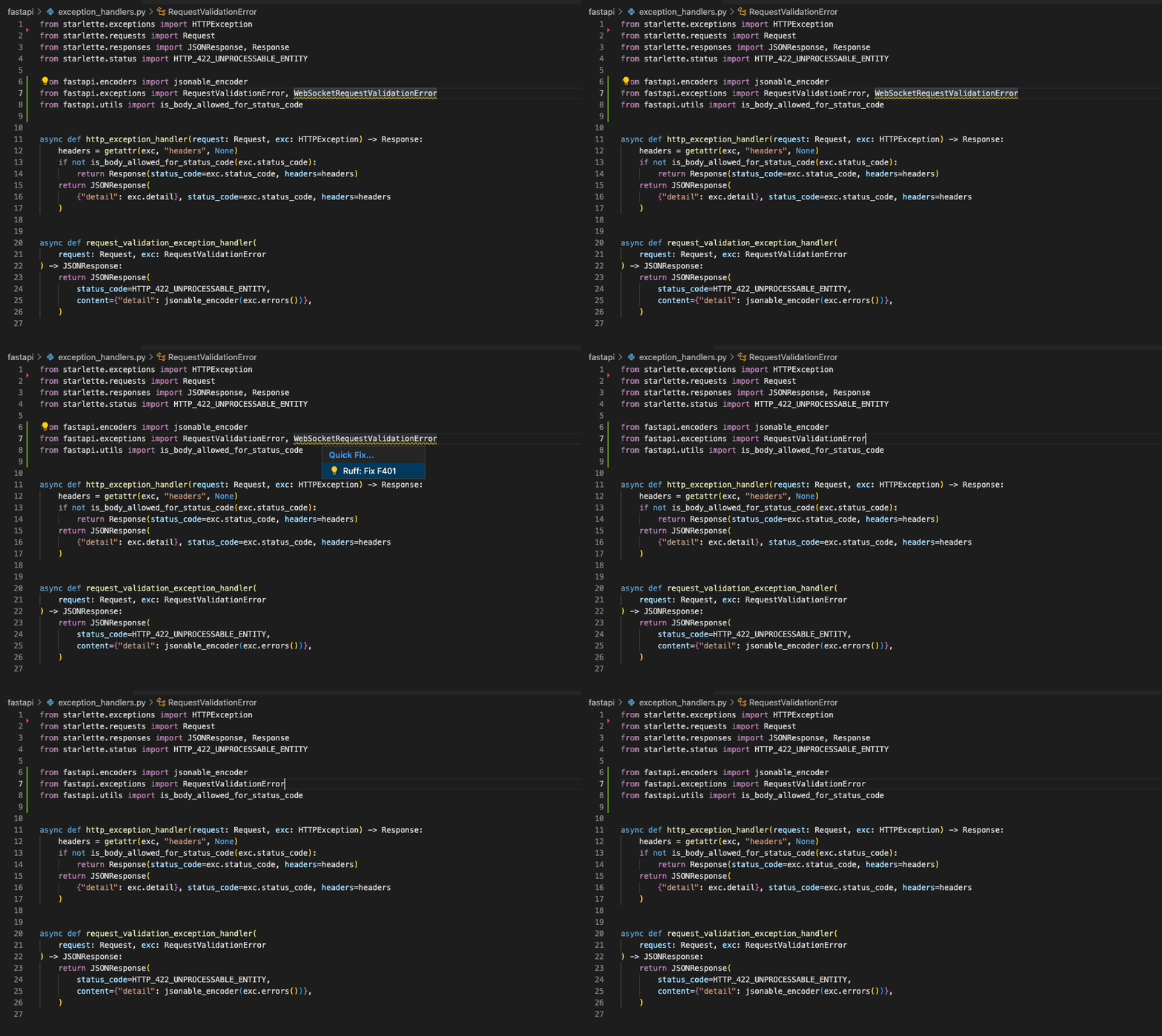
"Fix all": automatically fix all auto-fixable violations
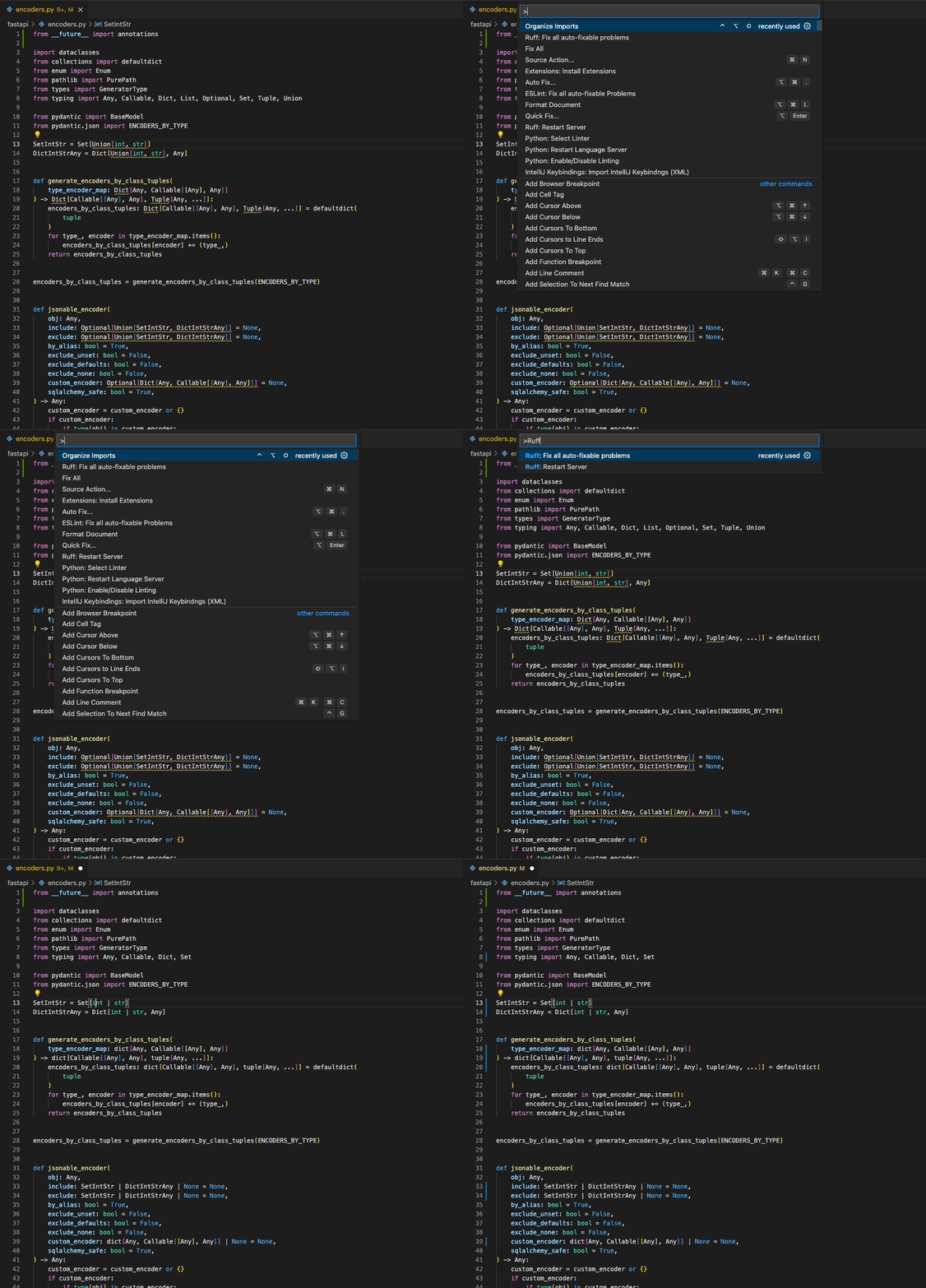
"Format Document": Black-compatible code formatting
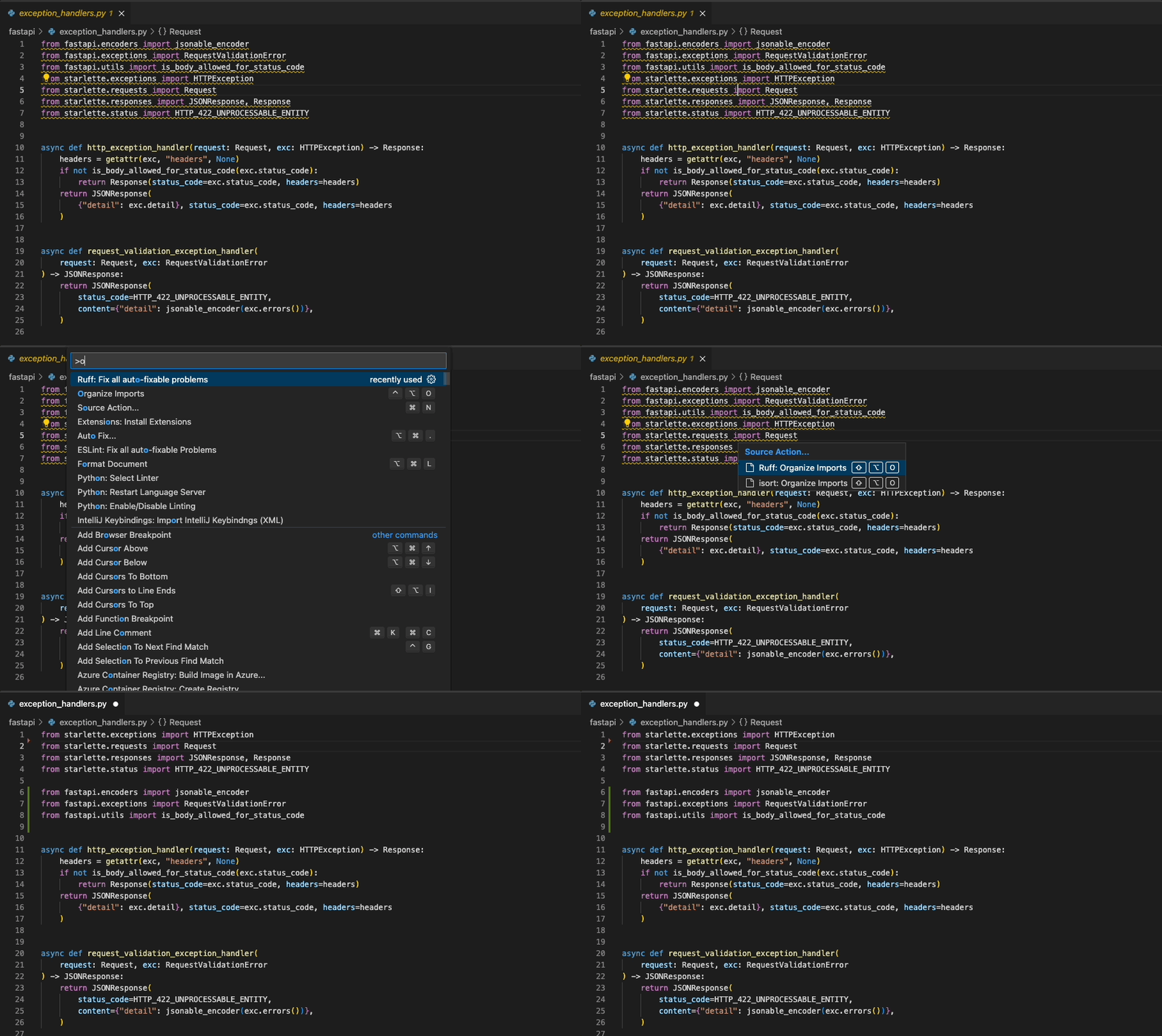
"Organize Imports": isort-compatible import sorting
Usage
Once installed in Visual Studio Code, ruff will automatically execute when you open or edit a
Python or Jupyter Notebook file.
If you want to disable Ruff, you can disable this extension per workspace in Visual Studio Code.
Fix safety
Ruff's automatic fixes are labeled as "safe" and "unsafe". By default, the "Fix all" action will not apply unsafe
fixes. However, unsafe fixes can be applied manually with the "Quick fix" action. Application of unsafe fixes when
using "Fix all" can be enabled by setting unsafe-fixes = true in your Ruff configuration file or adding
--unsafe-fixes flag to the "Lint args" setting.
See the Ruff fix docs for more details on how fix safety works.
Jupyter Notebook Support
The extension has support for Jupyter Notebooks via the Notebook Document Synchronization capabilities of the Language
Server Protocol which were added in 3.17. This has been implemented in ruff-lsp as of version v0.0.43 which provides
full support for all of the existing capabilities available to Python files in Jupyter Notebooks, including diagnostics,
code actions, and formatting.
This requires Ruff version v0.1.3 or later.
Native Server
Jupyter Notebook support was stabilized in Ruff 0.6.0 and
is now linted and formatted by default. Before this version, the native server required users to explicitly include Jupyter Notebooks
in the set of files to be linted and formatted. This can be done by updating the extend-include
setting in the Ruff configuration file.
[tool.ruff]
extend-include = ["*.ipynb"]
For more information, refer to the Jupyter Notebook discovery section of the Ruff documentation.
Untrusted Workspace
New in v2024.32.0
The extension supports loading in an untrusted workspace.
When the workspace is untrusted, the extension will always use the Rust-based language server even if the nativeServer
setting is set to off. This is because the Python-based language server requires a Python interpreter to run, which
is not allowed in an untrusted workspace. This also means that the extension will always use the bundled executable of
the ruff binary regardless of any other settings.
The following settings are not supported in an untrusted workspace:
Settings
Refer to the Ruff Language Server documentation for a full list of settings available in the extension.
Configuring VS Code
You can configure Ruff to format Python code on-save by enabling the editor.formatOnSave action in
settings.json, and setting Ruff as your default formatter:
{
  "[python]": {
    "editor.formatOnSave": true,
    "editor.defaultFormatter": "charliermarsh.ruff"
  }
}
And, for Jupyter Notebooks:
{
  "notebook.formatOnSave.enabled": true,
  "[python]": {
    "editor.defaultFormatter": "charliermarsh.ruff"
  }
}
And for Markdown code blocks. Note that this currently reqiures enabling preview mode which will change formatting results:
{
  "ruff.format.preview": true,
  "[markdown]": {
    "editor.formatOnSave": true,
    "editor.defaultFormatter": "charliermarsh.ruff"
  }
}
You can configure Ruff to fix lint violations on-save by enabling the source.fixAll action in
settings.json:
{
  "[python]": {
    "editor.codeActionsOnSave": {
      "source.fixAll": "explicit"
    }
  }
}
And, for Jupyter Notebooks:
{
  "notebook.codeActionsOnSave": {
    "notebook.source.fixAll": "explicit"
  }
}
Similarly, you can configure Ruff to organize imports on-save by enabling the
source.organizeImports action in settings.json:
{
  "[python]": {
    "editor.codeActionsOnSave": {
      "source.organizeImports": "explicit"
    }
  }
}
And, for Jupyter Notebooks:
{
  "notebook.codeActionsOnSave": {
    "notebook.source.organizeImports": "explicit"
  }
}
Taken together, you can configure Ruff to format, fix, and organize imports on-save via the
following settings.json:
{
  "[python]": {
    "editor.formatOnSave": true,
    "editor.codeActionsOnSave": {
      "source.fixAll": "explicit",
      "source.organizeImports": "explicit"
    },
    "editor.defaultFormatter": "charliermarsh.ruff"
  }
}
And, for Jupyter Notebooks:
{
  "notebook.formatOnSave.enabled": true,
  "notebook.codeActionsOnSave": {
    "notebook.source.fixAll": "explicit",
    "notebook.source.organizeImports": "explicit"
  },
  "[python]": {
    "editor.defaultFormatter": "charliermarsh.ruff"
  }
}
Note: if you're using Ruff to organize imports in VS Code and also expect to run Ruff from the
command line, you'll want to enable Ruff's isort rules by adding "I" to your
extend-select.
Note: The above-mentioned Notebook configurations will run the action for each cell individually.
This is the way VS Code handles Notebook actions and is unrelated to ruff-lsp. If you'd prefer to
run them on the entire notebook at once, prefer to use the Ruff prefixed commands such as
Ruff: Organize Imports and Ruff: Fix all auto-fixable problems.
If you're using the VS Code Python extension,
you can configure VS Code to fix violations on-save using Ruff, then re-format with the Black extension,
via the following settings.json:
{
  "[python]": {
    "editor.formatOnSave": true,
    "editor.codeActionsOnSave": {
      "source.fixAll": "explicit"
    },
    "editor.defaultFormatter": "ms-python.black-formatter"
  }
}
If you'd like to use Ruff as a linter, but continue to sort imports with the isort extension,
you can disable Ruff's import-sorting capabilities via the following settings.json:
{
  "[python]": {
    "editor.codeActionsOnSave": {
      "source.fixAll": "explicit",
      "source.organizeImports": "explicit"
    }
  },
  "ruff.organizeImports": false
}
If you'd like to run Ruff on-save, but avoid allowing other extensions to run on-save, you can
use Ruff's scoped source.fixAll and source.organizeImports actions via the following settings.json:
{
  "[python]": {
    "editor.codeActionsOnSave": {
      "source.fixAll.ruff": "explicit",
      "source.organizeImports.ruff": "explicit"
    }
  }
}
If you'd like to run Ruff, but disable code formatting (by Ruff, or by another formatter), be sure
to unset the editor.defaultFormatter in settings.json:
{
  "[python]": {
    "editor.defaultFormatter": null,
    "editor.codeActionsOnSave": {
      "source.fixAll": "explicit"
    }
  }
}
Configuring Ruff
The Ruff VS Code extension will respect any Ruff configuration as defined in your project's
pyproject.toml, ruff.toml, or .ruff.toml file (see: Configuring Ruff in the Ruff documentation).
In general, we recommend configuring Ruff via pyproject.toml or ruff.toml so that your
configuration is shared between the VS Code extension and the command-line tool, and between all
contributors to the project.
Unless you're using the Python-based language server, you can configure some common
settings in VS Code directly, like ruff.lineLength (to configure the line length for the linter
and formatter) or ruff.lint.select (to configure the enabled lint rules):
{
  "ruff.lineLength": 88,
  "ruff.lint.select": ["C", "E", "F", "W"]
}
To use a custom configuration file, set the ruff.configuration setting to the path of your
ruff.toml or pyproject.toml file:
{
  "ruff.configuration": "/path/to/ruff.toml"
}
Finally, to use a common Ruff configuration across all projects, consider creating a user-specific
pyproject.toml or ruff.toml file as described in the FAQ.
Python-based language server (ruff-lsp)
[!WARNING]
ruff-lspis deprecated and will be removed in a future release. Please switch to the Rust-based language server (ruff server) instead.
The Ruff extension will automatically use the Rust-based language server (ruff server) if the
following conditions are met:
- The
ruffexecutable is at least version0.5.3 - The
ruff.nativeServersetting is set toauto(default) - None of the settings that are exclusive to the Python-based language server are enabled (i.e., those that are marked as "unused by the native language server" in the Settings documentation).
You can opt-out of the Rust-based language server by setting
the nativeServer setting to off. If set to off, the extension
will use the Python-based language server (ruff-lsp).
{
  "ruff.nativeServer": "off"
}
You can use the ruff.lint.args and
ruff.format.args settings in settings.json to pass command-line arguments to Ruff.
For example, to enable the pyupgrade rule set in VS Code, add the following to settings.json:
{
  "ruff.lint.args": ["--extend-select=UP"]
}
To override the VS Code extension's Ruff configuration entirely, and override any local
pyproject.toml file or similar, you can pass a custom --config argument to the Ruff CLI, again
using the ruff.lint.args and ruff.format.args options in settings.json:
{
  "ruff.lint.args": ["--config=/path/to/ruff.toml"],
  "ruff.format.args": ["--config=/path/to/ruff.toml"]
}
Finally, to use a common Ruff configuration across all projects, consider creating a user-specific
pyproject.toml or ruff.toml file as described in the FAQ.
Commands
| Command | Description |
|---|---|
| Ruff: Fix all auto-fixable problems | Fix all auto-fixable problems |
| Ruff: Format Imports | Organize imports |
| Ruff: Format Document | Format the entire document |
| Ruff: Restart Server | Force restart the linter server |
| Ruff: Print debug information (native server only) | Print debug information about the native server |
| Ruff: Show client logs | Open the Ruff output channel |
Extension points exported contracts — how you extend this code
EnvironmentProvider (Interface)Core symbols most depended-on inside this repo
infoShape
Languages
Modules by API surface
For agents
$ claude mcp add ruff-vscode \
  -- python -m otcore.mcp_server <graph>