github.com/asLody/VirtualApp @main
Chat with this repoBrowse by type
What it actually does AI analysis from the code graph — generated when you open this
README
VA Product description & Development guidance
What is VA?
VirtualAPP (abbreviation: VA) is a sandbox product running on Android system, which can be understood as a lightweight "Android virtual machine". Its product form is a highly extensible, customizable, integrated SDK that allows you to develop a variety of seemingly impossible projects based on or using VA. Now, VA is widely used in many technology fields as following: mini game collection, blockchain, cloud control, silent hot fix and so on. On the one hand, you can realize cloud control mobile office security and achieve military and government data isolation with VA. On the other hand, you can implement script automation, device-info-mock, and plug-in development. Meanwhile, you can realize multi space and games booster. You can also rent the mobile game account and use the mobile controller without activation by VA.
The code on Github has stopped updating in December 2017. The code of business version is continuously being updated. If you need license to obtain the latest code, please contact WeChat: 10890.
Terminology in VA
| Terminology | Explanation |
|---|---|
| Host | The APP that integrates the VirtualAPP SDK is called host. |
| Host Plug-in | A host package is used to run another ABI on the same device. It also called plug-in package,extension package, host plug-in package, host extension package. |
| Virtual APP / VAPP | App installed in the VA space |
| External APP | App installed in the device |
VA Technical architecture

VA technology involves the APP layer, Framework layer and Native layer of Android in total.
App must be installed on the system before it can run. The APP installed inside the VA space is not actually installed into the system, so it cannot run. Then how to get it to run?
Answer: The only way to do this is to "cheat" the system into thinking it has been installed. This "cheat" process is the core work of the VA Framework, and is also the core technical principle of the VA.
Here is the description of what did each layer do:
| Layer | Main work |
|---|---|
| VA Space | An internal space is provided by the VA for the installation of the APP to be run inside it, and this space is system isolated. |
| VA Framework | This layer is mainly a proxy for Android Framework and VAPP, which is the core of VA. And VA provides a set of VA Framework of its own, which is between Android Framework and VA APP. |
-
For VAPP, all the system services it accesses have been proxied by VA Framework, which will modify the request parameters of VAPP and send all the parameters related to VAPP installation information to Android Framework after changing them to the parameters of the host (Some of the requests will be sent to their own VA Server to be processed directly, and no longer send to the Android system). This way Android Framework receives the VAPP request and checks the parameters, and it will think there is no problem.
-
When the Android system finishes processing the request and returns the result, the VA Framework will also intercept the return result and restore all the parameters that have been original modified to those that were sent during the VAPP request. This way the interaction between VAPP and Android system can work. VA Native | The main purpose of this layer is to accomplish 2 tasks: IO redirection and the request modification for VA APP to interact with Android system.
-
IO redirection is some APPs may be accessed through the hard code absolute path. But if the APP is not installed to the system, this path does not exist. Through IO redirection, it will be redirected to the path to install inside VA.
-
In addition, there are some jni functions that cannot be hooked in VA Framework, so they need to be hooked in the native layer.
In summary: As you can see from the above technical architecture, the internal VA APP actually runs on top of VA's own VA Framework. VA has intercepted all system requests from its internal APP, and through this technology it can also have full control over the APP, not just the multi space. And for the convenience of developers, VA also provides SDK and Hook SDK.
VA Process architecture
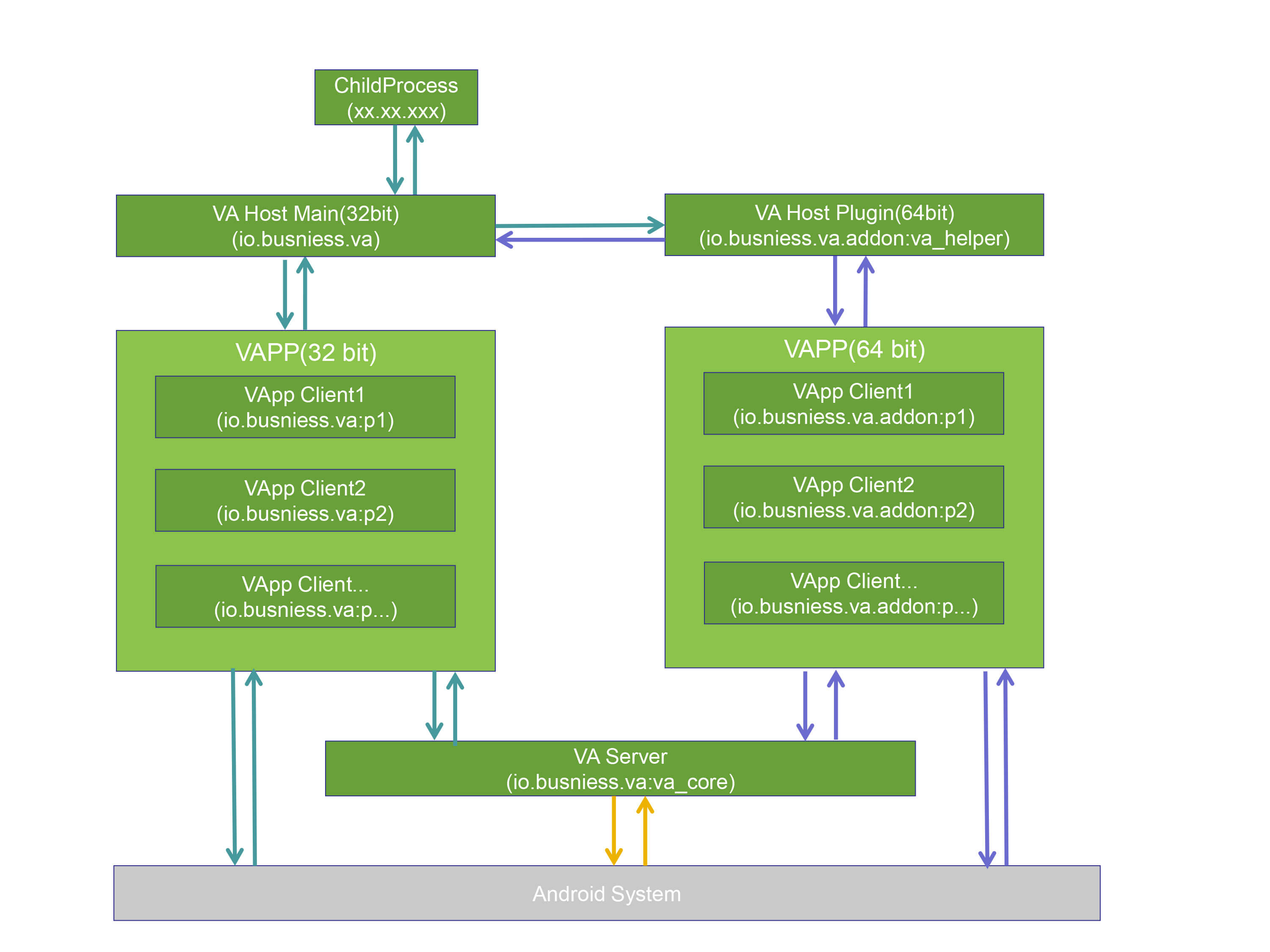
There are five types of processes in the VA’s runtime: CHILD process, VA Host Main process, VA Host Plugin process, VAPP Client process, and VAServer process.
To support both 32-bit and 64-bit APPs, VA needs to install two packages: a master package and a plug-in package ( In this document, the main package is 32 bits and the plug-in package is 64 bit ).
Two packages are also necessary because a package can only run in one mode, either 32-bit or 64-bit. So for 32-bit APPs, VA uses the 32-bit main package to run, and for 64-bit APPs, VA uses the 64-bit plug-in package to run.
The main package contains all the code of VA, and the plug-in package contains only one piece of code that loads the main package code for execution, no other code. So plug-in package rarely needs to be updated, just the main package.
In addition, whether the main package is chosen to use 32-bit or 64-bit can be modified in the configuration file ( For example, for users who want to access GooglePlay, it will be modified to 64-bit for the main package and 32-bit for the plug-in package ).
The functions and explanations of the each type of process are as follows:
| Process Type | Function |
|---|---|
| CHILD | Other processes integrated by VA Host, such as: keepalive process, push process, etc. |
| VA Host Main | The process where the UI main interface of the VA main package is located. The default main package is 32-bit and the plug-in package is 64-bit, which can be modified and switched in the configuration file |
| VA Host Plugin | The process that supports the plug-in package of 64-bit APP. The default main package is 32-bit and the plug-in package is 64-bit, which can be modified and switched in the configuration file. |
| VAPP Client | The process generated by the APP installed into VA after it starts, it will modify io.busniess.va:pxxx process name to the real process name of VAPP when it runs. |
| VAServer | The process where the VA Server is located, it is used to handle requests in VA that are not assigned to the system for processing, such as APP installation processing. |
VA can satisfy almost all your needs
Through the above technical architecture, we can know that VA can fully control APP and provide Hook SDK, which can satisfy almost all your needs in various fields:
-
Satisfy the need of dual/multi space
VA allows you to install multiple WeChat/QQ/WhatsAPP/Facebook and other APPs on the same mobile phone, so you can have one phone with multiple accounts logged in at the same time. -
Satisfy the need of mobile security
VA provides a set of internal and external isolation mechanisms, including but not limited to (file isolation / component isolation / process communication isolation). Simply speaking, VA internal is a "completely independent space". Through VA, work affairs and personal affairs can be safely separated without mutual interference. With a little customization, you can achieve mobile security-related needs such as application behavior audit, data encryption, data acquisition, data leakage prevention, anti-attack leaks and so on.
2.1 Application behavior audit
The HOOK capability provided by VA can realize real-time monitoring of user usage behavior and upload violation information to the server. And it's easy to implement things like Time Fence ( whether a feature of the APP can be used in a certain time ), Geo Fence ( whether a feature of the APP can be used in a certain area ), sensitive keyword filtering interception and other functional requirements.
2.2 Data encryption
The HOOK capability provided by VA can realize all data/file encryption of the application, ensuring data/file landing security.
2.3 Data acquisition
The HOOK capability provided by VA can realize the demand for real-time silent upload of application data, such as chat records and transfer records, preventing them from being deleted afterwards without traceability.
2.4 Data leakage prevention
The HOOK capability provided by VA can realize application anti-copy/paste, anti-screenshot/recording, anti-sharing/forwarding, watermark traceability and other requirements.
2.5 Anti-attack leaks
With the application control capability provided by VA, privacy-related behaviors such as SMS/ address book/call log/ background recording/background photo/ browsing history and location information can be completely controlled in sandbox, prevent Trojan horses/malicious APPs from acquiring users' real private data, causing serious consequences such as leakage of secrets. -
Satisfy the need of ROOT without HOOK
VA provides Hook capability of Java and Native. With VA, you can easily achieve functions required by various scenarios, such as virtual positioning, changing device, APP monitoring and management, mobile security and so on. -
Satisfy the need of silent installation
VA provides the ability to silently install, silently upgrade and silently uninstall APPs. For example, the application store or game center can be integrated with VA to avoid the need for users to manually click to confirm the installation operation, so that it can be installed into VA immediately after downloading, bringing users an experience like "small program" , completely avoiding the problem of applications not easily installed by users. -
Satisfy the need of APP controlled
You can clearly grasp the system API, sensitive data, device information, etc. accessed by the APP through VA. For example, whether the APP accesses the contacts, photo albums, call log, whether it accesses the user's geographic location and other information. Of course, you can also control or construct custom messages to these APPs via VA, and not only that, you can also get access to the APP's private data, such as chat database and so on. In a word, through the application control capability provided by VA, you can easily control all the behaviors of the APP, even modify the content of the APP and server interaction and so on . -
Satisfy the need of overseas markets
VA implements support for Google services to support overseas APPs running, such as Twitter, Messenger, WhatsAPP, Instagram, FaceBook, Youtube and so on. -
Satisfy the need of almost everything you can think of
VA has complete oversight and control over the internal APP, and can meet almost any of your needs! - VA is also the only commercially licensed product in this technology area
Hundreds of licensed customers are currently paying to use the business version of VirtualAPP code, and the APP integrated with VirtualAPP code is launched more than 200 million times per day. Many Android engineers provide us with user feedback in different scenarios, and through our technical team's continuous optimization and iteration, we continue to improve product performance and compatibility.
VA Specialized capabilities
- Cloning ability
You can clone the APP already installed in the external system and run it internally without mutual interference. Typical application scenario is double space.
- Without installation ability
In addition to cloning already installed, VA can install (externally silent ) apk's directly internally and run them directly internally. Typical application scenarios are plug-in, standalone APP marketplace and so on.
- Double space ability
VA is not only "double space", but also has a unique multi-user mode that allows users to open the same APP internally for an unlimited number of times.
- Internal and external isolation ability
VA is a standard sandbox, or "virtual machine", that provides a set of internal and external isolation mechanisms, including but not limited to (file isolation/component isolation/process communication isolation). Simply put, the inside of a VA is a "completely separate space". Simply put, the inside of a VA is a "completely separate space". Based on it, you can realize a "virtual phone" on your cell phone with a little customization. Of course, you can also use your imagination to customize it for data encryption, data isolation, privacy protection, and enterprise management applications.
- Full control over internal APPs ability
VA has complete monitoring and control over the internal APP, which is absolutely impossible to achieve in an external environment without Root.
Details(Drop down to open)
-
Service request control. First, VA directly provides some service request interception, you can easily customize these service requests when integrating VA, including but far from limited to (APP request to install apk / APP request to open certain files / APP request for location data / APP request for phone information, etc.)
-
System API control. VA virtualizes and implements the entire Android system framework, which is the principle that VA can run apk internally without installation. And you can through modify the virtual framework's implementation to dynamically monitor and analyze the behavior of the app, etc. In addition, you can also mock some system behavior to achieve some needs that are difficult to achieve externally (e.g. game controller).
-
Memory read and write. VA can read and write the memory of internal APP processes without Root.
-
Root without debugging. VA can debug (ptrace) internal APP processes without Root, based on which you can also achieve Root-free process injection.
-
Load arbit
Extension points exported contracts — how you extend this code
browse all types & interfaces →
Core symbols most depended-on inside this repo
Shape
Languages
Modules by API surface
For agents
$ claude mcp add VirtualApp \
  -- python -m otcore.mcp_server <graph>