github.com/arkaloscom/arkalos @0.7.0
Chat with this repoWhat it actually does AI analysis from the code graph — generated when you open this
README
Arkalos Beta 7 - The Python Framework for AI & Data Artisans


Docs: https://arkalos.com/docs/installation/
Folder Structure: https://arkalos.com/docs/structure/
Git: https://github.com/arkaloscom/arkalos

Arkalos is an easy-to-use framework for data analysis, data science, building data apps, warehouses, AI agents, robots, ML, training LLMs with elegant syntax. It just works.
Why Arkalos? Beginner- and Micro Business-Friendly
Arkalos makes it easy to get started, whether you're a beginner non-coder, scientist, or AI engineer.
And small businesses can now leverage the power of data warehouses and AI on a budget and at speed.
No more struggling with:
- Setting up your environment
- Spending hours searching for basic solutions
- Following instructions that just don't work
- Manually installing and managing packages
- Writing too much code for basic tasks
- Resolving import issues and errors
- Figuring out how to structure custom code and modules
- Growing from Jupyter Notebooks to full AI apps and pipelines
- Connecting data sources and building data warehouses
- Training AI models and running LLMs locally
- Collaborating with teams or sharing code across devices
The name Arkalos combines "Arc" and the Greek word "Kalos," meaning "a beautiful journey through the data."
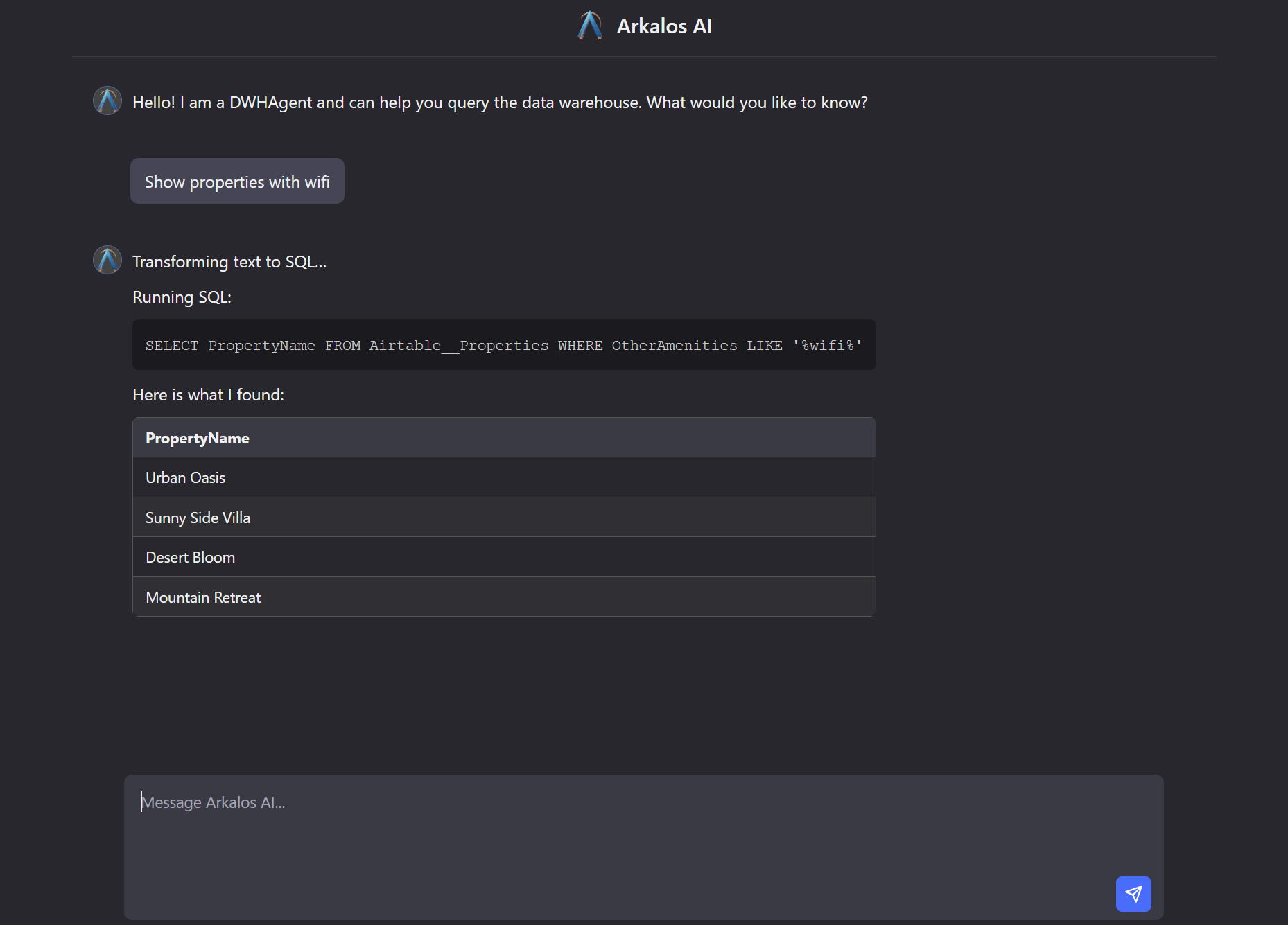
Beautiful Syntax and Documentation
Arkalos offers:
- Beautiful Documentation: Clear, concise, and easy-to-follow guides, even if you are learning coding, Python or data science.
- Elegant Syntax: Simple code that's easy to write and read.
- Reliable Performance: Works out of the box with minimal setup.
uv init
uv add arkalos
uv run arkalos init

# That's it. Your workspace is ready to write code. It just works!
Key Features
- 🚀 Modern Python Workflow:
Built with modern Python practices, libraries, and a package manager. Perfect for non-coders and AI engineers.
- 🛠️ Hassle-Free Setup:
No more struggling with environment setups, package installs, or import errors.
- 🤝 Easy Collaboration & Folder Structure:
Share code across devices or with your team. Built-in workspace folder and file structure. Know where to put each file.
- 📓 Jupyter Notebook Friendly:
Start with a simple notebook and easily transition to scripts, full apps, or microservices.
- 🕸️ Browser Automation & Structured Web Crawling & Scraping:
Control a real browser to bypass auth and captchas, crawl dynamic websites, and extract structured data using simple annotations with CSS selectors, attributes, slices, and regex — no manual parsing needed.
- 📊 Built-in Data Extractors & Warehouse:
Connect to Notion, Airtable, Google Drive, and more. Uses SQLite for a local, lightweight data warehouse.
- 🤖 AI, LLM & RAG Ready. Talk to Your Own Data:
Train AI models, run LLMs, and build AI and RAG pipelines locally. Fully open-source and compliant. Built-in AI agent helps you to talk to your own data in natural language.
- 🐞 Debugging and Logging Made Easy:
Built-in utilities and Python extensions like var_dump() for quick variable inspection, dd() to halt code execution, and pre-configured logging for notices and errors.
- 🧩 Extensible Architecture:
Easily extend Arkalos components and inject your own dependencies with a modern, modular software design.
- 🔗 Seamless Microservices:
Deploy your own data or AI microservice like ChatGPT without the need to use external APIs to integrate with your existing platforms effortlessly.
- 🔒 Data Privacy & Compliance First:
Run everything locally with full control. No need to send sensitive data to third parties. Fully open-source under the MIT license, and perfect for organizations needing data governance.
Truly Open-Source, Local, and Compliant
Arkalos helps individuals and businesses analyze data securely, with everything running locally and fully compliant with regulations.
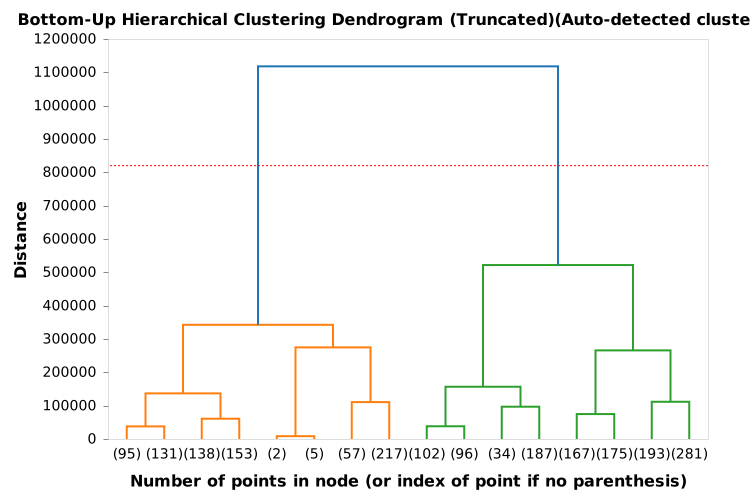
ClusterAnalyzer, DataTransformer and Altair Dendrogram and Other Charts
dtf = (DataTransformer(df)
    .renameColsSnakeCase()
    .dropRowsByID(9432)
    .dropCols(['id', 'dt_customer'])
    .dropRowsDuplicate()
    .dropRowsNullsAndNaNs()
    .dropColsSameValueNoVariance()
    .splitColsOneHotEncode(['education', 'marital_status'])
)

cln_df = dtf.get()  # Get cleaned Polars DataFrame

print(f'Dataset shape: {cln_df.shape}')
cln_df.head()
n_clusters = ca.findNClustersViaDendrogram()
print(f'Optimal clusters (dendrogram): {n_clusters}')

ca.createDendrogram()
Database & Data Warehouse Migrations
class Migration(DatabaseMigration):

    def up(self):

        with DB().createTable('users') as table:
            table.col('id').id()
            table.col('name').string(64).notNull()
            table.col('email').string().notNull()
            table.col('is_admin').boolean().notNull().default('FALSE')
            table.col('created_at').datetime().notNull().defaultNow()
            table.col('updated_at').datetime().notNull().defaultNow()
            table.indexUnique('email')


    def down(self):
        DB().dropTable('users')
Free Built-In Data Warehouse and Integrations
Data warehouses are centralized repositories that connect multiple data sources to enable AI and analytics.
Not every case needs complex and expensive tools like Snowflake or BigQuery. With Arkalos, you get a simple, local data warehouse right out of the box!
Arkalos connects seamlessly to popular tools like Notion, Airtable, Google Drive, and HubSpot.
Automatically detects and generates the schema.
And syncs data into your own data warehouse.
config/data_sources.py
    'airtable': {
        'enabled': True,
        'api_key': env('AIRTABLE_API_KEY'),
        'base_id': env('AIRTABLE_BASE_ID'),
        'tables': env('AIRTABLE_TABLES'),
    }
SQLite is used as the default local data warehouse.
.env
DWH_ENGINE=SQLite
DWH_SCHEMA_PATH=data/dwh/schema.sql
DWH_SQLITE_PATH=data/dwh/dwh.db
uv run arkalos dwh sync
scripts/etl/my_script.py
from arkalos.data.extractors.airtable_extractor import AirtableExtractor
# or for Notion
# from arkalos.data.extractors.notion_extractor import NotionExtractor
from arkalos.workflows.etl_workflow import ETLWorkflow

wf = ETLWorkflow(AirtableExtractor)
wf.run(drop_tables=True)
And that's it! Your data is imported automatically, ready for analysis or AI pipelines, and even accessible offline.
Built-in HTTP API Server - Launch a Python Data or AI Microservice
Python is the world's fastest-growing programming language thanks to its rich ecosystem of data, AI, and scientific libraries.
Arkalos lets freelancers, consultants, startups, businesses, and even governments add powerful data and AI capabilities to their products and platforms. Simply launch Arkalos as a microservice and integrate it seamlessly into your architecture.
uv run arkalos serve
Build Custom AI Agents Without Abstraction
app/ai/actions/what_is_my_ip_action.py
import socket
from arkalos.ai import AIAction

class WhatIsMyIpAction(AIAction):

    NAME = 'what_is_my_ip'
    DESCRIPTION = 'Determine the user IP'

    def run(self, message):
        hostname = socket.gethostname()
        ip = socket.gethostbyname(hostname)
        return ip
app/ai/actions/calc_action.py
from arkalos.ai import AIAction

class CalcAction(AIAction):

    NAME = 'calc'
    DESCRIPTION = 'Calculate mathematical expressions and provide a single value'

    def run(self, message):
        prompt = f"""
            ### Instructions:
            You are a calculator. Calculate mathematical expression and provide an answer

            ### Input:
            Generate a proper mathematical formula based on this question `{message}`.

            And calculate the final answer to this formula.

            ### Response:
            Respond as a single mathematical value to the expression
        """
        return self.generateTextResponse(prompt)
Multi-Task Agent - Determine Which Action to Take
app/ai/agents/multi_agent.py
from arkalos.ai import AIAgent, TextToSQLAction

from app.ai.actions import WhatIsMyIpAction, CalcAction


class MultiAgent(AIAgent):

    NAME = 'MultiAgent'

    DESCRIPTION = 'An Agent that understands the intent, determines which task to perform and runs it.'

    GREETING = 'Hi, I am a MultiAgent. I can tell your IP address, do basic math calculations or transform text to SQL.'

    ACTIONS = [
        WhatIsMyIpAction,
        CalcAction,
        TextToSQLAction
    ]

    def processMessage(self, message):
        response = f"Determining the intent and which task to run...\n"
        which_action = self.whichAction(message)
        response += f"Based on your question, I determined this task: {which_action}\n"
        response += f"Running this task...\n"
        output = self.runAction(which_action, message)
        response += f"Task output: {output}\n"
        return response
Test Your Models and Agents Locally
scripts/ai/agent.py
from app.ai.agents import MultiAgent

agent = MultiAgent()
agent.runConsole()
uv run scripts/ai/agent.py
Web Browser Automation, Crawling and Scraping
from arkalos.browser import WebBrowser, WebBrowserTab

browser = WebBrowser(WebBrowser.TYPE.REMOTE_CDP)

async def search_google(tab: WebBrowserTab):
    await tab.goto('https://www.google.com')
    search_input = tab.get_by_role('combobox', name='Search')
    await search_input.click()
    await search_input.fill('cats')
    await search_input.press('Enter')
    images_tab = tab.get_by_role('link', name='Images', exact=True)
    await images_tab.click()

await browser.run(search_google)
from arkalos.data.extractors import WebExtractor, WebDetails, _
from dataclasses import dataclass
import polars as pl

@dataclass
class ArticleDetails(WebDetails):
    CONTAINER = 'article[data-id]'

    id: _[str, None, 'data-id']           # Attribute from container
    url: _[str, 'a', 'href']              # Link
    title: _[str, 'a']                    # Text from <a>
    description: _[str, '[data-item="description"]']
    tags: _[list[str], '[data-item="tag"]']
    rating: _[int, '.rating', 1]          # Second child (after image)

class MyWebsiteWebExtractor(WebExtractor):
    BASE_URL = 'https://mywebsite.com'
    PAGE_CONTENT_SELECTOR = 'main'
    SCROLL = True
    DETAILS = ArticleDetails

    async def crawlTechArticles(self):
        return await self.crawlSpecificDetails(['/category/tech'])

mywebsite = MyWebsiteWebExtractor()
data = await mywebsite.crawlTechArticles()

df = pl.DataFrame(data)
df
Powerful Google Extractor
Search and List Google Drive Files, Spreadsheets and Forms
import polars as pl

from arkalos.utils import MimeType
from arkalos.data.extractors import GoogleExtractor

google = GoogleExtractor()

folder_id = 'folder_id'

# List files and their metadata in a Google Drive folder
files = google.drive.listFiles(folder_id)

# Search for files with regex and by type
files = google.drive.listFiles(folder_id, name_pattern='report', file_types=[MimeType.DOC_PDF])

print(pl.DataFrame(files))
List All the Spreadsheets Recursively With Their Tabs (Sheets) Info
files = google.drive.listSpreadsheets(folder_id, name_pattern='report', recursive_depth=1, with_meta=True, do_print=True)

for file in files:
    google.drive.downloadFile(file['id'], do_print=True)
Download, Export Files and Spreadsheets or Google Form Responses
google.drive.getFormMetadata(form_id)

google.drive.getFormResponses(form_id)

google.drive.getFormQuestions(form_id)

# Export Google Form responses as CSV
google.drive.downloadFile(form_id)

# Export Google Spreadsheet as LibreOffice Calc
google.drive.downloadFile(spreadsheet_id, 'my_folder/spreadsheet_name', as_mime_type=MimeType.SHEET_LIBRE_CALC)
Get Data from Google Analytics 4
# Past 28 days (minus 2 days of delay)
start_date = (datetime.now() - timedelta(days=29)).strftime('%Y-%m-%d')
end_date = (datetime.now() - timedelta(days=2)).strftime('%Y-%m-%d')

props = google.analytics.listProperties()

property_id = 'property_id'

google.analytics.fetchPages(property_id, start_date, end_date)

google.analytics.fetchTrafficStats(property_id, start_date, end_date)

google.analytics.fetchInternalSiteSearch(property_id, start_date, end_date)
And From Google Search Console (GSC)
```python google.analytics.listGSCSites()
site = 'sc-domain:arkalos.com'
google.analytics.fetchTopGSCPages(site, start_date, end_date)
queries = google.analytics.fetchTopGSCQueries(site, start_date, end_date)
Sort by a built-in CTR Opportunity Score
pl.Config(tbl_rows=100) pl.DataFrame(queries).select(pl.exclude('site', 'page_url', 'page_path')).sort('ctr_os', descending=True)
Fetch top pages first and then their top queries (Page-first)
google.analytics.fetchTopGSCPagesThenQueries(site, start_date, end_date)
Query-first
google.analytics.fetchTopGSCQueriesThenPages(site, start_date, end_date)
Or as sections, instead o
Core symbols most depended-on inside this repo
appendShape
Languages
Modules by API surface
For agents
$ claude mcp add arkalos \
  -- python -m otcore.mcp_server <graph>