github.com/arjun-g/vs-swagger-viewer @v3.0.0
Chat with this repoWhat it actually does AI analysis from the code graph — generated when you open this
README


Swagger Viewer - v3.0.0
Swagger Viewer lets you preview Swagger 2.0 and OpenAPI files as you type in Visual Studio Code. Additionally provide intellisense for the files as well.
It works on swagger files in json and yaml format. Preview happens in real time as you type.
Preview
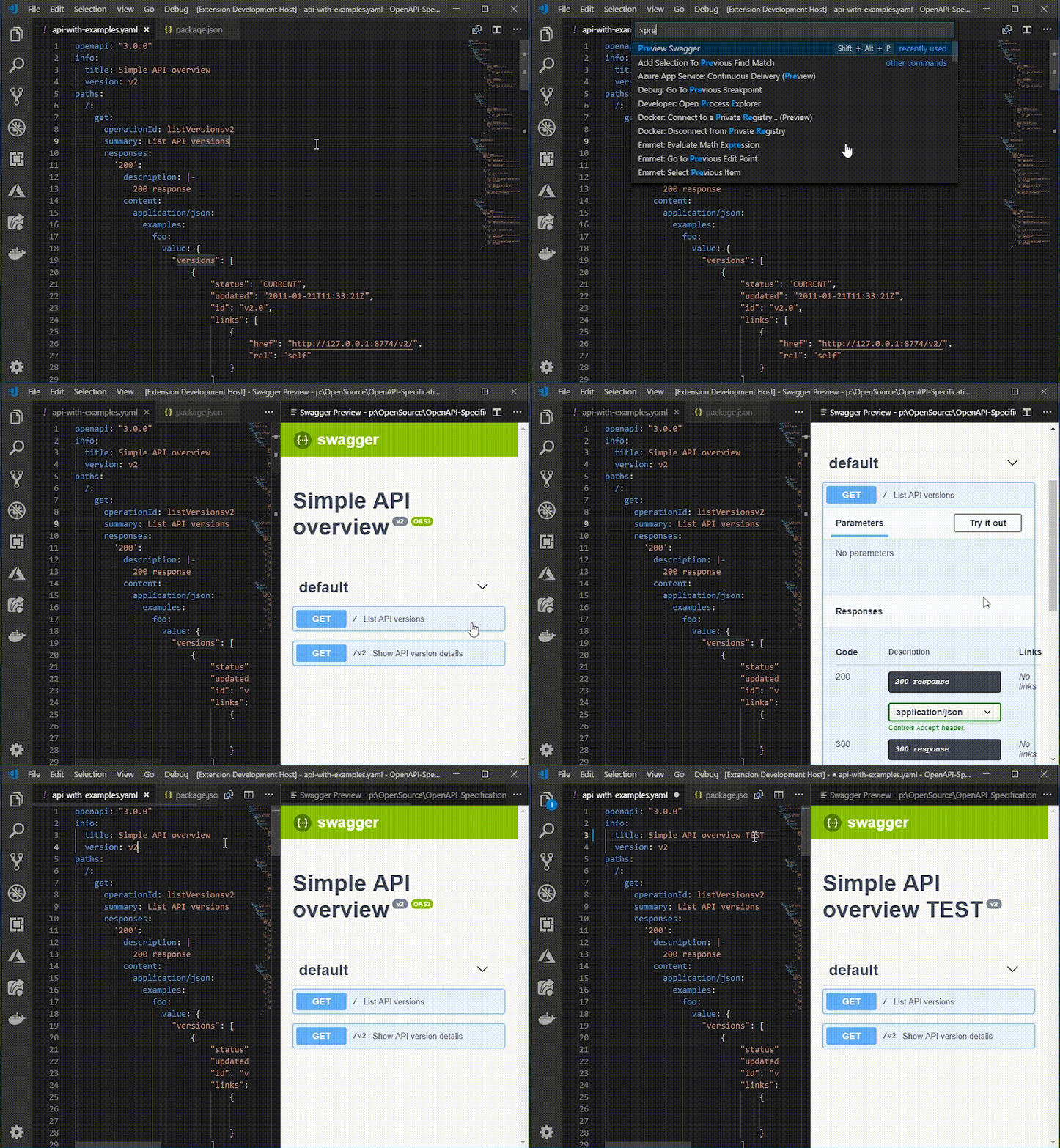
To start
* Open the swagger file and press F1.
* Run the Command Preview Swagger.
OR
* Press Shift + Alt + P
OR
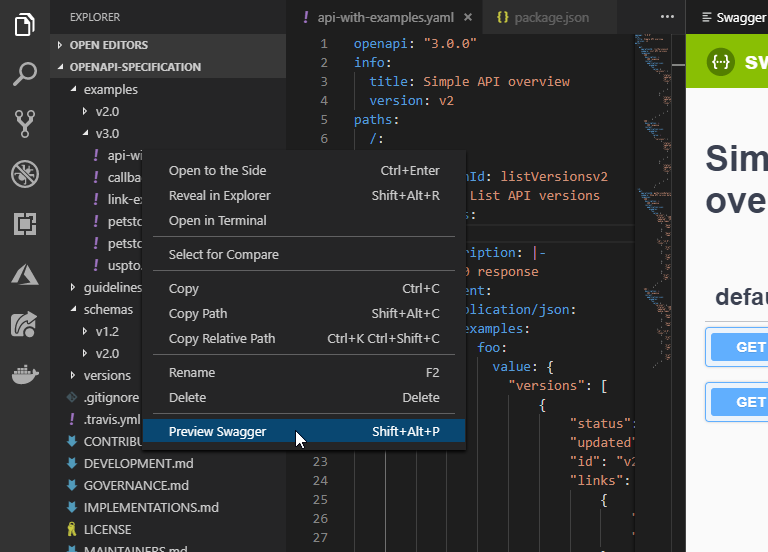
* Right click file in explorer panel and click Preview Swagger
THEN
- Preview it in vscode Itself like this
Configurations
Opening In External browser
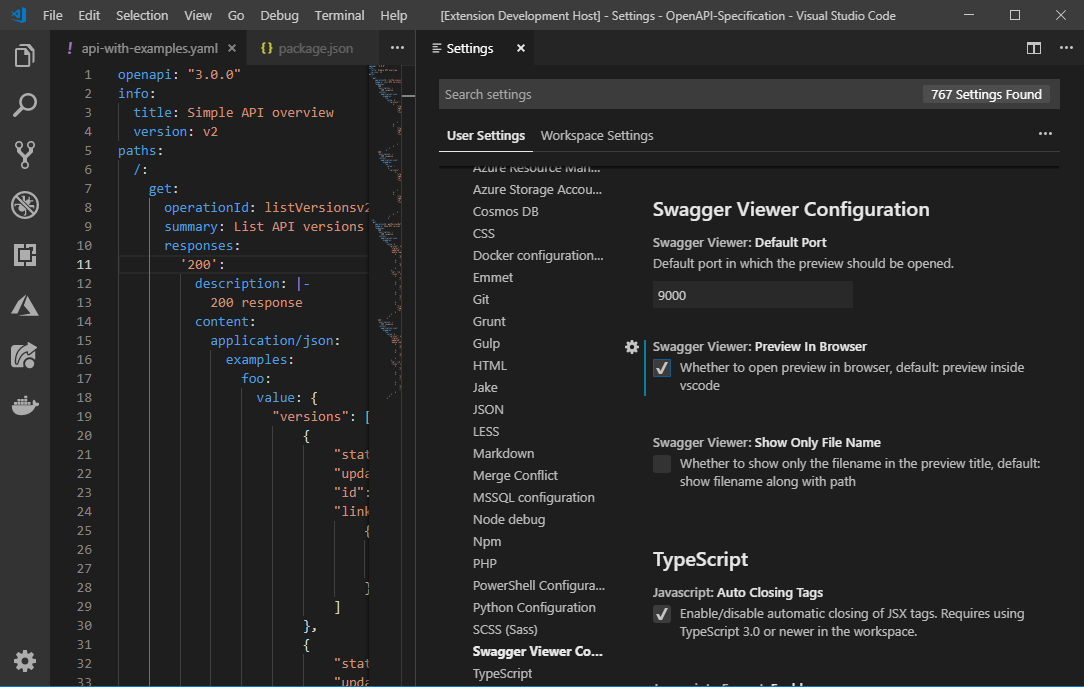
If you want to preview the changes in external browser change the settings Preview In Browser to true in User/Workspace Settings
THEN
* Run the Command Preview Swagger.
OR
* Press Shift + Alt + P
Preview will be automatically opened in default browser.
Change Default Port
Default port of the preview url can be changed by changing the Default Port value in User/Workspace Settings
Show Only File Name
In the preview title the file name along with the full path is displayed by default. It can be changed to show only the file name by changing the Show Only File Name to true in User/Workspace Settings
Change Default Host
Default host(localhost) of the preview url can be changed by changing the swaggerViewer.defaultHost value in User/Workspace Settings
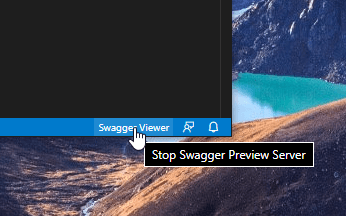
Stop Swagger Viewer Preview Server
To stop the preview server simply click the status bar item.
Releases
v3.0.0 Changes * The primary functionality of the Swagger Viewer extension would be the ability to preview Swagger and OpenAPI files. * Swagger Viewer will no longer be handling validation. Recommend using OpenAPI (Swagger) Editor for full editing capabilities * Intellisense for Swagger 2.0 and OpenAPI 3.0 is available now. Added extension YAML as extensionDependencies for YAML intellisense. * Default port changed to 18512 * Upgraded swagger-ui to version 3.25.2 * Start preview server in next available port for preview if configured port is not available * Fix for custom host config * Ability to stop the preview server
v2.2.2 Changes * Fixed validation issue with external refs #45 By @yuri1969 https://github.com/arjun-g/vs-swagger-viewer/pull/56 * Fix for #43 By @joschiwald https://github.com/arjun-g/vs-swagger-viewer/pull/59
v2.2.1 Changes * Fixed the external refs issue #45
Known Issue * Validator still gives a warning on relative paths. Will be fixed in next version.
v2.2.0 Changes * Support to configure default preview host (instead of localhost) - By @beastoin https://github.com/arjun-g/vs-swagger-viewer/pull/41
v2.1.0 Changes
* Replaced the deprecated vscode.previewHtml with Webview - #50
* Added configuration option to show only file name in title
* Added support for OpenAPI 3.0.3 validation - By @ackintosh https://github.com/arjun-g/vs-swagger-viewer/pull/49
v2.0.2 Changes * Fixed issues with parsing yaml due in yamljs library. Changed to js-yaml library. * Fixed issue where validation errors are not cleared in yaml file.
v2.0.0 Changes * Code base changed to TypeScript * Partial validation support added * OpenAPI Support added (Not fully tested) * Only one server runs for the preview page * Multiple files can be previewed at a time inside vscode * Context menu added to the explorer to start the preview directly without opening the file * Using files from swagger-ui-dist npm package - By @Raptor399 https://github.com/arjun-g/vs-swagger-viewer/pull/36 * Multiple minor bug fixes
v1.7.0 Changes * Fixed issue in json file parsing. - By @Zlass https://github.com/arjun-g/vs-swagger-viewer/pull/27
v1.6.0 Changes * Added support for .yaml, .yml, .json and unsaved documents. - By @DW8Reaper https://github.com/arjun-g/vs-swagger-viewer/pull/21
v1.5.0 Changes
- Upgraded Swagger UI v3 for preview. - By @jienco https://github.com/arjun-g/vs-swagger-viewer/pull/17
v1.4.0 Changes
- Fixed - Preview of JSON Swagger files not getting updated in realtime. - By @tmsns
- Fixed - Preview window in vs code not switching to latest file.
- Added - File name in preview window to identify which file is in preview.
- Some performance fixes
v1.3.0 Changes
- Added - Now preview swagger inside the editor itself. - By @ferreus https://github.com/arjun-g/vs-swagger-viewer/pull/7
- Added - Preview inside editor by default
v1.2.0 Changes
- Added -
Openbutton in message box. - By @pmentz https://github.com/arjun-g/vs-swagger-viewer/pull/3 - Added - shortcut
Shift + Alt + Pto run the command - Added - Ability to change default port from
User/Workspace Settings.
Credits
Swagger Viewer utilizes the following open source projects * Swagger Editor * Swagger Parser * Express * socket.io * yaml.js
Contributors
Core symbols most depended-on inside this repo
getParsedContentShape
Languages
Modules by API surface
For agents
$ claude mcp add vs-swagger-viewer \
  -- python -m otcore.mcp_server <graph>