github.com/arcsin1/oh-my-ppt @v2.0.19
Chat with this repoWhat it actually does AI analysis from the code graph — generated when you open this
README







Oh My PPT - Local-first AI Slide Deck Generator & Editor
中文 | Why • Features • Workflow • Changelog • Usage Notes
Describe what you need — a presentation, lesson, or story —


and let the AI build clean, beautiful HTML slides for you.


Local-first · Works offline, works for you.
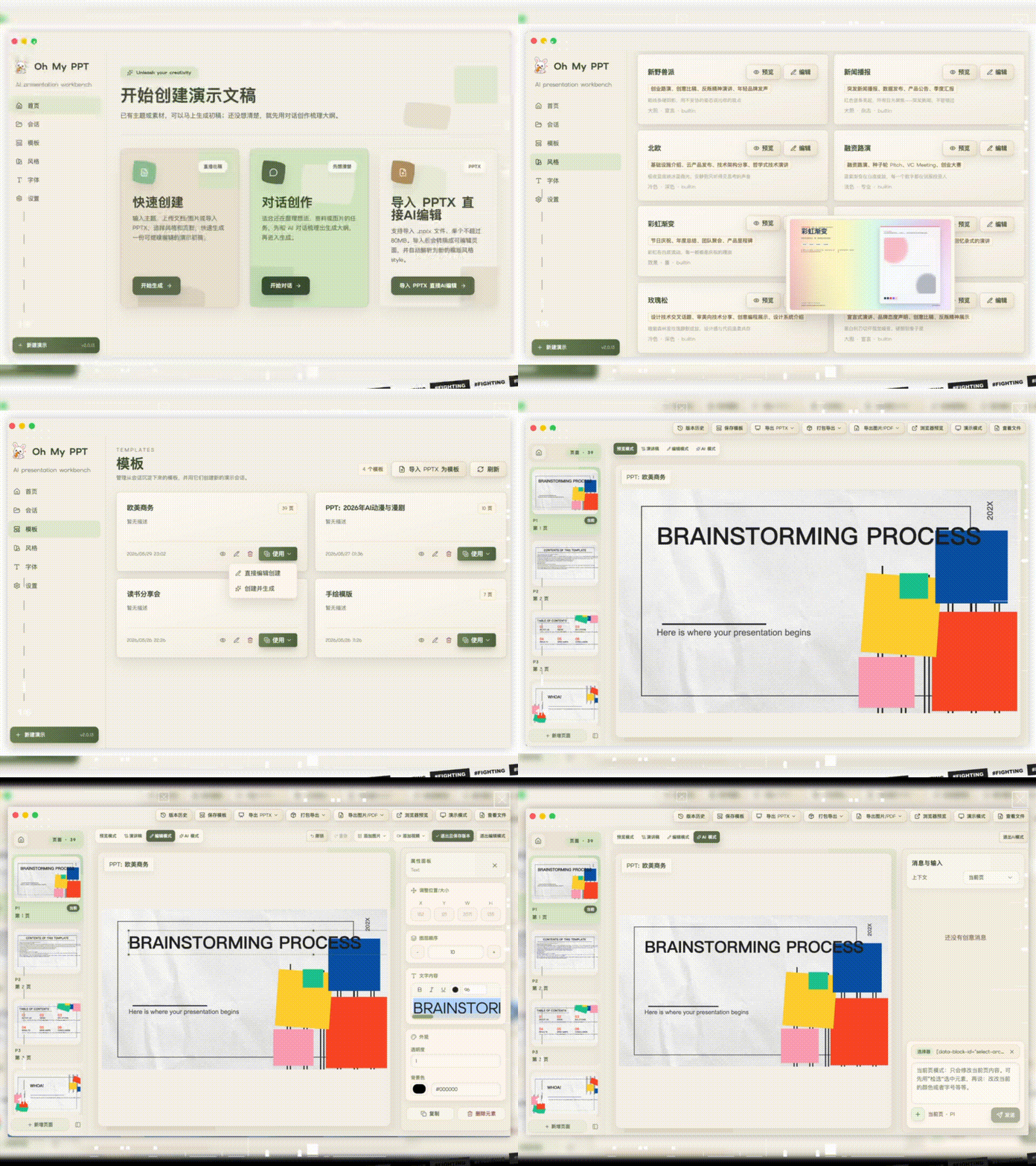
Table of Contents
- Why I Built This
- What It Can Do
- Workflow
- 70+ Built-in Style Skills
- Font Management
- Animation Support
- Local Ollama Support
- Usage Notes
- Do not forget to configure your model
- How to add images to PPT
- About preview mode
- About export
- Opening Unsigned Apps
- Feedback & Requests
- Sponsor Support
- Reference
- Sponsors
- Contributors
- License
🎯 Why I Built This
Making AI-powered HTML presentations possible.
Every time I needed to prepare a talk, report, pitch, or defense, most of the time went into layout tweaks.
There are many AI PPT tools, but most output fixed-format files. Fine-tuning styles or adding custom animation demos is still painful.
So I built my own HTML-based PPT generator, originally as a personal tool.
Output is pure HTML slides: instant browser preview, no extra software, easy to tweak styles, add motion, embed code, and export to PDF / PNG / editable PPTX.
✅ What It Can Do
- 💬 One-prompt generation — Enter topic + requirements, AI plans outline + palette + layout, then generates a complete deck
- 🔀 Multi-task generation — Submit multiple generation tasks in parallel without waiting for one to finish before starting another, with automatic notifications on completion
- 📄 Document-based creation — Upload txt, md, csv, or docx files to prepare topic, page count, and description automatically, then keep using the source document during generation
- 📥 Import PPTX for editing — Convert local PPTX files into in-app HTML pages, then continue previewing, adjusting positions, and chat-based editing
- 🧱 Template library and template creation — Save generated or edited decks as templates, import PPTX files as templates, and reuse templates to create new PPT sessions
- 🖼️ Image-based style and outline generation — Upload a screenshot or design mockup, then automatically extract a distinctive visual style and generate an outline
- 🔒 Local-first — Runs on your machine, no signup, no upload anxiety
- 🔤 Font management — 14 curated Google Fonts built-in (including CJK), upload local fonts, pick title and body fonts separately or let AI auto-match
- 🎨 70+ built-in style skills — Minimal White, Cyber Neon, Bauhaus, Japanese Minimal, Xiaohongshu White, and more, plus custom styles
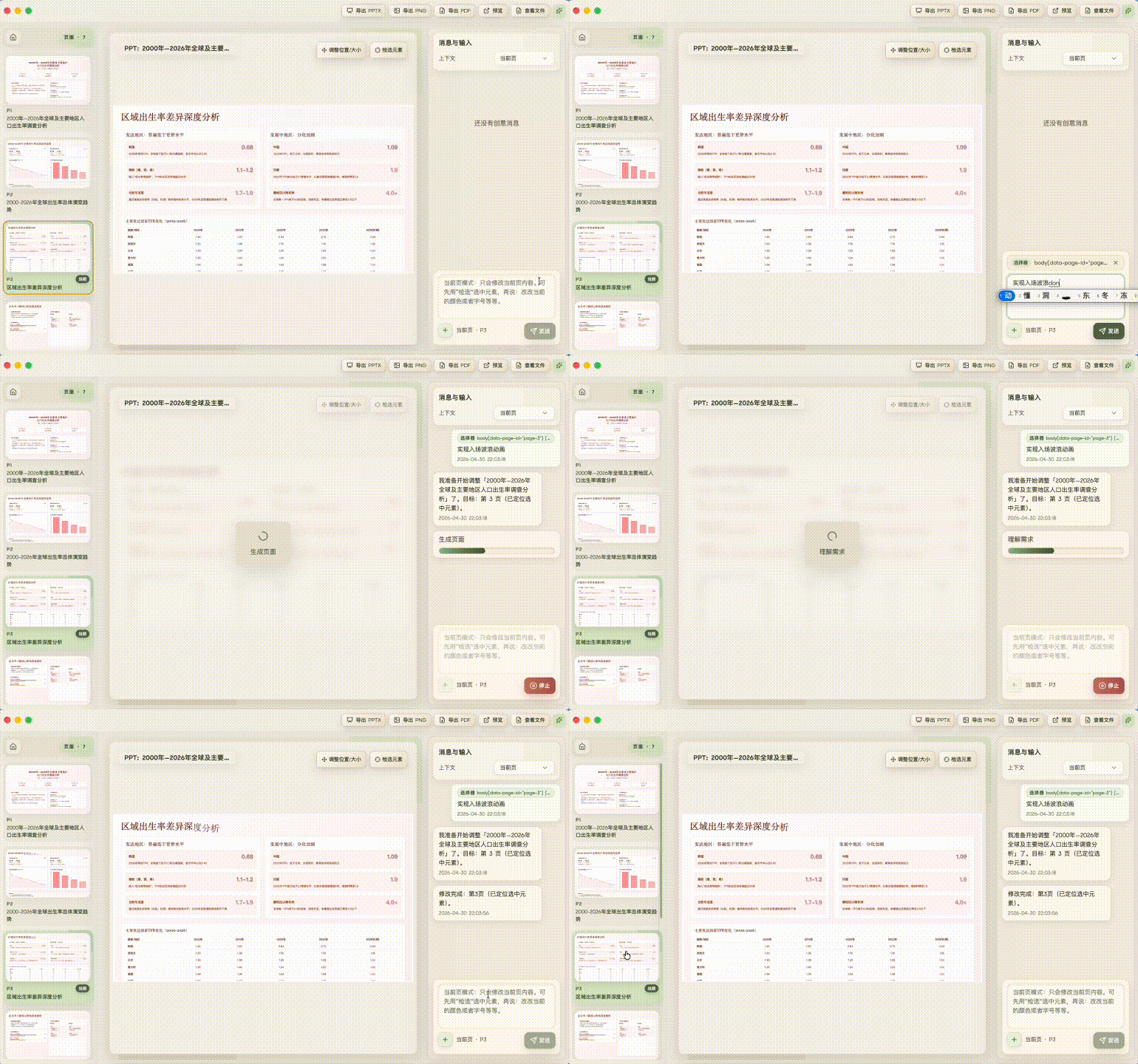
- ✏️ Chat-based editing — Tell it “change title color” or “add a data chart” on a specific page, without rebuilding everything
- 🖱️ Visual editing — Every visible element can be dragged and resized, and every element can be picked and modified with AI
- 📸 Image and video insertion — Upload images and videos directly in edit mode, from the asset library or local files
- 📋 Element duplication — One-click copy of any element (text, images, videos, etc.), auto-offset and independently editable
- ↩️ Undo and redo — Undo and redo edits freely before committing, then save as a version history entry
- 🗑️ Element deletion — Delete any element with a click or keyboard shortcut
- 🖥️ Presentation mode — Enter fullscreen presentation with one click, navigate slides with arrow keys or clicks
- 📝 Speaker script generation — Generate scripts for the full deck or the current slide, with formal, casual conversational, storytelling, and custom styles
- 🎬 Animation support — 16+ slide transition effects plus Anime.js v4-powered whole-element motion
- 🎞️ Per-element animation controls — Select individual text, image, chart, or other elements while editing, then configure entrance, emphasis, or exit effects with automatic/click triggers, duration, and direction
- 🧮 Math formula rendering — Display common LaTeX formulas for classes, teaching decks, and technical talks
- 📄 Multi-format export — Export to PDF, batch PNG, MP4 video, or editable PPTX with embedded fonts (still being improved)
- 🏷️ Session management — Session list distinguishes AI-created decks from imported PPTX decks, and deck names can be renamed
- 🧩 More reliable slide layout — Generation follows a fixed 16:9 canvas and content-height budget to reduce overflow
- 🔄 Version history rollback — Every edit is automatically saved, roll back to any previous version with one click, never worry about mistakes
- 📦 One-click packaging — Bundle your HTML deck into a single executable file, double-click to open and present anywhere, no installation needed (just a browser)
- 💾 AI-generated creative deck import & export — Export your AI-generated creative deck from the editing page and import it on another computer to continue editing, making cross-device collaboration seamless


🔄 Workflow
💡 Choose a creation mode → confirm topic / materials / page count / style / fonts → AI generates the HTML deck → preview, present, and edit → generate speaker scripts → export PDF / PNG / PPTX / MP4 / packaged HTML
The home page supports several common entry points:
- One-prompt creation: enter a topic and detailed description to quickly generate a complete deck.
- Chat to Create: use a multi-turn conversation to clarify the topic, materials, audience, structure, and key points for each slide. This is useful when requirements are still unclear, the source material is complex, or you want to shape the outline together first.
- Upload document parsing: upload txt, md, csv, docx, and other files so the app can prepare the topic, page count, and detailed description, then keep referencing the source file during generation.
- Create from template: choose a saved template from the Templates page to copy it into an editable PPT session, or enter a new topic/outline or upload a document so the app regenerates content while preserving the template's layout, palette, and visual rhythm.
Document parsing also checks whether the outline and page count match. For example, if the outline clearly contains five pages, the creation form will try to use five pages too. Your documents stay in the local workspace; the app only prepares them as AI-readable text.
If you already have an existing PPTX file, click “Import PPTX” on the home page to convert it into editable in-app pages, then continue previewing, adjusting positions, chat-editing, and exporting.
You can also save an existing session to the template library, or import a PPTX as a template from the Templates page, then reuse the same structure and visual style to create new PPT sessions.
After generation, you can enter preview or presentation mode, keep editing by dragging elements, inserting images/videos, using chat edits, rolling back history, and generate speaker scripts for the full deck or the current slide.
🎨 70+ Built-in Style Skills
To create your own Style Skill, use the official style generation package: arcsin1/style-generate-skill. It helps turn reference designs, palettes, and layout requirements into importable Oh My PPT style packages.

🔤 Font Management
14 curated Google Fonts are built in (including CJK families). You can also upload local .woff2 font files and customize the font name, category (sans-serif, serif, handwriting, monospace, and more), role (title / body), and script type (Latin / CJK).
When creating a deck, you can choose title fonts and body fonts separately, or let AI automatically match the best font pair based on the topic and style. When exporting to PPTX, used fonts are automatically embedded so the deck displays consistently on other computers.

🎬 Animation Support
Oh My PPT generates HTML slides with 16+ slide transition effects and a local Anime.js v4 runtime. During generation or chat-based editing, the AI can add presentation motion to whole slide elements such as titles, metric cards, images, chart containers, and step blocks.
In addition to AI-generated motion, edit mode lets you select an individual element and configure its entrance, emphasis, or exit effect, together with automatic or click triggering, duration, and direction.
Animations are designed for real presentation flow: content can appear step by step with the speaker's rhythm instead of showing everything on the slide at once. This works well for reports, pitches, classes, and product walkthroughs.
Common animation expressions include:
- Fade in: lightweight transitions when modules appear.
- Slide-in motion: short movement from top, bottom, left, or right for titles, cards, and lists.
- Scale emphasis: gently enlarge key numbers or conclusion cards, then settle back.
- Staggered reveal: reveal cards or bullets one after another.
- Click-to-reveal: reveal content step by step during presentation, so the deck follows your speaking pace.
Whole-element animation is preferred over splitting text into many tiny moving fragments. It keeps slides readable, stable, and easier to export or edit later. Animations are meant to guide attention and show hierarchy, so complex timelines, high-frequency flashing, infinite loops, and large shaking motion are not recommended.
</>

🦙 Local Ollama Support (OpenAI-Compatible)
This project supports local Ollama through the OpenAI-compatible API.
Fill the Settings page like this:
provider:openaibase_url:http://127.0.0.1:11434/v1model: your local model tag (for exampleqwen2.5-coder:14b), recommended 14B+ (or a strong cloud model)api_key: any non-empty string (for exampleollama)
Notes:
- Ollama does not validate API keys by default, but this app enforces a non-empty check, so
api_keycannot be blank. - 14B+ local models (or strong cloud models) are recommended for stable generation quality.
- Official OpenAI endpoints do not receive the non-standard
thinkingparameter, avoiding400 Unknown parameterresponses. Other OpenAI-compatiblebase_urlvalues still request disabled thinking so multi-turn tool flows do not losereasoning_content.
Usage Notes
Do not forget to configure your model
Recommended: DeepSeek v4, Kimi, Doubao, Qwen, GLM, Xiaomi MiMo, MiniMax, and more Chinese models, plus GPT, Claude, and other international models.
Fill in your model configuration on the Settings page, otherwise generation will fail.

How to add images to PPT
Images and assets are copied into your local session directory. They are not uploaded to a cloud service by this app.

About preview mode
Supports keyboard navigation (Left/Right), presentation mode, fullscreen presentation mode, and ESC to exit presentation mode.

About export
Oh My PPT currently supports four export modes:
- PDF: best for sharing, archiving, and printing.
- PNG: batch-export every slide as an image for docs, Notion, articles, or social posts.
- PPTX: export an editable file for PowerPoint / Keynote. Text, images, colors, formulas, and basic layout are preserved where possible, while text overlap, mixed-language layout, and complex chart rendering are still being improved.
- MP4: export the presentation as a video for social posts, client sharing, or playback when a PPT file is not the best fit.
📦 Opening Unsigned Apps
Release builds may not be code-signed yet, so macOS or Windows can show security warnings on first launch. This usually does not mean the app is broken; it is the operating system blocking unsigned or unnotarized software by default.
macOS
If macOS says the app cannot be opened, is damaged, or cannot verify the developer, use either option below.
Option 1: Right-click Open
- Open Finder or the Applications folder.
- Find
OhMyPPT.app. - Right-click the app and choose Open.
Extension points exported contracts — how you extend this code
AddSessionElementOptions (Interface)Core symbols most depended-on inside this repo
tShape
Languages
Modules by API surface
For agents
$ claude mcp add oh-my-ppt \
  -- python -m otcore.mcp_server <graph>