github.com/appspa/app-space-android @1.0.1
Chat with this repoWhat it actually does AI analysis from the code graph — generated when you open this
README
XUpdate


English | Chinese | Video tutorial
A lightweight, high availability Android version update framework. Click instruction document to experience it!
Please read 【wisdom of asking questions】 before raising the issue and strictly follow the issue template fill in and save everyone's time.
Please read the instruction document carefully before use, important things are to be repeated for three time!!!
Please read the instruction document carefully before use, important things are to be repeated for three time!!!
Please read the instruction document carefully before use, important things are to be repeated for three time!!!
About me
| WeChat public number | juejin | zhihu | CSDN | jianshu | segmentfault | bilibili | toutiao |
|---|---|---|---|---|---|---|---|
| 我的Android开源之旅 | Click me | Click me | Click me | Click me | Click me | Click me | Click me |
Simplify use
If you want to use xupdate faster, reduce the difficulty of integration, support breakpoint continuation download and other expansion functions, you can try to use XUpdateAPI.
Rapid integration of X-Library
In order to facilitate the rapid integration of X-Library, I provide a template project for your reference: https://github.com/xuexiangjys/TemplateAppProject
Features
-
It supports
PostorGetrequest to check version, and supports user-defined network requests. -
Only version update under WiFi is supported。
-
Support silent download (background update) and automatic version update.
-
The user-friendly version update prompt pop-up window is provided to customize the theme style.
-
It supports user-defined version update checker, parser, prompter, downloader, install listener and error listener.
-
Support MD5 file verification, version ignore, version forced update and other functions.
-
It supports the user-defined file verification method【MD5 verification by default】.
-
Support custom request API interface.
-
Compatible with Android 6.0 ~ 11.0.
-
Support Chinese and English language (internationalization).
-
Support the use of the flutter plugin:flutter_xupdate。
-
Support the use of react native plugin:react-native-xupdate。
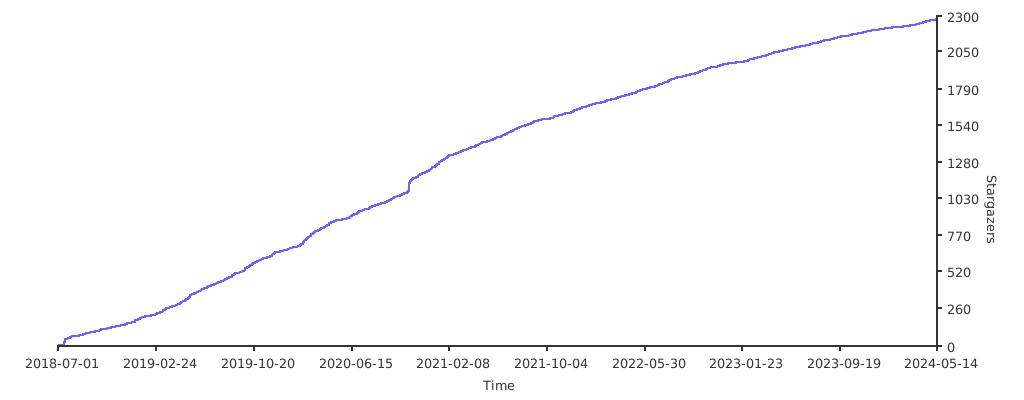
Stargazers over time
Composition structure
This framework refers to AppUpdate some ideas and UI, the various parts of the version update are separated to form the following parts:
-
IUpdateChecker: Check for the latest version. -
IUpdateParser: Parsing the data results returned by the server. -
IUpdatePrompter: Display the latest version information. -
IUpdateDownloader: Download the latest version of APK installation package. -
IUpdateHttpService: The interface for network request.
In addition, there are two listeners:
-
OnUpdateFailureListener: Listening error -
OnInstallListener: Callback of application installation
Update core manager:
IUpdateProxy: Responsible for the process control of version update, calling update to start the version update process.
Update process
Process after calling update:
IUpdateProxy/XUpdate --- (update) ---> IUpdateChecker --->(Request the server to get the latest version information)---> IUpdateParser ---> (Parse the data returned by the server, and build the UpdateEntity)---> IUpdateProxy ---> (If there is no latest version, end it directly, otherwise proceed to the following process)

    ---Automatic mode---> IUpdateDownloader ---> (Download the latest app apk) ---> Install application

    ---Non automatic mode---> IUpdatePrompter ---> Prompt for version update

                                                        ---> click Update ---> IUpdateDownloader ---> (Download the latest app apk) ---> Jump to application installation UI

                                                        ---> Click cancel or ignore ---> End
Click to view the framework UML design diagram

1、Demonstration
- Default version update

- Background update

- Force version update

- Ignored version update

- Custom pop up theme

- Use the system pop-up prompt

Demo update background service
Because GitHub is slow to visit recently, if you need to experience xupdate better, you can Click to build a simple version update service.
Demo Download
Pgyer Download
Pgyer Download password: xuexiangjys


GitHub Download

2、Quick integration guide
At present, it supports the use of the mainstream development tool AndroidStudio and add dependency by configures
build.gradledirectly.
2.1、Add gradle dependency
1.In the project root directory build.gradle:
allprojects {
     repositories {
        ...
        maven { url "https://jitpack.io" }
    }
}
- Then add in the dependencies of
build.gradleof the application project (usually app):
The following is the version description. Choose one.
- androidx project: above 2.0.0
dependencies {
  ...
  // androidx project
  implementation 'com.github.xuexiangjys:XUpdate:2.1.3'
}
- support project: below 1.1.6
dependencies {
  ...
  // support project
  implementation 'com.github.xuexiangjys:XUpdate:1.1.6'
}
2.2、Initialization
Initialize settings at the top of the application:
XUpdate.get()
    .debug(true)
    .isWifiOnly(true)                                               // By default, only version updates are checked under WiFi
    .isGet(true)                                                    // The default setting uses Get request to check versions
    .isAutoMode(false)                                              // The default setting is non automatic mode
    .param("versionCode", UpdateUtils.getVersionCode(this))         // Set default public request parameters
    .param("appKey", getPackageName())
    .setOnUpdateFailureListener(new OnUpdateFailureListener() {     // Set listening for version update errors
        @Override
        public void onFailure(UpdateError error) {
            if (error.getCode() != CHECK_NO_NEW_VERSION) {          // Handling different errors
                ToastUtils.toast(error.toString());
            }
        }
    })
    .supportSilentInstall(true)                                     // Set whether silent installation is supported. The default is true
    .setIUpdateHttpService(new OKHttpUpdateHttpService())           // This must be set! Realize the network request function.
    .init(this);                                                    // This must be initialized
【note】: if there is any problem, you can open debug mode to track the problem. If you also need to log on disk, you can implement the following interface.
XUpdate.get().setILogger(new ILogger() {
    @Override
    public void log(int priority, String tag, String message, Throwable t) {
        // Realize the function of logging
    }
});
2.3、Version update entity information
(1) UpdateEntity
| Field name | Type | Default value | Description |
|---|---|---|---|
| mHasUpdate | boolean | false | Whether have the latest version |
| mIsForce | boolean | false | Force installation: app cannot be used without installation |
| mIsIgnorable | boolean | false | Whether the version can be ignored |
| mVersionCode | int | 0 | Latest version code |
| mVersionName | String | unknown_version | Latest version name |
| mUpdateContent | String | "" | Update content |
| mDownloadEntity | DownloadEntity | / | Download information entity |
| mIsSilent | boolean | false | Whether to download silently: when there is a new version, do not prompt to download directly |
| mIsAutoInstall | boolean | true | Whether to automatic install app when the download is completed |
(2) DownloadEntity
| Field name | Type | Default value | Description |
|---|---|---|---|
| mDownloadUrl | String | "" | Download address |
| mCacheDir | String | "" | File download directory |
| mMd5 | String | "" | The encrypted check value of the downloaded file (MD5 encryption is used by default), which is used to verify and prevent the downloaded APK file from being replaced (the latest demo has a tool for calculating the check value). Note that the MD5 value here is not the MD5 value of the application signature file! |
| mSize | long | 0 | Size of download file【unit: KB】 |
| mIsShowNotification | boolean | false | Whether to show download progress in the notification bar |
(3) PromptEntity
| Field name | Type | Default value | Description |
|---|---|---|---|
| mThemeColor | int | R.color.xupdate_default_theme_color | Theme colors (background colors for progress bars and buttons) |
| mTopResId | int | R.drawable.xupdate_bg_app_top | Top background image resource ID |
| mTopDrawableTag | String | "" | Top background image drawable tag |
| mButtonTextColor | int | 0 | Button text color |
| mSupportBackgroundUpdate | boolean | false | Whether background updates are supported |
| mWidthRatio | float | -1(Unconstrained) | The ratio of the width of the version update prompter to the screen |
| mHeightRatio | float | -1(Unconstrained) | The ratio of the height of the version update prompter to the screen |
| mIgnoreDownloadError | boolean | false | Whether to ignore the download exception (the update prompt box will not disappear if the download fails) |
2.4、File encryption verification method
The default file encryption verification method used in this framework is MD5 encryption. Of course, if you don't want to use MD5 encryption, you can also customize the File Encryptor IFileEncryptor. The following is the implementation of MD5 File Encryptor for reference:
/**
 * The default file encryption calculation uses MD5 encryption
 *
 * @author treexi
 * @since 2019-09-06 14:21
 */
public class DefaultFileEncryptor implements IFileEncryptor {
    /**
     * Encrypted files
     *
     * @param file
     * @return
     */
    @Override
    public String encryptFile(File file) {
        return Md5Utils.getFileMD5(file);
    }

    /**
     * Verify that the file is valid (whether the encryption is consistent)
     *
     * @param encrypt The encrypted value, is considered to be valid if encrypt is empty.
     * @param file    File to be verified
     * @return Whether the document is valid
     */
    @Override
    public boolean isFileValid(String encrypt, File file) {
        return TextUtils.isEmpty(encrypt) || encrypt.equalsIgnoreCase(encryptFile(file));
    }
}
Finally, call the XUpdate.get().setIFileEncryptor method, settings will take effect.
3、Version update
3.1、Default version update
You can directly call the following code to complete the version update operation:
XUpdate.newBuild(getActivity())
        .updateUrl(mUpdateUrl)
        .update();
It should be noted that with the default version update, the JSON format returned by the request server should include the following contents:
{
  "Code": 0,
  "Msg": "",
  "UpdateStatus": 1,
  "VersionCode": 3,
  "VersionName": "1.0.2",
  "ModifyContent": "1、优化api接口。\r\n2、添加使用demo演示。\r\n3、新增自定义更新服务API接口。\r\n4、优化更新提示界面。",
  "DownloadUrl": "https://raw.githubusercontent.com/xuexiangjys/XUpdate/master/apk/xupdate_demo_1.0.2.apk",
  "ApkSize": 2048,
  "ApkMd5": ""
}
Field description:
- Code: 0 means the request is successful, non-0 means failure.
- Msg: Request error information.
- UpdateStatus: 0 means no update, 1 means version update, no forced upgrade is required, and 2 represents version update and forced upgrade is required.
- VersionCode: Version number, self incrementing. Used to compare whether the version is the latest version.
- VersionNa
Extension points exported contracts — how you extend this code
IDownloadEventHandler (Interface)Core symbols most depended-on inside this repo
getShape
Languages
Modules by API surface
For agents
$ claude mcp add app-space-android \
  -- python -m otcore.mcp_server <graph>