github.com/antonk52/cssmodules-language-server @v1.5.2
Chat with this repoWhat it actually does AI analysis from the code graph — generated when you open this
README
cssmodules-language-server
Language server for autocompletion and go-to-definition functionality for css modules.
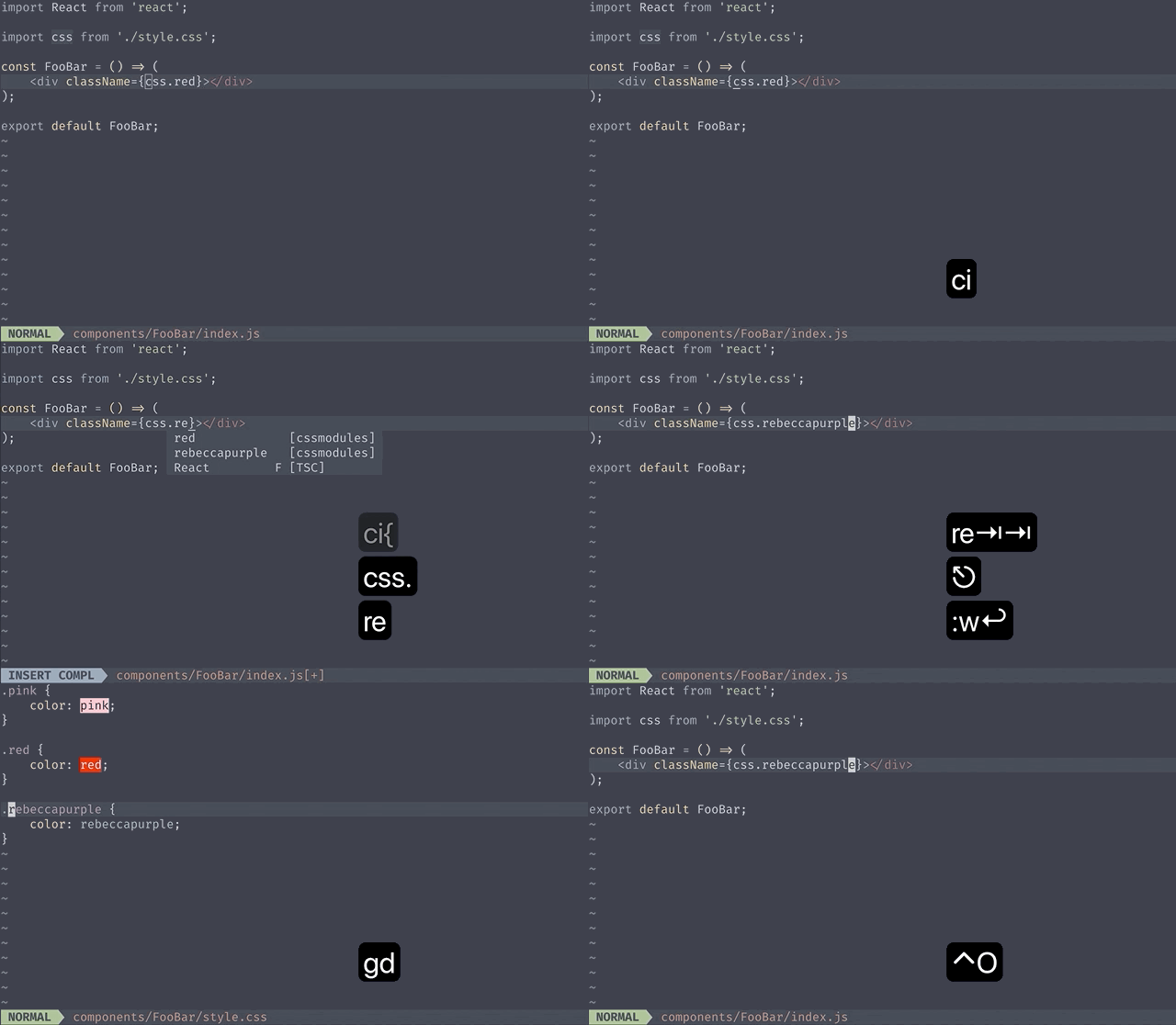
Features:
- definition jumps to class name under cursor.
- implementation (works the same as definition).
- hover provides comments before the class name with direct declarations within the class name.
The supported languages are css(postcss), sass and scss. styl files are parsed as regular css.
Installation
npm install --global cssmodules-language-server
Configuration
See if your editor supports language servers or if there is a plugin to add support for language servers
Neovim
Example uses nvim-lspconfig
require'lspconfig'.cssmodules_ls.setup {
    -- provide your on_attach to bind keymappings
    on_attach = custom_on_attach,
    -- optionally
    init_options = {
        camelCase = 'dashes',
    },
}
Known issue: if you have multiple LSP that provide hover and go-to-definition support, there can be races(example typescript and cssmodules-language-server work simultaneously). As a workaround you can disable definition in favor of implementation to avoid conflicting with typescript's go-to-definition.
require'lspconfig'.cssmodules_ls.setup {
    on_attach = function (client)
        -- avoid accepting `definitionProvider` responses from this LSP
        client.server_capabilities.definitionProvider = false
        custom_on_attach(client)
    end,
}
coc.nvim
let cssmodules_config = {
\ "command": "cssmodules-language-server",
\ "initializationOptions": {"camelCase": "dashes"},
\ "filetypes": ["javascript", "javascriptreact", "typescript", "typescriptreact"],
\ "requireRootPattern": 0,
\ "settings": {}
\ }
coc#config('languageserver.cssmodules', cssmodules_config)
AstroNvim
As per AstroNvim's documentation, you can install cssmodules_ls with:
:TSInstall cssmodules_ls
Known issue: since AstroNvim uses nvim-lspconfig, it suffers from the same issue as above. Here's a workaround to be inserted into init.nvim:
  -- previous config
  lsp = {
    -- previous configuration
    ["server-settings"] = {
      cssmodules_ls = {
        capabilities = {
          definitionProvider = false,
        },
      },
    },
}
From then, you can use gI which is the default shortcut for (go to implementation) as opposed to the usual gd.
For more information on how to config LSP for AstroNvim, please refer to the Advanced LSP part of the documentation.
Initialization options
camelCase
If you write kebab-case classes in css files, but want to get camelCase complete items, set following to true.
{
   "camelCase": true
}
You can set the cssmodules.camelCase option to true, "dashes" or false(default).
| Classname in css file | true(default |
dashes |
false |
|---|---|---|---|
.button |
.button |
.button |
.button |
.btn__icon--mod |
.btnIconMod |
.btn__iconMod |
.btn__icon--mod |
Acknowledgments
This plugin was extracted from coc-cssmodules as a standalone language server.
Core symbols most depended-on inside this repo
getTransformerShape
Languages
Modules by API surface
For agents
$ claude mcp add cssmodules-language-server \
  -- python -m otcore.mcp_server <graph>