github.com/angular-material-extensions/google-maps-autocomplete @16.4.0
Chat with this repoWhat it actually does AI analysis from the code graph — generated when you open this
README

@angular-material-extensions/google-maps-autocomplete - Autocomplete input component for google-maps built with angular material design






Please use lib v8 only with angular v15
Built by and for developers :heart:
Do you have any question or suggestion ? Please do not hesitate to contact us! Alternatively, provide a PR | open an appropriate issue here
If did you like this project, support angular-material-extensions by starring :star: and sharing it :loudspeaker:
Table of Contents
- Demo
- Dependencies
- Peer Dependencies
- Additional Requirements - material (Include a theme)
- Installation
- Usage
- Documentation
- Run Demo App Locally
- Development
- Other Angular Libraries
- Support
- License
Demo
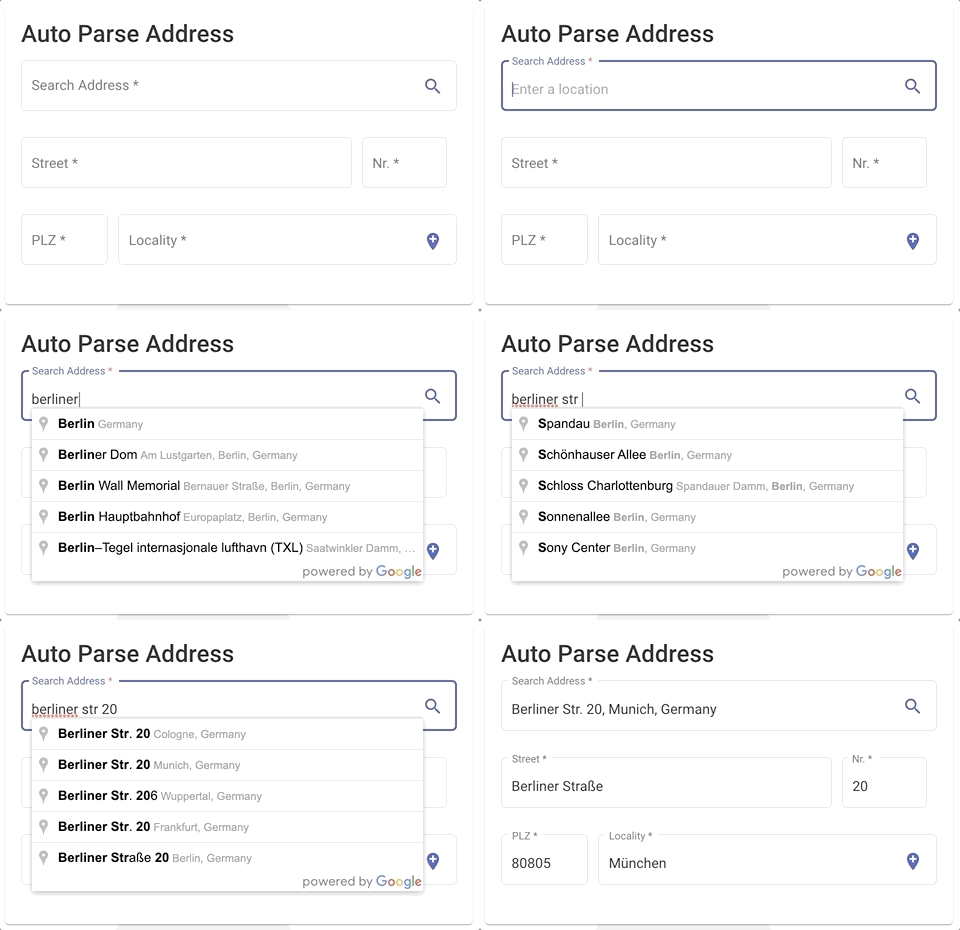
View all the directives and components in action at https://angular-material-extensions.github.io/google-maps-autocomplete
Dependencies
- Angular (requires Angular latest | we are using already v16 ;)
optional
npm i -D @types/googlemaps
Installation
1. Install via ng add. (Recommended)
If Angular Material Design is not setup, just
run ng add @angular/material learn more
Now add the library via the angular schematics and everything will be setup for you
ng add @angular-material-extensions/google-maps-autocomplete
2. Install via npm. (Alternative)
Now install @angular-material-extensions/google-maps-autocomplete via:
npm install --save @angular-material-extensions/google-maps-autocomplete
Requirements (peer dependencies):
for the ui input component, please consider installing the following packages
ng add @angular/material
Additional requirements Theme (Material Design)
Once installed you need to import the main module:
import {MatGoogleMapsAutocompleteModule} from '@angular-material-extensions/google-maps-autocomplete';
The only remaining part is to list the imported module in your application module. The exact method will be slightly
different for the root (top-level) module for which you should end up with the code similar to (
notice MatGoogleMapsAutocompleteModule.forRoot()):
import {MatGoogleMapsAutocompleteModule} from '@angular-material-extensions/google-maps-autocomplete';

@NgModule({
  declarations: [AppComponent, ...],
  imports: [
    MatGoogleMapsAutocompleteModule.forRoot('YOUR_GOOGLE_MAPS_API_KEY'), ...],
  bootstrap: [AppComponent]
})
export class AppModule {
}
Other modules in your application can simply import MatGoogleMapsAutocompleteModule:
import {MatGoogleMapsAutocompleteModule} from '@angular-material-extensions/google-maps-autocomplete';

@NgModule({
  declarations: [OtherComponent, ...],
  imports: [
    MatGoogleMapsAutocompleteModule, ...],
})
export class OtherModule {
}
Usage
As directive
add matGoogleMapsAutocomplete to your target html input element to enable the google maps autocomplete api as feature
<mat-form-field>
  <mat-label>Address << using the directive >></mat-label>
  <input matInput
         matGoogleMapsAutocomplete
         [country]="de"
         (onAutocompleteSelected)="onAutocompleteSelected($event)"
         (onLocationSelected)="onLocationSelected($event)">
</mat-form-field>
As components
or alternatively use mat-google-maps-auto-complete, the UI wrapper
add mat-google-maps-auto-complete element to your template
mat-google-maps-auto-complete
<mat-google-maps-autocomplete [appearance]="appearance.OUTLINE"
                              (onAutocompleteSelected)="onAutocompleteSelected($event)"
                              (onLocationSelected)="onLocationSelected($event)">
</mat-google-maps-autocomplete>
A customized mat-google-maps-autocomplete
<mat-google-maps-autocomplete country="us"
                              type="address"
                              (onAutocompleteSelected)="onAutocompleteSelected($event)"
                              (onLocationSelected)="onLocationSelected($event)">
</mat-google-maps-autocomplete>
combine the result of the mat-google-maps-autocomplete with a google map instance
    <mat-google-maps-autocomplete (onAutocompleteSelected)="onAutocompleteSelected($event)"
                                  (onLocationSelected)="onLocationSelected($event)"
                                  (onGermanAddressMapped)="onGermanAddressMapped($event)">
    </mat-google-maps-autocomplete>
in your component, the code will be similar to -->
import {Component, OnInit, ViewEncapsulation} from '@angular/core';
import {Title} from '@angular/platform-browser';
import {Location, Appearance, GermanAddress} from '@angular-material-extensions/google-maps-autocomplete';
import {} from '@types/googlemaps';
import PlaceResult = google.maps.places.PlaceResult;

@Component({
  selector: 'app-home',
  templateUrl: './home.component.html',
  styleUrls: ['./home.component.scss'],
  encapsulation: ViewEncapsulation.None,
})
export class HomeComponent implements OnInit {

  public appearance = Appearance;
  public zoom: number;
  public latitude: number;
  public longitude: number;
  public selectedAddress: PlaceResult;

  constructor(private titleService: Title) {
  }

  ngOnInit() {
    this.titleService.setTitle('Home | @angular-material-extensions/google-maps-autocomplete');

    this.zoom = 10;
    this.latitude = 52.520008;
    this.longitude = 13.404954;

    this.setCurrentPosition();

  }

  private setCurrentPosition() {
    if ('geolocation' in navigator) {
      navigator.geolocation.getCurrentPosition((position) => {
        this.latitude = position.coords.latitude;
        this.longitude = position.coords.longitude;
        this.zoom = 12;
      });
    }
  }

  onAutocompleteSelected(result: PlaceResult) {
    console.log('onAutocompleteSelected: ', result);
  }

  onLocationSelected(location: Location) {
    console.log('onLocationSelected: ', location);
    this.latitude = location.latitude;
    this.longitude = location.longitude;
  }

  onGermanAddressMapped($event: GermanAddress) {
    console.log('onGermanAddressMapped', $event);
  }

}
Reactive Forms Example
<form [formGroup]="addressFormGroup">
  <mat-search-google-maps-autocomplete formControlName="address">
  </mat-search-google-maps-autocomplete>

  // OR

  <mat-google-maps-autocomplete formControlName="address">
  </mat-google-maps-autocomplete>

</form>
import {Component, OnInit} from '@angular/core';
import {FormControl, FormGroup} from '@angular/forms';

@Component({
  selector: 'app-root',
  templateUrl: './app.component.html',
  styleUrls: ['./app.component.scss']
})
export class AppComponent implements OnInit {

  addressFormGroup: FormGroup;

  ngOnInit(): void {
    this.addressFormGroup = new FormGroup({
      address: new FormControl(),
    });

    this.addressFormGroup.get('address').valueChanges.subscribe(value => console.log('value changed', value))
  }
}
API - for more info please visit the official documentation Maps JavaScript API
matGoogleMapsAutocomplete
| option | bind | type | default | description |
|---|---|---|---|---|
| value | Input() |
PlaceResult ; | - | |
| address | Input() |
PlaceResult | string; | - |
| country | Input() |
string | string[]; | - |
| placeIdOnly | Input() |
boolean | - | can be used to instruct the Autocomplete widget to retrieve only Place IDs. On calling getPlace() on the Autocomplete object, the PlaceResult made available will only have the place id, types and name properties set. You can use the returned place ID with calls to the Places, Geocoding, Directions or Distance Matrix services. |
| strictBounds |
Extension points exported contracts — how you extend this code
NodeDependency (Interface)Core symbols most depended-on inside this repo
subscribeShape
Languages
Modules by API surface
For agents
$ claude mcp add google-maps-autocomplete \
  -- python -m otcore.mcp_server <graph>