github.com/andremion/Louvre @v1.3.0
Chat with this repoWhat it actually does AI analysis from the code graph — generated when you open this
README



Louvre
A small customizable image picker. Useful to handle an gallery image pick action built-in your app.






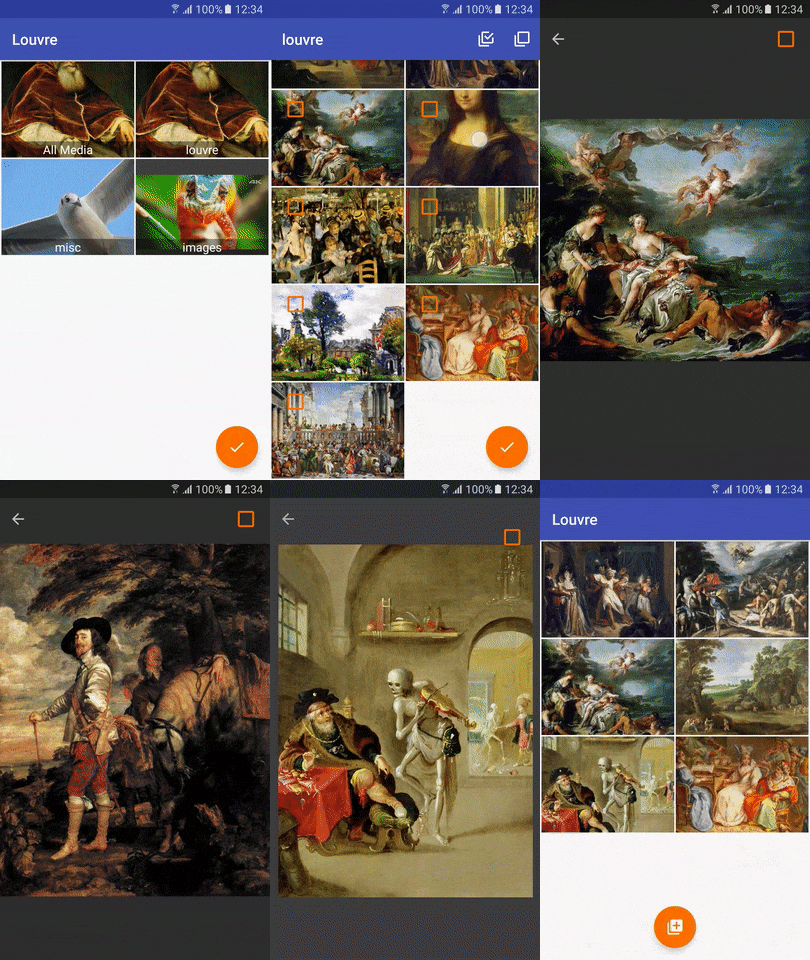
*Images from Google Image Search
Installation
Add this in your root build.gradle file (not your app module build.gradle file):
allprojects {
    repositories {
        ...
        maven { url "https://jitpack.io" }
    }
}
Then, add the library in your app module build.gradle
dependencies{
    compile 'com.github.andremion:louvre:[LATEST VERSION]'
}
Usage
Choose one of the Louvre themes to use in GalleryActivity and override it to define your app color palette.
<style name="AppTheme.Louvre.Light.DarkActionBar" parent="Louvre.Theme.Light.DarkActionBar">
    <item name="colorPrimary">@color/colorPrimary</item>
    <item name="colorPrimaryDark">@color/colorPrimaryDark</item>
    <item name="colorAccent">@color/colorAccent</item>
</style>
<style name="AppTheme.Louvre.Dark" parent="Louvre.Theme.Dark">
    <item name="colorPrimary">@color/colorPrimary</item>
    <item name="colorPrimaryDark">@color/colorPrimaryDark</item>
    <item name="colorAccent">@color/colorAccent</item>
</style>
<style name="AppTheme.Louvre.Light" parent="Louvre.Theme.Light">
    <item name="colorPrimary">@color/colorPrimary</item>
    <item name="colorPrimaryDark">@color/colorPrimaryDark</item>
    <item name="colorAccent">@color/colorAccent</item>
</style>
For PreviewActivity you just need to define the accent color.
<style name="AppTheme.Louvre.Preview" parent="Louvre.Theme.Preview">
    <item name="colorAccent">@color/colorAccent</item>
</style>
Declare the Louvre activities in AndroidManifest.xml file using your new app themes.
<activity
    android:name="com.andremion.louvre.home.GalleryActivity"
    android:theme="@style/AppTheme.Louvre.Light.DarkActionBar" />
<activity
    android:name="com.andremion.louvre.preview.PreviewActivity"
    android:theme="@style/AppTheme.Louvre.Preview" />
Add READ_EXTERNAL_STORAGE permission in your AndroidManifest.xml file.
<uses-permission android:name="android.permission.READ_EXTERNAL_STORAGE" />
In your Activity you just need the below lines of code to open the Louvre.
Louvre.init(myActivity)
        .setRequestCode(LOUVRE_REQUEST_CODE)
        .open();
You can also use a Fragment to open the Louvre. In this case, the Fragment will get the onActivityResult callback.
Louvre.init(myFragment)
        .setRequestCode(LOUVRE_REQUEST_CODE)
        .open();
But you can customize the picker:
Setting the max images allowed to pick
louvre.setMaxSelection(10)
Setting the current selected items
List<Uri> selection;
...
louvre.setSelection(selection)
Setting the media type to filter the query with a combination of one of these types: Louvre.IMAGE_TYPE_BMP, Louvre.IMAGE_TYPE_JPEG, Louvre.IMAGE_TYPE_PNG
louvre.setMediaTypeFilter(Louvre.IMAGE_TYPE_JPEG, Louvre.IMAGE_TYPE_PNG)
See more at the sample
Libraries and tools used in the project
- Design Support Library The Design package provides APIs to support adding material design components and patterns to your apps.
- CounterFab A FloatingActionButton subclass that shows a counter badge on right top corner.
- Glide An image loading and caching library for Android focused on smooth scrolling
- PhotoView Implementation of ImageView for Android that supports zooming, by various touch gestures.
Contributing
Contributions are always welcome!
Issues: Fell free to open a new issue. Follow the ISSUE_TEMPLATE.MD
Follow the "fork-and-pull" Git workflow.
- Fork the repo on GitHub
- Clone the project to your own machine
- Commit changes to your own branch
- Merge with current development branch
- Push your work back up to your fork
- Submit a Pull request your changes can be reviewed (please refere the issue if reported)
Prevent code-style related changes. Format the code before commiting.
License
Copyright 2017 André Mion

Licensed under the Apache License, Version 2.0 (the "License");
you may not use this file except in compliance with the License.
You may obtain a copy of the License at

    http://www.apache.org/licenses/LICENSE-2.0

Unless required by applicable law or agreed to in writing, software
distributed under the License is distributed on an "AS IS" BASIS,
WITHOUT WARRANTIES OR CONDITIONS OF ANY KIND, either express or implied.
See the License for the specific language governing permissions and
limitations under the License.
Extension points exported contracts — how you extend this code
Callbacks (Interface)Core symbols most depended-on inside this repo
showShape
Languages
Modules by API surface
For agents
$ claude mcp add Louvre \
  -- python -m otcore.mcp_server <graph>