github.com/alphastrata/nvtop-rust @main
Chat with this repoBrowse by type
What it actually does AI analysis from the code graph — generated when you open this
README
NVTOP

An NVIDIA SMI'esk GPU Monitoring tool for your terminal.
art by stable-diffusion + Maz
Contents:
nvtop is a command-line utility that provides a replacement for some of the output from nvidia-smi (System Management Interface).
It offers real-time monitoring and visualisation of GPU information: Core Clock, Temps, Fanspeed and Memory Usage.
Usage:
- Control the rate at which you're polling the GPU(s) for info:
# Monitor the GPU and system with a 1-second update interval
nvtop --delay 1000
- Go with the default 1s update speed :
# 1-second just so happens to be the default so, if you're happy with that you can just run:
nvtop
- If you're having trouble, send us a log!
# The app can log debug info
nvtop --log <PATH TO CREATE A LOGFILE @>
Keyboard Shortcuts:
| Shortcut | Functionality |
|---|---|
f or / |
Search processes (fuzzy) |
s |
'Sort' [Name |
p |
Processes (up / down arrows) |
r |
Reverse (processes list ordering) |
m |
Multi-Gpu Rescan PCIe devices (Linux Only, multi-gpu systems only.) |
q |
Quit |
Prerequisites
Before installing nvtop, ensure that you have Rust and Cargo (the Rust package manager) installed on your system. You can download and install Rust from the official website: Rust Downloads.
You will also need to at least confirm that nvidia-smi (The official NVIDIA tool that this one seeks to mimic) works.
Why? Because, not all of the functionality from nvmlt-sys the library this app relies on does not guarantee all reporting functionality across ALL NVIDIA gpus.
Installation
Install via Cargo
You can install nvtop directly from Cargo. Follow these steps:
- Build and install
nvtopfrom GitHub:
bash
   cargo install nvtop
   # or for the latest you can use a git url,
   cargo install --git https://github.com/alphastrata/nvtop
Build manually
To build nvtop from the source code, you can follow these steps:
- Download the source code or clone the repository to your local machine:
bash
   git clone https://github.com/alphastrata/nvtop
- Change to the
nvtopdirectory:
bash
   cd nvtop
- Build the project using Cargo:
bash
   cargo build --release
   # the binary will be available at ./target/release/nvtop
- After building, you can find the
nvtopexecutable in thetarget/release/directory.
Install build artifact
To make nvtop easily accessible from the command line, you can copy the executable to a directory in your system's PATH. For example, you can copy it to /usr/local/bin/:
sudo install -Dm755 target/release/nvtop /usr/local/bin/nvtop
Now, you can use nvtop from anywhere in your terminal.
Why?
because _this:
+---------------------------------------------------------------------------------------+
| NVIDIA-SMI 535.113.01             Driver Version: 535.113.01   CUDA Version: 12.2     |
|-----------------------------------------+----------------------+----------------------+
| GPU  Name                 Persistence-M | Bus-Id        Disp.A | Volatile Uncorr. ECC |
| Fan  Temp   Perf          Pwr:Usage/Cap |         Memory-Usage | GPU-Util  Compute M. |
|                                         |                      |               MIG M. |
|=========================================+======================+======================|
|   0  NVIDIA TITAN RTX               Off | 00000000:0A:00.0  On |                  N/A |
| 41%   44C    P0              67W / 280W |   1367MiB / 24576MiB |      2%      Default |
|                                         |                      |                  N/A |
+-----------------------------------------+----------------------+----------------------+

+---------------------------------------------------------------------------------------+
| Processes:                                                                            |
|  GPU   GI   CI        PID   Type   Process name                            GPU Memory |
|        ID   ID                                                             Usage      |
|=======================================================================================|
|    0   N/A  N/A      1008      G   /usr/lib/Xorg                               439MiB |
+---------------------------------------------------------------------------------------+
is boring, and this:
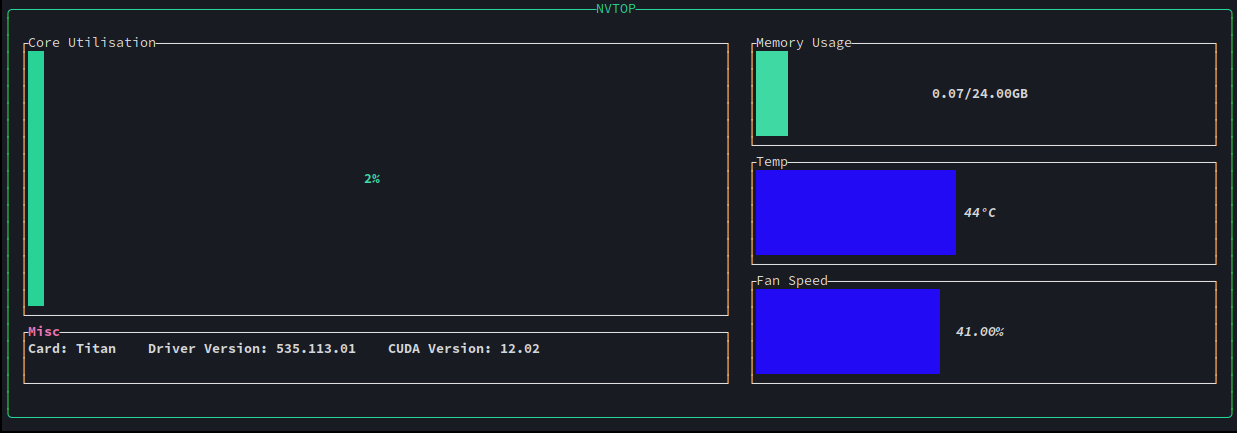
is fun!
Troubleshooting:
-
If something ain't working please feel free to open an issue, before doing so however, the app has the ability to do some verbose logging (to disk):
nvtop --log -
This, by default will make an
nvtop.logwherever your binary is, include that with your bug report (there's Issue templates).
Contributing:
- All are welcome, I'm not really too fussy about coding standards etc (when I'm not at work :p)
Advice for contributors:
- if you touch the readme, please format it with
mdformat(pip install mdformat). - if you touch python scripts, please format them with
black(pip install black). - always run these
cargo test,cargo check,cargo clippy-- please don't make PRs until any issues those tools flag are resolved. - if this is your first time contributing to open source, wow! thank you.
Core symbols most depended-on inside this repo
Shape
Languages
Modules by API surface
For agents
$ claude mcp add nvtop-rust \
  -- python -m otcore.mcp_server <graph>