github.com/alitekes1/ackermann-vehicle-gzsim-ros2 @main
Chat with this repoBrowse by type
What it actually does AI analysis from the code graph — generated when you open this
README
Ackermann Steering Vehicle Simulation in ROS2 with Gazebo Sim Harmonic
This project features the simulation of a custom vehicle with Ackermann steering capabilities, developed using ROS2 and the Gazebo Sim Harmonic environment. The model integrates a variety of sensors and navigation tools for autonomous operation, making it one of the first implementations of an Ackermann steering vehicle in this simulation framework.
| 3D LiDAR Point Cloud Visualization | Warehouse Environment Model |
|---|---|
 |
 |
If you like this project, consider giving it a ⭐ to show your support!
Table of Contents
- Ackermann Steering Vehicle Simulation in ROS2 with Gazebo Sim Harmonic
- Features
- 1 Ackermann Steering
- 2 ROS2 Communication
- 3 Sensors
- 4 Navigation
- 5 Manual Control with external joystick
- 6 Visualization
- Requirements
- Local Installation
- Docker Installation
- Usage
- 1 Basic Simulation and Manual Control
- 2 SLAM Simultaneous Localization and Mapping
- 3 Navigation with Nav2
- Future Work
- Gallery
- TF Tree
- Star History
Features
1. Ackermann Steering
- A custom vehicle model built with realistic Ackermann steering dynamics for accurate maneuverability.
2. ROS2 Communication
- All sensor data and control signals are fully integrated into the ROS2 ecosystem for seamless interoperability.
3. Sensors
- IMU: Provides orientation and angular velocity.
- Odometry: Ensures accurate vehicle state feedback.
- LiDAR: Mounted for obstacle detection and environmental scanning. Supports 3D point cloud generation for advanced perception tasks.
- Cameras:
- Front-facing
- Rear-facing
- Left-side
- Right-side
Note: By default, only the front camera is bridged to ROS 2.If you want to use all cameras (left, right, rear) in ROS 2,remove the
#at the beginning of the relevant camera sections insaye_bringup/config/ros_gz_bridge.yamlto activate them (e.g.,/camera/left_raw,/camera/right_raw,/camera/rear_raw).
4. Navigation
- Integrated with the Nav2 stack for autonomous navigation.
- AMCL (Adaptive Monte Carlo Localization) for improved positional accuracy.
- SLAM techniques implemented for real-time mapping and understanding of the environment.
- Fine-tuned parameters for optimized navigation performance.
5. Manual Control (with external joystick)
- Added support for joystick-based manual control in the simulation environment, enabling users to test vehicle movement interactively.
6. Visualization
- Full model and sensor data visualization in RViz2, providing insights into robot states and environmental feedback.
Requirements
- ROS2 (Humble)
- Gazebo Sim Harmonic
- RViz2
- Nav2
Local Installation
- Your need to sure that installation of Gazebo Harmonic and ROS (ros_gz):
sudo apt-get install ros-${ROS_DISTRO}-ros-gz
sudo apt-get install ros-humble-ros-gzharmonic (Only Humble version)
More details about installation Gazebo and ROS: Link 1. Clone the repository:
mkdir -p ackermann_sim/src && cd ackermann_sim/src
git clone https://github.com/alitekes1/ackermann-vehicle-gzsim-ros2
cd ..
2. Build the project:
colcon build && source install/setup.bash
3. Set environment variables:
bash
   # Set environment variables for current session
   export GZ_SIM_RESOURCE_PATH=$GZ_SIM_RESOURCE_PATH:/your/path/ackermann_sim/src/ackermann-vehicle-gzsim-ros2/
   export ROS_PACKAGE_PATH=$ROS_PACKAGE_PATH:/your/path/ackermann_sim/src/ackermann-vehicle-gzsim-ros2/
For Permanent Setup:
To make these environment variables permanent, add them to your .bashrc file:
```bash
# Add environment variables to .bashrc
echo 'export GZ_SIM_RESOURCE_PATH=$GZ_SIM_RESOURCE_PATH:/your/path/ackermann_sim/src/ackermann-vehicle-gzsim-ros2/' >> ~/.bashrc
echo 'export ROS_PACKAGE_PATH=$ROS_PACKAGE_PATH:/your/path/ackermann_sim/src/ackermann-vehicle-gzsim-ros2/' >> ~/.bashrc
# Apply changes source ~/.bashrc ```
Note: Replace
/your/path/with your actual installation path.
Docker Installation
You can also run the simulation using Docker, which ensures a consistent environment across different systems.
Prerequisites
- Docker
- NVIDIA Container Toolkit (for GPU support)
Steps to Run with Docker
-
Clone the repository:
bash mkdir -p ackermann_sim/src && cd ackermann_sim/src git clone https://github.com/alitekes1/ackermann-vehicle-gzsim-ros2 cd ackermann-vehicle-gzsim-ros2 -
Build and run the Docker container:
bash docker run -it \ --name ackermann_sim \ --hostname ackermann_sim \ --env="DISPLAY=$DISPLAY" \ --env="QT_X11_NO_MITSHM=1" \ --volume="/tmp/.X11-unix:/tmp/.X11-unix:rw" \ --privileged alitekes1/ackermann_sim:latest -
If you want to additional terminal for same container
bash
      docker exec -it ackermann_sim bash
Note: Inside the container, you can run the simulation commands as normal.
Usage
1. Basic Simulation and Manual Control
- Launch the simulation:
bash ros2 launch saye_bringup saye_spawn.launch.py - Control car:
bash
    ros2 run teleop_twist_keyboard teleop_twist_keyboard
2. SLAM (Simultaneous Localization and Mapping)
- To run SLAM Toolbox for mapping, launch the following after starting the simulation:
bash
    ros2 launch saye_bringup slam.launch.py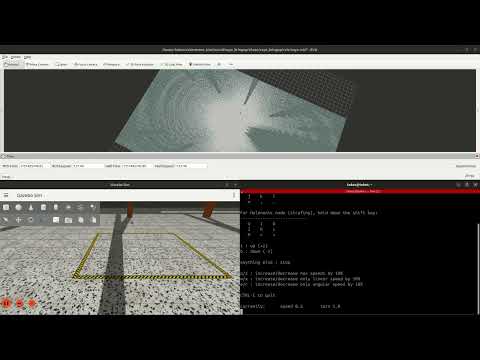
3. Navigation with Nav2
- To run the simulation with the Nav2 stack for autonomous navigation, launch the following after starting the simulation:
bash
    ros2 launch saye_bringup navigation_bringup.launch.py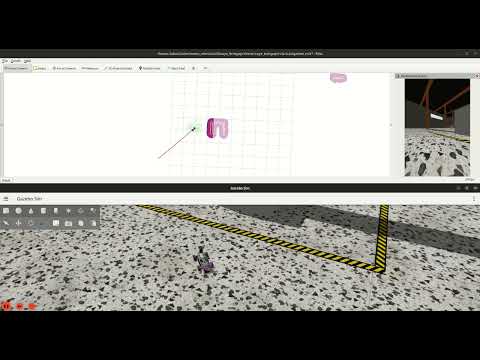
Note: The YouTube videos above are played at 4x speed. You can reach the videos by click on the images.
Future Work
- 3D SLAM Support:
- Train the vehicle to handle complex scenarios autonomously using advanced DRL algorithms.
- Enhanced Features:
- Explore additional sensor configurations and navigation strategies.
- Nav2 entegration with 3D Localization
- Instead of AMCL(2D), more accurate and robust algorithms implementation.
Gallery
3D LiDAR Point Cloud & Environment
| 3D LiDAR Point Cloud Visualization | Warehouse Environment Model |
|---|---|
|
|
Vehicle & Navigation
| Gazebo Sim Harmonic | RViz2 |
|---|---|
 |
 |
TF Tree

Star History
Core symbols most depended-on inside this repo
Shape
Languages
Modules by API surface
For agents
$ claude mcp add ackermann-vehicle-gzsim-ros2 \
  -- python -m otcore.mcp_server <graph>