hub / github.com/alirezaashrafi/GoogleMapView
github.com/alirezaashrafi/GoogleMapView @1.0.4
Chat with this repo
103 symbols
194 edges
15 files
1 documented · 1%
What it actually does AI analysis from the code graph — generated when you open this
loading…
README
Android google map view Library by static map
A library to make the map display process easier by entering latitude and longitude only
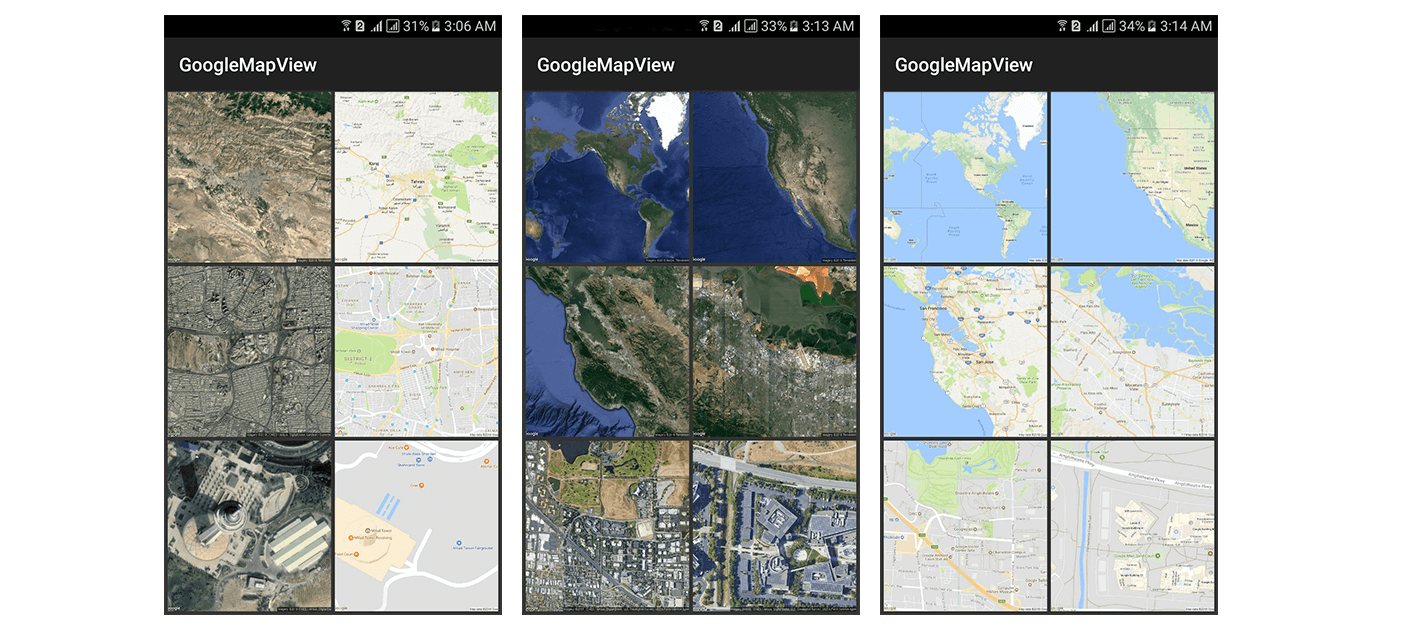
#### Do not forget the star:)⭐️
GoogleMapView APK Demo
How to download
Gradle
Add it in your root build.gradle at the end of repositories:
    allprojects {
         repositories {
             ...
             maven { url 'https://jitpack.io' }
         }
    }
add this line to your module build.gradle dependecies block:
compile 'com.github.alirezaashrafi:GoogleMapView:1.0.2'
Maven
Add the JitPack repository to your build file
  <repositories>
    <repository>
      <id>jitpack.io</id>
      <url>https://jitpack.io</url>
    </repository>
  </repositories>
Add the dependency
    <dependency>
      <groupId>com.github.alirezaashrafi</groupId>
      <artifactId>GoogleMapView</artifactId>
      <version>1.0.2</version>
    </dependency>
how to use GoogleMapView
Attributes
| Attribute Name | Type | Default Value |
|---|---|---|
| setLatitude | float | 35.744920 |
| setLongitude | float | 51.376303 |
| setMapType | enum | satellite |
| setMapScale | enum | high |
| setMapZoom | int | 17 |
| setMapWidth | int | 640px |
| setMapHeight | int | 640px |
XML
  <com.alirezaashrafi.library.GoogleMapView
      android:id="@+id/googleMapView"
      android:layout_width="match_parent"
      android:layout_height="match_parent"
      app:setLatitude="35.744920"
      app:setLongitude="51.376303"
      app:setMapType="satellite"
      app:setMapScale="high"
      app:setMapZoom="15"
      app:setMapWidth="350"
      app:setMapHeight="350"/>
JAVA
  GoogleMapView googleMapView = (GoogleMapView) findViewById(R.id.googleMapView);
  googleMapView.setLatitude(35.744920f);
  googleMapView.setLongitude(51.376303f);
  googleMapView.setMapType(MapType.SATELLITE);
  googleMapView.setMapScale(MapScale.HIGH);
  googleMapView.setMapZoom(15);
  googleMapView.setMapWidth(350);
  googleMapView.setMapHeight(350);
  googleMapView.setLocation(location);
  googleMapView.setZoomable(activity);
custom style GoogleMapView
  <style name="googleViewStyle" parent="GoogleMapView">
      <item name="android:layout_width">match_parent</item>
      <item name="android:layout_height">match_parent</item>
      <item name="setMapType">roadmap</item>
      <item name="setMapScale">low</item>
      <item name="setLatitude">35.744920</item>
      <item name="setLongitude">51.376303</item>
      <item name="setMapZoom">17</item>
      <item name="setMapWidth">640</item>
      <item name="setMapHeight">640</item>
  </style>
how to change GoogleMapView default values?
note: for better performance change default values in the Application class onCreate method
  @Override
  public void onCreate() {
      super.onCreate();

      GoogleMapViewConfigs.setDefaultMapType(MapType.SATELLITE);
      GoogleMapViewConfigs.setDefaultLatitude(35.744920f);
      GoogleMapViewConfigs.setDefaultLongitude(51.376303f);
      GoogleMapViewConfigs.setDefaultMapZoom(17);
      GoogleMapViewConfigs.setDefaultMapScale(MapScale.HIGH);
      GoogleMapViewConfigs.setDefaultMapHeight(350);
      GoogleMapViewConfigs.setDefaultMapWidth(350);

  }
Pinch to zoom in JAVA
googleMapView.setZoomable(this);

Licence
Copyright 2018 Alireza Ashrafi
Licensed under the Apache License, Version 2.0 (the "License"); you may not use this file except in compliance with the License. You may obtain a copy of the License at
http://www.apache.org/licenses/LICENSE-2.0
Unless required by applicable law or agreed to in writing, software distributed under the License is distributed on an "AS IS" BASIS, WITHOUT WARRANTIES OR CONDITIONS OF ANY KIND, either express or implied. See the License for the specific language governing permissions and limitations under the License.
Author
- Alireza Ashrafi
- web site : alirezaashrafi.ir
- email : alirezaashrafi.email@gmail.com
- Phone & Whatsapp +98 901 396 2648
- telegram : @dr_khaki
If you liked this library, do not forget to star and follow me ⭐️❤️️💙
Eventually see my other libraries and projects
Extension points exported contracts — how you extend this code
ZoomListener (Interface)
(no doc)
library/src/main/java/com/alirezaashrafi/library/zoom/ZoomListener.java
TapListener (Interface)
(no doc)
library/src/main/java/com/alirezaashrafi/library/zoom/TapListener.java
Core symbols most depended-on inside this repo
load
called by 9
library/src/main/java/com/alirezaashrafi/library/GoogleMapView.java
setKey
called by 6
library/src/main/java/com/alirezaashrafi/library/Get.java
setValue
called by 6
library/src/main/java/com/alirezaashrafi/library/Get.java
checkNotDisposed
called by 6
library/src/main/java/com/alirezaashrafi/library/zoom/Zoomy.java
getValue
called by 5
library/src/main/java/com/alirezaashrafi/library/Get.java
init
called by 4
library/src/main/java/com/alirezaashrafi/library/GoogleMapView.java
isImmersiveModeEnabled
called by 2
library/src/main/java/com/alirezaashrafi/library/zoom/ZoomyConfig.java
midPointOfEvent
called by 2
library/src/main/java/com/alirezaashrafi/library/zoom/MotionUtils.java
Shape
Languages
Java100%
Modules by API surface
library/src/main/java/com/alirezaashrafi/library/GoogleMapView.java22 symbols
library/src/main/java/com/alirezaashrafi/library/zoom/ZoomableTouchListener.java15 symbols
library/src/main/java/com/alirezaashrafi/library/GoogleMapViewConfigs.java15 symbols
library/src/main/java/com/alirezaashrafi/library/zoom/Zoomy.java13 symbols
library/src/main/java/com/alirezaashrafi/library/zoom/SimpleGestureListener.java7 symbols
library/src/main/java/com/alirezaashrafi/library/zoom/ZoomyConfig.java5 symbols
library/src/main/java/com/alirezaashrafi/library/Get.java5 symbols
library/src/main/java/com/alirezaashrafi/library/zoom/ViewUtils.java4 symbols
library/src/main/java/com/alirezaashrafi/library/zoom/ZoomListener.java3 symbols
library/src/main/java/com/alirezaashrafi/library/MapType.java3 symbols
library/src/main/java/com/alirezaashrafi/library/MapScale.java3 symbols
library/src/main/java/com/alirezaashrafi/library/zoom/TapListener.java2 symbols
For agents
$ claude mcp add GoogleMapView \
  -- python -m otcore.mcp_server <graph>