github.com/alireza0/s-ui @v1.5.3 sqlite
README
S-UI
An Advanced Web Panel • Built on SagerNet/Sing-Box




Disclaimer: This project is only for personal learning and communication, please do not use it for illegal purposes, please do not use it in a production environment
If you think this project is helpful to you, you may wish to give a:star2:
Want to contribute? See CONTRIBUTING.md for development setup, coding conventions, testing, and the pull request process.


Quick Overview
| Features | Enable? |
|---|---|
| Multi-Protocol | :heavy_check_mark: |
| Multi-Language | :heavy_check_mark: |
| Multi-Client/Inbound | :heavy_check_mark: |
| Advanced Traffic Routing Interface | :heavy_check_mark: |
| Client & Traffic & System Status | :heavy_check_mark: |
| Subscription Link (link/json/clash + info) | :heavy_check_mark: |
| Dark/Light Theme | :heavy_check_mark: |
| API Interface | :heavy_check_mark: |
Supported Platforms
| Platform | Architecture | Status |
|---|---|---|
| Linux | amd64, arm64, armv7, armv6, armv5, 386, s390x | ✅ Supported |
| Windows | amd64, 386, arm64 | ✅ Supported |
| macOS | amd64, arm64 | 🚧 Experimental |
Screenshots

API Documentation
Default Installation Information
- Panel Port: 2095
- Panel Path: /app/
- Subscription Port: 2096
- Subscription Path: /sub/
- User/Password: admin
Install & Upgrade to Latest Version
Linux/macOS
bash <(curl -Ls https://raw.githubusercontent.com/alireza0/s-ui/master/install.sh)
Windows
- Download the latest Windows release from GitHub Releases
- Extract the ZIP file
- Run
install-windows.batas Administrator - Follow the installation wizard
Install legacy Version
Step 1: To install your desired legacy version, add the version to the end of the installation command. e.g., ver 1.0.0:
VERSION=1.0.0 && bash <(curl -Ls https://raw.githubusercontent.com/alireza0/s-ui/$VERSION/install.sh) $VERSION
Manual installation
Linux/macOS
- Get the latest version of S-UI based on your OS/Architecture from GitHub: https://github.com/alireza0/s-ui/releases/latest
- OPTIONAL Get the latest version of
s-ui.shhttps://raw.githubusercontent.com/alireza0/s-ui/master/s-ui.sh - OPTIONAL Copy
s-ui.shto /usr/bin/ and runchmod +x /usr/bin/s-ui. - Extract s-ui tar.gz file to a directory of your choice and navigate to the directory where you extracted the tar.gz file.
- Copy *.service files to /etc/systemd/system/ and run
systemctl daemon-reload. - Enable autostart and start S-UI service using
systemctl enable s-ui --now - Start sing-box service using
systemctl enable sing-box --now
Windows
- Get the latest Windows version from GitHub: https://github.com/alireza0/s-ui/releases/latest
- Download the appropriate Windows package (e.g.,
s-ui-windows-amd64.zip) - Extract the ZIP file to a directory of your choice
- Run
install-windows.batas Administrator - Follow the installation wizard
- Access the panel at http://localhost:2095/app
Uninstall S-UI
sudo -i

systemctl disable s-ui  --now

rm -f /etc/systemd/system/sing-box.service
systemctl daemon-reload

rm -fr /usr/local/s-ui
rm /usr/bin/s-ui
Install using Docker
Click for details
Usage
Step 1: Install Docker
curl -fsSL https://get.docker.com | sh
Step 2: Install S-UI
Docker compose method
mkdir s-ui && cd s-ui
wget -q https://raw.githubusercontent.com/alireza0/s-ui/master/docker-compose.yml
docker compose up -d
Use docker
mkdir s-ui && cd s-ui
docker run -itd \
    -p 2095:2095 -p 2096:2096 -p 443:443 -p 80:80 \
    -v $PWD/db/:/app/db/ \
    -v $PWD/cert/:/root/cert/ \
    --name s-ui --restart=unless-stopped \
    alireza7/s-ui:latest
Build your own image
git clone https://github.com/alireza0/s-ui
git submodule update --init --recursive
docker build -t s-ui .
Manual run ( contribution )
Click for details
Build and run whole project
./runSUI.sh
Clone the repository
# clone repository
git clone https://github.com/alireza0/s-ui
# clone submodules
git submodule update --init --recursive
- Frontend
Visit s-ui-frontend for frontend code
- Backend
Please build frontend once before!
To build backend:
# remove old frontend compiled files
rm -fr web/html/*
# apply new frontend compiled files
cp -R frontend/dist/ web/html/
# build
go build -o sui main.go
To run backend (from root folder of repository):
./sui
Languages
- English
- Farsi
- Vietnamese
- Chinese (Simplified)
- Chinese (Traditional)
- Russian
Features
- Supported protocols:
- General: Mixed, SOCKS, HTTP, HTTPS, Direct, Redirect, TProxy
- V2Ray based: VLESS, VMess, Trojan, Shadowsocks
- Other protocols: ShadowTLS, Hysteria, Hysteria2, Naive, TUIC
- Supports XTLS protocols
- An advanced interface for routing traffic, incorporating PROXY Protocol, External, and Transparent Proxy, SSL Certificate, and Port
- An advanced interface for inbound and outbound configuration
- Clients’ traffic cap and expiration date
- Displays online clients, inbounds and outbounds with traffic statistics, and system status monitoring
- Subscription service with ability to add external links and subscription
- HTTPS for secure access to the web panel and subscription service (self-provided domain + SSL certificate)
- Dark/Light theme
Environment Variables
Click for details
Usage
| Variable | Type | Default |
|---|---|---|
| SUI_LOG_LEVEL | "debug" | "info" | "warn" | "error" |
"info" |
| SUI_DEBUG | boolean |
false |
| SUI_BIN_FOLDER | string |
"bin" |
| SUI_DB_FOLDER | string |
"db" |
| SINGBOX_API | string |
- |
SSL Certificate
Click for details
Certbot
snap install core; snap refresh core
snap install --classic certbot
ln -s /snap/bin/certbot /usr/bin/certbot

certbot certonly --standalone --register-unsafely-without-email --non-interactive --agree-tos -d <Your Domain Name>
Third-party Projects
Community-made projects built around S-UI. These are not affiliated with or maintained by S-UI — use them at your own discretion:
- itning/reset-s-ui-traffic — periodic traffic reset for all users
- zqh2333/s-ui-traffic-reset — traffic reset tool
Building something on top of S-UI (a Telegram bot, monitoring, automation, ...)? Open an issue/PR to get it listed here.
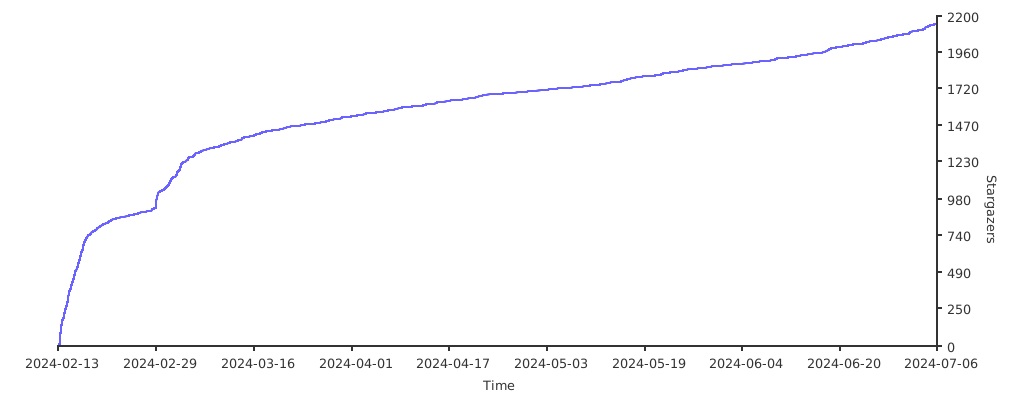
Stargazers over Time