github.com/alinz/react-native-share-extension @v2.0.0
Chat with this repoWhat it actually does AI analysis from the code graph — generated when you open this
README
React Native Share Extension
This is a helper module which brings react native as an engine to drive share extension for your app.
<img src ="https://raw.githubusercontent.com/alinz/react-native-share-extension/master/assets/ios-demo.gif" />
<img src ="https://raw.githubusercontent.com/alinz/react-native-share-extension/master/assets/android-demo.gif" />
Installation
Installation should be very easy by just installing it from npm.
npm install react-native-share-extension --save
Setup
The setup requires a little bit more work. I will try to describe as detail as possible. I would love to use rnpm so I will welcome pull request.
iOS
- Click on your project's name
-
Click on
+sign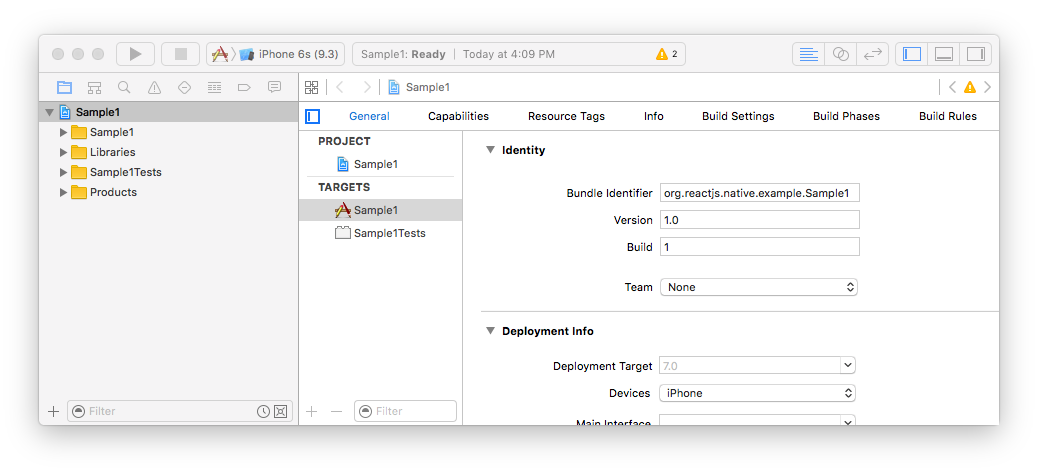
-
Select
Share ExtensionunderiOS > Application Extension
-
Select a name for your new share extension, in my case I chose
MyShareEx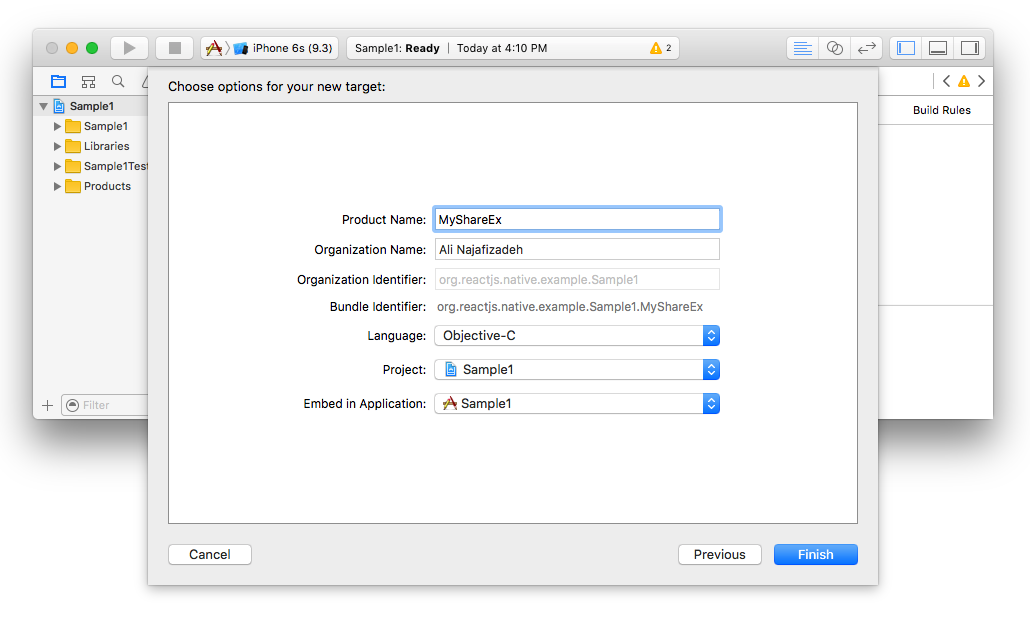
-
Delete both
ShareViewController.handShareViewController.m. make sure to click on theMove to Trashbutton during deletion.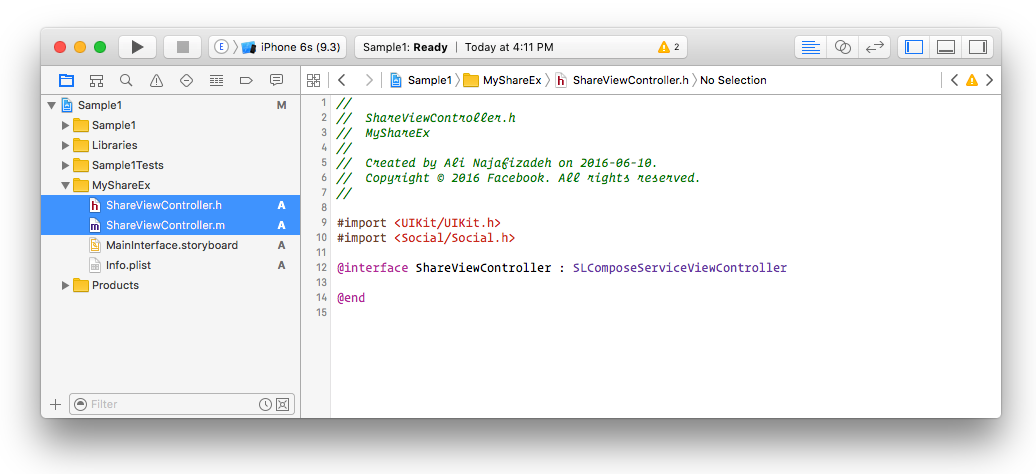
-
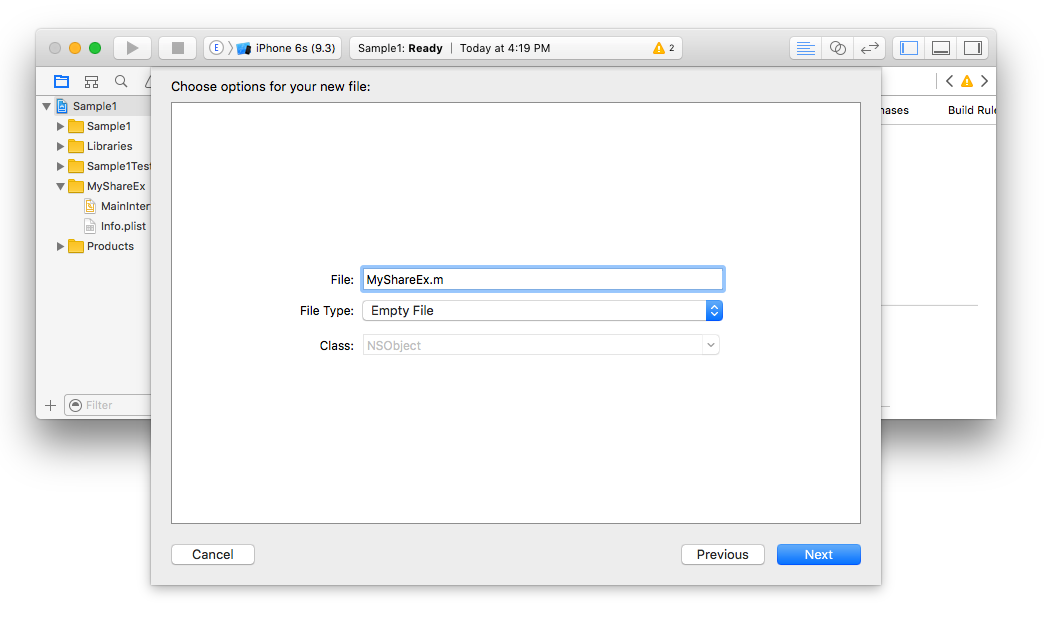
Create a new file under your share extension group, in my case it was
MyShareEx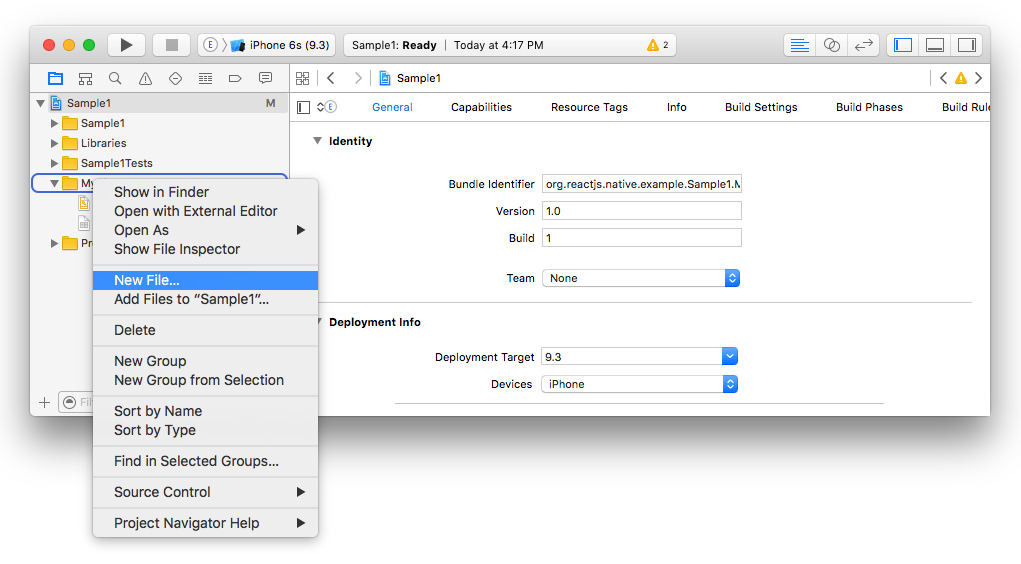
-
Make sure that the type of that object is
Objective-C File, e.g. forMyShareExname itMyShareEx.m
-
Since we deleted
ShareViewController.m, we need to tell the storyboard of your share extension where the view needs to be loaded. So click onMainInterface.storyboardand replace the class field fromShareViewControllerto whatever you chose above (in my caseMyShareEx)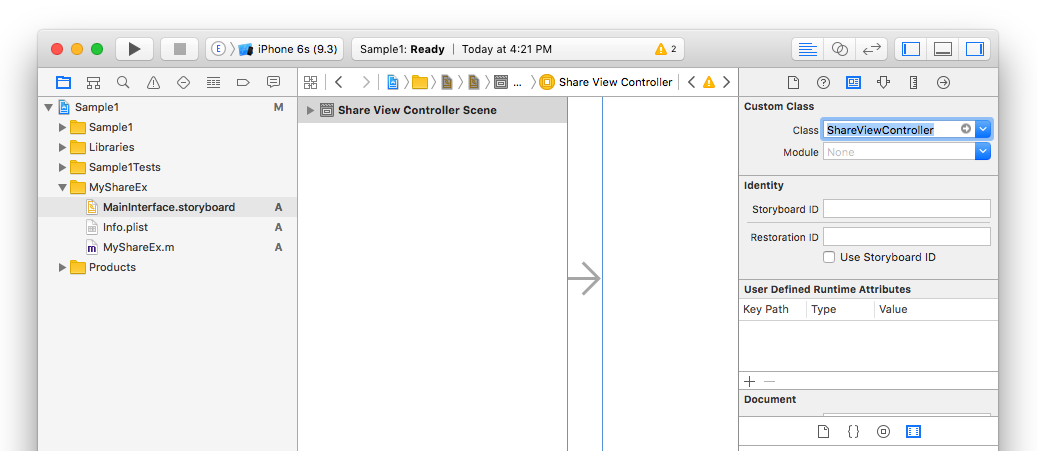
-
Now it's time to add our library. Right click on the
Librariesgroup and selectAdd Files to "Sample1"...
-
select
node_modules>react-native-share-extension>ios>ReactNativeShareExtension.xcodeproj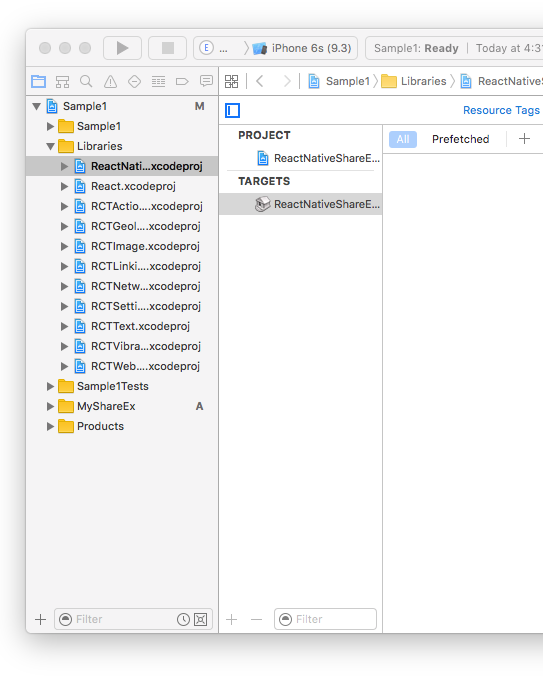
-
Now we need to tell the share extension that we want to read new header files. Click on project name (in my case
Sample1), then click on your extension name (in my caseMyShareEx). After that click on Build Settings and search forHeader Search Paths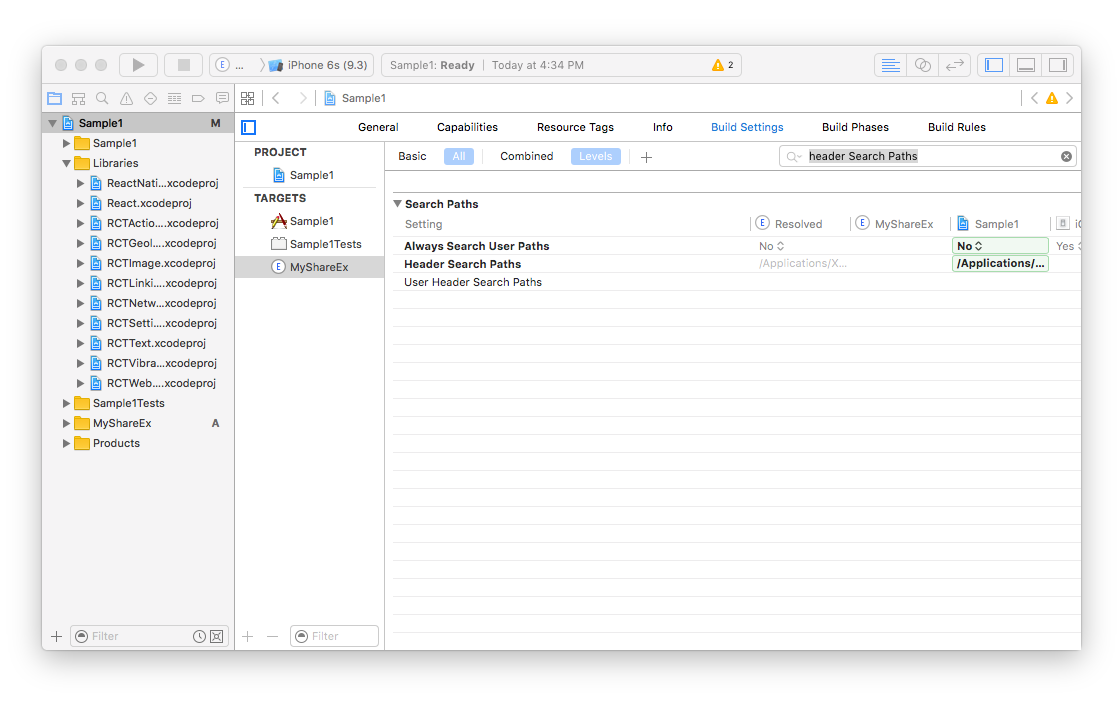
-
Add the new path
$(SRCROOT)/../node_modules/react-native-share-extension/ioswithrecursiveselected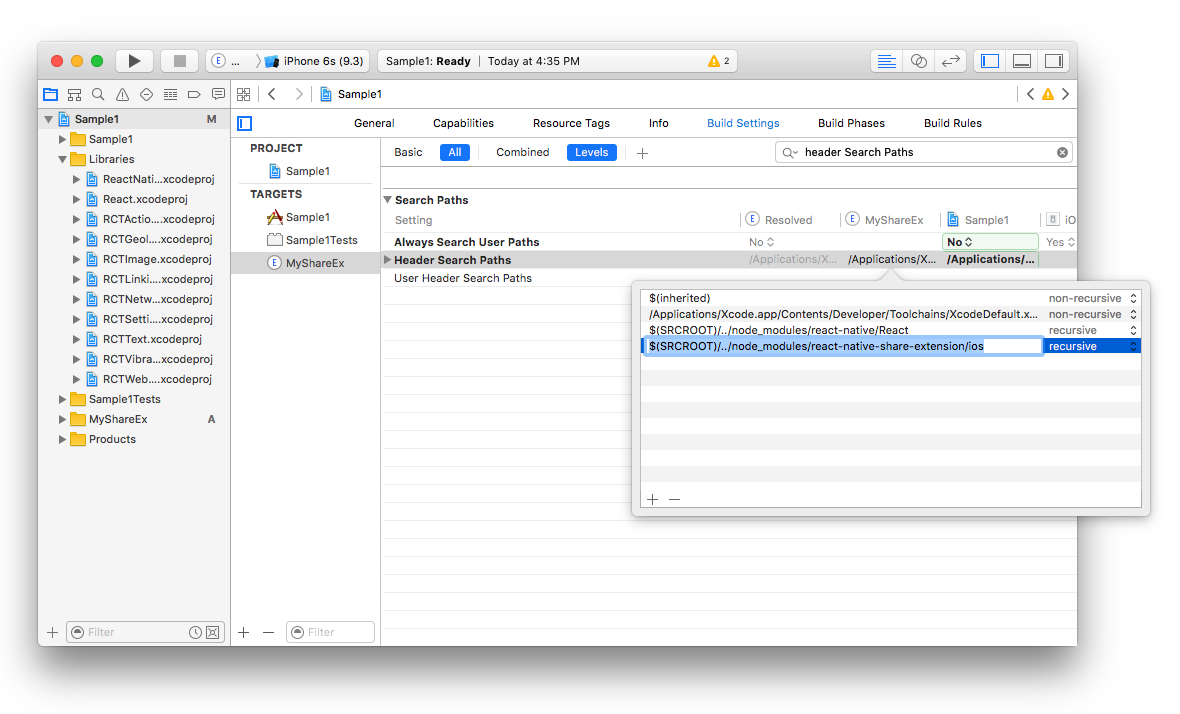
-
We need to add some linker flags as well, so search for
Other Linker Flagsand add-ObjCand-lc++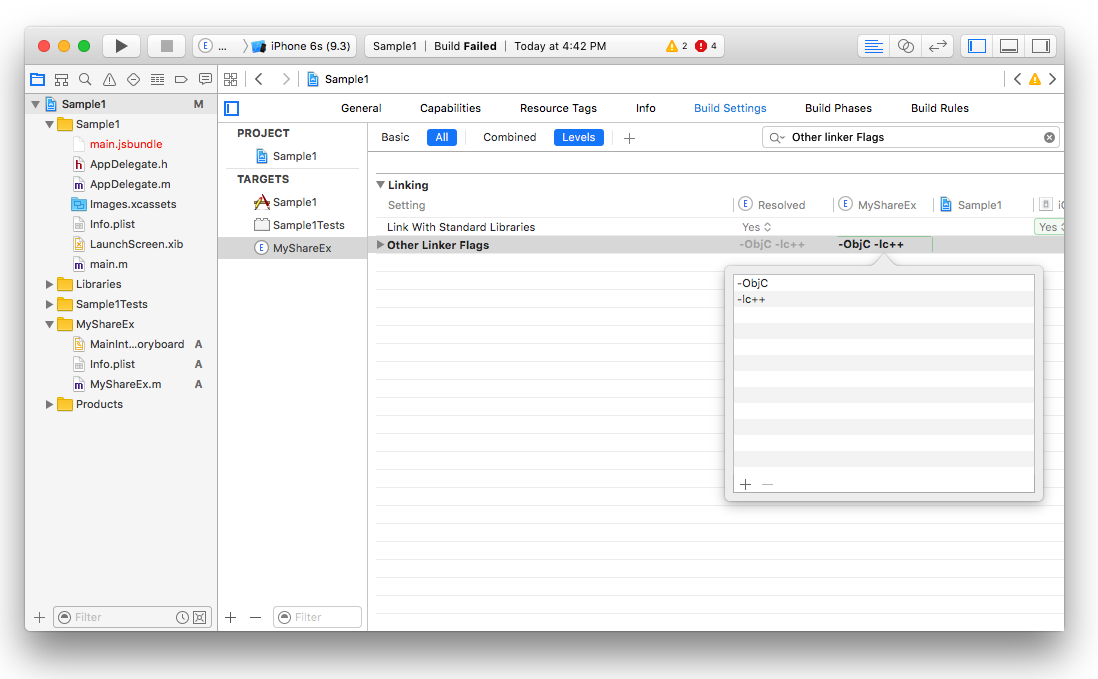
-
We also need to add all the static libraries such as
ReactandReact Native Share Extension. Select theGeneraltab and underLinked frameworks and Librariesclick on+and add all of the selected static binaries there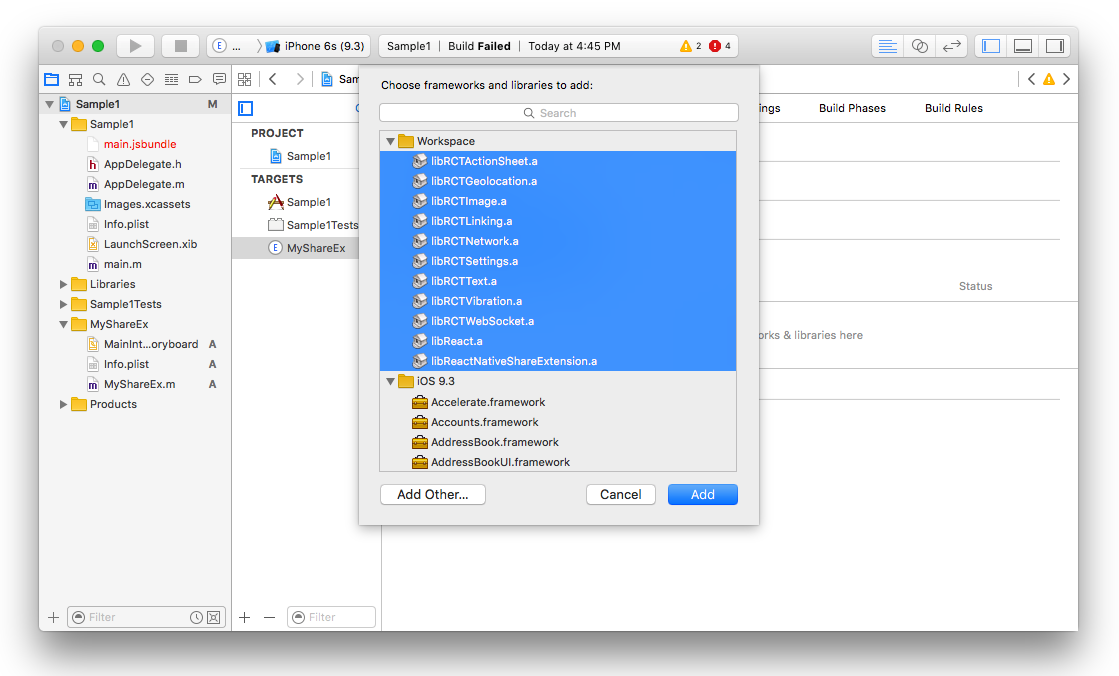
-
We need to modify the
Info.plistinside the extension (e.g.MyShareEx/Info.plist) to make sure that our share extension can connect to internet. This is useful if you need your share extension connects to your API server or react-native remote server dev. For doing that we need toApp Transport Security SettingstoInfo.plist
-
Now go back to your extension file (in my case
MyShareEx.m) and paste the following code there being sure to substituteMyShareExin all three places for whatever you chose above
If your project entry is
index.jsinstead ofindex.ios.jsthen needs to replace@"index.ios"with@"index"
#import <Foundation/Foundation.h>
#import "ReactNativeShareExtension.h"
#import <React/RCTBundleURLProvider.h>
#import <React/RCTRootView.h>
#import <React/RCTLog.h>

@interface MyShareEx : ReactNativeShareExtension
@end

@implementation MyShareEx

RCT_EXPORT_MODULE();

- (UIView*) shareView {
  NSURL *jsCodeLocation;

  jsCodeLocation = [[RCTBundleURLProvider sharedSettings] jsBundleURLForBundleRoot:@"index.ios" fallbackResource:nil];

  RCTRootView *rootView = [[RCTRootView alloc] initWithBundleURL:jsCodeLocation
                                                      moduleName:@"MyShareEx"
                                               initialProperties:nil
                                                   launchOptions:nil];
  rootView.backgroundColor = nil;

  // Uncomment for console output in Xcode console for release mode on device:
  // RCTSetLogThreshold(RCTLogLevelInfo - 1);

  return rootView;
}

@end
Set the NSExtensionActivationRule key in your Info.plist
For the time being, this package only handles sharing of urls specifically from browsers. In order to tell the system to show your extension only when sharing a url, you must set the NSExtensionActivationRule key (under NSExtensionAttributes) in the share extension's Info.plist file as follows (this is also needed to pass Apple's reveiw):
<key>NSExtensionAttributes</key>
<dict>
  <key>NSExtensionActivationRule</key>
  <dict>
    <key>NSExtensionActivationSupportsWebURLWithMaxCount</key>
    <integer>1</integer>
  </dict>
</dict>
<img src ="https://raw.githubusercontent.com/alinz/react-native-share-extension/master/assets/NSExtensionActivationRule.png" />
Note that while the above will prevent many apps from wrongly sharing using your extension, some apps (e.g., YouTube) will still allow sharing using your extension, which might cause your extension to crash. Check out this issue for details.
For reference about NSExtensionActivationRule checkout Apple's docs
- Try to build the project, it should now build successfully!
Android
- Edit
android/settings.gradleand add the following
include ':app', ':react-native-share-extension'

project(':react-native-share-extension').projectDir = new File(rootProject.projectDir, '../node_modules/react-native-share-extension/android')
- Edit
android/app/build.gradleand add the following line before the react section in dependencies
dependencies {
    ...
    compile project(':react-native-share-extension')
    compile "com.facebook.react:react-native:+"
}
-
Create a folder called
shareunder your java project and create two files. Call themShareActivity.javaandShareApplication.java....just like your main project. -
ShareActivity should look like this
// define your share project, if your main project is com.sample1, then com.sample1.share makes sense....
package com.sample1.share;


// import ReactActivity
import com.facebook.react.ReactActivity;


public class ShareActivity extends ReactActivity {
    @Override
    protected String getMainComponentName() {
      // this is the name AppRegistry will use to launch the Share View
        return "MyShareEx";
    }

}
- ShareApplication should now look like this
// your package you defined in ShareActivity
package com.sample1.share;
// import build config
import com.sample1.BuildConfig;

import com.alinz.parkerdan.shareextension.SharePackage;

import android.app.Application;

import com.facebook.react.shell.MainReactPackage;
import com.facebook.react.ReactNativeHost;
import com.facebook.react.ReactApplication;
import com.facebook.react.ReactPackage;

import java.util.Arrays;
import java.util.List;


public class ShareApplication extends Application implements ReactApplication {
 private final ReactNativeHost mReactNativeHost = new ReactNativeHost(this) {
   @Override
   protected boolean getUseDeveloperSupport() {
     return BuildConfig.DEBUG;

   }

   @Override
   protected List<ReactPackage> getPackages() {
     return Arrays.<ReactPackage>asList(
         new MainReactPackage(),
         new SharePackage()
     );
   }
 };

 @Override
 public ReactNativeHost getReactNativeHost() {
     return mReactNativeHost;
 }
}
- MainApplication should now look like this
// your package you defined in ShareActivity
package com.sample1;

import android.app.Application;
import android.util.Log;

import com.facebook.react.ReactApplication;
import com.facebook.react.ReactInstanceManager;
import com.facebook.react.ReactNativeHost;
import com.facebook.react.ReactPackage;
import com.facebook.react.shell.MainReactPackage;

import com.alinz.parkerdan.shareextension.SharePackage;

import java.util.Arrays;
import java.util.List;

public class MainApplication extends Application implements ReactApplication {

  private final ReactNativeHost mReactNativeHost = new ReactNativeHost(this) {
    @Override
    protected boolean getUseDeveloperSupport() {
      return BuildConfig.DEBUG;
    }

    @Override
    protected List<ReactPackage> getPackages() {
      return Arrays.<ReactPackage>asList(
          new MainReactPackage(),
          new SharePackage()
      );
    }
  };

  @Override
  public ReactNativeHost getReactNativeHost() {
      return mReactNativeHost;
  }
}
- Edit
android/app/src/main/AndroidMainfest.xmland add the newactivityright afterdevSettingActivity.
<activity android:name="com.facebook.react.devsupport.DevSettingsActivity"/>

<activity
    android:noHistory="true"
    android:name=".share.ShareActivity"
    android:configChanges="orientation"
    android:label="@string/title_activity_share"
    android:screenOrientation="portrait"
    android:theme="@style/Theme.Share.Transparent" >
   <intent-filter>
     <action android:name="android.intent.action.SEND" />
     <category android:name="android.intent.category.DEFAULT" />
    //  for sharing links include
     <data android:mimeType="text/plain" />
    //  for sharing photos include
    <data android:mimeType="image/*" />
   </intent-filter>
</activity>
in this new activity I have used 2 variables @string/title_activity_share and @style/Theme.Share.Transparent, you can add those in res/values.
So in values/strings.xml
<resources>
    ...
    <string name="title_activity_share">MyShareEx</string>
</resources>
and in values/styles.xml
<resources>
    ...
    <style name="Share.Window" parent="android:Theme">
        <item name="android:windowEnterAnimation">@null</item>
        <item name="android:windowExitAnimation">@null</item>
    </style>

    <style name="Theme.Share.Transparent" parent="android:Theme">
        <item name="android:windowIsTranslucent">true</item>
        <item name="android:windowBackground">@android:color/transparent</item>
        <item name="android:windowContentOverlay">@null</item>
        <item name="android:windowNoTitle">true</item>
        <item name="android:windowIsFloating">true</item>
        <item name="android:backgroundDimEnabled">true</item>
        <item name="android:windowAnimationStyle">@style/Share.Window</item>
    </style>
</resources>
- Now you should be able to compile the code without any errors!
If you need to add more packages to your share extension, do not override
getPackages, instead override thegetMorePackagesmethod underShareExActivity.
Share Component
So both share extension and main application are using the same code base, or same main.jsbundle file. So the trick to separate Share and Main App is registering 2 different Component entries with AppRegistry.registerComponent.
In both the iOS and Android share extensions we are telling react to load the extension component (in my case MyShareEx) from js.
So in index.ios.js and index.android.js we are writing the same code:
//index.android.js
import React from 'react'
import { AppRegistry } from 'react-native'

import App from './app.android'
import Share from './share.android'

AppRegistry.registerComponent('Sample1', () => App)
AppRegistry.registerComponent('MyShareEx', () => Share) // TODO: Replace MyShareEx with my extension name
//index.ios.js
import React from 'react'
import { AppRegistry } from 'react-native'

import App from './app.ios'
import Share from './share.ios'

AppRegistry.registerComponent('Sample1', () => App)
AppRegistry.registerComponent('MyShareEx', () => Share) // TODO: Replace MyShareEx with my extension name
So
Core symbols most depended-on inside this repo
closeShape
Languages
Modules by API surface
Used by 1 indexed graphs manifest dependencies, hub-wide
For agents
$ claude mcp add react-native-share-extension \
  -- python -m otcore.mcp_server <graph>