github.com/alibaba/yalantinglibs @0.6.1
Chat with this repoBrowse by type
What it actually does AI analysis from the code graph — generated when you open this
README
yaLanTingLibs
A Collection of C++20 libraries, include struct_pack, struct_json, struct_xml, struct_yaml, struct_pb, easylog, coro_rpc, coro_http and async_simple



yaLanTingLibs is a collection of modern c++ util libraries, now it contains struct_pack, struct_json, struct_xml, struct_yaml, struct_pb, easylog, coro_rpc, coro_io, coro_http and async_simple, more and more cool libraries will be added into yaLanTingLibs in the future.
The target of yaLanTingLibs: provide very easy and high performance modern C++ libraries for developers, it can help to quickly build high performance applications.
| OS (Compiler Version) | Status |
|---|---|
| Ubuntu 22.04 (clang 14.0.0) |  |
| Ubuntu 22.04 (gcc 11.2.0) |  |
| macOS Monterey 12 (AppleClang 14.0.0.14000029) |  |
| Windows Server 2022 (MSVC 19.33.31630.0) |  |
Quick Start
compiler requirements
If your compiler don't support C++20, yalantinglibs will only compile the serialization libraries (struct_pack, struct_json, struct_xml, struct_yaml, easylog support C++17). Make sure you have such compilers:
- g++9 above;
- clang++6 above
- msvc 14.20 above;
Otherwise, yalantinglibs will compile all the libraries. Make sure you have such compilers:
- g++10 above;
- clang++13 above
- msvc 14.29 above;
You can also use cmake option -DENABLE_CPP_20=ON or -DENABLE_CPP_20=OFF to control it.
Install & Compile
By Homebrew
- Install homebrew
- run
brew install yalantinglibs - If you use cmake, add those codes:
find_package(yalantinglibs CONFIG REQUIRED)
target_link_libraries(main PRIVATE yalantinglibs::yalantinglibs)
By Vcpkg
- Install vcpkg
- run
./vcpkg install yalantinglibs - If you use cmake, add those codes:
find_package(yalantinglibs CONFIG REQUIRED)
target_link_libraries(main PRIVATE yalantinglibs::yalantinglibs)
Cmake FetchContent
You can also import ylt by cmake FetchContent
cmake_minimum_required(VERSION 3.15)
project(ylt_test)

include(FetchContent)

FetchContent_Declare(
    yalantinglibs
    GIT_REPOSITORY https://github.com/alibaba/yalantinglibs.git
    GIT_TAG main
    GIT_SHALLOW 1 # optional ( --depth=1 )
)

FetchContent_MakeAvailable(yalantinglibs)
add_executable(main main.cpp)

target_link_libraries(main yalantinglibs::yalantinglibs)
target_compile_features(main PRIVATE cxx_std_20)
Cmake add_subdirectory
- download ylt source code and put it in your project
- add ylt to your project as subdirectory:
cmake_minimum_required(VERSION 3.15)
project(ylt_test)

add_subdirectory(yalantinglibs)  # you may modify the path as the real relative path in your project
add_executable(main main.cpp)

target_link_libraries(main yalantinglibs::yalantinglibs)
target_compile_features(main PRIVATE cxx_std_20)
Manually Install & Import
Yalantinglibs is a head-only library. You can just copy ./include/ylt directory into your project. But we suggest you use cmake to install it.
- clone repo
git clone https://github.com/alibaba/yalantinglibs.git
cd yalantinglibs
mkdir build
cd build
-
build & test
-
We suggest you compile the example and test the code first:
cmake ..
cmake --build . --config debug # add -j, if you have enough memory to parallel compile
ctest . # run tests


You can see the test/example/benchmark executable file in `./build/output/`.

- Or you can just skip build example/test/benchmark:

```shell
# You can use those option to skip build unit-test & benchmark & example:
cmake .. -DBUILD_EXAMPLES=OFF -DBUILD_BENCHMARK=OFF -DBUILD_UNIT_TESTS=OFF -DGENERATE_BENCHMARK_DATA=OFF
- install
cmake --install . # --prefix ./user_defined_install_path
-
start develop
-
start by example:
After install ylt, copy then open the directory src/*/examples, then:
mkdir build
cd build
cmake ..
cmake --build .
- import ylt to your project(cmake):
find_package(yalantinglibs CONFIG REQUIRED)
target_link_libraries(main PRIVATE yalantinglibs::yalantinglibs)
-
import ylt in your project Manually if you don't want to use cmake:
-
Add
include/directory to include path(skip it if you have install ylt into default include path). - Add
include/ylt/thirdpartyto include path(skip it if you have install ylt by cmake). - Add
include/ylt/standaloneto include path(skip it if you have install ylt by cmake). - Enable
c++20standard by option-std=c++20(g++/clang++) or/std:c++20(msvc) - Add link option
-pthread,-ldlwhen you use g++, add option-fcoroutineswhen you use g++10.
More Details:
For more details, see the cmake file here and there.
Introduction
coro_rpc
Very easy-to-use, coroutine-based, high performance rpc framework with C++20, more than 0.4M QPS per thread in pipeline mode. coro_rpc is a header only library.
You can finish a rpc server and rpc client in 5 minutes!
[English API] (TODO)
Talk (Chinese) of coro_rpc on purecpp conference.
Video (Chinese) on purecpp conference, start from 04:55:08 of the video record.
quick example
1.define a rpc function as a local normal function.
// rpc_service.hpp
inline std::string_view echo(std::string_view str) { return str; }
2.register rpc function and start a server
#include "rpc_service.hpp"
#include <ylt/coro_rpc/coro_rpc_server.hpp>

int main() {
  coro_rpc_server server(/*thread_num =*/10, /*port =*/9000);
  server.register_handler<echo>(); // register function echo
  server.start(); // start the server & block
}
3.rpc client call rpc service
#include "rpc_service.hpp"
#include <ylt/coro_rpc/coro_rpc_client.hpp>

Lazy<void> test_client() {
  coro_rpc_client client;
  co_await client.connect("localhost", /*port =*/"9000"); // connect to the server

  auto r = co_await client.call<echo>("hello coro_rpc"); // call remote function echo
  std::cout << r.result.value() << "\n"; //will print "hello coro_rpc"
}

int main() {
  syncAwait(test_client());
}
More examples here.
struct_pack
Based on compile-time reflection, very easy to use, high performance serialization library, struct_pack is a header only library, it is used by coro_rpc now.
Only one line code to finish serialization and deserialization, 2-20x faster than protobuf.
quick example
struct person {
  int64_t id;
  std::string name;
  int age;
  double salary;
};

person person1{.id = 1, .name = "hello struct pack", .age = 20, .salary = 1024.42};

// one line code serialize
std::vector<char> buffer = struct_pack::serialize(person1);

// one line code deserialization
auto person2 = deserialize<person>(buffer);
struct_pack is very fast.
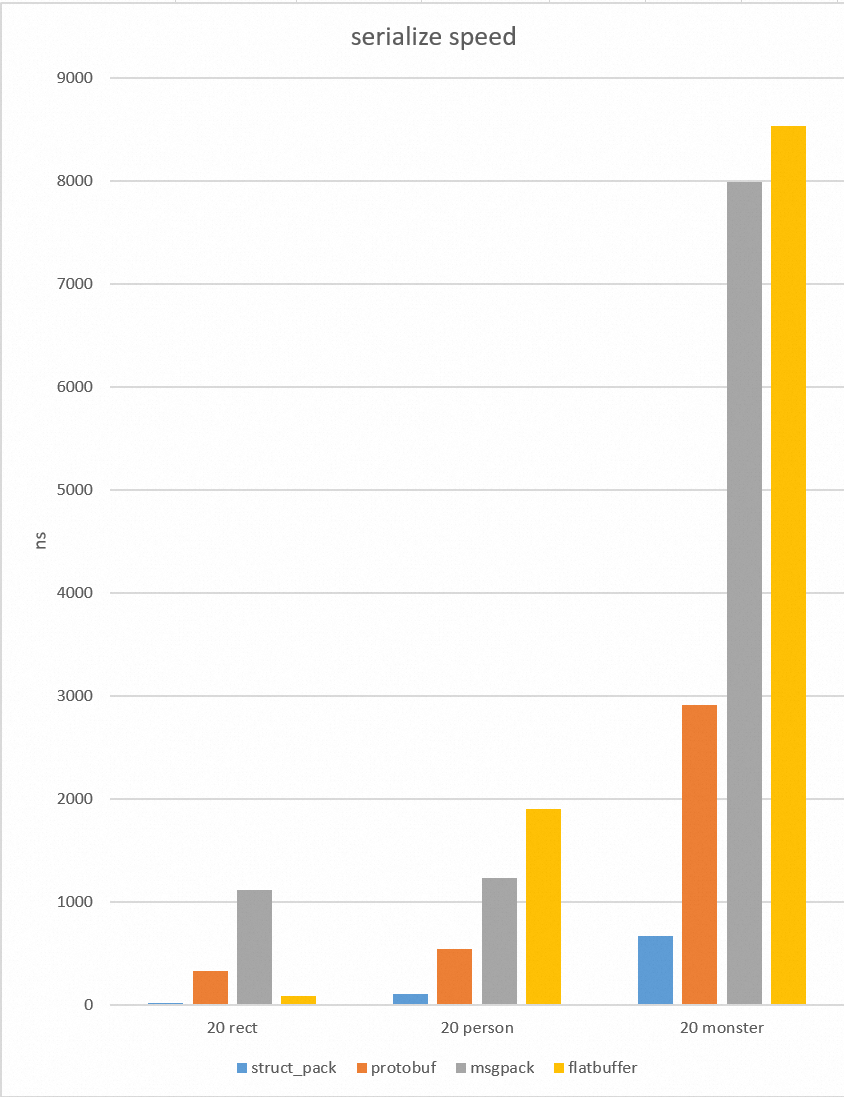
[English API] (TODO)
(Slides) A Faster Serialization Library Based on Compile-time Reflection and C++ 20 of struct_pack on CppCon2022
(Video) A Faster Serialization Library Based on Compile-time Reflection and C++ 20 on cppcon2022
(Slides)(Chinese) of struct_pack on purecpp conference.
(Video)(Chinese) on purecpp conference, start from 01:32:20 of the video record.
See more examples here.
struct_json
reflection-based json lib, very easy to do struct to json and json to struct.
quick example
#include "ylt/struct_json/json_reader.h"
#include "ylt/struct_json/json_writer.h"

struct person {
  std::string name;
  int age;
};

// static reflection works in C++20. In C++17 we need add macro manually
// YLT_REFL(person, name, age);

int main() {
  person p{.name = "tom", .age = 20};
  std::string str;
  struct_json::to_json(p, str); // {"name":"tom","age":20}

  person p1;
  struct_json::from_json(p1, str);
}
struct_xml
reflection-based xml lib, very easy to do struct to xml and xml to struct.
quick example
#include "ylt/struct_xml/xml_reader.h"
#include "ylt/struct_xml/xml_writer.h"

struct person {
  std::string name;
  int age;
};

// static reflection works in C++20. In C++17 we need add macro manually
// YLT_REFL(person, name, age);

void basic_usage() {
  std::string xml = R"(
<person>
    <name>tom</name>
    <age>20</age>
</person>
)";

  person p;
  bool r = struct_xml::from_xml(p, xml.data());
  assert(r);
  assert(p.name == "tom" && p.age == 20);

  std::string str;
  r = struct_xml::to_xml_pretty(p, str);
  assert(r);
  std::cout << str;
}
struct_yaml
reflection-based yaml lib, very easy to do struct to yaml and yaml to struct.
quick example
#include "ylt/struct_yaml/yaml_reader.h"
#include "ylt/struct_yaml/yaml_writer.h"

struct person {
  std::string name;
  int age;
};

// static reflection works in C++20. In C++17 we need add macro manually
// YLT_REFL(person, name, age);

void basic_usage() {
    // serialization the structure to the string
    person p = {"admin", 20};
    std::string ss;
    struct_yaml::to_yaml(ss, p);
    std::cout << ss << std::endl;

    std::string yaml = R"(
    name : tom
    age : 30
    )";

    // deserialization the structure from the string
    struct_yaml::from_yaml(p, yaml);
}
coro_http
coro_http is a C++20 coroutine http(https) library, include server and client, functions: get/post, websocket, multipart file upload, chunked and ranges download etc. more examples
get/post
#include "ylt/coro_http/coro_http_server.hpp"
#include "ylt/coro_http/coro_http_client.hpp"
using namespace coro_http;

async_simple::coro::Lazy<void> basic_usage() {
  coro_http_server server(1, 9001);
  server.set_http_handler<GET>(
      "/get", [](coro_http_request &req, coro_http_response &resp) {
        resp.set_status_and_content(status_type::ok, "ok");
      });

  server.set_http_handler<GET>(
      "/coro",
      [](coro_http_request &req,
         coro_http_response &resp) -> async_simple::coro::Lazy<void> {
        resp.set_status_and_content(status_type::ok, "ok");
        co_return;
      });
  server.aync_start(); // aync_start() don't block, sync_start() will block.
  std::this_thread::sleep_for(300ms);  // wait for server start

  coro_http_client client{};
  auto result = co_await client.async_get("http://127.0.0.1:9001/get");
  assert(result.status == 200);
  assert(result.resp_body == "ok");
  for (auto [key, val] : result.resp_headers) {
    std::cout << key << ": " << val << "\n";
  }
}

async_simple::coro::Lazy<void> get_post(coro_http_client &client) {
  std::string uri = "http://www.example.com";
  auto result = co_await client.async_get(uri);
  std::cout << result.status << "\n";

  result = co_await client.async_post(uri, "hello", req_content_type::string);
  std::cout << result.status << "\n";
}

int main() {
  coro_http_client client{};
  async_simple::coro::syncAwait(get_post(client));
}
websocket
async_simple::coro::Lazy<void> websocket(coro_http_client &client) {
  // connect to your websocket server.
  bool r = co_await client.async_connect("ws://example.com/ws");
  if (!r) {
    co_return;
  }

  co_await client.write_websocket("hello websocket");
  auto data = co_await client.read_websocket();
  CHECK(data.resp_body == "hello websocket");
  co_await client.write_websocket("test again");
  data = co_await client.read_websocket();
  CHECK(data.resp_body == "test again");
  co_await client.write_websocket("ws close");
  data = co_await client.read_websocket();
  CHECK(data.net_err == asio::error::eof);
  CHECK(data.resp_body == "ws close");
}
upload/download
```cpp async_simple::coro::Lazy upload_files(coro_http_client &client) { std::string uri = "http://example.com";
client.add_str_part("hello", "world");
Core symbols most depended-on inside this repo
Shape
Languages
Modules by API surface
For agents
$ claude mcp add yalantinglibs \
  -- python -m otcore.mcp_server <graph>