github.com/alibaba/react-intl-universal
Chat with this repoBrowse by type
What it actually does AI analysis from the code graph — generated when you open this
README
react-intl-universal
react-intl-universal is a React internationalization package developed by Alibaba Group.



✨ Features
- Can be used not only in React component but also in Vanilla JS.
- Simple API surface centered around
intl.get. - Display locale-aware numbers.
- Stable date/time helpers:
formatDate,formatTime, andformatDateTimereturn deterministicYYYY-MM-DD,HH:mm:ss, andYYYY-MM-DD HH:mm:ss. This avoids nativeIntloutput drift across runtimes, which has caused SSR and CI issues in tc39/ecma402#1028, nodejs/node#44454, nodejs/node#46123, and formatjs/formatjs#1319. - Pluralize labels in strings.
- Support variables in message.
- Support React rich text component interpolation in message.
- Support for 150+ languages.
- Runs in the browser and Node.js.
- Message format is strictly implemented by ICU standards.
- Locale data in nested JSON format are supported.
- react-intl-universal-extract helps you generate a locale file easily.
- use-react-intl-universal skill helps AI coding agents produce natural translations, stable localized UI, and reviewable locale updates.
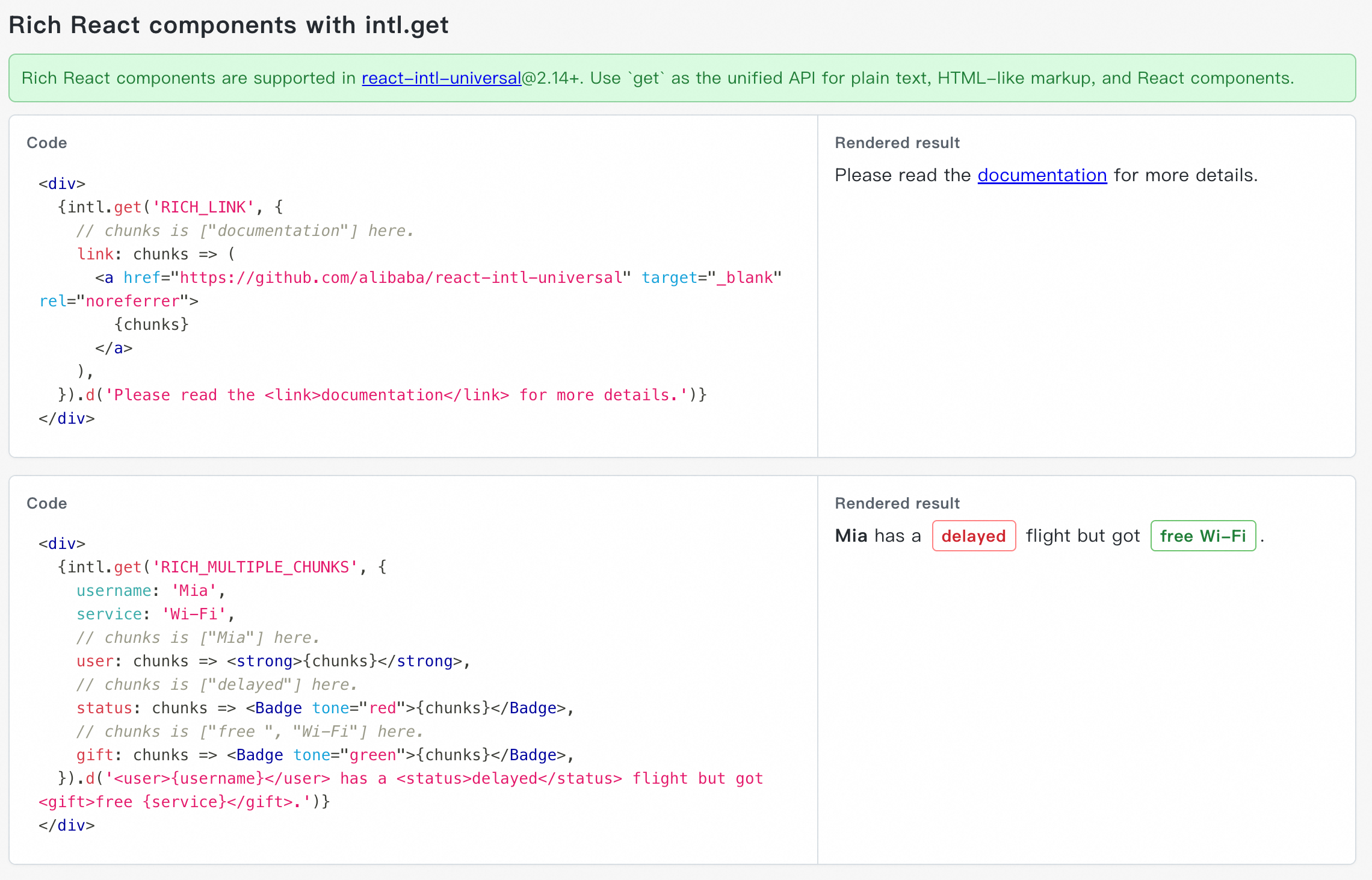
⚡ New in react-intl-universal@2.14+: Support Rich React Components with intl.get
Upgrade to react-intl-universal@2.14+ to use intl.get(...) as the recommended unified API for plain text, ICU variables, and rich React components.
See the live demo for runnable examples. You can keep one complete sentence in the locale message, while React code controls the actual component, props, and event handlers:
⚡ New: Let AI Agents Ship Better Internationalized UI
Use the use-react-intl-universal skill to give AI coding agents a practical i18n workflow, not just API hints.
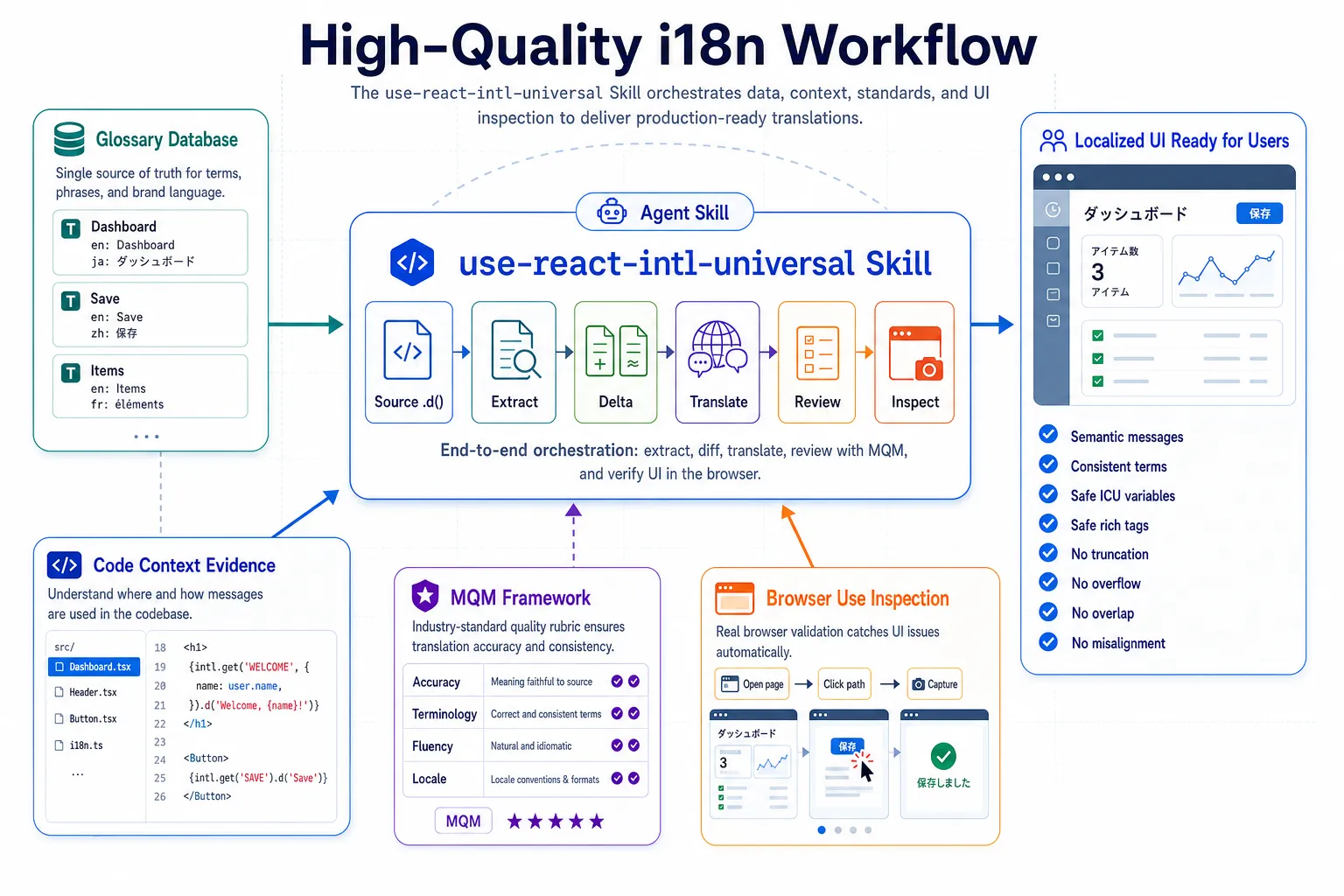
It helps agents:
- write high-quality localized copy that preserves the real product meaning, not word-for-word translations;
- keep product terms and UI wording consistent across modules;
- avoid broken localized UI, such as text truncation, overflow, overlap, or misalignment;
- keep ICU variables, rich tags, default messages, and locale files aligned;
- review translation quality with Multidimensional Quality Metrics (MQM), one of the most professional and comprehensive translation quality assessment frameworks widely recognized in the localization industry;
- inspect running localized pages by URL, click through interactions, capture screenshots, and generate a process-and-findings report;
- produce smaller, more reviewable locale changes.
💡 Why Another Internationalization Solution for React?
In case of internationalizing React apps, react-intl is one of most popular package in industry. react-intl decorate your React.Component with wrapped component which is injected internationalized message dynamically so that the locale data is able to be loaded dynamically without reloading page. The following is the example code using react-intl.
import { injectIntl } from 'react-intl';
class MyComponent extends Component {
  render() {
    const intl = this.props;
    const title = intl.formatMessage({ id: 'title' });
    return (

{title}

);
  }
};
export default injectIntl(MyComponent);
However, this approach introduces two major issues.
Firstly, Internationalizing can be applied only in view layer such as React.Component. For Vanilla JS file, there's no way to internationalize it. For example, the following snippet is general form validator used by many React.Component in our apps. We definitely will not have such code separated in different React.Component in order to internationalize the warning message. Sadly, react-intl can't be used in Vanilla JS.
export default const rules = {
  noSpace(value) {
    if (value.includes(' ')) {
      return 'Space is not allowed.';
    }
  }
};
Secondly, since your React.Component is wrapped by another class, the behavior is not as expected in many way. For example, to get the instance of React.Component, you can't use the normal way like:
class App {
  render() {
    <MyComponent ref="my"/>
  }
  getMyInstance() {
    console.log('getMyInstance', this.refs.my);
  }
}
Instead, you need to use the method getWrappedInstance() to get that.
class MyComponent {...}
export default injectIntl(MyComponent, {withRef: true});

class App {
  render() {
    <MyComponent ref="my"/>
  }
  getMyInstance() {
    console.log('getMyInstance', this.refs.my.getWrappedInstance());
  }
}
Furthermore, your React.Component's properties are not inherited in subclass since component is injected by react-intl.
Due to the problem above, we create react-intl-universal to internationalize React app using simple but powerful API.
📚 APIs Definition
  /**
   * Initialize properties and load locale data according to currentLocale
   * @param {Object} options
   * @param {string} options.escapeHtml To escape html. Default value is true.
   * @param {string} options.currentLocale Current locale such as 'en-US'
   * @param {Object} options.locales App locale data like {"en-US":{"key1":"value1"},"zh-CN":{"key1":"值1"}}
   * @param {Object} options.warningHandler Ability to accumulate missing messages using third party services. See https://github.com/alibaba/react-intl-universal/releases/tag/1.11.1
   * @param {string} options.fallbackLocale Fallback locale such as 'zh-CN' to use if a key is not found in the current locale
   * @param {boolean} options.debug If debugger mode is on, the message will be wrapped by a span with data key
   * @param {string} options.dataKey If debugger mode is on, the message will be wrapped by a span with this data key. Default value 'data-i18n-key'
   * @returns {Promise}
   */
  init(options)


  /**
   * Load more locales after init
   * @param {Object} locales App locale data
   */
  load(locales)


  /**
   * Get the formatted message by key.
   * Returns string for plain messages.
   * Returns React-renderable chunks array when variables contain rich tag formatter functions
   * and every parsed rich tag has a matching formatter.
   * @param {string} key The string representing key in locale data file
   * @param {Object} variables Variables in message
   * @returns {string|React.ReactNode[]} message
   */
  get(key, variables)

  /**
   * Legacy API: get the formatted html message by key.
   * Prefer get(key, variables) with rich tag formatter functions for new React code.
   * @param {string} key The string representing key in locale data file
   * @param {Object} variables Variables in message
   * @returns {React.Element} message
  */
  getHTML(key, options)

  /**
   * Helper: determine user's locale via URL, cookie, and browser's language.
   * You may not need this API, if you have other rules to determine user's locale.
   * @param {string} options.urlLocaleKey URL's query Key to determine locale. Example: if URL=http://localhost?lang=en-US, then set it 'lang'
   * @param {string} options.cookieLocaleKey Cookie's Key to determine locale. Example: if cookie=lang:en-US, then set it 'lang'
   * @param {string} options.localStorageLocaleKey LocalStorage's Key to determine locale such as 'lang'
   * @returns {string} determined locale such as 'en-US'
   */
  determineLocale(options)

  /**
  * Change current locale
  * @param {string} newLocale Current locale such as 'en-US'
  */
  changeCurrentLocale(newLocale)

  /**
   * Get the inital options
   * @returns {Object} options includes currentLocale and locales
   */
  getInitOptions()

  /**
   * Formats a list of React nodes for proper internationalized formatting.
   * @param {React.ReactNode[]} nodeList - Array of React nodes to format.
   * @param {Intl.ListFormatOptions} options - Intl.ListFormat options.
   * @returns {React.ReactNode[]} Array of React nodes formatted with locale-appropriate separators.
   *
   * @example
   * For en-US locale: formatList(["str1", "str2"]) => Returns: ["str1", ", ", "str2"] => Render as: "str1, str2" in React.js
   * For zh-CN locale: formatList(["str1", "str2"]) => Returns: ["str1", "、", "str2"] => Render as: "str1、str2" in React.js
   */
  formatList(nodeList, options)

  /**
   * Returns locale-specific parentheses format for the current language.
   * @param {React.ReactNode} node - The content to be wrapped in parentheses.
   * @returns {ReactNode[]} An array containing left parenthesis, content, and right parenthesis.
   *
   * @example
   * For en-US locale: formatParentheses("str1") => Returns ["(", "str1", ")"] => Render as "(str1)" in React.js
   * For zh-CN locale: formatParentheses("str1") => Returns ["(", "str1", ")"] => Render as "(str1)" in React.js
   */
  formatParentheses(node)

  /**
   * Returns locale-specific colon character for the current language.
   * @returns {string} The locale-appropriate colon character.
   *
   * @example
   * For en-US locale: <>{intl.get("LABEL_NAME")}{intl.getColon()}{intl.get("VALUE")}</> => Returns "label: value"
   * For zh-CN locale: <>{intl.get("LABEL_NAME")}{intl.getColon()}{intl.get("VALUE")}</> => Returns "label:value"
   */
  getColon()

  /**
   * Formats a Date or timestamp as a stable ISO 8601 date: YYYY-MM-DD.
   * @param {Date|number} value - The Date or timestamp to format.
   * @returns {string} The formatted date.
   *
   * @example
   * formatDate(new Date(2026, 0, 2)) => Returns "2026-01-02"
   */
  formatDate(value)

  /**
   * Formats a Date or timestamp as stable 24-hour time with seconds: HH:mm:ss.
   * @param {Date|number} value - The Date or timestamp to format.
   * @returns {string} The formatted time.
   *
   * @example
   * formatTime(new Date(2026, 0, 2, 15, 30, 45)) => Returns "15:30:45"
   */
  formatTime(value)

  /**
   * Formats a Date or timestamp as stable ISO 8601 date plus 24-hour time: YYYY-MM-DD HH:mm:ss.
   * @param {Date|number} value - The Date or timestamp to format.
   * @returns {string} The formatted date and time.
   *
   * @example
   * formatDateTime(new Date(2026, 0, 2, 15, 30, 45)) => Returns "2026-01-02 15:30:45"
   */
  formatDateTime(value)

   /**
   * Formats a number according to the current locale.
   * @param {number} number - The number to format.
   * @returns {string} The formatted number.
   *
   * @example
   * For en-US locale: formatNumber(1234.56) => Returns "1,234.56"
   * For de-DE locale: formatNumber(1234.56) => Returns "1.234,567"
   * For fr-FR locale: formatNumber(1234.56) => Returns "1 234,567"
   */
  formatNumber(number)
🔄 Compatibility with react-intl
As mentioned in the issue Mirror react-intl API, to make people switch their existing React projects from react-intl to react-intl-universal. We provide two compatible APIs as following.
  /**
   * As same as get(...) API
   * @param {Object} options
   * @param {string} options.id
   * @param {string} options.defaultMessage
   * @param {Object} variables Variables in message
   * @returns {string|React.ReactNode[]} message
  */
  formatMessage(options, variables)
  /**
   * Legacy API: as same as getHTML(...) API
   * @param {Object} options
   * @param {string} options.id
   * @param {React.Element} options.defaultMessage
   * @param {Object} variables Variables in message
   * @returns {React.Element} message
  */
  formatHTMLMessage(options, variables)
For example, the formatMessage API
const name = 'Tony';
intl.formatMessage({ id:'hello', defaultMessage: 'Hello, {name}'}, {name});
is equivalent to get API
const name = 'Tony';
intl.get('hello', {name}).d('Hello, {name}');
And the legacy formatHTMLMessage API
const name = 'Tony';
intl.formatHTMLMessage({ id:'hello', defaultMessage:

Hello

}, {name});
is equivalent to getHTML API
const name = 'Tony';
intl.getHTML('hello', {name}).d(

Hello

);
❓ FAQ
1. How Do I Determine the User's Locale?
react-intl-universal provides a helper to determine the user's currentLocale. In the running examples, when a user selects a new locale, the page is r
Extension points exported contracts — how you extend this code
Core symbols most depended-on inside this repo
Shape
Languages
Modules by API surface
Dependencies from manifests, versioned
For agents
$ claude mcp add react-intl-universal \
  -- python -m otcore.mcp_server <graph>