github.com/alibaba/innodb-java-reader @1.0.10
Chat with this repoWhat it actually does AI analysis from the code graph — generated when you open this
README
MySQL InnoDB Java Reader






innodb-java-reader is a java implementation to access MySQL InnoDB storage engine file directly. With the library or command-line tool, it provides read-only features like examining pages, looking up record by primary key, secondary key and generating page heatmap by LSN or filling rate. Innodb-java-reader can be a tool to dump/query table by offloading from MySQL server. Moreover, this project is useful for prototyping and learning MySQL.
1. Background
InnoDB is a general-purpose storage engine that balances high reliability and high performance in MySQL, since 5.6 InnoDB has become the default MySQL storage engine. In Alibaba, I encountered one performance issue related to MySQL, and this led me to deep dive into InnoDB internal mechanism. To better understand how InnoDB stores data, I introduce this project, and I choose Java language to implement because it is widely used and more understandable. Some of the works are inspired by Jeremy Cole's blog about InnoDB, which helps me a lot.
Currently this project is production-ready and is able to work in real environment.
2. Prerequisites
- Supported MySQL version: 5.6, 5.7, 8.0.
- Make sure InnoDB row format is either
COMPACTorDYNAMIC. - Enable
innodb_file_per_table, which will create standalone*.ibdfile for each table. - InnoDB file page size is set to 16K.
3. Features
The row format of a table determines how rows are physically stored, which in turn can affect the performance of queries and DML operations. innodb-java-reader supports COMPACT or DYNAMIC page format and can work smartly to choose the right page format decoder to read pages.
innodb-java-reader supports operations like examining pages' information, looking up record by primary key and secondary key, range querying by primary key and secondary key, querying records by page number, dumping table and generating page heatmap & filling rate.
Supported column types are listed below. Java type mapping refer to docs.
| Type | Support column types |
|---|---|
| Numeric | TINYINT, SMALLINT, MEDIUMINT, INT, BIGINT, FLOAT, REAL, DOUBLE, DECIMAL, NUMERIC |
| String and Binary | CHAR, VARCHAR, BINARY, VARBINARY, TINYBLOB, BLOB, MEDIUMBLOB, LONGBLOB, TINYTEXT, TEXT, MEDIUMTEXT, LONGTEXT |
| Date and Time | DATETIME, TIMESTAMP, TIME (support precision), YEAR, DATE |
| Other | BOOL, BOOLEAN, ENUM, SET, BIT |
4. Quickstart
Dependency
Maven
<dependency>
  <groupId>com.alibaba.database</groupId>
  <artifactId>innodb-java-reader</artifactId>
  <version>1.0.10</version>
</dependency>
To use snapshot version, please refer to this doc.
API examples
Here's an example to look up record in a table by primary key.
String createTableSql = "CREATE TABLE t (id int(11), a bigint(20)) ENGINE=InnoDB;";
String ibdFilePath = "/usr/local/mysql/data/test/t.ibd";
try (TableReader reader = new TableReaderImpl(ibdFilePath, createTableSql)) {
  reader.open();
  GenericRecord record = reader.queryByPrimaryKey(ImmutableList.of(4));
  Object[] values = record.getValues();
  System.out.println(Arrays.asList(values));
}
More usage you can jump to API usage section. The best place to better explore is to look at the examples for some common use cases addressed here in innodb-java-reader-demo.
Command-line examples
Here's an example to dump all records with command-line tool.
You can download latest version of innodb-java-reader-cli.jar from release page or build from source.
t.ibd is the InnoDB ibd file path. t.sql is where the output of SHOW CREATE TABLE <table_name> saved as content, you can generate table definitions by executing mysqldump -d -u<username> -p<password> -h <hostname> <dbname> in command-line.
java -jar innodb-java-reader-cli.jar \
  -ibd-file-path /usr/local/mysql/data/test/t.ibd \
  -create-table-sql-file-path t.sql \
  -c query-all -o output.dat
The result is the same by running mysql -N -uroot -e "select * from test.t" > output.
But to be aware that if pages are not flushed from InnoDB Buffer pool to disk, then the result maybe not consistent. How long do dirty pages usually stay dirty in memory? That is a tough question, InnoDB leverages WAL in terms of performance, so there is no command available to flush all dirty pages. Only internal mechanism controls when there need pages to flush, like Page Cleaner thread, adaptive flushing, etc.
Here's another example to generate heatmap.
Assume we have a table without secondary index, and the primary key is built by inserting rows in key order. Then run the following command.
java -jar innodb-java-reader-cli.jar \
  -ibd-file-path /usr/local/mysql/data/test/t.ibd \
  -create-table-sql-file-path t.sql \
  -c gen-lsn-heatmap -args ./out.html
The heatmap shows as below.
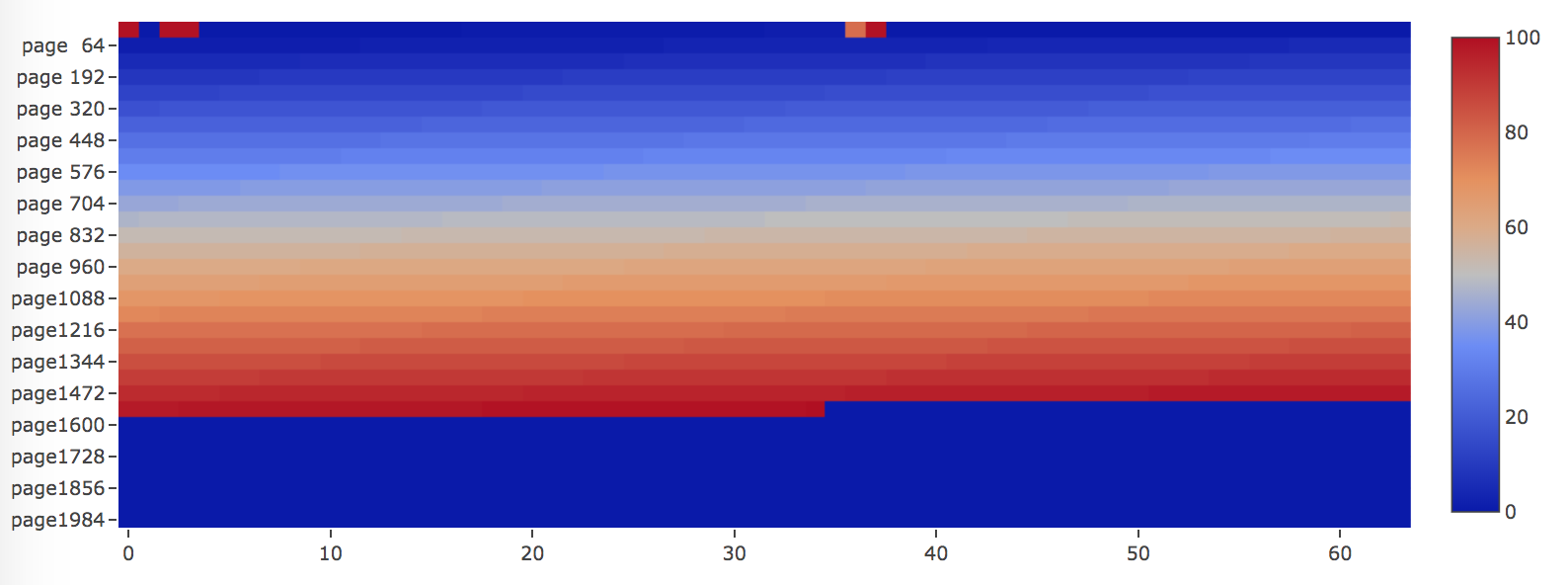
The pages are allocated and filled perfectly as color changes from blue (LSN is smallest) to red (LSN is biggest), from the beginning of the file towards to the end.
More usage you can jump to Command-line tool section.
5. API usage
You can prepare some data beforehand. All the following examples will be based on a table named t.
CREATE TABLE `t`
(`id` int(11) NOT NULL,
`a` bigint(20) NOT NULL,
`b` varchar(64) NOT NULL,
PRIMARY KEY (`id`)) ENGINE=InnoDB;

delimiter ;;
drop procedure if EXISTS idata;
create procedure idata()
  begin
    declare i int;
    set i=1;
    while(i<=5)do
      insert into t values(i, i * 2, REPEAT(char(97+((i - 1) % 26)), 8));
      set i=i+1;
    end while;
  end;;
delimiter ;
call idata();
After creating and populating the very simple table, there should be 5 rows.
mysql> select * from t;
+----+----+----------+
| id | a  | b        |
+----+----+----------+
|  1 |  2 | aaaaaaaa |
|  2 |  4 | bbbbbbbb |
|  3 |  6 | cccccccc |
|  4 |  8 | dddddddd |
|  5 | 10 | eeeeeeee |
+----+----+----------+
5.1 Setting table definition
There are two ways to specify a table definition, or TableDef within the library.
Using SQL
Run SHOW CREATE TABLE statement in MySQL command-line and copy the output as a string. Inside innodb-java-reader, it leverages JSqlParser and antlr4 to parse SQL to AST and get the table definition.
You can generate all table definitions by executing mysqldump -d -u<username> -p<password> -h <hostname> <dbname> in command-line.
For example,
String createTableSql = "CREATE TABLE `t`\n"
        + "(`id` int(11) NOT NULL ,\n"
        + "`a` bigint(20) NOT NULL,\n"
        + "`b` varchar(64) NOT NULL,\n"
        + "PRIMARY KEY (`id`))\n"
        + "ENGINE=InnoDB;";
Using API
Create a TableDef instance with all Columns. Column can be created in fluent style by setting the required column name, type, while there are optional settings to specify nullable, charset or if the column is primary key.
For variable-length or fixed-length column types likeVARCHAR, VARBINARY, CHAR, column type can be declared with a length that indicates the maximum length you want to store, just like what you define a DDL in MySQL. For integer types, the display width of the integer column will be ignored.
For example, to create table with single primary key.
TableDef tableDef = new TableDef().setDefaultCharset("utf8mb4")
    .addColumn(new Column().setName("id").setType("int(11)").setNullable(false).setPrimaryKey(true))
    .addColumn(new Column().setName("a").setType("bigint(20)").setNullable(false))
    .addColumn(new Column().setName("b").setType("varchar(64)").setNullable(false))
    .addColumn(new Column().setName("c").setType("varchar(1024)").setNullable(true));
To create table with multiple column primary key.
TableDef tableDef = new TableDef()
    .setDefaultCharset("utf8mb4")
    .addColumn(new Column().setName("id").setType("int(11)").setNullable(false)
    .addColumn(new Column().setName("a").setType("bigint(20)").setNullable(false))
    .addColumn(new Column().setName("b").setType("varchar(64)").setNullable(false))
    .addColumn(new Column().setName("c").setType("varchar(1024)").setNullable(true))
    .setPrimaryKeyColumns(ImmutableList.of("a", "b"));
Table without primary key is also supported. By default, a 6 bytes ROW ID will be treated as primary key.
5.2 Creating TableReader
Thread-safe class TableReader enables you to call all the useful APIs.
With try-with-resources statement, you can ensure that IO resource used by TableReader is closed at the end of all invocations. By default, TableReader leverage buffer IO, pages are read from page cache into DirectByteBuffer and then copy to heap to manage their lifecycle. This framework is also open for extension to use mmap or direct io.
There are two constructors, one needs to provide tablespace file *.ibd file path and create table sql, while the other needs the *.ibd file path and TableDef.
For example,
String createTableSql = "CREATE TABLE `tb11`\n"
        + "(`id` int(11) NOT NULL ,\n"
        + "`a` bigint(20) NOT NULL,\n"
        + "`b` varchar(64) NOT NULL,\n"
        + "PRIMARY KEY (`id`))\n"
        + "ENGINE=InnoDB;";
String ibdFilePath = "/usr/local/mysql/data/test/t.ibd";
try (TableReader reader = new TableReaderImpl(ibdFilePath, createTableSql)) {
  reader.open();
  // API invocation goes here...
}
Moreover, there is a useful factory utility which can facilitate the process of creating TableReader. In this case, table definition is no longer needed, so you can skip table definition using SQL or API as section 5.1 describes.
For example,
String createTableSql = "CREATE TABLE `tb11`\n"
        + "(`id` int(11) NOT NULL ,\n"
        + "`a` bigint(20) NOT NULL,\n"
        + "`b` varchar(64) NOT NULL,\n"
        + "PRIMARY KEY (`id`))\n"
        + "ENGINE=InnoDB;";

TableDefProvider tableDefProvider = new SqlTableDefProvider(createTableSql);
TableReaderFactory tableReaderFactory = TableReaderFactory.builder()
    .withProvider(tableDefProvider)
    .withDataFileBasePath("/usr/local/mysql/data/test/")
    .build();
TableReader reader = tableReaderFactory.createTableReader("tb11");
try {
  reader.open();
  // API invocation goes here...
} finally {
  reader.close();
}
You can also provide a sql file path, the file
contains multiple SQLs, the table name should match the ibd file name, or else the tool is not able to
identify the ibd file to read, you can generate the file by executing mysqldump -d -u<username> -p<password> -h <hostname> <dbname> in command-line.
TableDefProvider tableDefProvider = new SqlFileTableDefProvider("/path/mysqldump_ddl.sql");
TableReaderFactory tableReaderFactory = TableReaderFactory.builder()
    .withProvider(tableDefProvider)
    .withDataFileBasePath("/usr/local/mysql/data/test/")
    .build();
TableReader reader = tableReaderFactory.createTableReader("t");
try {
  reader.open();
  // API invocation goes here...
} finally {
  reader.close();
}
The provider is extensible, in the future, we plan to support MysqlFrmTableDefProvider as well.
5.3 Examining a tablespace file
Listing all pages
This will give you a high-level overview about InnoDB file structure, as it results in a list of AbstractPage, for example, you can get all contiguous pages of their basic information.
try (TableReader reader = new TableReaderImpl(ibdFilePath, createTableSql)) {
  reader.open();
  long numOfPages = reader.getNumOfPages();
  List<AbstractPage> pages = reader.readAllPages();
}
AbstractPage is the parent class of all pages. The page definition can be found in fil0fil.h. innodb-java-reader supports some of the commonly used page types like FspHdr/Xdes page, insert buffer bitmap page, index page, blob page, SDI page (only in MySQL 8.0 or later) and allocated page (unused page).
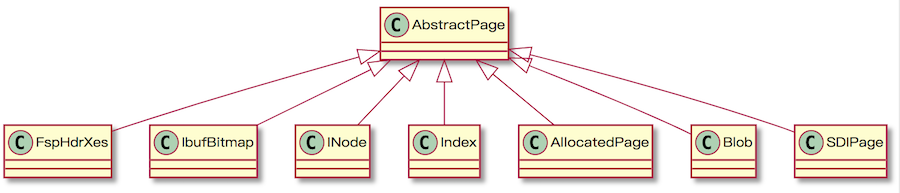
AbstractPage base class includes 38 bytes FilHeader and 8 bytes FilTrailer for all page type. The raw byte array body will be extracted accordingly for sub-classes. You can find the APIs regarding how to access the detailed structure for different types under page package in Javadoc.
For example, t
Extension points exported contracts — how you extend this code
Writer (Interface)Core symbols most depended-on inside this repo
ofShape
Languages
Modules by API surface
For agents
$ claude mcp add innodb-java-reader \
  -- python -m otcore.mcp_server <graph>