github.com/alexkroman/ollychat @main
Chat with this repoBrowse by type
What it actually does AI analysis from the code graph — generated when you open this
README
OllyChat: AI Agents for DevOps

OllyChat allows you to create custom DevOps AI agents that understand and manage your infrastructure.
Engineers are drowning in reliability problems
According to a recent New Relic report:
- Companies have 97 minutes of downtime every week - each minute bleeding $15,000 from your bottom line
- ~400 minutes of outages per month - keeping engineers in reactive firefighting mode and not innovating
- 90% of incident response time is wasted on “ClickOps"
- hunting through dashboards instead of solving problems.
The future of observability isn’t more dashboards and alerts. It’s purpose-built AI agents that work like an expert SRE (site reliability engineer) — without the burnout.
Meet OllyChat
OllyChat isn't another tool – it's an AI teammate that works the way your team works:
- Embedded in your workflow - Slack, Teams, JIRA – wherever your teams communicate
- Understands your infrastructure - Seamlessly integrated with your SRE toolchain
- AI-powered automation - Resolves incidents faster than any human could
The AI-First Open Source DevOps Platform
Today's observability and incident management tools weren't built for AI. They were built for humans – limited by dashboards, on-call response times, and manual processes.
OllyChat flips the script. It's an AI-first platform that:
- Diagnoses incidents in real-time
- Automates remediation with AI-driven agents you control
- Learns from your unique infrastructure and workflows over time
Get Started With Our Demo Prometheus Server
You can try OllyChat without any observability data by pointing your config at our demo Prometheus server: http://34.123.158.139:9090
✨ Features
🖥️ OllyChat in CLI
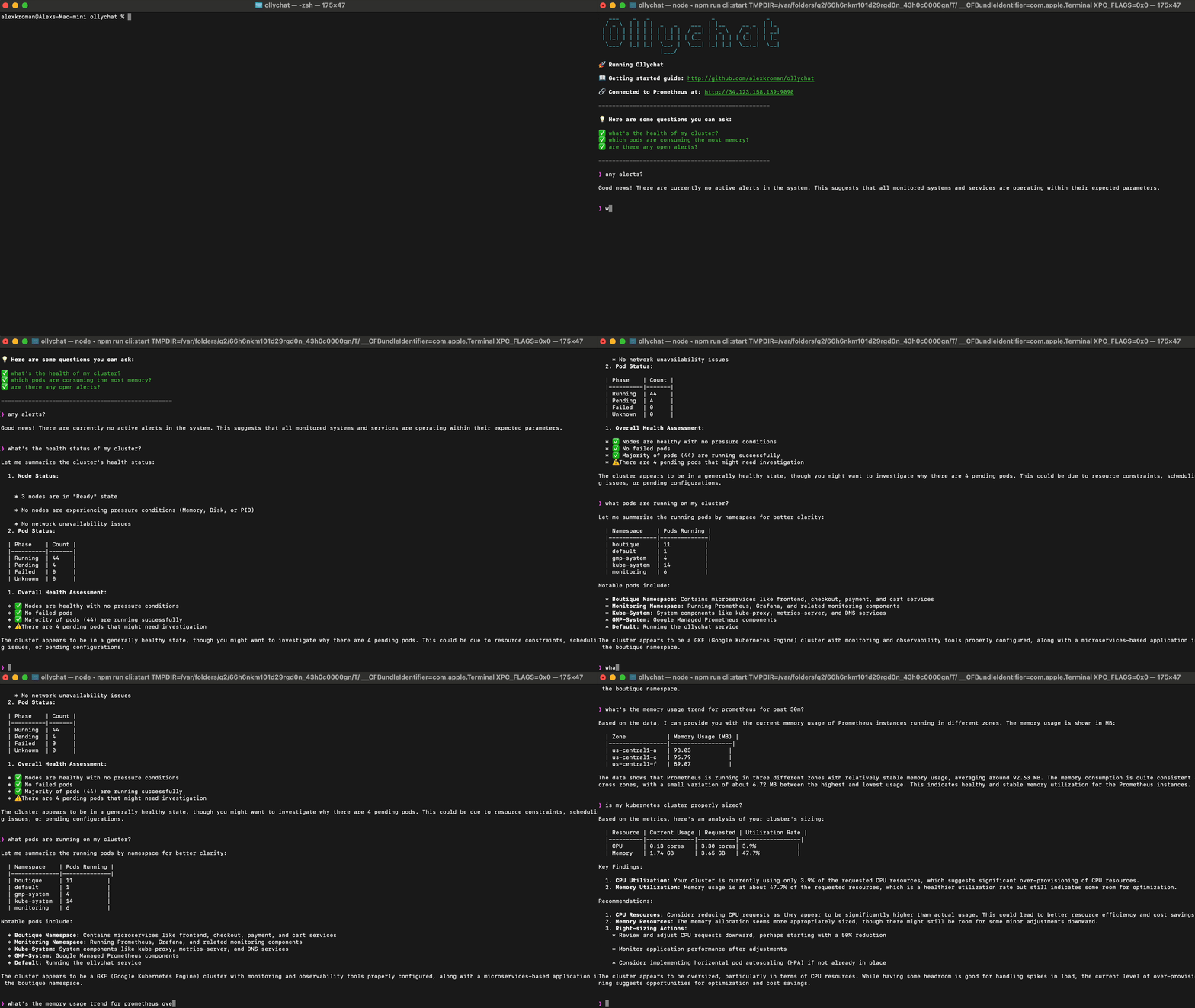
💬 OllyChat in Slack

📊 Supported Observability Platforms
- Prometheus
- New Relic (coming soon)
- DataDog (coming soon)
- Elastic (coming soon)
🧠 Supported LLM's
- OpenAI
- Anthropic
- Ollama (tool supporting)
🚀 Getting Started Without Docker
Prerequisites
- node.js
- npm
Install
# Clone the repository
git clone https://github.com/alexkroman/ollychat.git

cd ollychat

# Install dependencies
npm install
Set Your Environment Variables
cp env-example.sh .env
Edit `.env` with your settings
Running the CLI
# Start the CLI
npm run cli:start
Installing Optional Slack Integration
-
Create a Slack App:
-
Visit Slack API
- Click "Create New App" → "From an app manifest"
- Select your workspace
-
Copy JSON in
deploy/slack/slack-manifest.json -
Install the app to your workspace:
-
Navigate to "Install App" in your Slack App settings
- Click "Install to Workspace"
-
Grant requested permissions
-
Start the Slack bot:
# Start the Slack backend
npm run slack:start
Using OllyChat in Slack
Invite @olly to your team or incident channel.
- @olly what's the health status of my cluster?
- @olly any alerts?
- @olly which pods are consuming the most memory?
Getting Started With Docker
You can use Docker to deploy both the Slack app and CLI app
Set Your Docker Environment Variables
cp env-example.sh .env
# Edit .env with your settings
Build the Container
# Build the docker container
npm run docker:build
Run the CLI
# Build the docker container
npm run docker:run:cli
Run the Slack App
# Build the docker container
npm run docker:run:slack
❤️ Contributing
- Submit a feature request or bug report
Building your own DevOps AI Agent with OllyChat
- You can use src/tools/prometheus.ts as a template to get started
# Use prometheus agent as a template
cp src/tools/prometheus.ts src/tools/newTool.ts
- Add your tool as an import and to the tools array in src/tools/index.ts
Run Tests
npm test
Run Linter
npm run lint
Generate Evaluation Run
When you make changes to the app you should generate an evaluation run to test your change against ground truths.
# Load the latest version of the evaluation data
npm run evals:load

# Run the evaluations
npm run evals:start
📜 License
Ollychat is MIT licensed. See LICENSE for details.
Core symbols most depended-on inside this repo
Shape
Languages
Modules by API surface
For agents
$ claude mcp add ollychat \
  -- python -m otcore.mcp_server <graph>