github.com/alexbudure/queuedash @main
Chat with this repoBrowse by type
What it actually does AI analysis from the code graph — generated when you open this
README
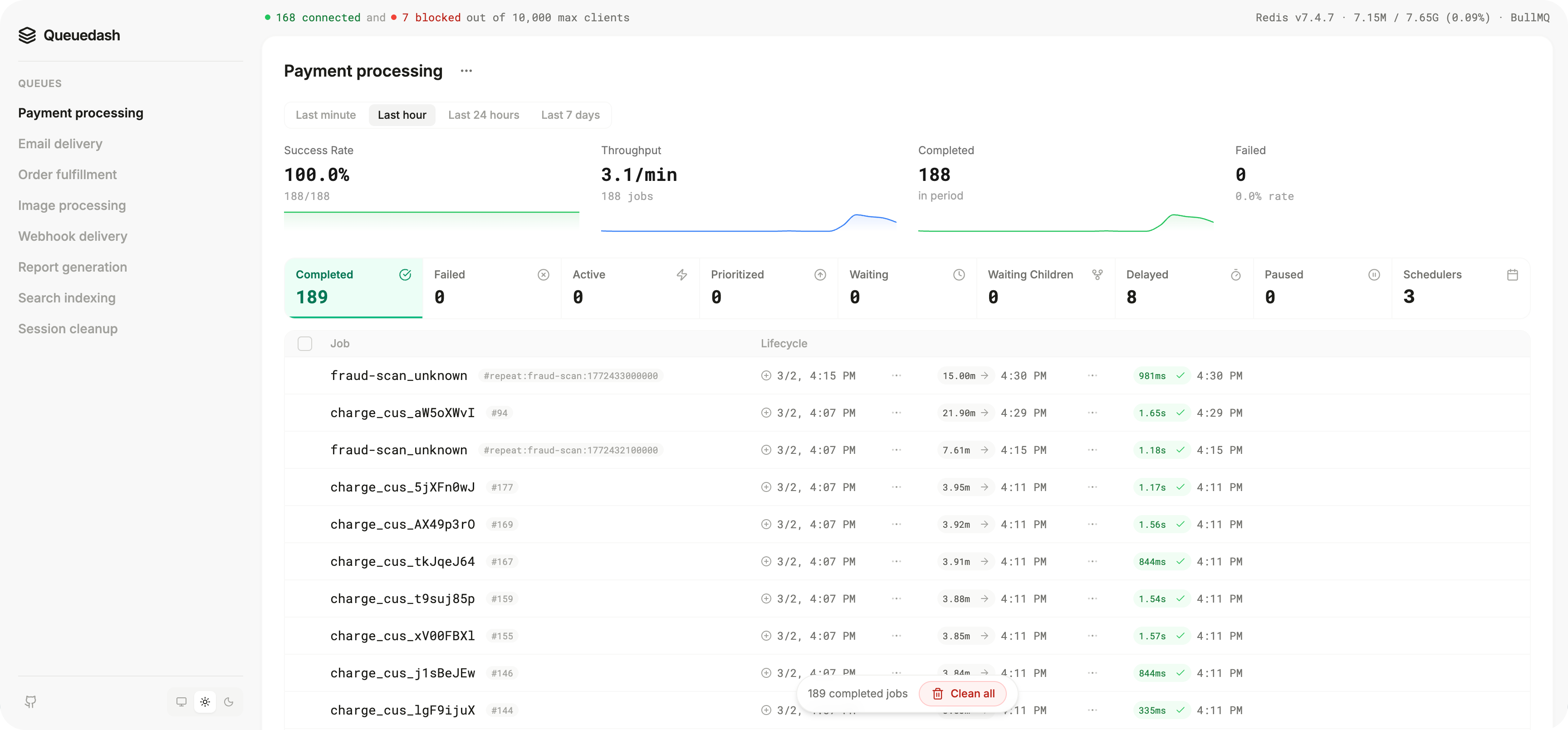
A stunning, sleek dashboard for Bull, BullMQ, Bee-Queue, and GroupMQ.


Features
- 😍 Simple, clean, and compact UI
- 🧙 Add jobs to your queue with ease
- 🪄 Retry, remove, and more convenient actions for your jobs
- 📊 Stats for job counts, job durations, and job wait times
- ✨ Top-level overview page of all queues
- 🔋 Integrates with Next.js, Express.js, and Fastify
- ⚡️ Compatible with Bull, BullMQ, Bee-Queue, and GroupMQ
- 📅 Job scheduler support
- 📈 Metrics for queue performance
Getting Started
Express
pnpm install @queuedash/api
import express from "express";
import Bull from "bull";
import { createQueueDashExpressMiddleware } from "@queuedash/api";

const app = express();

const reportQueue = new Bull("report-queue");

app.use(
  "/queuedash",
  createQueueDashExpressMiddleware({
    ctx: {
      queues: [
        {
          queue: reportQueue,
          displayName: "Reports",
          type: "bull" as const,
        },
      ],
    },
  }),
);

app.listen(3000, () => {
  console.log("Listening on port 3000");
  console.log("Visit http://localhost:3000/queuedash");
});
Next.js
pnpm install @queuedash/api @queuedash/ui
App Router
```typescript jsx // app/admin/queuedash/[[...slug]]/page.tsx "use client";
import { QueueDashApp } from "@queuedash/ui"; import "@queuedash/ui/dist/styles.css";
function getBaseUrl() {
if (process.env.VERCEL_URL) {
return https://${process.env.VERCEL_URL}/api/queuedash;
}
return http://localhost:${process.env.PORT ?? 3000}/api/queuedash;
}
export default function QueueDashPages() { return ; }
```typescript jsx
// app/api/queuedash/[...trpc]/route.ts
import { fetchRequestHandler } from "@trpc/server/adapters/fetch";
import { appRouter } from "@queuedash/api";

const reportQueue = new Bull("report-queue");

function handler(req: Request) {
  return fetchRequestHandler({
    endpoint: "/api/queuedash",
    req,
    router: appRouter,
    allowBatching: true,
    createContext: () => ({
    queues: [
      {
        queue: reportQueue,
        displayName: "Reports",
        type: "bull" as const,
      },
    ],
  });
}

export { handler as GET, handler as POST };
Pages Router
```typescript jsx // pages/admin/queuedash/[[...slug]].tsx import { QueueDashApp } from "@queuedash/ui";
function getBaseUrl() {
if (process.env.VERCEL_URL) {
return https://${process.env.VERCEL_URL}/api/queuedash;
}
return http://localhost:${process.env.PORT ?? 3000}/api/queuedash;
}
const QueueDashPages = () => { return ; };
export default QueueDashPages;
```typescript jsx
// pages/api/queuedash/[trpc].ts
import * as trpcNext from "@trpc/server/adapters/next";
import { appRouter } from "@queuedash/api";

const reportQueue = new Bull("report-queue");

export default trpcNext.createNextApiHandler({
  router: appRouter,
  batching: {
    enabled: true,
  },
  createContext: () => ({
    queues: [
      {
        queue: reportQueue,
        displayName: "Reports",
        type: "bull" as const,
      },
    ],
  }),
});
Optional authentication
The Express, Fastify, Hono, and Elysia adapters support optional HTTP Basic authentication. When configured, it protects both the dashboard UI and its tRPC API. Existing integrations remain public when auth is omitted.
createQueueDashExpressMiddleware({
  auth: {
    username: process.env.QUEUEDASH_AUTH_USERNAME!,
    password: process.env.QUEUEDASH_AUTH_PASSWORD!,
  },
  ctx: {
    queues: [
      {
        queue: reportQueue,
        displayName: "Reports",
        type: "bull",
      },
    ],
  },
});
Use HTTPS whenever Basic authentication is enabled. For application-specific sessions, roles, or OAuth, keep using your framework's authentication middleware around the QueueDash routes. Direct @queuedash/ui integrations can pass request credentials through the headers prop.
Docker
The fastest way to get started is using the official Docker image:
docker run -p 3000:3000 \
  -e QUEUEDASH_AUTH_USERNAME='admin' \
  -e QUEUEDASH_AUTH_PASSWORD='change-me' \
  -e QUEUES_CONFIG_JSON='{"queues":[{"name":"my-queue","displayName":"My Queue","type":"bullmq","connectionUrl":"redis://localhost:6379"}]}' \
  ghcr.io/alexbudure/queuedash:latest
Then visit http://localhost:3000
Environment Variables
QUEUES_CONFIG_JSON- Optional ifQUEUES_CONFIG_FILE_PATHis set. JSON string containing queue configuration.QUEUES_CONFIG_FILE_PATH- Optional ifQUEUES_CONFIG_JSONis set. Path to a JSON file containing queue configuration.QUEUEDASH_AUTH_USERNAME- Optional. Username for HTTP Basic authentication. Must be set withQUEUEDASH_AUTH_PASSWORD.QUEUEDASH_AUTH_PASSWORD- Optional. Password for HTTP Basic authentication. Must be set withQUEUEDASH_AUTH_USERNAME.
Example configuration:
{
  "queues": [
    {
      "name": "cancellation-follow-ups",
      "displayName": "Cancellation follow-ups",
      "type": "bullmq",
      "connectionUrl": "redis://localhost:6379"
    },
    {
      "name": "clustered-reports",
      "displayName": "Clustered Reports",
      "type": "bullmq",
      "clusterNodes": [
        { "host": "redis-cluster-0", "port": 6379 },
        { "host": "redis-cluster-1", "port": 6379 },
        { "host": "redis-cluster-2", "port": 6379 }
      ]
    },
    {
      "name": "email-queue",
      "displayName": "Email Queue",
      "type": "bull",
      "connectionUrl": "redis://localhost:6379"
    }
  ]
}
For bullmq queues, provide either connectionUrl (single-node Redis) or clusterNodes (Redis Cluster). clusterNodes is not supported for bull or bee.
Supported queue types: bull, bullmq, bee, groupmq
See the ./examples folder for more.
API Reference
createQueueDash<*>Middleware
type QueueDashMiddlewareOptions = {
  ctx: QueueDashContext; // Context for the UI
  auth?: QueueDashAuthOptions; // Optional HTTP Basic authentication
  baseUrl?: string; // Required by Fastify, Hono, and Elysia
};

type QueueDashAuthOptions = {
  username: string;
  password: string;
};

type QueueDashContext = {
  queues: QueueDashQueue[]; // Array of queues to display
};

type QueueDashQueue = {
  queue: Bull.Queue | BullMQ.Queue | BeeQueue; // Queue instance
  displayName: string; // Display name for the queue
  type: "bull" | "bullmq" | "bee" | "groupmq"; // Queue type
};
<QueueDashApp />
typescript jsx
type QueueDashAppProps = {
  apiUrl: string; // URL to the API endpoint
  basename: string; // Base path for the app
  headers?:
    | Record<string, string>
    | (() => Record<string, string> | Promise<Record<string, string>>); // Optional tRPC request headers
};
Need more?
If you need more capabilities, check out queuedash.com:
- Alerts and notifications
- Quick search and filtering
- Queue trends and analytics
- Invite team members
Acknowledgements
QueueDash was inspired by some great open source projects. Here's a few of them:
Extension points exported contracts — how you extend this code
browse all types & interfaces →
Core symbols most depended-on inside this repo
Shape
Languages
Modules by API surface
For agents
$ claude mcp add queuedash \
  -- python -m otcore.mcp_server <graph>