github.com/alexa/ask-toolkit-for-vscode @v2.16.0
Chat with this repoWhat it actually does AI analysis from the code graph — generated when you open this
README
<img src="https://d34a6e1u0y0eo2.cloudfront.net/media/images/alexa.png">


<h1 align="center">Alexa Skills Toolkit for Visual Studio Code</h1>
Alexa Skills Toolkit for Visual Studio Code is an extension that makes it easier for you to create, test, and deploy Alexa skills. It provides a dedicated workspace for Alexa Skills in VS Code and provides features for managing and previewing APL documents along with the ability to test and debug your skills in VS Code with local debugging.
See the getting started documentation
Requirements
- To create and deploy Alexa-hosted skills, download Git and install it. We recommend the latest version of
gitto have a seamless experience. - Install and configure VSCode Python extension, if you plan to develop skills using python.
- ASK Toolkit (
v2.5.0and above) works with Visual Studio Code IDE (version 1.53.0 or higher), please make sure you have the latest version installed.
Note :
ASK CLIis no longer a requirement for the extension and the commands are no longer available in the VSCode Command Palette. Please install and use theASK CLIdirectly.
Quick Start
Sign in to your Amazon Developer account
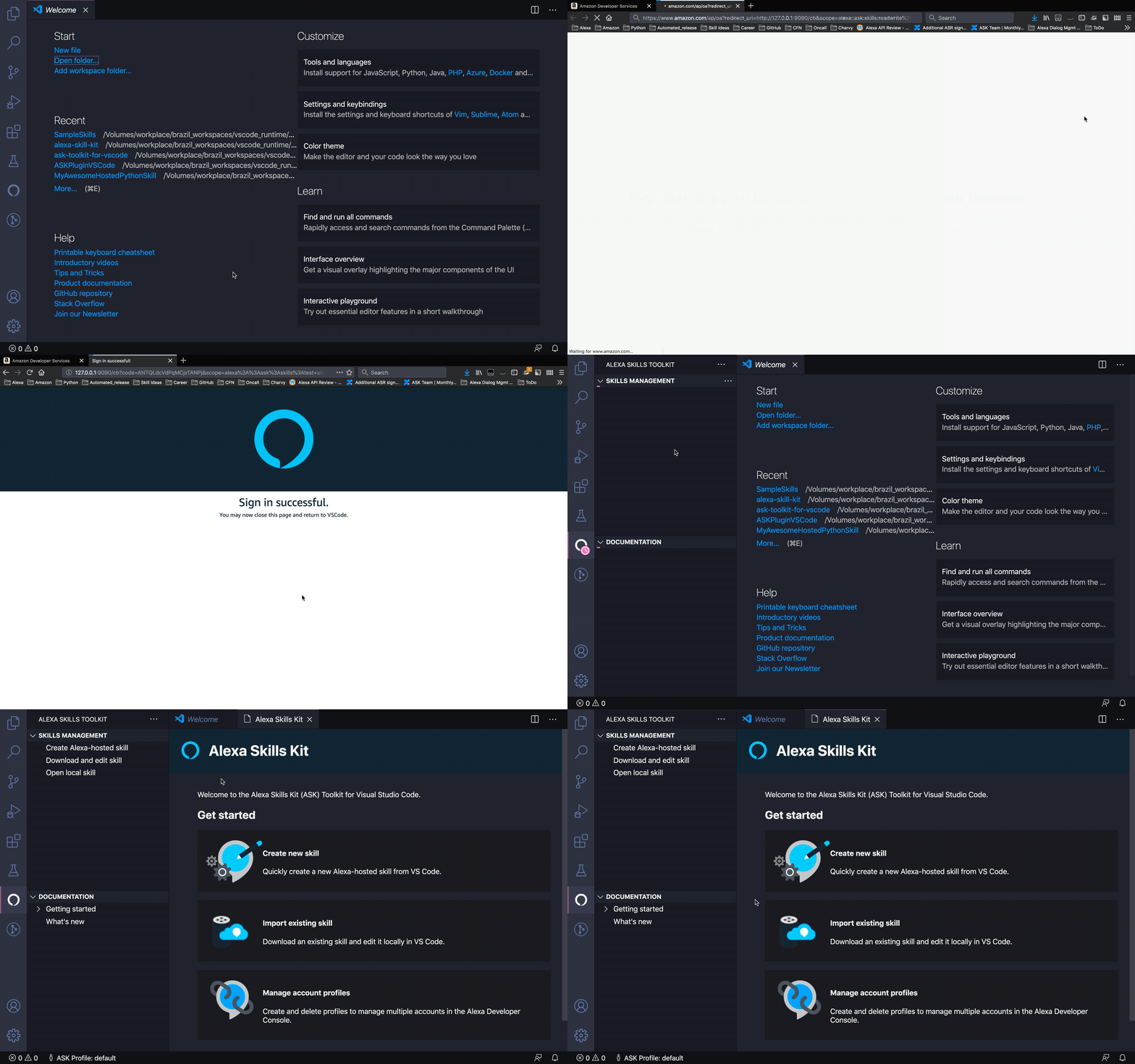
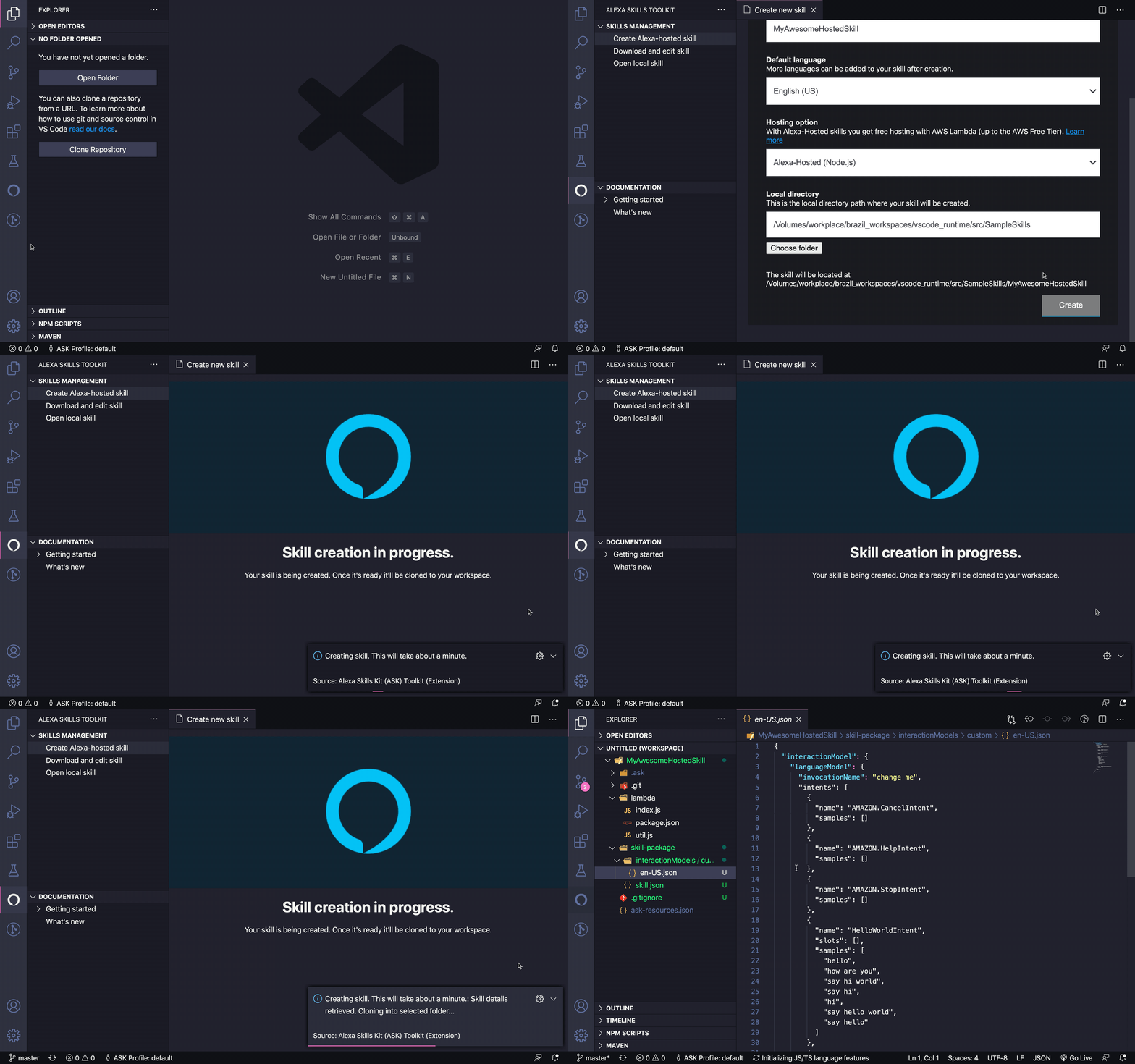
Create a skill
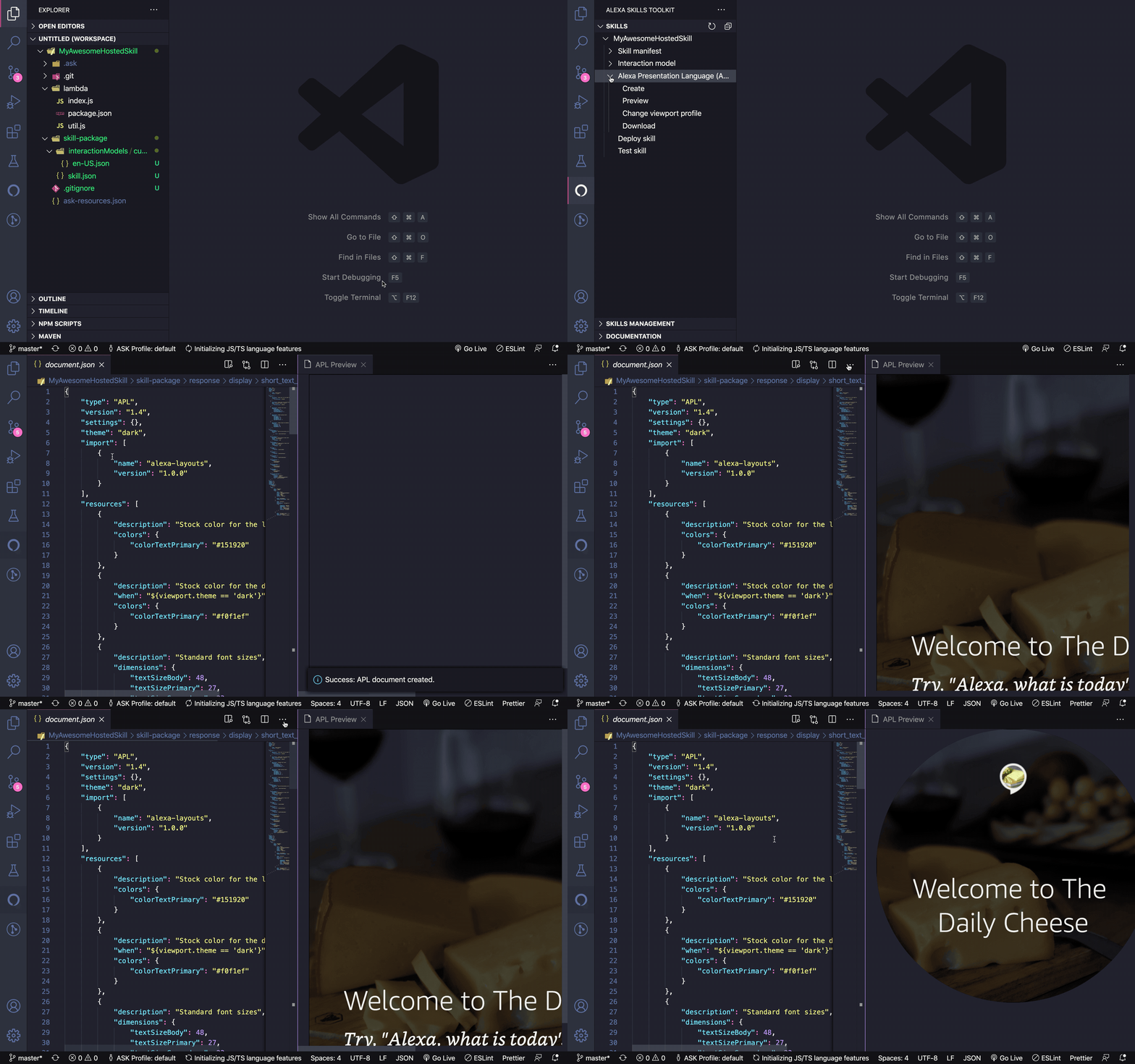
Create and preview APL documents
Setup local debugging

Test skill through local simulator

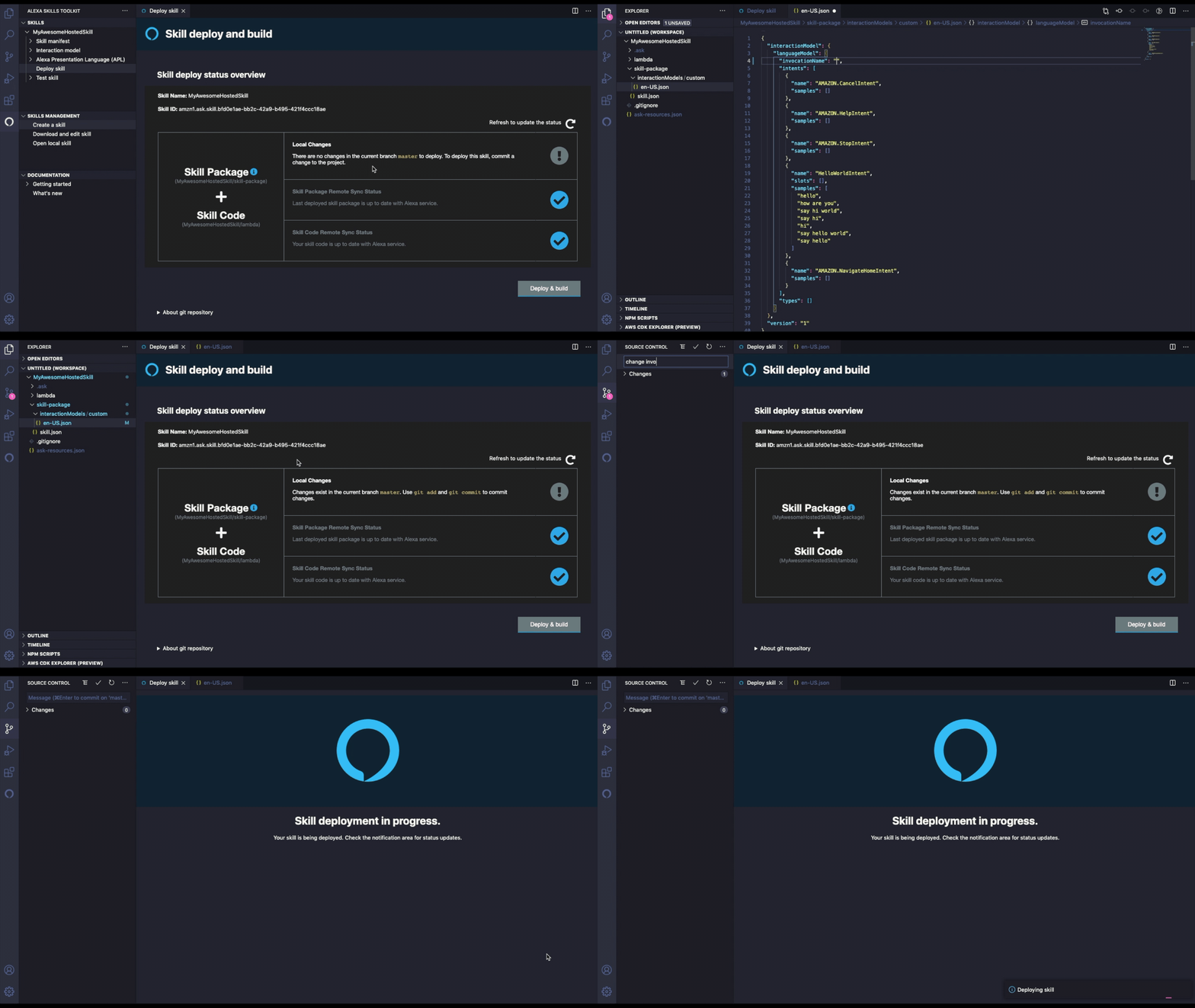
Deploy and build skill
Deploy an Alexa hosted skill
Deploy a self hosted skill
Features
-
Set up skill project
- Quickly set up an Alexa skill project by creating a skill or downloading an existing skill or opening a local skill. Any skill that follows the ASK CLI v2 skill structure is supported. Use the Skill Management tab under the extension, to try these out.
- Once opened, your skill project will appear under the Skills pane in the extension sidebar.
- Alexa Skills Toolkit supports creation of both Alexa-hosted and self-hosted skills. To create a self-hosted skill, you can select Provision your own to host your skill's backend resources.
-
Build or Download Interaction Model
- Edit the Interaction Model JSON under
Skill Packagefolder of your skill project. - Alternatively, download the updated Interaction Model JSON from developer console using the Download option under Skills pane -> YourAwesomeSkill -> Interaction model.
- Edit the Interaction Model JSON under
Note: Currently, only saved and built interaction models can be downloaded from developer console.
-
Build or Download Skill Manifest
- Edit the Skill Manifest JSON under
Skill Packagefolder of your skill project. - Alternatively, download the updated Skill Manifest JSON from developer console using the Download option under Skills pane -> YourAwesomeSkill -> Skill manifest.
- Edit the Skill Manifest JSON under
-
Create, Download & Preview APL Documents
- Create new APL documents using the Create option under Skills pane -> YourAwesomeSkill -> Alexa Presentation Language (APL).
- Download saved APL documents in the APL Authoring tool, using Download option under Skills pane -> YourAwesomeSkill -> Alexa Presentation Language (APL).
- Preview APL documents in
Skill Package, using Preview option under Skills pane -> YourAwesomeSkill -> Alexa Presentation Language (APL). - Optionally, change the viewport of the preview to a different device, using Change viewport profile option under Skills pane -> YourAwesomeSkill -> Alexa Presentation Language (APL).
-
Test & Debug Skills Locally
- Add default Node/Python debug configurations in your skill's
launch.jsondebug configuration file, install dependencies (ask-sdk-local-debug) and start a local debug session. More information can be found on the getting started documentation - Simulate alexa requests through local simulator in the extension.
- Save and replay the simulate session through the local simulator.
- Add default Node/Python debug configurations in your skill's
Note: If you are using any existing profiles, we recommend you to recreate them again from the Skill Management tab -> hamburger (
...) menu -> Profile Manager view, so that the profile will contain all LWA scopes needed for local debugging.
- Deploy your skill
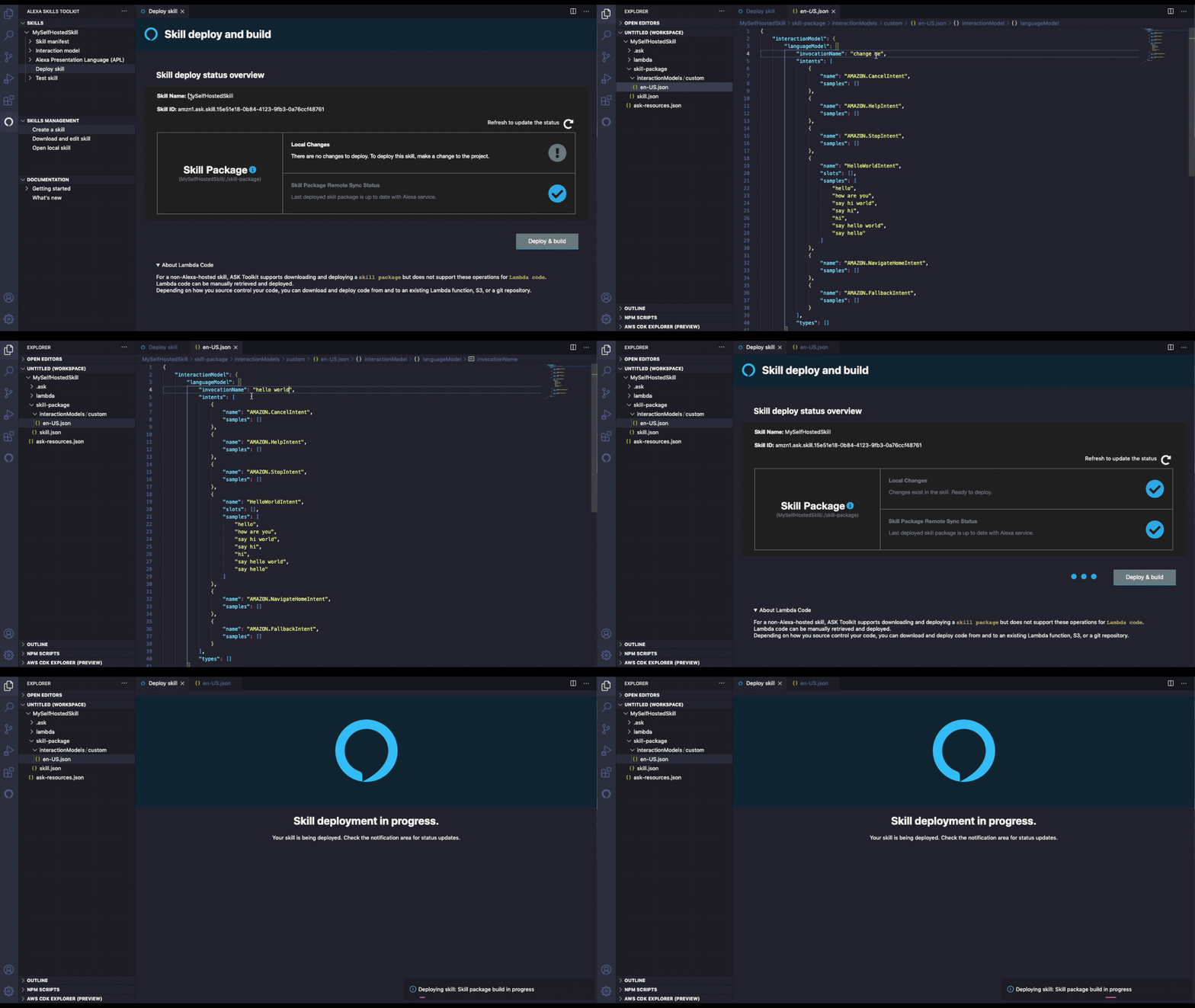
- Deploy all changes in your skill, using the Deploy skill option under the Skills pane -> YourAwesomeSkill.
- A skill must be synchronized with changes made in the console in order to deploy. The Skill deploy status overview displays skill local changes and the skill remote sync status to guide you how to successfully deploy.
- Alexa Skills Toolkit supports deployment of Alexa-hosted skills, using Git. Commit any changes you wish to deploy to your skill's
masterbranch. You can use VS Code built-in Git support or any Git client. - Alexa Skills Toolkit also supports the deployment of self-hosted skills. However, only the skill package can be deployed. Depending on how you source control your code, you can download and deploy skill code from and to an existing Lambda function, S3, or a git repository.
Note: Alexa Skills Toolkit does not support deployment of the skill code for a self-hosted skill, but you can set up your own skill service endpoint in the
skill.jsonfile. The endpoint will receive POST requests when a user interacts with your Alexa Skills. SeeFAQsfor more information.
-
Documentation
- Quickly jump to Alexa Skills Kit docs using the links under Documentation pane.
-
Profile Manager
- Create or delete profiles using Profile Manager under the hamburger menu (
...) of Skill Management pane. - Quickly jump between multiple developer profiles using the
ASK Profilestatus bar item.
- Create or delete profiles using Profile Manager under the hamburger menu (
and many more ...
FAQs
-
How do I setup and configure Alexa Skills Kit Toolkit extension when doing Visual Studio Code Remote Development using SSH? > Note: Install Remote - SSH extension on Visual Studio Code, then connect to remote machine over SSH.
- Install Alexa Skills Kit Toolkit extension on SSH after connecting to remote machine over SSH.
- Forward port 9090 on Remote-SSH extension, please refer to Forwarding a port / creating SSH tunnel.
- Click on the Alexa activity tab icon and sign in.
-
What if I failed to sign in Amazon account over SSH remote development?
- Please refer to Forwarding a port / creating SSH tunnel to check whether you have forwarded port 9090.
-
Why do I get a prompt for Git credentials when an Alexa hosted skill is created or downloaded?
- The git credential is used to access the AWS CodeCommit repository that the hosted skill resides at. This is one of the AWS resources Alexa-hosted skills service provides when creating a skill, explained here.
- To get the hosted skills' git credentials, you can call SMAPI API manually, or use the ASK CLI command. The git credentials are short-lived, and need to be refreshed periodically, to keep being able to access the locally cloned hosted skill git.
- The ASK Toolkit extension is able to automatically configure the credential helper for the hosted skills, and fetch the credentials whenever executing git operations. However, we observed that some specific versions(2.26.x and 2.25.x) of git cannot configure the credential helper properly, leading to the Git credentials prompt.
- Therefore, we suggest checking your git version using
git version. If it is versions 2.25.x or 2.26.x, you need to update to Git >= 2.27.x. This should prevent being asked for Git credentials again. - Otherwise, we suggest you create an issue report.
-
How do I set up my own skill service endpoint for a self-hosted skill?
- You can specify your skill's service endpoint by updating the
apisfiled in theskill.json. The endpoint will receive POST requests when a user interacts with your Alexa Skills. The JSON snippet below shows how to set up your Lambda endpoint. The code below will set up your endpoint in theDefault Region."apis": { "custom": { "endpoint": { "uri": "arn:aws:lambda:us-west-2:123456789012:function:my-function" } } } - Skill endpoints can also be set up in a specific region. For each AWS region, there is an corresponding optimal ASK region code (
NA,EU,FE). See the best practices in choosing Lambda regions for the AWS region codes and corresponding optimal ASK region codes. Using the corresponding optimal codes is recommended and can reduce the overall latency of your skill. The JSON snippet below shows how to specify other regions. In this example, the AWS region code is (us-east-1) and the optimal ASK region code is (NA)."apis": { "custom": { "endpoint": { "uri": "arn:aws:lambda:us-west-2:123456789012:function:my-function" } "regions": { "NA": { "endpoint": { "uri":"arn:aws:lambda:us-east-1:123456789012:function:my-function" } }, } } }
- You can specify your skill's service endpoint by updating the
-
Why cannot I use the toolkit for deploying ACDL files?
- ASK Toolkit (
v2.4.0and above) provides syntax highlighting support forAlexa Conversations Descriptive Language (ACDL)files. ACDL is a beta feature and is currently under developer preview. - Since ACDL files need additional builds before deploying to the service, and since this development is still in beta phase, we do not yet provide support for the same. As ACDL and the development processes evolve, we will prioritize on improving the support in the toolkit.
- You will need to install the
ASK CLItool, to manage your ACDL skills. Please follow this documentation for more details.
- ASK Toolkit (
-
How can I test APL user events and audio output in simulator? > Note: The APL user events and audio output are available only in MacOS and Windows.
- ASK Toolkit simulator supports testing APL user events now. To enable this feature, follow Register device instructions to register your device in ASK toolkit.
-
How can I deregister my virtual device?
- To delete the device in ASK toolkit, please follow Delete device instructions.
- To deregister the device with your Amazon account, please follow Deregister a Device instructions.
-
The latest version seems to be not installable on my vscode. What is the minimum compatible vscode version for the toolkit?
- ASK Toolkit (`v2.5.
Extension points exported contracts — how you extend this code
GenericCommand (Interface)Core symbols most depended-on inside this repo
verboseShape
Languages
Modules by API surface
For agents
$ claude mcp add ask-toolkit-for-vscode \
  -- python -m otcore.mcp_server <graph>