github.com/alemelis/sd-webui-ar @main
Chat with this repoBrowse by type
What it actually does AI analysis from the code graph — generated when you open this
README
Stable Diffusion WebUI Aspect Ratio selector
Extension for AUTOMATIC1111/stable-diffusion-webui adding image aspect ratio selector buttons.
Updates
- 20/02/2023 :warning: this update will remove your local config files (
aspect_ratios.txtandresolutions.txt) and it will create new default ones. These can be then modified freely and preserved in the future. For more info read here.
Install
Browse to the Extensions tab -> go to Install from URL -> paste in https://github.com/alemelis/sd-webui-ar -> click Install
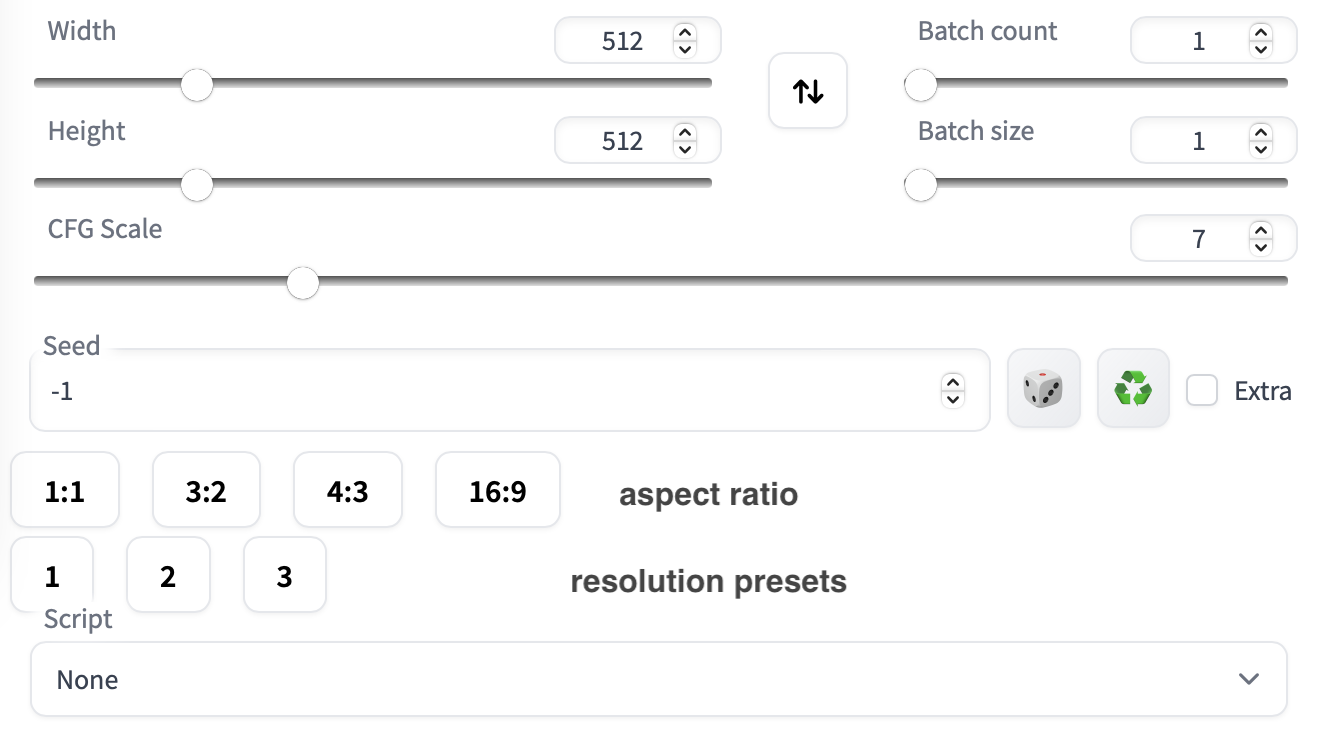
Here's how the UI looks like after installing this extension
Usage
- Click on the aspect ratio button you want to set. In the case of an aspect ratio greater than 1, the script fixes the width and changes the height. Whereas if the aspect ratio is smaller than 1, the width changes while the height is fixed.
- Reset image resolution by clicking on one of the buttons on the second row.
Configuration
Aspect ratios can be defined in the /sd-webui-ar/aspect_ratios.txt file. For example,
1:1, 1.0
3:2, 3/2
4:3, 4/3
16:9, 16/9
# 6:13, 6/13
# 9:16, 9/16
# 3:5, 3/5
# 2:3, 2/3
# 19:16, 19/16 # fox movietone
# 5:4, 5/4 # medium format photo
# 11:8, 11/8 # academy standard
# IMAX, 1.43
# 14:9, 14/9
# 16:10, 16/10
# 𝜑, 1.6180 # golden ratio
# 5:3, 5/3 # super 16mm
# 1.85, 1.85 # US widescreen cinema
# DCI, 1.9 # digital imax
# 2:1, 2.0 # univisium
# 70mm, 2.2
# 21:9, 21/9 # cinematic wide screen
# δ, 2.414 # silver ratio
# UPV70, 2.76 # ultra panavision 70
# 32:9, 32/9 # ultra wide screen
# PV, 4.0 # polyvision
Note the # marking the line as a comment, i.e. the extension is not reading that line. To use a custom value, un-comment the relative line by removing the starting #.
A custom aspect ratio is defined as button-label, aspect-ratio-value # comment. It is recommended to set the aspect-ratio-value to a fraction, but a float or int will work as well. The # comment is optional.
The button-label will be displayed inside the button. It can be anything you like.
Resolutions presets are defined inside resolutions.txt file,
1, 512, 512 # 1:1 square
2, 768, 512 # 3:2 landscape
3, 403, 716 # 9:16 portrait
The format to be used is button-label, width, height, # optional comment. As before, lines starting with # will be ignored.
Calculator Panel
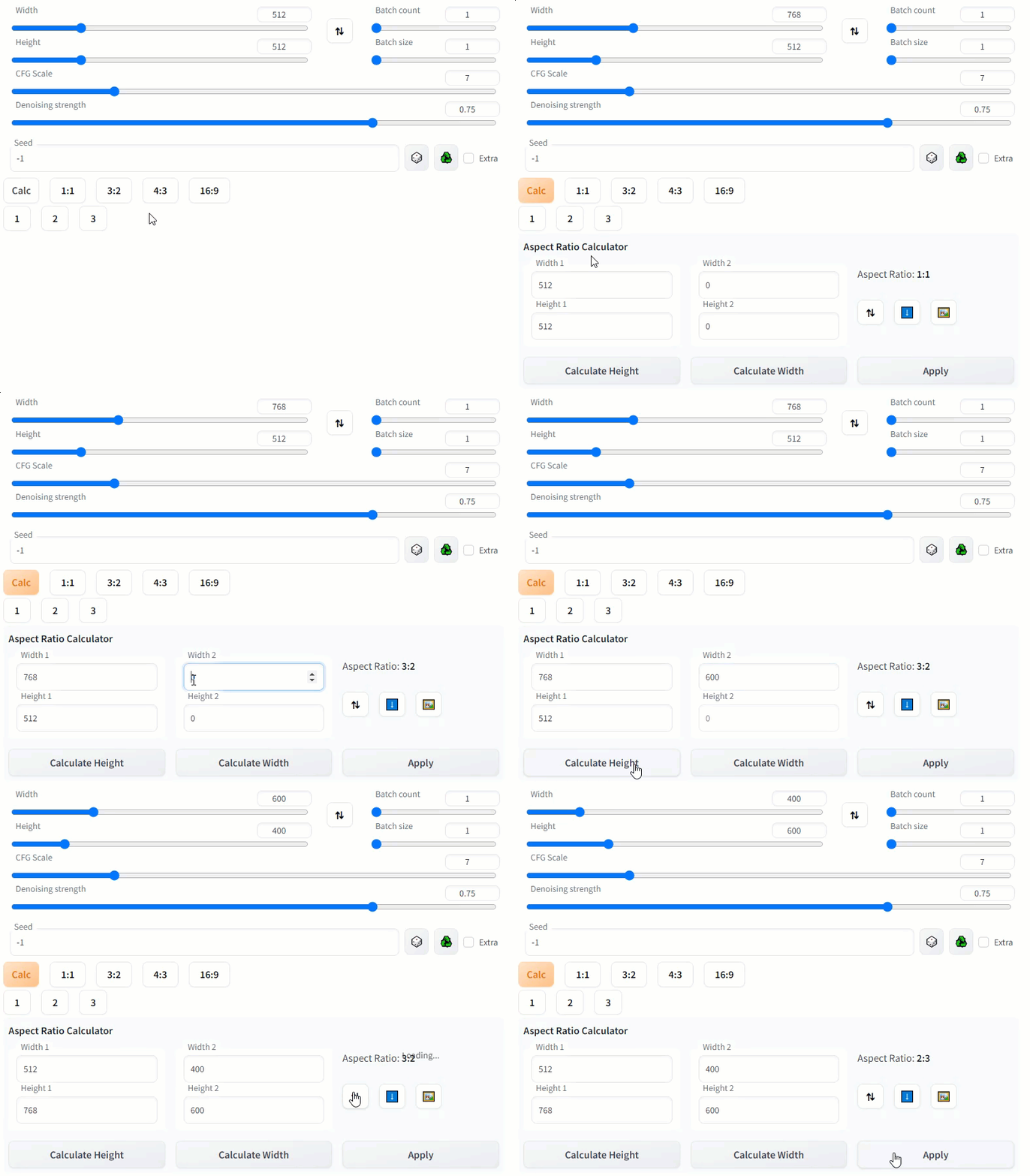
Use the calculator to determine new width or height values based on the aspect ratio of source dimensions.
- Click Calc to show or hide the aspect ratio calculator
- Set the source dimensions:
- Enter manually, or
- Click ⬇️ to get source dimentions from txt2img/img2img sliders, or
- Click 🖼️ to get source dimensions from input image component on the current tab
- Click ⇅ to swap the width and height, if desired
- Set the desired width or height, then click either Calculate Height or Calculate Width to calculate the missing value
- Click Apply to send the values to the txt2txt/img2img sliders
Core symbols most depended-on inside this repo
Shape
Languages
Modules by API surface
For agents
$ claude mcp add sd-webui-ar \
  -- python -m otcore.mcp_server <graph>