hub / github.com/aki77/rails-template-inspector
github.com/aki77/rails-template-inspector @v0.8.0
Chat with this repo
40 symbols
67 edges
10 files
0 documented · 0%
Browse by type
What it actually does AI analysis from the code graph — generated when you open this
loading…
README
<rails-inspector>
This custom element allows users to jump to local IDE code directly from browser element by just a simple click. It supports Rails templates.
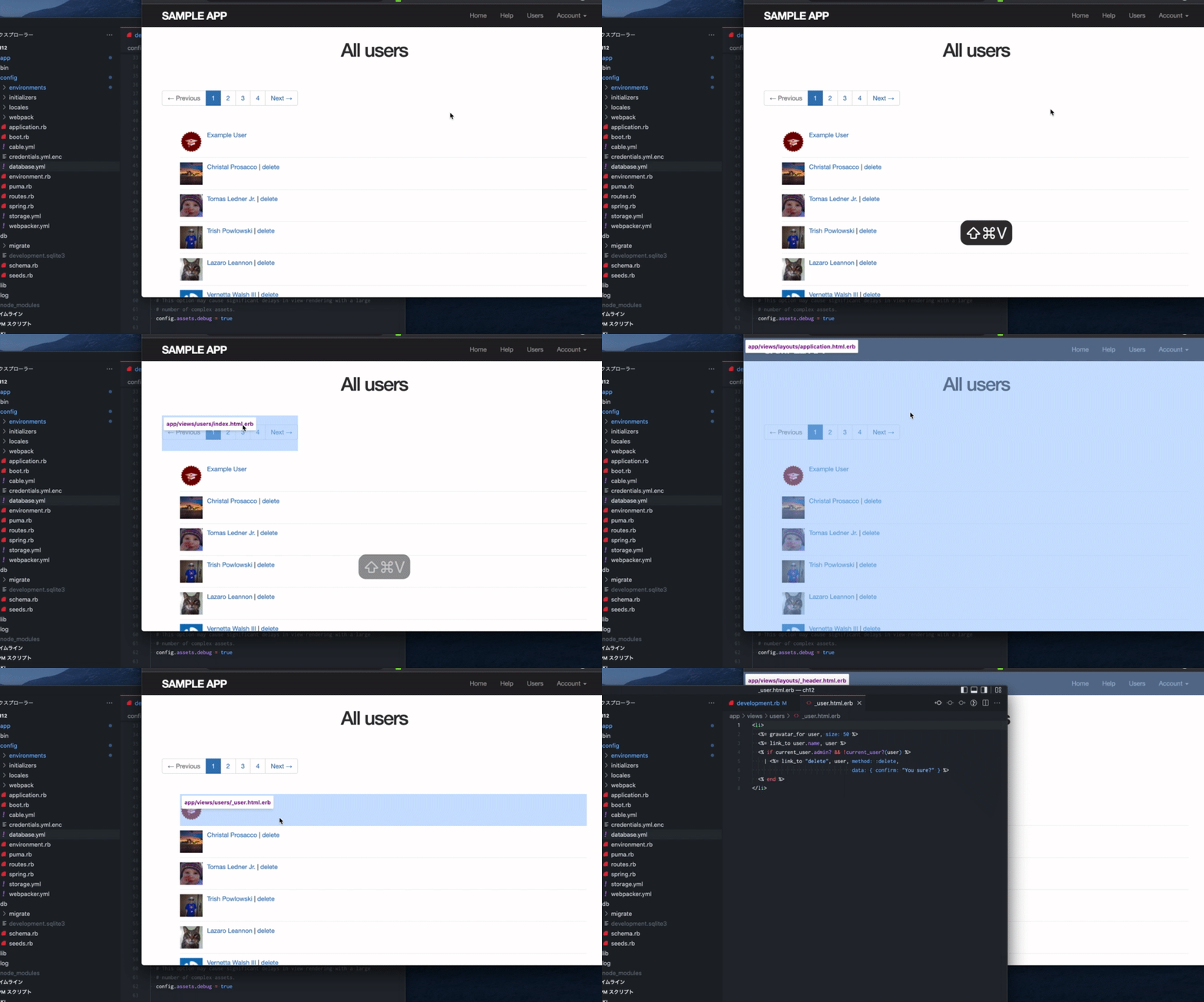
Usage
In config/environments/development.rb:
config.action_view.annotate_rendered_view_with_filenames = true
In app/views/layouts/application.html.erb:
<!DOCTYPE html>
<html>
<head>

</head>
<body>

<%= yield %>

<% if Rails.env.development? %>
  <script type="module" src="https://cdn.jsdelivr.net/npm/@aki77/rails-template-inspector@latest/dist/rails-template-inspector.mjs"></script>
  <rails-inspector url-prefix="vscode://file" root="<%= Rails.root %>" combo-key="command-shift-v"></rails-inspector>


<% end %>
</body>
</html>
Attributes
url-prefix: Custom URL Scheme for editor. (default:vscode://file)- Examples
- Visual Studio Code:
vscode://file - RubyMine:
x-mine://open?file= - MacVIM:
mvim://open?url=file:// - Emacs:
emacs://open?url=file://
- Visual Studio Code:
combo-key: Key to toggle inspector. (default:meta-shift-v)- any number of modifiers
control,shift,alt,meta,commandfollowed by zero or one regular key, separated by-. - examples:
control-shift,control-o,control-alt-s,meta-x,control-meta root: Rails root dir. (default:/)no-auto-disable: Keep the inspector when you open the editor. (default:false)
Notes
Disable confirmation dialog when opening external apps from Chrome on mac.
defaults write com.google.Chrome URLAllowlist -array "vscode://*"
https://owky.github.io/blog/2022/01/09/mac-chrome-url-allow-list.html
Extension points exported contracts — how you extend this code
HTMLElementTagNameMap (Interface)
(no doc)
types/rails-inspector-dropdown.d.ts
HTMLElementTagNameMap (Interface)
(no doc)
types/rails-inspector-button.d.ts
HTMLElementTagNameMap (Interface)
(no doc)
types/rails-inspector.d.ts
HTMLElementTagNameMap (Interface)
(no doc)
src/rails-inspector-dropdown.ts
HTMLElementTagNameMap (Interface)
(no doc)
src/rails-inspector.ts
HTMLElementTagNameMap (Interface)
(no doc)
src/rails-inspector-button.ts
Core symbols most depended-on inside this repo
disable
called by 3
src/rails-inspector.ts
findTarget
called by 3
src/utils.ts
_removeEventListener
called by 2
src/rails-inspector.ts
basename
called by 1
src/rails-inspector-dropdown.ts
_handleDropdownItemClick
called by 1
src/rails-inspector-dropdown.ts
_dispatchOpen
called by 1
src/rails-inspector-dropdown.ts
enable
called by 1
src/rails-inspector.ts
toggle
called by 1
src/rails-inspector.ts
Shape
Languages
TypeScript100%
Modules by API surface
src/rails-inspector.ts13 symbols
src/rails-inspector-dropdown.ts9 symbols
src/utils.ts5 symbols
src/rails-inspector-button.ts4 symbols
types/rails-inspector.d.ts3 symbols
types/rails-inspector-dropdown.d.ts3 symbols
types/rails-inspector-button.d.ts3 symbols
For agents
$ claude mcp add rails-template-inspector \
  -- python -m otcore.mcp_server <graph>