github.com/ajith-ab/react-native-receive-sharing-intent @1.0.1
Chat with this repoWhat it actually does AI analysis from the code graph — generated when you open this
README
react-native-receive-sharing-intent
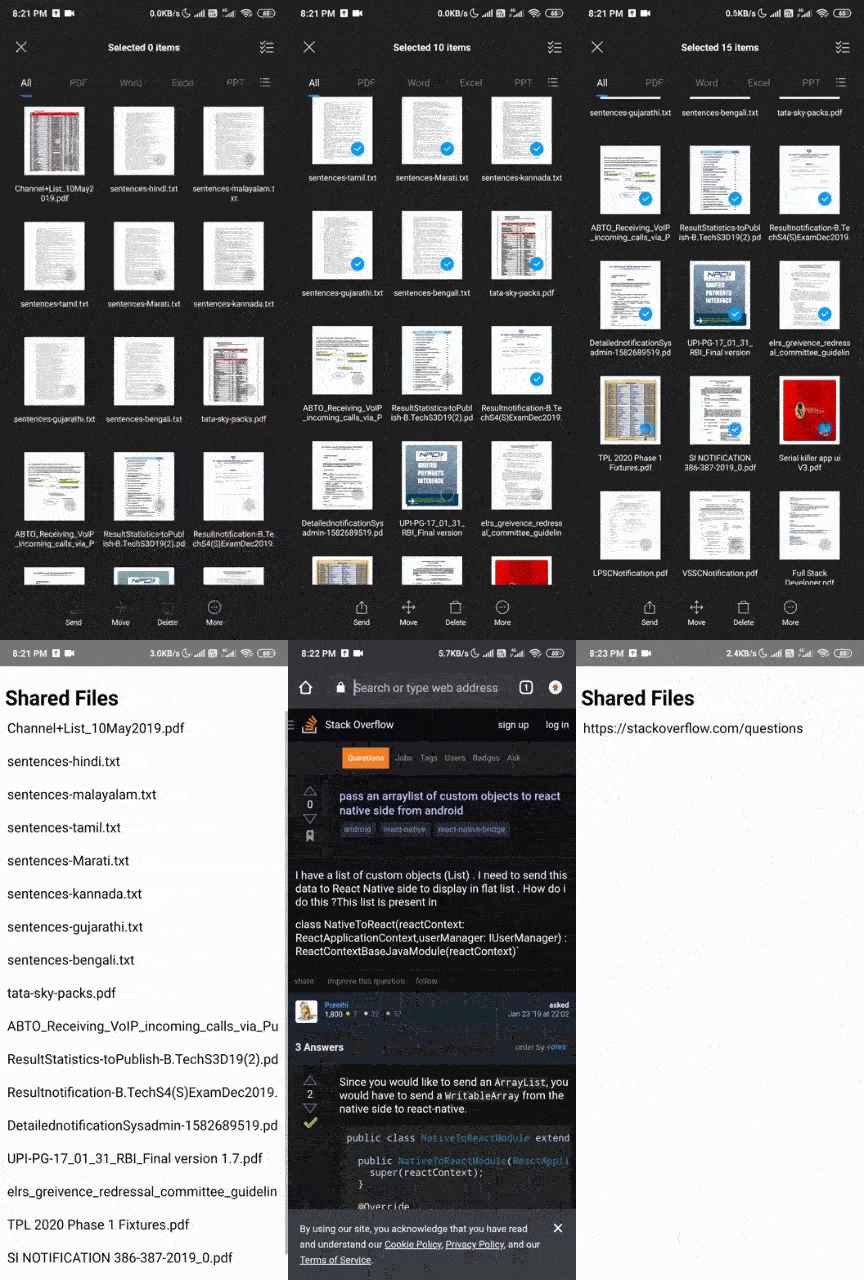
A React Native plugin that enables React Native apps to receive sharing photos, videos, text, urls or any other file types from another app.
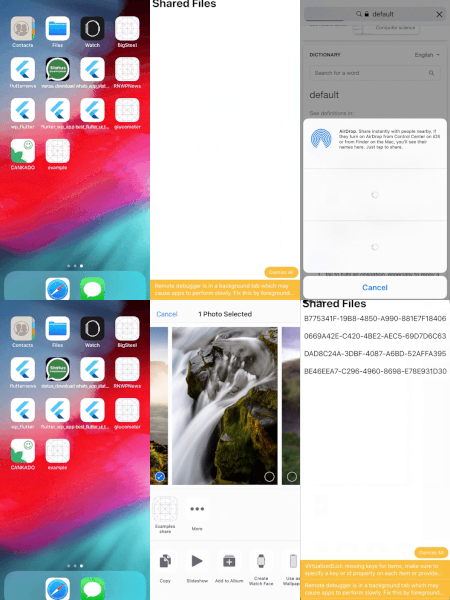
Also, supports iOS Share extension and launching the host app automatically. Check the provided example for more info.
Demo
| Android | Ios |
|---|---|
 |
 |
Installation
Npm
$ npm install react-native-receive-sharing-intent --save
Yarn
$ yarn add react-native-receive-sharing-intent
Mostly automatic installation less than React Native 0.60.0
$ react-native link react-native-receive-sharing-intent
Note: Ios and Android on Debbuging time not working at sometimes while App is Closed
Android
<Project_folder>/android/app/src/main/manifest.xml
<manifest xmlns:android="http://schemas.android.com/apk/res/android"
  package="com.example">
    ....

    <uses-permission android:name="android.permission.READ_EXTERNAL_STORAGE"/>

      <application .... >
            <activity
              ....
              android:launchMode="singleTop">

            .....
          <intent-filter>
              <action android:name="android.intent.action.VIEW" />
              <category android:name="android.intent.category.DEFAULT" />
              <category android:name="android.intent.category.BROWSABLE" />

              <data
                  android:scheme="https"
                  android:host="example.com"
                  android:pathPrefix="/invite"/>
          </intent-filter>


          <intent-filter>
              <action android:name="android.intent.action.SEND" />
              <category android:name="android.intent.category.DEFAULT" />
              <data android:mimeType="text/*" />
          </intent-filter>


          <intent-filter>
              <action android:name="android.intent.action.SEND" />
              <category android:name="android.intent.category.DEFAULT" />
              <data android:mimeType="image/*" />
          </intent-filter>

          <intent-filter>
              <action android:name="android.intent.action.SEND_MULTIPLE" />
              <category android:name="android.intent.category.DEFAULT" />
              <data android:mimeType="image/*" />
          </intent-filter>


          <intent-filter>
              <action android:name="android.intent.action.SEND" />
              <category android:name="android.intent.category.DEFAULT" />
              <data android:mimeType="video/*" />
          </intent-filter>
          <intent-filter>
              <action android:name="android.intent.action.SEND_MULTIPLE" />
              <category android:name="android.intent.category.DEFAULT" />
              <data android:mimeType="video/*" />
          </intent-filter>


          <intent-filter>
              <action android:name="android.intent.action.SEND" />
              <category android:name="android.intent.category.DEFAULT" />
              <data android:mimeType="*/*" />
          </intent-filter>
          <intent-filter>
              <action android:name="android.intent.action.SEND_MULTIPLE" />
              <category android:name="android.intent.category.DEFAULT" />
              <data android:mimeType="*/*" />
          </intent-filter>

             .....

       </activity>

     </application>

</manifest>
Ios
<project_folder>/ios/<project_name>/info.plist
<plist version="1.0">
<dict>

  .....

<key>CFBundleURLTypes</key>
    <array>
        <dict>
            <key>CFBundleTypeRole</key>
            <string>Editor</string>
            <key>CFBundleURLSchemes</key>
            <array>
                <string>ShareMedia</string>
            </array>
        </dict>
        <dict/>
    </array>

<key>NSPhotoLibraryUsageDescription</key>
  <string>
      To upload photos, please allow permission to access your photo library.
  </string>

  ....

</dict>
</plist>
<project_folder>/ios/<project_name>/AppDelegate.m
....

#import <React/RCTLinkingManager.h> // Add this Line in Header of file

....
@implementation AppDelegate

...

- (BOOL)application:(UIApplication *)application
            openURL:(NSURL *)url
            options:(NSDictionary<UIApplicationOpenURLOptionsKey,id> *)options
{
  return [RCTLinkingManager application:application openURL:url options:options];
}

@end
<project_folder>/ios/<your project name>/<your project name>.entitlements
....

    <key>com.apple.developer.associated-domains</key>
    <array>
        <string>applinks:example.com</string>
    </array>
....
Create Share Extension
- Using xcode, go to File/New/Target and Choose "Share Extension"
- Give it a name you want to show on while Sharing i.e. i Choose "Example Share"
<project_folder>/ios/<Your Share Extension Name>/info.plist
```xml ... NSExtension NSExtensionAttributes PHSupportedMediaTypes
                 <string>Video</string>

                 <string>Image</string>
             </array>
          <key>NSExtensionActivationRule</key>
          <dict>

              <key>NSExtensionActivationSupportsText</key>
              <true/>

            <key>NSExtensionActivationSupportsWebURLWithMaxCount</key>
            <integer>1</integer>

              <key>NSExtensionActivationSupportsImageWithMaxCount</key>
              <integer>100</integer>

              <key>NSExtensionActivationSupportsMovieWithMaxCount</key>
              <integer>100</integer>


              <key>NSExtensionActivationSupportsFileWithMaxCount</key>
              <integer>100</integer>
          </dict>
      </dict>
  <key>NSExtensionMainStoryboard</key>
  <string>MainInterface</string>
  <key>NSExtensionPointIdentifier</key>
  <string>com.apple.share-services</string>
</dict>
``/ios//ShareViewController.swift- <b> Note: Important </b> change thehostAppBundleIdentifiervalue to your main host app bundle identifier (example in my case:com.ajith.example) in thisShareViewController.swift`
```swift
// // ShareViewController.swift // Example Share // // Created by Ajith A B on 30/05/20. //
import UIKit import Social import MobileCoreServices import Photos
class ShareViewController: SLComposeServiceViewController { // TODO: IMPORTANT: This should be your host app bundle identifier let hostAppBundleIdentifier = "com.ajith.example" let sharedKey = "ShareKey" var sharedMedia: [SharedMediaFile] = [] var sharedText: [String] = [] let imageContentType = kUTTypeImage as String let videoContentType = kUTTypeMovie as String let textContentType = kUTTypeText as String let urlContentType = kUTTypeURL as String let fileURLType = kUTTypeFileURL as String;
override func isContentValid() -> Bool { return true }
override func viewDidLoad() { // This is called after the user selects Post. Do the upload of contentText and/or NSExtensionContext attachments. if let content = extensionContext!.inputItems[0] as? NSExtensionItem { if let contents = content.attachments { for (index, attachment) in (contents).enumerated() { if attachment.hasItemConformingToTypeIdentifier(imageContentType) { handleImages(content: content, attachment: attachment, index: index) } else if attachment.hasItemConformingToTypeIdentifier(textContentType) { handleText(content: content, attachment: attachment, index: index) } else if attachment.hasItemConformingToTypeIdentifier(fileURLType) { handleFiles(content: content, attachment: attachment, index: index) } else if attachment.hasItemConformingToTypeIdentifier(urlContentType) { handleUrl(content: content, attachment: attachment, index: index) } else if attachment.hasItemConformingToTypeIdentifier(videoContentType) { handleVideos(content: content, attachment: attachment, index: index) } } } } }
override func didSelectPost() { print("didSelectPost"); }
override func configurationItems() -> [Any]! { // To add configuration options via table cells at the bottom of the sheet, return an array of SLComposeSheetConfigurationItem here. return [] }
private func handleText (content: NSExtensionItem, attachment: NSItemProvider, index: Int) { attachment.loadItem(forTypeIdentifier: textContentType, options: nil) { [weak self] data, error in
  if error == nil, let item = data as? String, let this = self {

    this.sharedText.append(item)

    // If this is the last item, save imagesData in userDefaults and redirect to host app
    if index == (content.attachments?.count)! - 1 {
      let userDefaults = UserDefaults(suiteName: "group.\(this.hostAppBundleIdentifier)")
      userDefaults?.set(this.sharedText, forKey: this.sharedKey)
      userDefaults?.synchronize()
      this.redirectToHostApp(type: .text)
    }

  } else {
    self?.dismissWithError()
  }
}
}
private func handleUrl (content: NSExtensionItem, attachment: NSItemProvider, index: Int) { attachment.loadItem(forTypeIdentifier: urlContentType, options: nil) { [weak self] data, error in
  if error == nil, let item = data as? URL, let this = self {

    this.sharedText.append(item.absoluteString)

    // If this is the last item, save imagesData in userDefaults and redirect to host app
    if index == (content.attachments?.count)! - 1 {
      let userDefaults = UserDefaults(suiteName: "group.\(this.hostAppBundleIdentifier)")
      userDefaults?.set(this.sharedText, forKey: this.sharedKey)
      userDefaults?.synchronize()
      this.redirectToHostApp(type: .text)
    }

  } else {
    self?.dismissWithError()
  }
}
}
private func handleImages (content: NSExtensionItem, attachment: NSItemProvider, index: Int) { attachment.loadItem(forTypeIdentifier: imageContentType, options: nil) { [weak self] data, error in
  if error == nil, let url = data as? URL, let this = self {
  //  this.redirectToHostApp(type: .media)
    // Always copy
    let fileExtension = this.getExtension(from: url, type: .video)
    let newName = UUID().uuidString
    let newPath = FileManager.default
      .containerURL(forSecurityApplicationGroupIdentifier: "group.\(this.hostAppBundleIdentifier)")!
      .appendingPathComponent("\(newName).\(fileExtension)")
    let copied = this.copyFile(at: url, to: newPath)
    if(copied) {
      this.sharedMedia.append(SharedMediaFile(path: newPath.absoluteString, thumbnail: nil, duration: nil, type: .image))
    }

    // If this is the last item, save imagesData in userDefaults and redirect to host app
    if index == (content.attachments?.count)! - 1 {
      let userDefaults = UserDefaults(suiteName: "group.\(this.hostAppBundleIdentifier)")
      userDefaults?.set(this.toData(data: this.sharedMedia), forKey: this.sharedKey)
      userDefaults?.synchronize()
      this.redirectToHostApp(type: .media)
    }

  } else {
    self?.dismissWithError()
  }
}
}
private func handleVideos (content: NSExtensionItem, attachment: NSItemProvider, index: Int) { attachment.loadItem(forTypeIdentifier: videoContentType, options:nil) { [weak self] data, error in
  if error == nil, let url = data as? URL, let this = self {

    // Always copy
    let fileExtension = this.getExtension(from: url, type: .video)
    let newName = UUID().uuidString
    let newPath = FileManager.default
      .containerURL(forSecurityApplicationGroupIdentifier: "group.\(this.hostAppBundleIdentifier)")!
      .appendingPathComponent("\(newName).\(fileExtension)")
    let copied = this.copyFile(at: url, to: newPath)
    if(copied) {
      guard let sharedFile = this.getSharedMediaFile(forVideo: newPath) el
Core symbols most depended-on inside this repo
getFileNamesShape
Languages
Modules by API surface
For agents
$ claude mcp add react-native-receive-sharing-intent \
  -- python -m otcore.mcp_server <graph>