github.com/aimeos/aimeos @2026.04.1 sqlite
README
<a href="https://aimeos.org/">
    <img src="https://aimeos.org/fileadmin/template/icons/logo.png" alt="Aimeos logo" title="Aimeos" align="center" />
</a>


<a href="https://packagist.org/packages/aimeos/aimeos" alt="Total Downloads"><img src="https://poser.pugx.org/aimeos/aimeos-laravel/d/total.svg" alt="Total Downloads" title="Total Downloads" /></a>
<a href="https://packagist.org/packages/aimeos/aimeos" alt="Latest Stable Version"><img src="https://poser.pugx.org/aimeos/aimeos/v/stable.svg" alt="Latest Stable Version" title="Latest Stable Version" /></a>
<a href="https://packagist.org/packages/aimeos/aimeos" alt="License"><img src="https://img.shields.io/github/license/aimeos/aimeos" alt="License" title="License" /></a>
<a href="https://github.com/aimeos/aimeos/issues" alt="Open issues"><img src="https://img.shields.io/github/issues/aimeos/aimeos?color=brightgreen" alt="Open issues" title="Open issues" /></a>


<a href="https://github.com/aimeos/aimeos"><img src="https://img.shields.io/github/followers/aimeos?label=Followers&style=social"></a>
<a href="https://twitter.com/intent/follow?screen_name=aimeos"><img src="https://img.shields.io/twitter/follow/aimeos?style=social"></a>
<a href="https://www.youtube.com/c/Aimeos"><img src="https://img.shields.io/youtube/channel/subscribers/UCjKBbV2hSQjBy_8IkSkG4FQ?style=social"></a>
:star: Star us on GitHub — it motivates us a lot! 😀
<img src="https://github-readme-stats.vercel.app/api?username=aimeos&count_private=true&include_all_commits=true&show_icons=true&bg_color=90,103050,109095&title_color=fff&text_color=fff&icon_color=fff&hide=prs" alt="Aimeos GitHub stats" />
Aimeos - THE Laravel ecommerce platform
Aimeos is THE ultra-fast, cloud-native and API-first e-commerce platform! You can install it within 5 minutes and can adapt, extend, overwrite and customize anything to your needs.

Features
Aimeos is a full-featured e-commerce package:
- JSON REST API based on jsonapi.org
- GraphQL API for administration
- Perfect fit for AWS, Google, Azure and Kubernetes based clouds
- Multi vendor, multi channel and multi warehouse
- From one to 1,000,000,000+ items
- Extremly fast down to 20ms
- For multi-tentant e-commerce SaaS solutions with unlimited vendors
- Bundles, vouchers, virtual, configurable, custom and event products
- Subscriptions with recurring payments
- 100+ payment gateways
- Full RTL support (frontend and backend)
- Block/tier pricing out of the box
- Extension for customer/group based prices
- Discount and voucher support
- Flexible basket rule system
- Full-featured admin backend
- Beautiful admin dashboard
- Configurable product data sets
- Completly modular structure
- Extremely configurable and extensible
- Extension for market places with millions of vendors
- Fully SEO optimized including rich snippets
- Translated to 30+ languages
- AI-based text translation
- Optimized for smart phones and tablets
- Secure and reviewed implementation
- High quality source code
... and more Aimeos features
Supported languages:
<a href="https://www.transifex.com/aimeos/"><img src="https://flagicons.lipis.dev/flags/4x3/us.svg" title="English" width="24"></a>
<a href="https://www.transifex.com/aimeos/dashboard/all_projects/de/"><img src="https://flagicons.lipis.dev/flags/4x3/de.svg" title="German" width="24"></a>
<a href="https://www.transifex.com/aimeos/dashboard/all_projects/fr/"><img src="https://flagicons.lipis.dev/flags/4x3/fr.svg" title="French" width="24"></a>
<a href="https://www.transifex.com/aimeos/dashboard/all_projects/es/"><img src="https://flagicons.lipis.dev/flags/4x3/es.svg" title="Spanish" width="24"></a>
<a href="https://www.transifex.com/aimeos/dashboard/all_projects/nl/"><img src="https://flagicons.lipis.dev/flags/4x3/nl.svg" title="Dutch" width="24"></a>
<a href="https://www.transifex.com/aimeos/dashboard/all_projects/it/"><img src="https://flagicons.lipis.dev/flags/4x3/it.svg" title="Italian" width="24"></a>
<a href="https://www.transifex.com/aimeos/dashboard/all_projects/pt/"><img src="https://flagicons.lipis.dev/flags/4x3/pt.svg" title="Portuguese" width="24"></a>
<a href="https://www.transifex.com/aimeos/dashboard/all_projects/da/"><img src="https://flagicons.lipis.dev/flags/4x3/dk.svg" title="Danish" width="24"></a>
<a href="https://www.transifex.com/aimeos/dashboard/all_projects/fi/"><img src="https://flagicons.lipis.dev/flags/4x3/fi.svg" title="Finnish" width="24"></a>
<a href="https://www.transifex.com/aimeos/dashboard/all_projects/sv/"><img src="https://flagicons.lipis.dev/flags/4x3/sv.svg" title="Swedish" width="24"></a>
<a href="https://www.transifex.com/aimeos/dashboard/all_projects/no/"><img src="https://flagicons.lipis.dev/flags/4x3/no.svg" title="Norwegian" width="24"></a>
<a href="https://www.transifex.com/aimeos/dashboard/all_projects/pl/"><img src="https://flagicons.lipis.dev/flags/4x3/pl.svg" title="Polish" width="24"></a>
<a href="https://www.transifex.com/aimeos/dashboard/all_projects/hu/"><img src="https://flagicons.lipis.dev/flags/4x3/hu.svg" title="Hungarian" width="24"></a>
<a href="https://www.transifex.com/aimeos/dashboard/all_projects/ru/"><img src="https://flagicons.lipis.dev/flags/4x3/ru.svg" title="Russian" width="24"></a>
<a href="https://www.transifex.com/aimeos/dashboard/all_projects/uk/"><img src="https://flagicons.lipis.dev/flags/4x3/ua.svg" title="Ukrainian" width="24"></a>
<a href="https://www.transifex.com/aimeos/dashboard/all_projects/hr/"><img src="https://flagicons.lipis.dev/flags/4x3/hr.svg" title="Croatian" width="24"></a>
<a href="https://www.transifex.com/aimeos/dashboard/all_projects/sl/"><img src="https://flagicons.lipis.dev/flags/4x3/sl.svg" title="Slovenian" width="24"></a>
<a href="https://www.transifex.com/aimeos/dashboard/all_projects/ro/"><img src="https://flagicons.lipis.dev/flags/4x3/ro.svg" title="Romanian" width="24"></a>
<a href="https://www.transifex.com/aimeos/dashboard/all_projects/cs/"><img src="https://flagicons.lipis.dev/flags/4x3/cz.svg" title="Czech" width="24"></a>
<a href="https://www.transifex.com/aimeos/dashboard/all_projects/sr/"><img src="https://flagicons.lipis.dev/flags/4x3/sr.svg" title="Serbian" width="24"></a>
<a href="https://www.transifex.com/aimeos/dashboard/all_projects/sk/"><img src="https://flagicons.lipis.dev/flags/4x3/sk.svg" title="Slovak" width="24"></a>
<a href="https://www.transifex.com/aimeos/dashboard/all_projects/et/"><img src="https://flagicons.lipis.dev/flags/4x3/et.svg" title="Estonian" width="24"></a>
<a href="https://www.transifex.com/aimeos/dashboard/all_projects/lv/"><img src="https://flagicons.lipis.dev/flags/4x3/lv.svg" title="Latvian" width="24"></a>
<a href="https://www.transifex.com/aimeos/dashboard/all_projects/tr/"><img src="https://flagicons.lipis.dev/flags/4x3/tr.svg" title="Turkish" width="24"></a>
<a href="https://www.transifex.com/aimeos/dashboard/all_projects/ar/"><img src="https://flagicons.lipis.dev/flags/4x3/sa.svg" title="Arabic" width="24"></a>
<a href="https://www.transifex.com/aimeos/dashboard/all_projects/fa/"><img src="https://flagicons.lipis.dev/flags/4x3/ir.svg" title="Persian" width="24"></a>
<a href="https://www.transifex.com/aimeos/dashboard/all_projects/zh/"><img src="https://flagicons.lipis.dev/flags/4x3/cn.svg" title="Chinese" width="24"></a>
<a href="https://www.transifex.com/aimeos/dashboard/all_projects/ja/"><img src="https://flagicons.lipis.dev/flags/4x3/jp.svg" title="Japanese" width="24"></a>
<a href="https://www.transifex.com/aimeos/dashboard/all_projects/id/"><img src="https://flagicons.lipis.dev/flags/4x3/id.svg" title="Indonesian" width="24"></a>
<a href="https://www.transifex.com/aimeos/dashboard/all_projects/vi/"><img src="https://flagicons.lipis.dev/flags/4x3/vi.svg" title="Vietnamese" width="24"></a>
<a href="https://www.transifex.com/aimeos/dashboard/all_projects/my/"><img src="https://flagicons.lipis.dev/flags/4x3/my.svg" title="Burmese" width="24"></a>
<a href="https://www.transifex.com/aimeos/dashboard/all_projects/ko/"><img src="https://flagicons.lipis.dev/flags/4x3/kr.svg" title="Korean" width="24"></a>
Check out the demos:
Headless distribution
To build a single page application (SPA) respectively a progressive web application (PWA), the Aimeos headless distribution is the right choice with API-only and JWT authentication pre-configured:
:star: Aimeos headless distribution
Integrate into existing applications
You already have an existing Laravel application and want to add a shop to your web site? Install the Aimeos composer package for Laravel and add e-commerce to your existing application in minutes:
:star: Aimeos Laravel package
Standalone application
- Requirements
- Installation
- Frontend
- Backend
- Customize
- Multi-language
- Multi-routing
- Multi-vendor
- License
- Links
Requirements
The Aimeos shop distribution requires: - Linux/Unix, WAMP/XAMP or MacOS environment - PHP >= 8.2 - MySQL >= 5.7.8, MariaDB >= 10.2.2, PostgreSQL 9.6+, SQL Server 2019+ - Web server (Apache, Nginx or integrated PHP web server for testing)
If required PHP extensions are missing, composer will tell you about the missing
dependencies.
If you want to upgrade between major versions, please have a look into the upgrade guide!
Installation
To install the Aimeos shop application, you need composer 2.2+. On the CLI, execute this command for a complete installation including a working setup:
wget https://getcomposer.org/download/latest-stable/composer.phar -O composer
php composer create-project aimeos/aimeos myshop
You will be asked for the parameters of your database and mail server as well as an e-mail and password used for creating the administration account.
In a local environment, you can use the integrated PHP web server to test your new Aimeos installation. Simply execute the following command to start the web server:
cd myshop
php artisan serve
Note: In an hosting environment, the document root of your virtual host must point to
the /.../myshop/public/ directory and you have to change the APP_URL setting in your .env
file to your domain without port, e.g.:
APP_URL=http://myhostingdomain.com
Frontend
After the installation, you can test the Aimeos shop frontend by calling the URL of your VHost in your browser. If you use the integrated PHP web server, you should browse this URL: http://127.0.0.1:8000

Backend
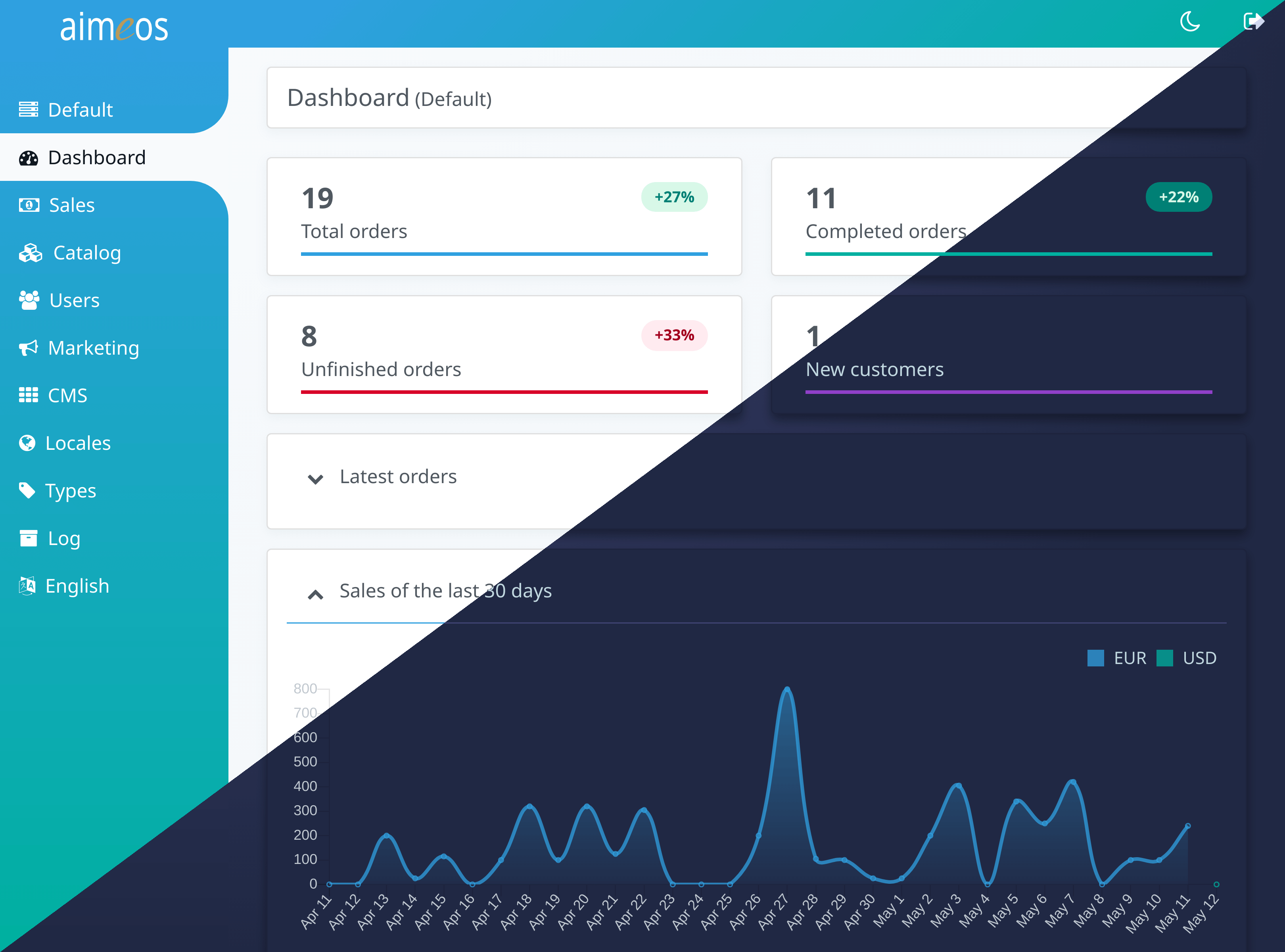
The Aimeos administration interface will be available at /admin in your VHost. When using
the integrated PHP web server, call this URL: http://127.0.0.1:8000/admin
Customize
Laravel and the Aimeos e-commerce package are extremely flexible and highly customizable. A lot of documentation for the Laravel framework and the Aimeos e-commerce framework exists. If you have questions about Aimeos, don't hesitate to ask in our Aimeos forum.
For more details about Aimeos Laravel integration, please have a look at its repository.
Multi-language
For shops which offers multiple languages, just add this line to your ./myshop/.env file:
SHOP_MULTILOCALE=true
Then, the language will be added to the routes automatically. You can set up the available languages in the "Locale > Locale" panel of the Aimeos admin backend.
Multi-routing
If you want to have all category, product and page URLs as top level URLs like /shoes,
/my-sneaker and /about-us, then you can enable the Aimeos multi-routing feature in
your ./myshop/.env file:
SHOP_MULTIROUTE=true
Caution: This will affect performance as it requires additional database queries for each request!
Multi-vendor
To enable multi-vendor features, add this settings to the ./myshop/.env file:
SHOP_MULTISHOP=true
If you want to allow vendors to register themselves as sellers, set this option in the
./myshop/.env file too:
SHOP_REGISTRATION=true
By default, newly registered sellers have administrator privileges in the backend for
their own site. For a more limited access to the backend, you can change the permission
level to "editor" in the ./myshop/.env file:
SHOP_PERMISSION=editor
You can change the permissions associated to "admin" or "editor" by adding your own version of the JQAdm resource configuration to the "admin"
Core symbols most depended-on inside this repo
isArrayShape
Languages
Modules by API surface
Dependencies from manifests, versioned
Datastores touched
For agents
$ claude mcp add aimeos \
  -- python -m otcore.mcp_server <graph>