github.com/agentic-labs/lsproxy @0.4.4
Chat with this repoWhat it actually does AI analysis from the code graph — generated when you open this
README

lsproxy - Precise code navigation via an API


What is lsproxy?
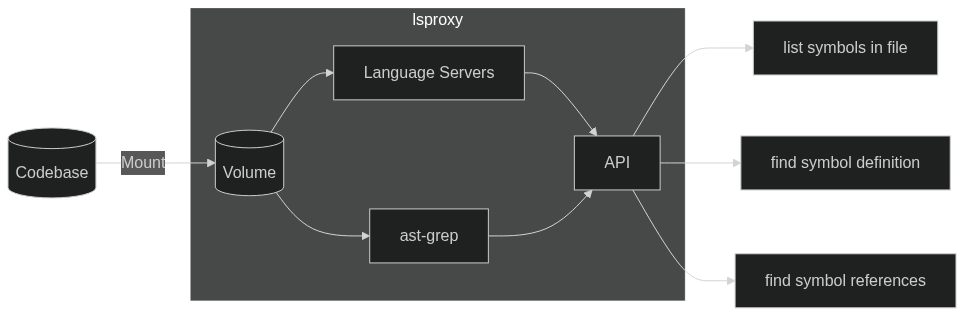
lsproxy offers IDE-like code analysis and navigation functionality in a docker container with a REST API.
It supports multiple languages and resolves relationships between code symbols (functions, classes, variables) anywhere in the project - which can be used to help AI assistants navigate a codebase or build custom code RAG systems.
lsproxy runs Language Servers and ast-grep under the hood, giving you precise search results without the headache of configuring and integrating language-specific tooling.
For more info, please refer to our API Reference.
Key Features
- 🎯 Precise Cross-File Code Navigation: Find symbol definitions and references across your entire project.
- 🌐 Unified API: Access multiple language servers through a single API.
- 🛠️ Auto-Configuration: Automatically detect and configure language servers based on your project files.
- 📊 Code Diagnostics: (Coming Soon) Get language-specific lint output from an endpoint.
- 🌳 Call & Type Hierarchies: (Coming Soon) Query multi-hop code relationships computed by the language servers.
- 🔄 Procedural Refactoring: (Coming Soon) Perform symbol operations like
rename,extract,auto importthrough the API. - 🧩 SDKs: Libraries to get started calling
lsproxyin popular languages.
Getting started
The easiest way to get started is to run our tutorial! Check it out at demo.lsproxy.dev
It's also super easy to run lsproxy on your code! We keep the latest version up to date on Docker Hub, and we have a Python SDK available via pip.
Install the sdk
pip install lsproxy-sdk
You can find the source for the SDK here
Run a container or add to compose
:warning: Version 0.2.0 and newer: JWT authentication is enabled by default for endpoints. So you MUST provide a secret or turn it off as described below
Authentication enabled
docker run -p 4444:4444 -v $WORKSPACE_PATH:/mnt/workspace -e JWT_SECRET=shared_secret agenticlabs/lsproxy
services:
  lsproxy:
    image: agenticlabs/lsproxy
    ports:
      - "4444:4444"
    environment:
      - JWT_SECRET=shared_secret
    volumes:
      - ${WORKSPACE_PATH}:/mnt/workspace
Authentication disabled
docker run -p 4444:4444 -v $WORKSPACE_PATH:/mnt/workspace -e USE_AUTH=false agenticlabs/lsproxy
services:
  lsproxy:
    image: agenticlabs/lsproxy
    ports:
      - "4444:4444"
    environment:
      - USE_AUTH=false
    volumes:
      - ${WORKSPACE_PATH}:/mnt/workspace
Configure an existing system
You can also configure an existing system to run lsproxy. Add the following line in your dockerfile or run it as part of a startup script
curl -sSL https://github.com/agentic-labs/lsproxy/releases/latest/download/install-lsproxy.sh | sh
Explore your workspace!
from lsproxy import Lsproxy

client = Lsproxy()
file_path = "relative/path/from/project/root.cpp"
symbols = client.definitions_in_file(file_path)
for symbol in symbols:
    print(f"{symbol.name} is defined in {file_path}")
Building products with lsproxy
If you're building AI coding agents or code RAG, or would like to use lsproxy in a commercial product, please reach out!
Contributing
We appreciate all contributions! You don't need to be an expert to help out. Please see CONTRIBUTING.md for more details on how to get started.
Questions? Reach out to us on Discord.
Community
We're building a community. Come hang out with us!
- 🌟 Star us on GitHub
- 💬 Chat with us on Discord
- ✏️ Start a GitHub Discussion
- 🐦 Follow us on Twitter
- 🕴️ Follow us on LinkedIn
Supported languages
We're looking to add new language support or better language servers so let us know what you need!
|Language|Server|URL|
|:-|:-|:-|
|C/C++|clangd|https://clangd.llvm.org/|
|Golang|gopls|https://github.com/golang/tools/tree/master/gopls|
|Java|jdtls|https://github.com/eclipse-jdtls/eclipse.jdt.ls|
|Javascript|typescript-language-server|https://github.com/typescript-language-server/typescript-language-server|
|PHP|phpactor|https://github.com/phpactor/phpactor|
|Python|jedi-language-server|https://github.com/pappasam/jedi-language-server|
|Rust|rust-analyzer|https://github.com/rust-lang/rust-analyzer|
|Typescript|typescript-language-server|https://github.com/typescript-language-server/typescript-language-server|
|Your Favorite Language | Awesome Language Server | https://github.com/agentic-labs/lsproxy/issues/new |
Extension points exported contracts — how you extend this code
LspClient (Interface)Core symbols most depended-on inside this repo
mapShape
Languages
Modules by API surface
For agents
$ claude mcp add lsproxy \
  -- python -m otcore.mcp_server <graph>