hub / github.com/addshore/browser-github-release-downloads
github.com/addshore/browser-github-release-downloads @v1.4.1
Chat with this repo
5 symbols
11 edges
2 files
5 documented · 100%
What it actually does AI analysis from the code graph — generated when you open this
loading…
README
GitHub release downloads

A browser extension that displays release download counters.
How to install?
Download it from:
- Chrome: https://chrome.google.com/webstore/detail/github-release-downloads/ncgomhdgmkicjeclohgokhciihpfdlhi
- Mozilla: https://addons.mozilla.org/en-US/firefox/addon/github-release-download-count/ (pending review)
- Edge: https://microsoftedge.microsoft.com/addons/detail/dafnpnmnbcjmjanjmcffnihflihgchaj (pending review)
- Safari: Use GitHubCounter from @aonez, which is based on this extension.
How it works?
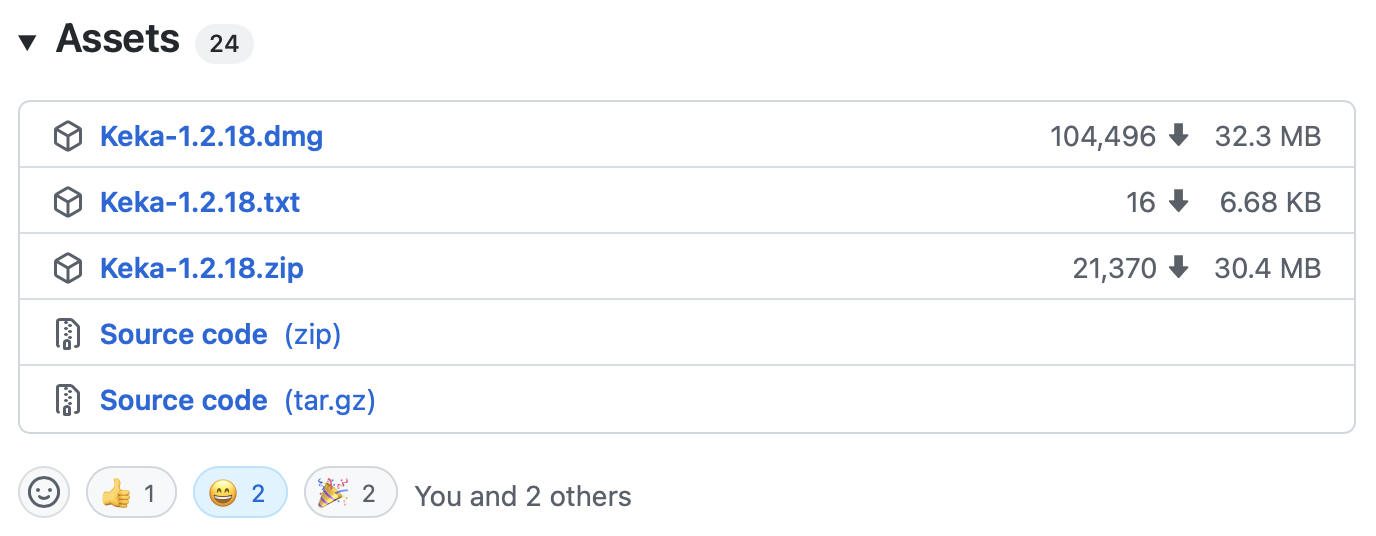
It just shows the downloads count near each release in GitHub. No toolbar elements, no bars, nothing else.
An example:
Icon
- Icon taken from the Safari version. Based on Nick Roach. Original icon can be found here.
Development
This extension uses webextension-toolbox
$ npm install
ERR_OSSL_EVP_UNSUPPORTED
If you get this error, try the following...
export NODE_OPTIONS=--openssl-legacy-provider
https://stackoverflow.com/questions/69394632/webpack-build-failing-with-err-ossl-evp-unsupported
While developing
npm run dev chrome
npm run dev firefox
npm run dev opera
npm run dev edge
If you have the browsers installed, you acn build and automatically open the extension in the browser.
npm run dev:chrome
npm run dev:firefox
npm run dev:opera
npm run dev:edge
For builds
npm run build chrome
npm run build firefox
npm run build opera
npm run build edge
For releasing
- Bump the version number in:
- package.json
- app/manifest.json
- Update the CHANGELOG.md
- Tag the change on Github (vx.x.x), DO NOT make a Github Release, this is done by Github Actions
- Wait for the Github actions to build the files
- See the STORE_NOTES.md file for helpful details on uploading...
Environment
The build tool also defines a variable named process.env.NODE_ENV in your scripts.
Core symbols most depended-on inside this repo
processAnchorscalled by 3
app/scripts/contentscript.js
checkUrlPattern
called by 2
app/scripts/contentscript.js
getReleaseUrls
called by 2
app/scripts/contentscript.js
observeDOM
called by 2
app/scripts/contentscript.js
hookPushState
called by 1
app/scripts/contentscript.js
Shape
Languages
TypeScript100%
Modules by API surface
app/scripts/contentscript.js5 symbols
For agents
$ claude mcp add browser-github-release-downloads \
  -- python -m otcore.mcp_server <graph>