github.com/acro5piano/typed-graphqlify @v3.1.6
Chat with this repoWhat it actually does AI analysis from the code graph — generated when you open this
README





typed-graphqlify
Build Typed GraphQL Queries in TypeScript. A better TypeScript + GraphQL experience.
Install
npm install --save typed-graphqlify
Or if you use Yarn:
yarn add typed-graphqlify
Motivation
We all know that GraphQL is so great and solves many problems that we have with REST APIs, like overfetching and underfetching. But developing a GraphQL Client in TypeScript is sometimes a bit of pain. Why? Let's take a look at the example we usually have to make.
When we use GraphQL library such as Apollo, We have to define a query and its interface like this:
interface GetUserQueryData {
  getUser: {
    id: number
    name: string
    bankAccount: {
      id: number
      branch?: string
    }
  }
}

const query = graphql(gql`
  query getUser {
    user {
      id
      name
      bankAccount {
        id
        branch
      }
    }
  }
`)

apolloClient.query<GetUserQueryData>(query).then(data => ...)
This is so painful.
The biggest problem is the redundancy in our codebase, which makes it difficult to keep things in sync. To add a new field to our entity, we have to care about both GraphQL and TypeScript interface. And type checking does not work if we do something wrong.
typed-graphqlify comes in to address this issues, based on experience from over a dozen months of developing with GraphQL APIs in TypeScript. The main idea is to have only one source of truth by defining the schema using GraphQL-like object and a bit of helper class. Additional features including graphql-tag, or Fragment can be implemented by other tools like Apollo.
How to use
Define GraphQL-like JS Object:
import { query, types, alias } from 'typed-graphqlify'

const getUserQuery = query('GetUser', {
  user: {
    id: types.number,
    name: types.string,
    bankAccount: {
      id: types.number,
      branch: types.optional.string,
    },
  },
})
Note that we use our types helper to define types in the result.
The getUserQuery has toString() method which converts the JS object into GraphQL string:
console.log(getUserQuery.toString())
// =>
//   query getUser {
//     user {
//       id
//       name
//       bankAccount {
//         id
//         branch
//       }
//     }
//   }
Finally, execute the GraphQL and type its result:
import { executeGraphql } from 'some-graphql-request-library'

// We would like to type this!
const data: typeof getUserQuery.data = await executeGraphql(getUserQuery.toString())

// As we cast `data` to `typeof getUserQuery.data`,
// Now, `data` type looks like this:
// interface result {
//   user: {
//     id: number
//     name: string
//     bankAccount: {
//       id: number
//       branch?: string
//     }
//   }
// }
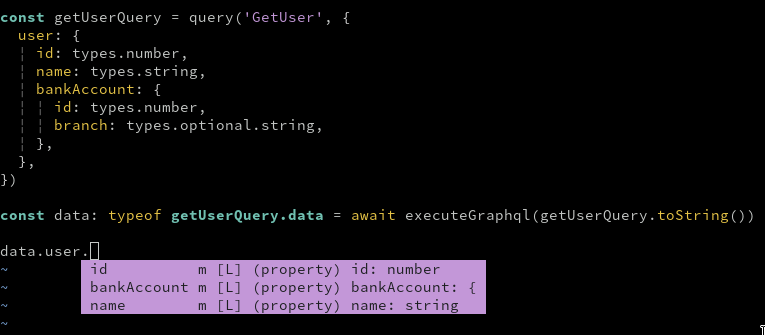
Features
Currently typed-graphqlify can convert these GraphQL features:
- Operations
- Query
- Mutation
- Subscription
- Inputs
- Variables
- Parameters
- Data structures
- Nested object query
- Array query
- Scalar types
numberstringboolean- Enum
- Constant
- Custom type
- Optional types, e.g.)
number | undefined - Fragments
- Inline Fragments
Examples
Basic Query
query getUser {
  user {
    id
    name
    isActive
  }
}
import { query, types } from 'typed-graphqlify'

query('getUser', {
  user: {
    id: types.number,
    name: types.string,
    isActive: types.boolean,
  },
})
Or without query name
query {
  user {
    id
    name
    isActive
  }
}
import { query, types } from 'typed-graphqlify'

query({
  user: {
    id: types.number,
    name: types.string,
    isActive: types.boolean,
  },
})
Basic Mutation
Use mutation. Note that you should use alias to remove arguments.
Note: When Template Literal Type is supported officially, we don't have to write alias. See https://github.com/acro5piano/typed-graphqlify/issues/158
mutation updateUserMutation($input: UserInput!) {
  updateUser: updateUser(input: $input) {
    id
    name
  }
}
import { mutation, alias } from 'typed-graphqlify'

mutation('updateUserMutation($input: UserInput!)', {
  [alias('updateUser', 'updateUser(input: $input)')]: {
    id: types.number,
    name: types.string,
  },
})
Or, you can also use params helper which is useful for inline arguments.
import { mutation, params, rawString } from 'typed-graphqlify'

mutation('updateUserMutation', {
  updateUser: params(
    {
      input: {
        name: rawString('Ben'),
        slug: rawString('/ben'),
      },
    },
    {
      id: types.number,
      name: types.string,
    },
  ),
})
Nested Query
Write nested objects just like GraphQL.
query getUser {
  user {
    id
    name
    parent {
      id
      name
      grandParent {
        id
        name
        children {
          id
          name
        }
      }
    }
  }
}
import { query, types } from 'typed-graphqlify'

query('getUser', {
  user: {
    id: types.number,
    name: types.string,
    parent: {
      id: types.number,
      name: types.string,
      grandParent: {
        id: types.number,
        name: types.string,
        children: {
          id: types.number,
          name: types.string,
        },
      },
    },
  },
})
Array Field
Just add array to your query. This does not change the result, but TypeScript will be aware the field is an array.
query getUsers {
  users: users(status: "active") {
    id
    name
  }
}
import { alias, query, types } from 'typed-graphqlify'

query('getUsers', {
  [alias('users', 'users(status: "active")')]: [{
    id: types.number,
    name: types.string,
  )],
})
Optional Field
Add types.optional or optional helper method to define optional field.
import { optional, query, types } from 'typed-graphqlify'

query('getUser', {
  user: {
    id: types.number,
    name: types.optional.string, // <-- user.name is `string | undefined`
    bankAccount: optional({      // <-- user.bankAccount is `{ id: number } | undefined`
      id: types.number,
    }),
  },
}
Constant field
Use types.constant method to define constant field.
query getUser {
  user {
    id
    name
    __typename # <-- Always `User`
  }
}
import { query, types } from 'typed-graphqlify'

query('getUser', {
  user: {
    id: types.number,
    name: types.string,
    __typename: types.constant('User'),
  },
})
Enum field
Use types.oneOf method to define Enum field. It accepts an instance of Array, Object and Enum.
query getUser {
  user {
    id
    name
    type # <-- `STUDENT` or `TEACHER`
  }
}
import { query, types } from 'typed-graphqlify'

const userType = ['STUDENT', 'TEACHER'] as const

query('getUser', {
  user: {
    id: types.number,
    name: types.string,
    type: types.oneOf(userType),
  },
})
import { query, types } from 'typed-graphqlify'

const userType = {
  STUDENT: 'STUDENT',
  TEACHER: 'TEACHER',
}

query('getUser', {
  user: {
    id: types.number,
    name: types.string,
    type: types.oneOf(userType),
  },
})
You can also use enum:
Deprecated: Don't use enum, use array or plain object to define enum if possible. typed-graphqlify can't guarantee inferred type is correct.
import { query, types } from 'typed-graphqlify'

enum UserType {
  'STUDENT',
  'TEACHER',
}

query('getUser', {
  user: {
    id: types.number,
    name: types.string,
    type: types.oneOf(UserType),
  },
})
Field with arguments
Use params to define field with arguments.
query getUser {
  user {
    id
    createdAt(format: "d.m.Y")
  }
}
import { query, types, params, rawString } from 'typed-graphqlify'

query('getUser', {
  user: {
    id: types.number,
    createdAt: params({ format: rawString('d.m.Y') }, types.string),
  },
})
Multiple Queries
Add other queries at the same level of the other query.
query getFatherAndMother {
  father {
    id
    name
  }
  mother {
    id
    name
  }
}
import { query, types } from 'typed-graphqlify'

query('getFatherAndMother', {
  father: {
    id: types.number,
    name: types.string,
  },
  mother: {
    id: types.number,
    name: types.number,
  },
})
Query Alias
Query alias is implemented via a dynamic property.
query getMaleUser {
  maleUser: user {
    id
    name
  }
}
import { alias, query, types } from 'typed-graphqlify'

query('getMaleUser', {
  [alias('maleUser', 'user')]: {
    id: types.number,
    name: types.string,
  },
}
Standard fragments
Use the fragment helper to create GraphQL Fragment, and spread the result into places the fragment is used.
query {
  user: user(id: 1) {
    ...userFragment
  }
  maleUsers: users(sex: MALE) {
    ...userFragment
  }
}

fragment userFragment on User {
  id
  name
  bankAccount {
    ...bankAccountFragment
  }
}

fragment bankAccountFragment on BankAccount {
  id
  branch
}
import { alias, fragment, query } from 'typed-graphqlify'

const bankAccountFragment = fragment('bankAccountFragment', 'BankAccount', {
  id: types.number,
  branch: types.string,
})

const userFragment = fragment('userFragment', 'User', {
  id: types.number,
  name: types.string,
  bankAccount: {
    ...bankAccountFragment,
  },
})

query({
  [alias('user', 'user(id: 1)')], {
    ...userFragment,
  },
  [alias('maleUsers', 'users(sex: MALE)')], {
    ...userFragment,
  },
}
Inline Fragment
Use on helper to write inline fragments.
query getHeroForEpisode {
  hero {
    id
    ... on Droid {
      primaryFunction
    }
    ... on Human {
      height
    }
  }
}
import { on, query, types } from 'typed-graphqlify'

query('getHeroForEpisode', {
  hero: {
    id: types.number,
    ...on('Droid', {
      primaryFunction: types.string,
    }),
    ...on('Human', {
      height: types.number,
    }),
  },
})
If you are using a discriminated union pattern, then you can use the onUnion helper, which will automatically generate the union type for you:
query getHeroForEpisode {
  hero {
    id
    ... on Droid {
      kind
      primaryFunction
    }
    ... on Human {
      kind
      height
    }
  }
}
import { onUnion, query, types } from 'typed-graphqlify'

query('getHeroForEpisode', {
  hero: {
    id: types.number,
    ...onUnion({
      Droid: {
        kind: types.constant('Droid'),
        primaryFunction: types.string,
      },
      Human: {
        kind: types.constant('Human'),
        height: types.number,
      },
    }),
  },
})
This function will return a type of A | B, meaning that you can use the following logic to differentiate between the 2 types:
const droidOrHuman = queryResult.hero
if (droidOrHuman.kind === 'Droid') {
  const droid = droidOrHuman
  // ... handle droid
} else if (droidOrHument.kind === 'Human') {
  const human = droidOrHuman
  // ... handle human
}
Directive
Directive is not supported, but you can use alias to render it.
query {
  myState: myState @client
}
import { alias, query } from 'typed-graphqlify'

query({
  [alias('myState', 'myState @client')]: types.string,
})
See more examples at src/__tests__/index.test.ts
Usage with React Native
This library uses Symbol and Map, meaning that if you are targeting ES5 and lower, you will need to polyfill both of them.
So, you may need to import babel-polyfill in App.tsx.
import 'babel-polyfill'
import * as React from 'react'
import { View, Text } from 'react-native'
import { query, types } from 'typed-graphqlify'

const queryString = query({
  getUser: {
    user: {
      id: types.number,
    },
  },
})

export class App extends React.Component<{}> {
  render() {
    return (
      <View>
        <Text>{queryString}</Text>
      </View>
    )
  }
}
See: https://github.com/facebook/react-native/issues/18932
Why not use apollo client:codegen?
There are some GraphQL -> TypeScript convertion tools. The most famous one is Apollo codegen:
https://github.com/apollographql/apollo-tooling#apollo-clientcodegen-output
In this section, we will go over why typed-graphqlify is a good alternative.
Disclaimer: I am not a heavy user of Apollo codegen, so the following points could be wrong. And I totally don't mean disrespect Apollo codegen.
Simplicity
Apollo codegen is a great tool. In addition to generating query interfaces, it does a lot of tasks including downloading schemas, schema validation, fragment spreading, etc.
However, great usability is the tradeoff of complexity.
There are some issues to generate interfaces with Apollo codegen.
- https://github.com/apollographql/apollo-tooling/issues/791
- https://github.com/apollographql/apollo-tooling/issues/678
I (and maybe everyone) don't know the exact reasons, but Apollo's codebase is too large to find out what the problem is.
On the other hand, typed-graphqlify is as simple as possible by
Extension points exported contracts — how you extend this code
Core symbols most depended-on inside this repo
Shape
Languages
Modules by API surface
For agents
$ claude mcp add typed-graphqlify \
  -- python -m otcore.mcp_server <graph>