hub / github.com/abhinavxd/libredesk
github.com/abhinavxd/libredesk @v2.4.0 sqlite
2,180 symbols
6,815 edges
362 files
1,179 documented · 54%
README

libredesk
Modern, open source, self-hosted omnichannel customer support desk. Live chat, email, and more in a single binary.
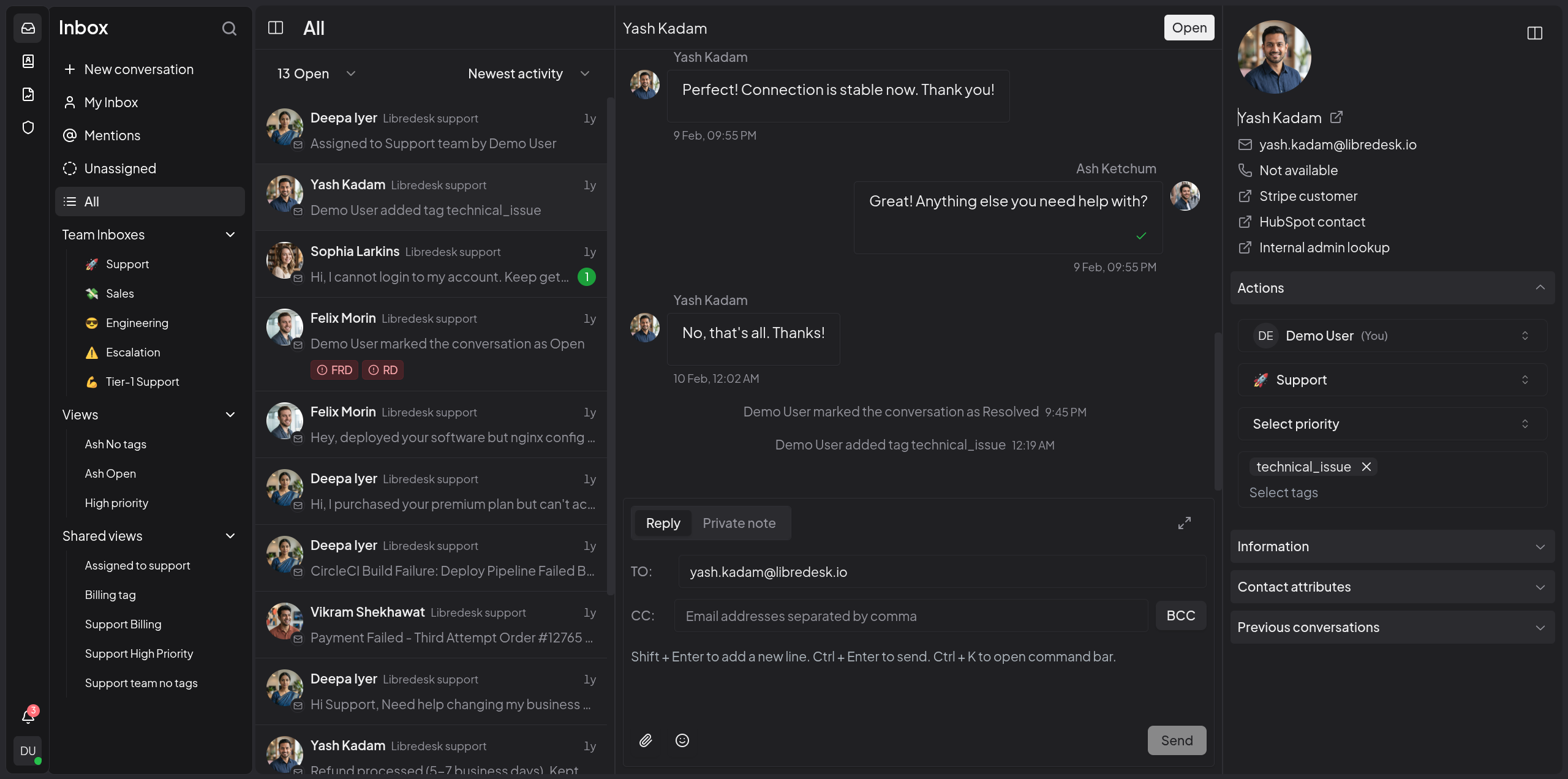
Visit libredesk.io for more info. Check out the live demo.
Features
- Omnichannel inbox
Live chat, email, and more — all in one inbox. Connect support@, billing@, sales@ and manage every conversation from a single, unified interface. - Live chat widget
Embed a real-time chat widget on your website. Engage visitors instantly and handle live conversations right from your support desk. - Granular permissions
Create custom roles with granular permissions for teams and individual agents. - Automations
Eliminate repetitive tasks with powerful automation rules. Auto-tag, assign, and route conversations based on custom conditions. - CSAT surveys
Measure customer satisfaction with automated surveys. - Macros
Save frequently sent messages as templates. With one click, send saved responses, set tags, and more. - Organization
Keep conversations organized with tags, custom statuses for conversations, and snoozing. Find any conversation instantly from the search bar. - Auto assignment
Distribute workload with auto assignment rules. Auto-assign conversations based on agent capacity or custom criteria. - SLA management
Set and track response time targets. Get notified when conversations are at risk of breaching SLA commitments. - Custom attributes
Create custom attributes for contacts or conversations such as the subscription plan or the date of their first purchase. - AI-assist
Instantly rewrite responses with AI to make them more friendly, professional, or polished. - Activity logs
Track all actions performed by agents and admins—updates and key events across the system—for auditing and accountability. - Webhooks
Integrate with external systems using real-time HTTP notifications for conversation and message events. - Command bar
Opens with a simple shortcut (CTRL+K) and lets you quickly perform actions on conversations.
And more — checkout libredesk.io or try the live demo.
Installation
Docker
The latest image is available on DockerHub at libredesk/libredesk:latest
# Download the compose file and sample config file in the current directory.
curl -LO https://github.com/abhinavxd/libredesk/raw/main/docker-compose.yml
curl -LO https://github.com/abhinavxd/libredesk/raw/main/config.sample.toml

# Copy the config.sample.toml to config.toml and edit it as needed.
cp config.sample.toml config.toml

# Run the services in the background.
docker compose up -d

# Setting System user password.
docker exec -it libredesk_app ./libredesk --set-system-user-password
Go to http://localhost:9000 and login with username System and the password you set using the --set-system-user-password command.
Binary
- Download the latest release and extract the libredesk binary.
- Edit config.toml as needed.
./libredesk --installto setup the Postgres DB.- Run
./libredesk --set-system-user-passwordto set the password for the System user. - Run
./libredeskand visithttp://localhost:9000and login with emailSystemand the password you set using the --set-system-user-password command.
Developers
- If you are interested in contributing, please read CONTRIBUTING.md first.
- For local development and setup, refer to the developer setup.
- For planned features and project direction, see ROADMAP.md.
The backend is written in Go and the frontend is Vue.js 3 with Shadcn UI.
Translators
You can help translate libredesk into your language on Crowdin.
Extension points exported contracts — how you extend this code
Closer (Interface)Closer provides a function for closing an inbox. [10 implementers]
internal/inbox/inbox.go
Notifier (Interface)
Notifier defines the interface for sending notifications through various providers. [3 implementers]
internal/notification/notification.go
Store (Interface)
Store defines the interface for media storage operations. [2 implementers]
internal/media/media.go
ProviderClient (Interface)
ProviderClient is the interface all providers should implement. [1 implementers]
internal/ai/provider.go
FieldRenderer (FuncType)
FieldRenderer renders a leaf condition for a field that does not map to a plain column, e.g. conversation tags rendered
internal/dbutil/builder.go
SidebarProps (Interface)
(no doc)
frontend/shared-ui/components/ui/sidebar/index.ts
Identifier (Interface)
Identifier provides a method for obtaining a unique identifier for the inbox. [2 implementers]
internal/inbox/inbox.go
WSHub (Interface)
WSHub defines the interface for the Websocket hub. [1 implementers]
internal/notification/dispatcher.go
Core symbols most depended-on inside this repo
Errorcalled by 726
internal/envelope/envelope.go
NewError
called by 486
internal/envelope/envelope.go
sendErrorEnvelope
called by 332
cmd/handlers.go
t
called by 307
frontend/apps/main/src/features/admin/teams/TeamsDataTableColumns.js
get
called by 142
internal/dbutil/builder.go
perm
called by 134
cmd/middlewares.go
Get
called by 133
internal/sla/sla.go
Set
called by 45
internal/ws/client.go
Shape
Languages
Go71%
TypeScript29%
Modules by API surface
frontend/apps/main/src/api/index.js173 symbols
internal/conversation/conversation.go112 symbols
frontend/apps/main/src/stores/conversation.js68 symbols
cmd/init.go59 symbols
internal/conversation/message.go56 symbols
internal/inbox/inbox.go46 symbols
static/widget.js40 symbols
internal/user/user.go40 symbols
cmd/chat.go39 symbols
internal/sla/sla.go35 symbols
internal/automation/evaluator_test.go34 symbols
internal/conversation/models/models.go33 symbols
Dependencies from manifests, versioned
cloud.google.com/go/compute/metadatav0.3.0 · 1×
github.com/abhinavxd/ssrfguardv0.1.0 · 1×
github.com/andybalholm/brotliv1.1.1 · 1×
github.com/cention-sany/utf7v0.0.0-2017012408004 · 1×
github.com/cespare/xxhash/v2v2.3.0 · 1×
github.com/coreos/go-oidc/v3v3.11.0 · 1×
github.com/davecgh/go-spewv1.1.1 · 1×
github.com/dgryski/go-rendezvousv0.0.0-2020082301473 · 1×
github.com/disintegration/imagingv1.6.2 · 1×
github.com/emersion/go-imap/v2v2.0.0-beta.3 · 1×
github.com/emersion/go-messagev0.18.1 · 1×
github.com/emersion/go-saslv0.0.0-2023110617335 · 1×
For agents
$ claude mcp add libredesk \
  -- python -m otcore.mcp_server <graph>