github.com/abhiTronix/vidgear @vidgear-0.3.5 sqlite
README


Getting Started | [Gears][gears] | [Documentation][docs] | [Installation][installation] | License
[![Build Status][github-cli]][github-flow] [![Codecov branch][codecov]][code] [![Azure DevOps builds (branch)][azure-badge]][azure-pipeline]
[![Glitter chat][gitter-badge]][gitter] [![Build Status][appveyor]][app] [![PyPi version][pypi-badge]][pypi]
Our Sponsors 🤝
Recall.ai - API for meeting recordings |
|---|
 |
| _If you’re looking for a meeting recording API, |
consider checking out Recall.ai, an API that records Zoom,
Google Meet, Microsoft Teams, in-person meetings, and more._ |
🙏 We are incredibly thankful to all our sponsors for supporting the development of VidGear. If you'd like to support VidGear, please check out our GitHub Sponsors page ➶
Overview
VidGear provides an easy-to-use, highly extensible, thoroughly optimised Multi-Threaded + Asyncio API Framework on top of many state-of-the-art specialized libraries like [OpenCV][opencv], [FFmpeg][ffmpeg], [ZeroMQ][zmq], [picamera2][picamera2], [starlette][starlette], [yt_dlp][yt_dlp], [pyscreenshot][pyscreenshot], [dxcam][dxcam], [aiortc][aiortc] and [python-mss][mss] serving at its backend, and enable us to flexibly exploit their internal parameters and methods, while silently delivering robust error-handling and real-time performance 🔥.
If you're new to VidGear, head straight to the Getting Started ➶ section to install VidGear.
The following functional block diagram clearly depicts the generalized functioning of VidGear APIs:
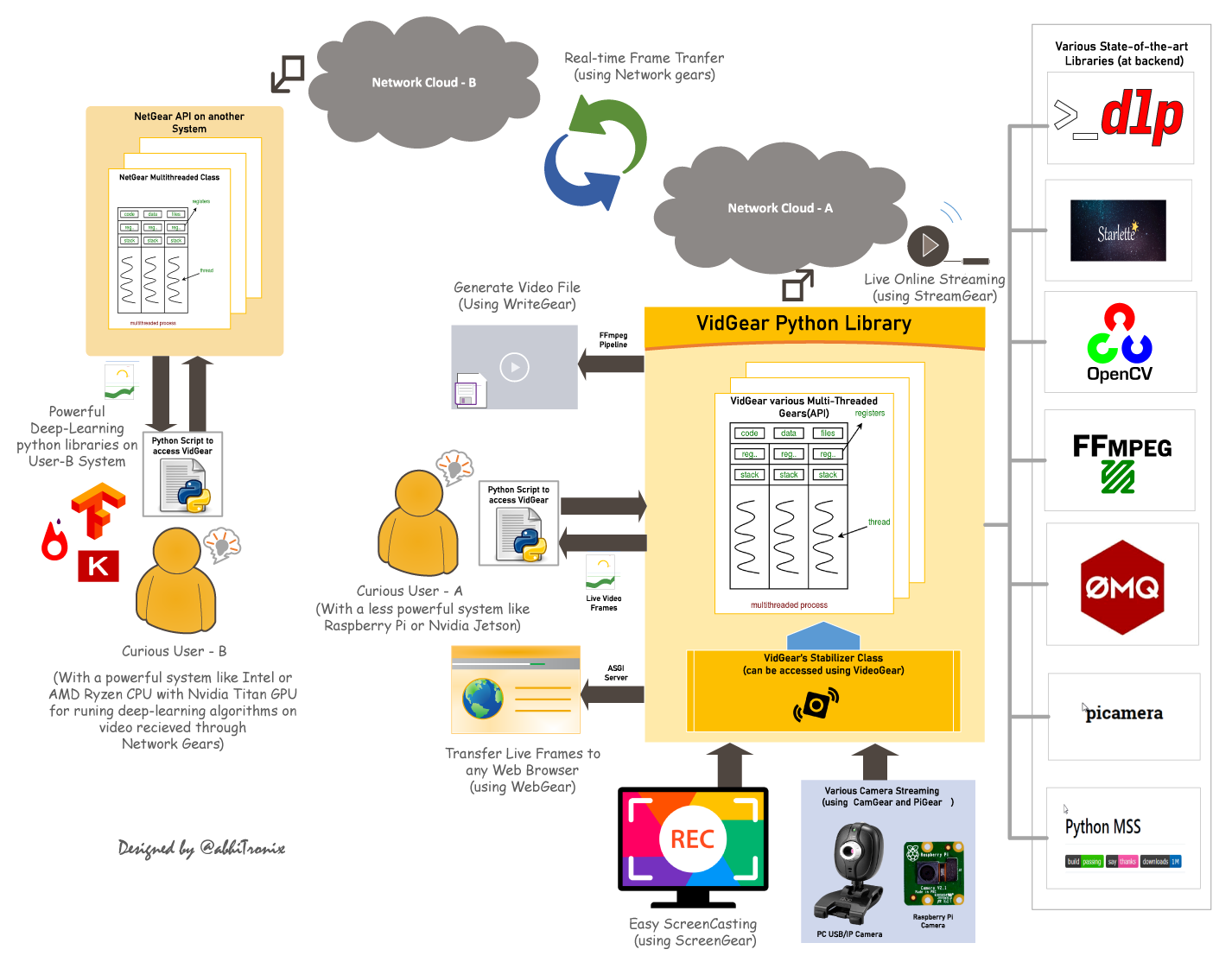
Table of Contents
- TL;DR
- Getting Started
- Gears: What are these?
- CamGear
- FFGear
- PiGear
- VideoGear
- ScreenGear
- WriteGear
- StreamGear
- NetGear
- WebGear
- WebGear_RTC
- NetGear_Async
- Contributions
- Donations and Sponsorships
- Citation
- Copyright
TL;DR
What is vidgear?
"VidGear is a cross-platform High-Performance Framework that provides an one-stop Video-Processing solution for building complex real-time media applications in python."
What does it do?
"VidGear can read, write, process, send & receive video files/frames/streams from/to various devices in real-time, and [faster][tqm-doc] than underline libraries."
What is its purpose?
"Write Less and Accomplish More" — VidGear's Motto
"Built with simplicity in mind, VidGear lets programmers and software developers to easily integrate and perform Complex Video-Processing Tasks in their existing or newer applications without going through hefty documentation and in just a [few lines of code][switch_from_cv]. Beneficial for both, if you're new to programming with Python language or already a pro at it."
Getting Started
If this is your first time using VidGear, head straight to the [Installation ➶][installation] to install VidGear.
Once you have VidGear installed, Checkout its Well-Documented [Function-Specific Gears ➶][gears]
Also, if you're already familiar with [OpenCV][opencv] library, then see [Switching from OpenCV Library ➶][switch_from_cv]
Or, if you're just getting started with OpenCV-Python programming, then refer this FAQ ➶
Finally, if looking for containerizing VidGear with Docker, then refer this guide ➶
Gears: What are these?
VidGear is built with multiple APIs a.k.a [Gears][gears], each with some unique functionality.
Each API is designed exclusively to handle/control/process different data-specific & device-specific video streams, network streams, and media encoders/decoders. These APIs provides the user an easy-to-use, dynamic, extensible, and exposed Multi-Threaded + Asyncio optimized internal layer above state-of-the-art libraries to work with, while silently delivering robust error-handling.
These Gears can be classified as follows:
A. Video-Capture Gears:
- CamGear: Multi-Threaded API targeting various IP-USB-Cameras/Network-Streams/Streaming-Sites-URLs.
- FFGear: Multi-Threaded API for hardware-accelerated FFmpeg-powered video decoding with full filtergraph support.
- PiGear: Multi-Threaded API targeting various Camera Modules and (limited) USB cameras on Raspberry Pis :grapes:.
- ScreenGear: High-performance API targeting rapid Screencasting Capabilities.
- VideoGear: Common Video-Capture API with internal Video Stabilizer wrapper.
B. Video-Writer Gears:
- WriteGear: Handles Lossless Video-Writer for file/stream/frames Encoding and Compression.
C. Streaming Gears:
-
StreamGear: Handles Transcoding of High-Quality, Dynamic & Adaptive Streaming Formats.
-
Asynchronous I/O Streaming Gear:
-
WebGear: ASGI Video-Server that broadcasts Live MJPEG-Frames to any web-browser on the network.
- WebGear_RTC: Real-time Asyncio WebRTC media server for streaming directly to peer clients over the network.
D. Network Gears:
-
NetGear: Handles High-Performance Video-Frames & Data Transfer between interconnecting systems over the network.
-
Asynchronous I/O Network Gear:
-
NetGear_Async: Immensely Memory-Efficient Asyncio Video-Frames Network Messaging Framework.
CamGear
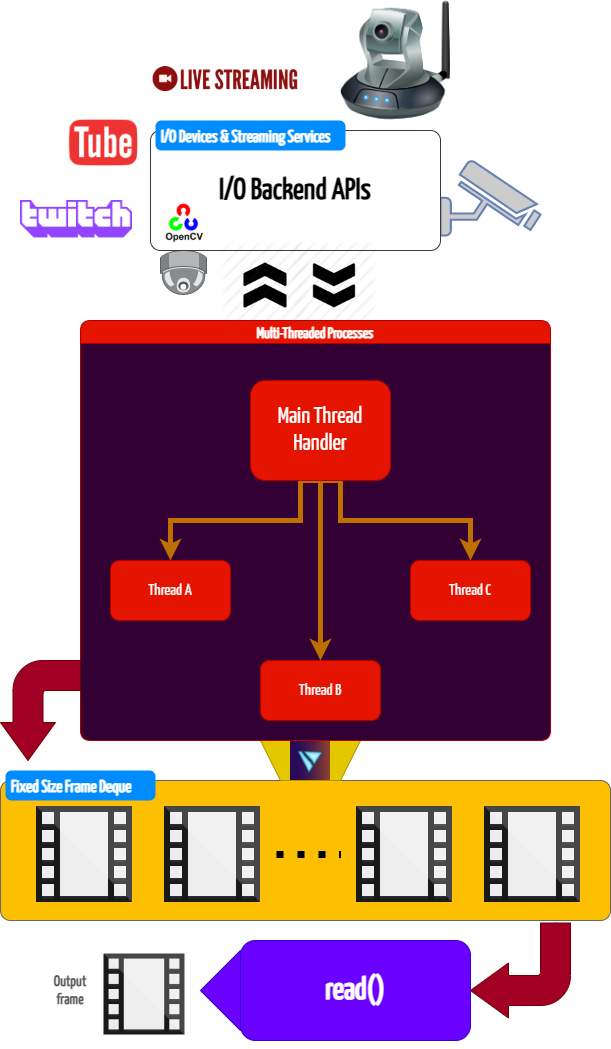
CamGear can grab ultra-fast frames from a diverse range of file-formats/devices/streams, which includes almost any IP-USB Cameras, multimedia video file-formats, various network stream protocols such as
http(s), rtp, rtsp, rtmp, mms, etc., and GStreamer's pipelines, plus direct support for live video streaming sites like YouTube, Twitch, LiveStream, Dailymotion etc.
CamGear provides a flexible, high-level, multi-threaded framework around OpenCV's [VideoCapture class][opencv-vc] with access almost all of its available parameters. CamGear internally implements [yt_dlp][yt_dlp] backend class for seamlessly pipelining live video-frames and metadata from various streaming services like [YouTube][youtube-doc], [Twitch][piping-live-videos], and many more ➶. Furthermore, its framework relies exclusively on [Threaded Queue mode][tqm-doc] for ultra-fast, error-free, and synchronized video-frame handling.
CamGear API Guide:
[>>> Usage Guide][camgear-doc]
FFGear
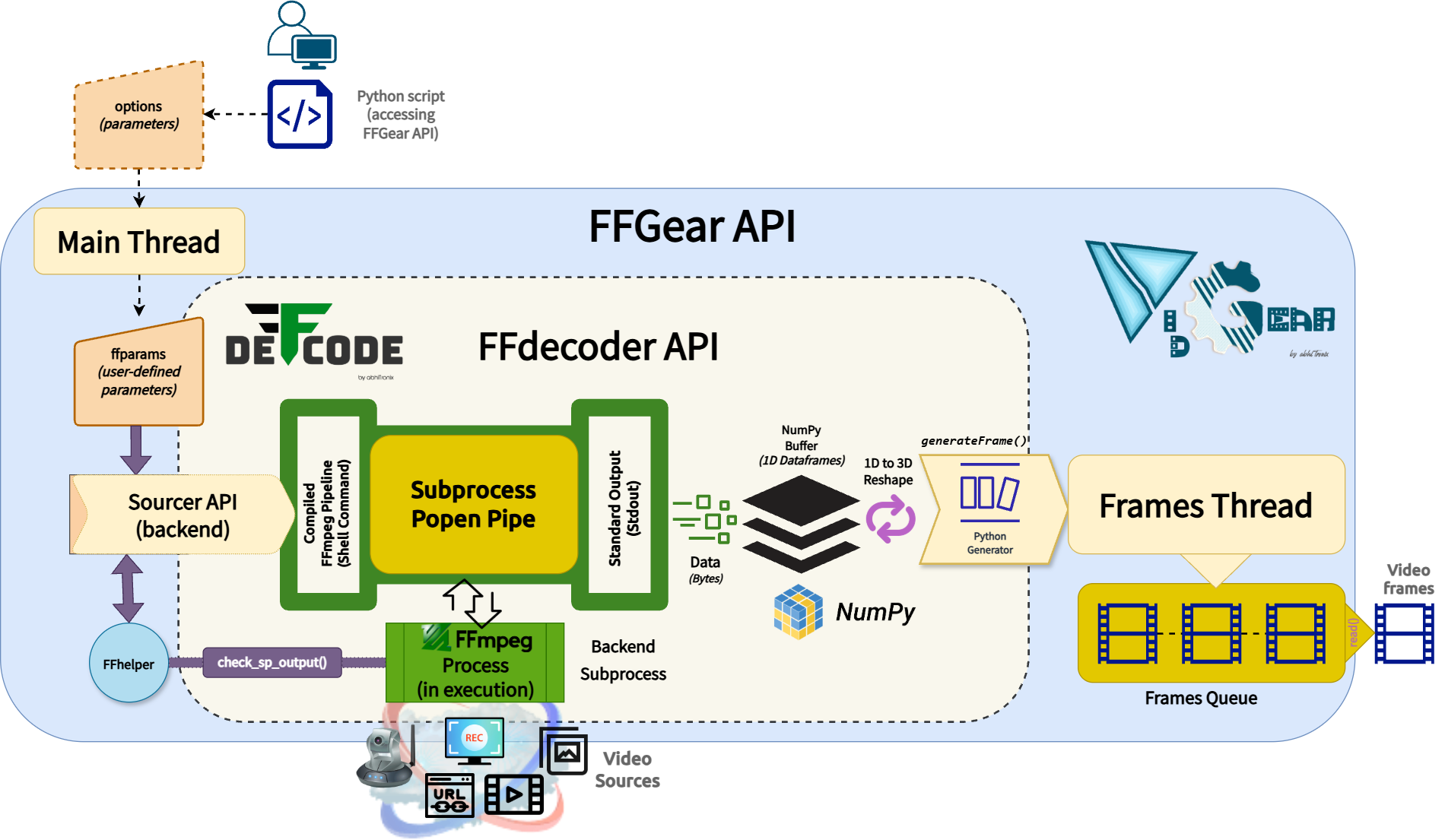
FFGear is a multi-threaded, high-performance wrapper around [DeFFcode's FFdecoder API][deffcode-doc] that compiles and executes an FFmpeg pipeline inside a subprocess pipe for generating real-time, low-overhead, lightning-fast decoded video frames in Python.
FFGear API provides direct, transparent access to the full FFdecoder feature set, including:
- [Hardware-Accelerated Decoding][hardware-accelerated-decoding] — GPU-powered decoding with CUDA/CUVID and other hardware-accelerated backends ⚡
- [Flexible Pixel Formats][flexible-pixel-formats] — support for any FFmpeg pixel format (e.g.,
bgr24,yuv420p,gray) with optional OpenCV compatibility patches for YUV/NV layouts. - [Per-Frame Metadata Extraction][per-frame-metadata-extraction] — asynchronous frame metadata extraction through the
showinfofilter. - [Live Complex Filtergraphs][complex-filtergraphs] — support for live simple and complex FFmpeg filter pipelines.
- Wide Source Support — capture [USB, virtual, and IP camera][cameras-ff] feeds by index similar to OpenCV, along with support for [multimedia files][multimedia-files-ff], [image sequences][image-sequences-ff], [desktop screen capture][desktop-screen-capture], and [network streams][network-streams-ff] (HTTP(s), RTSP/RTP, etc.).
Similar to CamGear, FFGear also supports the yt_dlp backend for seamlessly [pipelining live video frames from streaming services][streaming-services-ff] like YouTube, Twitch, and many more ➶
Below is a snapshot of FFGear optimizing Real-time YOLOv10-Nano model inference by processing only Keyframes (I-frames) while skipping all non-keyframes (P/B-frames), reducing unnecessary decoding and inference workloads by up to 98%.

FFGear Keyframes (I-frames) optimization in action!
Code to generate above result:
# import required libraries
from vidgear.gears import FFGear
from ultralytics import YOLO

# Initialize YOLOv10-Nano model
model = YOLO("yolov10n.pt")

# Configure FFGear with per-frame metadata extraction enable
options = {"-extract_metadata": True}
stream = FFGear(
    source="test.mp4", frame_format="bgr24", logging=True, **options
).start()

# loop over
while True:

    # read data from stream
    output = stream.read()

    # check if end of stream
    if output is None:
        break

    # Unpack the frame and its associated metadata
    frame, meta = output

    # --- OPTIMIZATION STEP ---
    # We skip all non-keyframes to save processing power.
    # This ensures the model only runs on the most information-dense frames.
    if not meta.get("is_keyframe"):
        continue  # <-- Skips Non-key frames (P, B-frames)

    # Log keyframe details
    print(f"Keyframe #{meta['frame_num']} at {meta['pts_time']:.3f}s")

    # Perform AI Inference on keyframes (I-frames) only
    # Because we skip non-keyframes, this heavy task runs significantly less often.
    results = model(frame)

    # Annotate the frame with detection boxes and labels
    annotated_frame = results[0].plot()

    # {Insert your custom logic here, e.g., displaying/saving frames or triggering an alert}

# safely close video stream
stream.stop()
FFGear API Guide:
[>>> Usage Guide][ffgear-doc]
VideoGear
VideoGear API provides a special internal wrapper around VidGear's exclusive [Video Stabilizer][stabilizer-doc] class.
VideoGear also serves as a unified video-capture API, offering seamless access to CamGear, PiGear, and FFGear along with their respective parameters. You can switch between these backends using the api parameter (defaults to Backend.CAMGEAR).
It is especially useful when you want to toggle between different video-capture backends without significant code changes. Additionally, it simplifies video stabilization for both real-time and non-real
Core symbols most depended-on inside this repo
return_testvideo_pathShape
Languages
Modules by API surface
For agents
$ claude mcp add vidgear \
  -- python -m otcore.mcp_server <graph>