github.com/abb128/LiveCaptions @v0.4.2
Chat with this repoWhat it actually does AI analysis from the code graph — generated when you open this
README
Live Captions
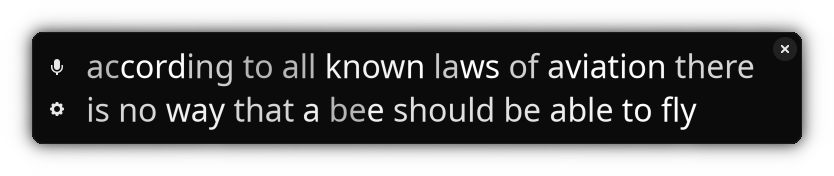
Live Captions is an application that provides live captioning for the Linux desktop.
<a href='https://flathub.org/apps/details/net.sapples.LiveCaptions'>
    <img width='240' alt='Download on Flathub' src='https://flathub.org/assets/badges/flathub-badge-en.png'/>
</a>
Join the Discord Chat if you're interested in keeping in touch.
Only the English language is supported currently. Other languages may produce gibberish or a bad phonetic translation.
Features: * Simple interface * Caption desktop/mic audio locally, audio is never sent anywhere * Does not rely on any proprietary services/libraries * Adjust font, font size, and text casing * Optional token-level confidence text fading
Running this requires a somewhat-decent CPU that can perform realtime captioning, especially if you want to be doing other tasks (such as video decode) while running Live Captions. It has been tested working on: * Intel i7-2670QM (2011) * Intel i7-7820HQ (2017) * Intel i5-8265U (2018) * AMD Ryzen 5 1600 (2017) * Steam Deck
GPU is not required or used.
Accuracy
The live captions may not be accurate. It may make mistakes, including when it comes to numbers. Please do not rely on the results for anything critical or important.
More models may be trained and released in the future with better and more robust accuracy.
Library
This application is built using aprilasr, a new library for realtime speech recognition.
Model credit
Thanks to Fangjun Kuang for the pretrained model, and thanks to the icefall contributors for creating the model recipes.
Building
You must make sure to do a recursive clone to get dependencies:
$ git clone --recursive https://github.com/abb128/LiveCaptions.git
If you forgot, you can initialize submodules like so:
$ git submodule update --init --recursive
Option 1: Building with GNOME Builder (easy)
You can build this easily with GNOME Builder. After cloning, open the project directory in GNOME Builder, download the SDK if it asks you, and click the play button to build and run.
If you are using Flatpak GNOME Builder and experience issues running this (for example, some cryptic X Window System error), please try using your distro's native packaged version of GNOME Builder instead of Flatpak (e.g. sudo apt install gnome-builder).
Option 2: Building from the terminal (not as easy)
First you must download ONNXRuntime v1.14.1 (Linux) or ONNXRuntime v.1.14.1 (Mac OS x86), extract it somewhere, and set the environment variables to point to it.
Make ONNX available
Linux:
$ export ONNX_ROOT=/path/to/onnxruntime-linux-x64-1.14.1/
$ export LD_LIBRARY_PATH=$LD_LIBRARY_PATH:/path/to/onnxruntime-linux-x64-1.14.1/lib
Alternatively you should also be able to locally build and install ONNXRuntime, in which case that step shouldn't be necessary.
Mac OS:
$ export ONNX_ROOT=/path/to/onnxruntime-osx-x86_64-1.14.1/
$ cp /path/to/onnxruntime-osx-x86_64-1.14.1/lib/libonnxruntime.1.14.1.dylib /usr/local/lib/libonnxruntime.1.14.1.dylib
$ cp /path/to/onnxruntime-osx-x86_64-1.14.1/lib/libonnxruntime.dylib /usr/local/lib/libonnxruntime.dylib
Other dependencies
You will also need the following prerequisites:
pulseaudio
libadwaita
meson
ninja
If you're on macOS, you may have to run the following command for Pulseaudio to be registered as a background service:
brew services restart pulseaudio
and to stop it, just change restart for stop.
Set up the build
To set up a build, run these commands:
$ meson setup builddir
$ meson devenv -C builddir
Build and run
Now you can build the application by running ninja.
Before being able to run the app, you must also download the model and export APRIL_MODEL_PATH to where the model is. For example:
$ wget https://april.sapples.net/april-english-dev-01110_en.april
$ export APRIL_MODEL_PATH=`pwd`/april-english-dev-01110_en.april
You should now be able to run the app with src/livecaptions
If you're on MacOS, now, go to security settings and confirm the prompt which asks to allow libonnxruntime, then, the application should work as intended.
Core symbols most depended-on inside this repo
asr_thread_update_modelShape
Languages
Modules by API surface
For agents
$ claude mcp add LiveCaptions \
  -- python -m otcore.mcp_server <graph>