github.com/ZebraDevs/DataWedge-Ionic-Demo @v3.0
Chat with this repoWhat it actually does AI analysis from the code graph — generated when you open this
README
DataWedge Ionic Demo (Formally ZebraIonicDemo)
This project shows a sample Ionic 3 application which uses DataWedge to capture barcode data on Zebra mobile devices
Ionic v4 / v5 and WebIntent
I have had several questions about whether this application works with Ionic v4 or v5 and issues surrounding the integration with WebIntent. This application has been written against Ionic v3 and uses the Cordova plugin directly however, if you would like to see a version of this application that compiles with Ionic v4 & v5 and uses WebIntent then please see the 'Transition_To_WebIntent' branch.
License
This project is protected by Zebra's EULA, as detailed in the License.md file
Restrictions
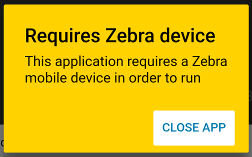
Note that this application will only work on Zebra mobile computers, running on non-Zebra devices will give you the following warning:
Building
To build this application:
- Install Ionic
- git clone https://github.com/Zebra/ZebraIonicDemo.git
- cd ZebraIonicDemo
- npm install
- Connect Zebra device to adb
- ionic cordova run android --device
DataWedge
This application is designed to use DataWedge. DataWedge is only available on Zebra mobile computing devices and provides access to the device hardware scanner(s) including the laser imager, attached Bluetooth scanners and camera imager; it is not a software scanning library.
Setup
Any Zebra mobile computer running Android which supports Datawedge should work with this sample but the complexity of setup will depend
If your device is running Datawedge 6.4 or higher you will see no warning messages and can safely skip this step
You will see this message if you are running a version of Datawedge prior to 6.3:
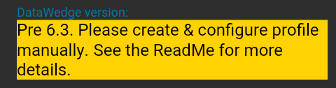
And this message if you are running Datawedge 6.3:

In either case, ensure you have a Datawedge profile on the device. You can do this by:
- Launching the Datawedge application
- (Prior to 6.3 only) Select Menu --> New Profile and name the profile ZebraIonicDemo
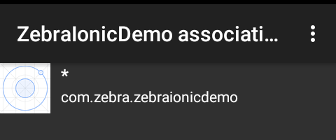
- Configure the ZebraIonicDemo profile to
- Associate the profile with com.zebra.zebraionicdemo, with * Activities
- Configure the intent output plugin to send broadcast intents to com.zebra.ionicdemo.ACTION
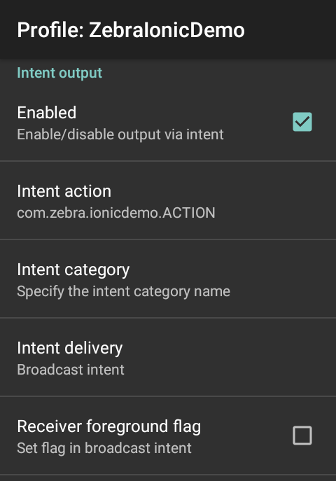
Older Devices
- Devices branded as 'Motorola Solutions' (identifyable by the Motorola logo) will need to use a recent version of this demo app as earlier versions did not detect this manufacturer. Motorola Solutions is one of the ancestor companies which now make up Zebra Technologies.
- Jellybean devices will not run with the latest version of Ionic. Some users have reported success by using the crosswalk rendering engine but since crosswalk is no longer maintained and recent forum posts report incompatibility with the Android 28 support libraries, users targeting Jellybean devices may wish to seek an alternative solution.
Use
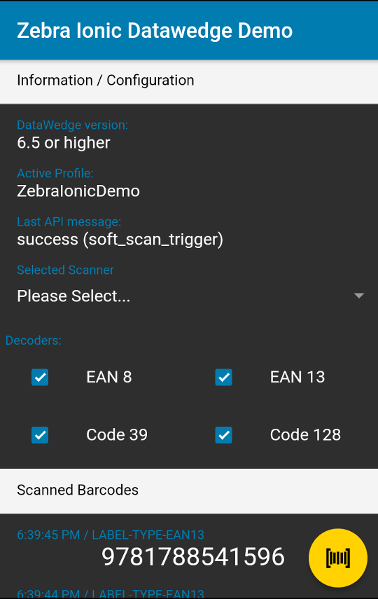
There are two sections to the UI, at the top you can configure scanning attributes such as choosing the supported decoders. Note that some configuration features will require a minimum version of Datawedge. You can initiate a soft trigger scan using the floating action button.
ALL versions of Datawedge support scanning barcodes.
Dependencies
In order to interact with the Datawedge service on Zebra devices this application relies on a 3rd party component to provide the Android Intent interface. Please be sure to add the Cordova plugin intent package to your application if you are using this code as a template for your own application:
ionic cordova plugin add com-darryncampbell-cordova-plugin-intent
Core symbols most depended-on inside this repo
Shape
Languages
Modules by API surface
For agents
$ claude mcp add DataWedge-Ionic-Demo \
  -- python -m otcore.mcp_server <graph>