github.com/YushuoLi/Gato-A-Generalist-Agent @main
Chat with this repoBrowse by type
What it actually does AI analysis from the code graph — generated when you open this
README
通用智能体: Gato
开发环境
使用容器:las 虚拟环境:stable_rl_las
概述
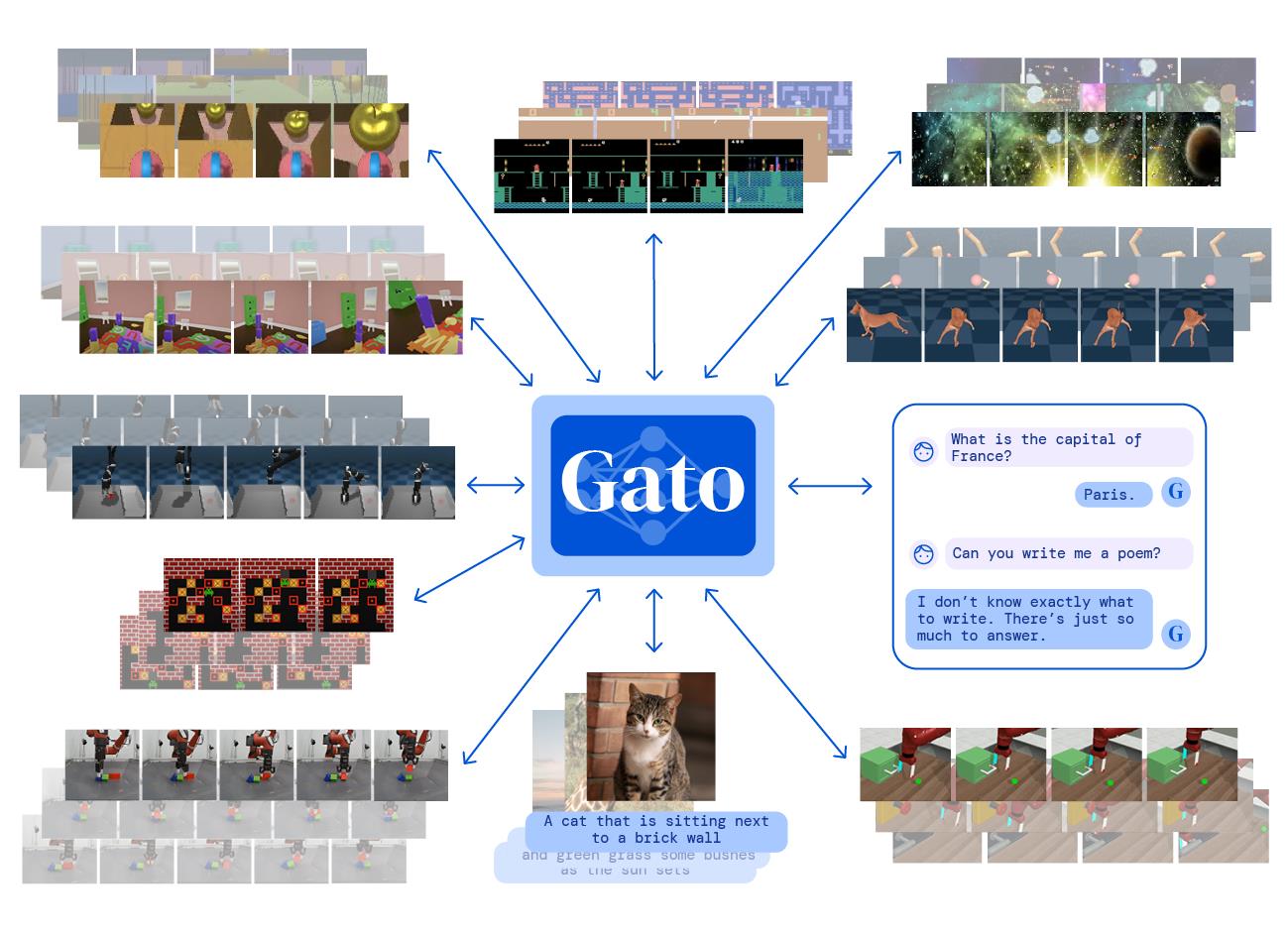 尝试实现论文 A Generalist Agent的模型和实验. 智能体 Gato 使用大规模的 Transformer 模型,仅需训练一个通用的权重就能对多模态的不同任务产生通用的策略. 我们实现了粗略的模型,并在 Atari 和 Mujoco 游戏上进行实验.
模型
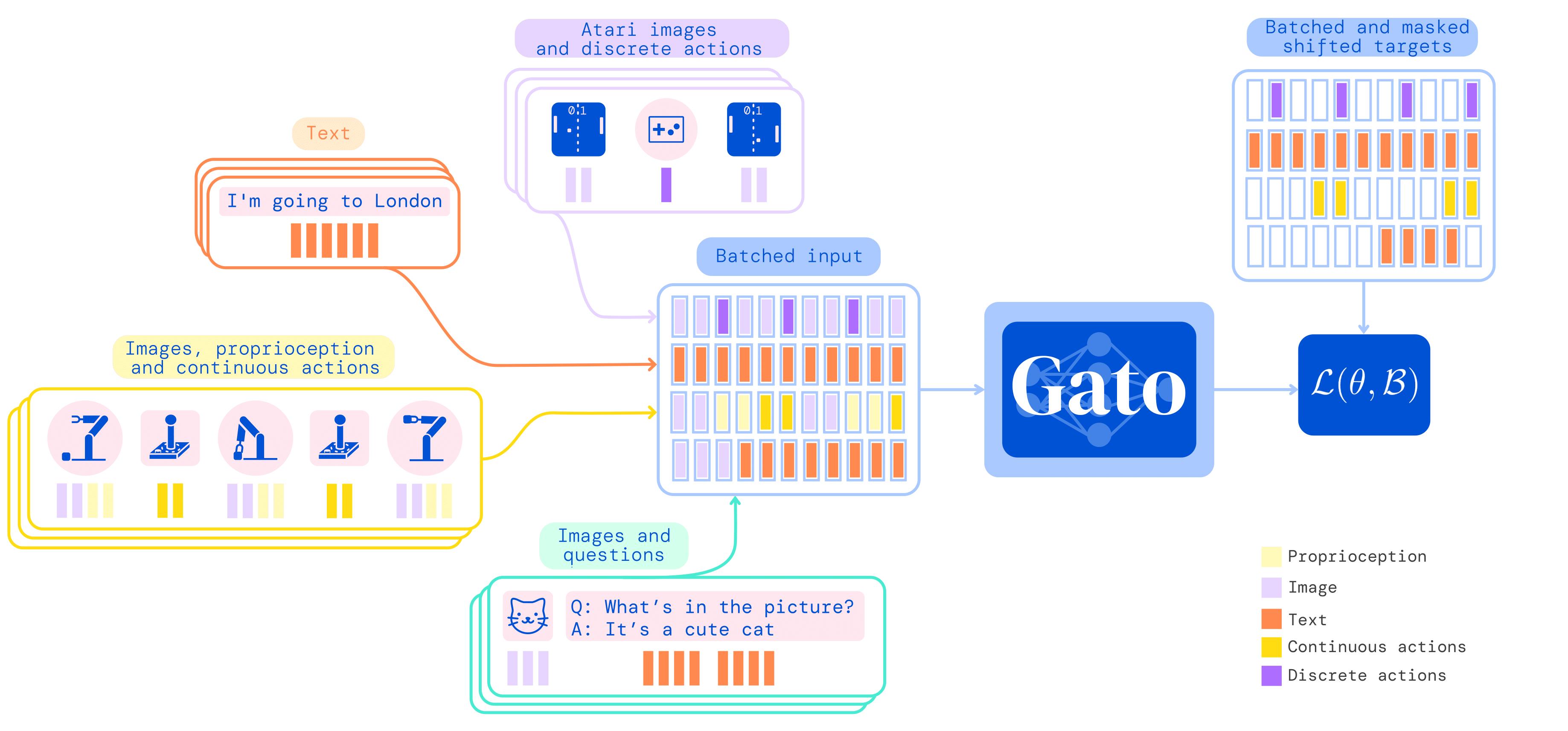
根据论文中的想法,我们实现了: * Tokenizer * Embedding and Encoding * Sequence * Transformer * Prompt
Tokenizer
针对不同模态的数据,使用不同的标记方法: * 文本:通过 SentencePiece 方式编码,将 32000 个 token 编码为整数范围 [0, 32000) * 图像:类似 ViT 的编码方式,将图像切成不重叠的 patches, 像素值归一化后除以根号下 patch 的宽度(目前图像的标记与嵌入同时实现,且未归一化)。 * 观测: * 连续值: 通过 mu-law 编码到 [-1,1] 的范围后离散化为 1024 个 bins,并移动到范围 [32000, 33024) * 离散值:[0, 1024) 的整数序列,移动到范围 [32000, 33024) * 动作: * 连续值: 取值范围在 [-1,1] 内,离散化为 1024 个 bins,并移动到范围 [33024, 34048) * 离散值:[0, 1024) 的整数序列,移动到范围 [33024, 34048)
mu-law:
$$ F(x)=\operatorname{sgn}(x) \frac{\log (|x| \mu+1.0)}{\log (M \mu+1.0)} $$
Embedding
使用参数化的 embedding 层来对每一个 token 进行嵌入,来生成最后的模型输入。embedding 层根据 token 模态的不同执行不同的操作: * 文本、离散或连续观测、行动先通过一个查找表嵌入到可以学习的向量嵌入空间中,同时加上其时间步内不同顺序决定的可学习的位置编码.
$$ f(\cdot ; \theta)=\text { LookupTable }+\text { LocalPositionEncodings } $$ * 图像块通过 ResNet block 来获得嵌入的向量,同时加上可学习的位置编码.
$$ f(\cdot ; \theta)=\text { ResNet }+\text { PatchPositionEncodings } $$
Value Embedding
对文本、离散或连续观测、行动数据,构建大小为 32000+1024+1024+1 的查找表
Residual Embedding
Appendix C.2. Embedding Function
ResNet 块的结构为: * V2 ResNet architecture * GroupNorm * GELU
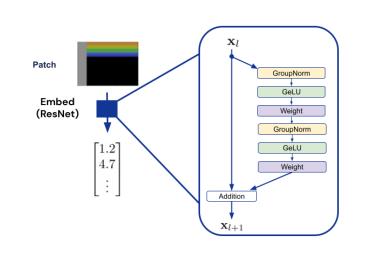 根据论文中的图示,我们只使用单一的残差块。
Position Encodings
Appendix C.3. Position Encodings
- Patch Position Encodings 图像序列的位置编码
- Local Observation Position Encodings 观测值的局部位置编码
- Timestep Position Encodings 时间步的位置编码(考虑时间步的越界问题,全部时间步归零化)
Sequence
Appendix B. Agent Data Tokenization Details
针对嵌入数据,将每个 timestep 下的数据以 observation-action 的方式连接在一起,就构成了输入模型的时间序列。其序列化过程的细节如下: * Episodes 按照时间顺序(时间步)呈递给智能体 * 时间步按照以下顺序设置 * 观测: $\left[y_{1: k}, x_{1: m}, z_{1: n}\right]$ * 文本嵌入 token $y_{1: k}$ * 图像块嵌入 token $x_{1: m}$ * 张量(离散和连续观测)嵌入 token $z_{1: n}$ * 分隔符:'|' 放在观测后、行动前的分割嵌入 token * 行动: $a_{1: A}$ 连续或离散值动作的嵌入 token
Token 的完整序列被给出为来自 T 个时间步长的数据的串联:
$$ s_{1: L}=\left[\left[y_{1: k}^1, x_{1: m}^1, z_{1: n}^1,\left.\right|^{\prime}, a_{1: A}^1\right], \ldots,\left[y_{1: k}^T, x_{1: m}^T, z_{1: n}^T,\left.\right|^{\prime}, a_{1: A}^T\right]\right], $$
Transformer
使用 Decision Transformer 中的 GPT 架构,模型参数为: | Hyperparameters | Large(1.18B) | Baseline(364M) | Small(79M) | |--------------------------|--------------|----------------|------------| | Transformer blocks | 24 | 12 | 8 | | Attention heads | 16 | 12 | 24 | | Layer width | 2048 | 1536 | 768 | | Feedforward hidden size | 8192 | 6144 | 3072 | | Key/value size | 128 | 128 | 32 |
Prompt
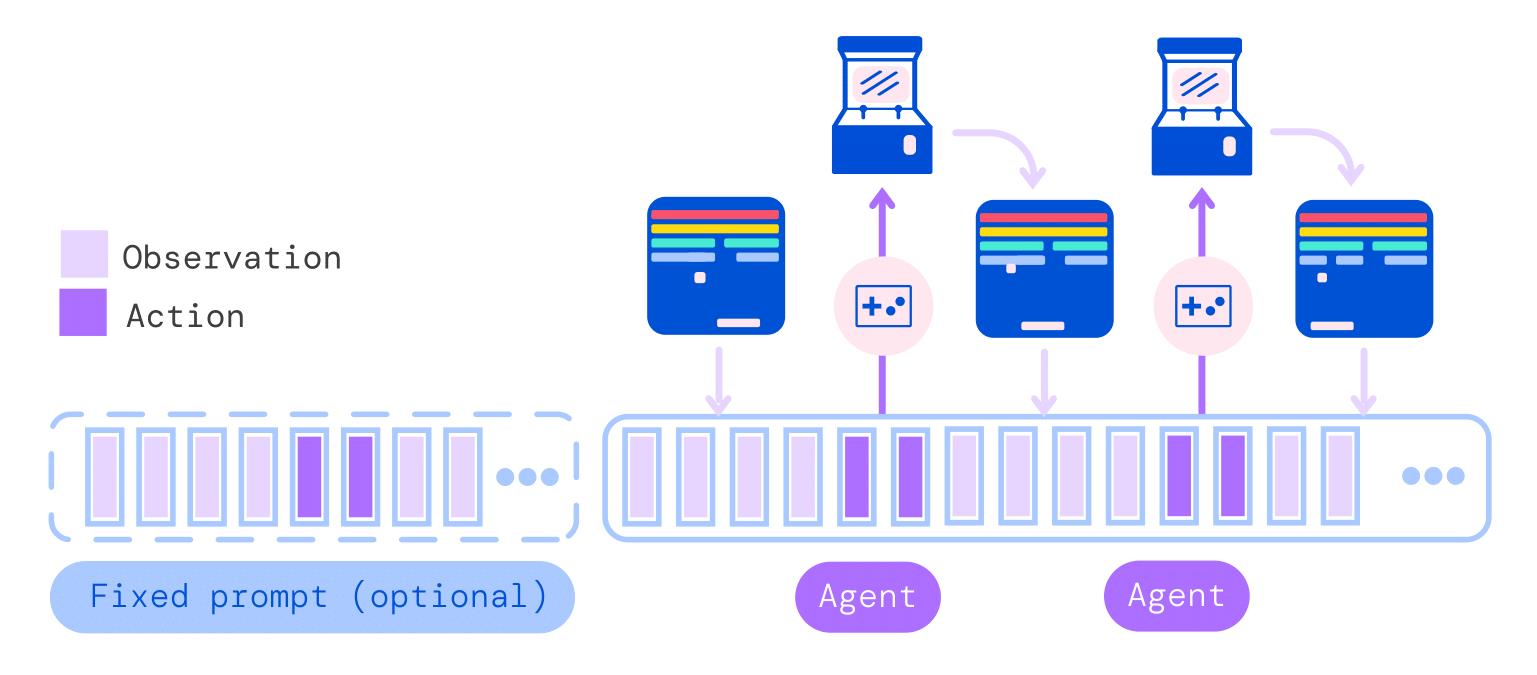 训练过程中,对于每批中 25\% 的序列,将提示序列加入到训练 batch 中。提示序列为从离线数据集中均匀随机抽取的轨迹的末端,自定义末端长度。
部署过程中,首先生成提示序列,重复与环境交互,将观测与分隔符连接到提示序列末端,自回归地生成动作。
环境需求
安装 Gym
pip install gym==0.23.1
安装 Mujoco 和 D4RL
下载 mujoco210.
mkdir ~/Downloads/
cd ~/Downloads/
wget https://github.com/deepmind/mujoco/releases/download/2.1.0/mujoco210-linux-x86_64.tar.gz
tar -zxvf mujoco210-linux-x86_64.tar.gz
mkdir ~/.mujoco
cp -r mujoco210 ~/.mujoco
gedit ~/.bashrc
export MUJOCO_KEY_PATH=~/.mujoco${MUJOCO_KEY_PATH}
export LD_LIBRARY_PATH=$LD_LIBRARY_PATH:/home/shenxi/.mujoco/mujoco210/bin
export LD_LIBRARY_PATH=$LD_LIBRARY_PATH:/usr/lib/nvidia
source ~/.bashrc

cd ~/.mujoco/mujoco210/bin/
./simulate ../model/humanoid.xml
安装 mujoco_py.
git clone https://github.com/openai/mujoco-py.git
cd mujoco-py
pip install -e .
pip install mujoco_py
sudo apt install libosmesa6-dev
sudo apt-get install libglew-dev glew-utils
sudo apt-get -y install patchelf
sudo apt install gcc
安装 dm_control
pip install dm_control
安装 D4RL
pip install absl-py
pip install matplotlib
git clone https://github.com/rail-berkeley/d4rl.git
找到 setup.py 文件,注释
install_requires=['gym',
                      'numpy',
                      # 'mujoco_py',
                      'pybullet',
                      'h5py',
                      'termcolor',  # adept_envs dependency
                      'click',  # adept_envs dependency
                      # 'dm_control' if 'macOS' in platform() else
                      # 'dm_control @ git+git://github.com/deepmind/dm_control@master#egg=dm_control',
                      'mjrl @ git+git://github.com/aravindr93/mjrl@master#egg=mjrl'],
安装并测试
# installing
pip install -e .

import gym
import d4rl # Import required to register environments
结果
固定随机种子进行训练,并比较不同模型的训练结果,待实现 | Dataset | Environment | DT | TT | Gato| | :---: | :---: | :---: | :---: | :---: |
改进
采用其他方法对模型进行改进,待实现
Core symbols most depended-on inside this repo
Shape
Languages
Modules by API surface
For agents
$ claude mcp add Gato-A-Generalist-Agent \
  -- python -m otcore.mcp_server <graph>