github.com/Xetera/ghost-cursor @v1.4.2
Chat with this repoWhat it actually does AI analysis from the code graph — generated when you open this
README
Ghost Cursor
Generate realistic, human-like mouse movement data between coordinates or navigate between elements with puppeteer like the definitely-not-robot you are.
Oh yeah? Could a robot do this?
Installation
yarn add ghost-cursor
or with npm
npm install ghost-cursor
Usage
Generating movement data between 2 coordinates.
import { path } from "ghost-cursor"

const from = { x: 100, y: 100 }
const to = { x: 600, y: 700 }

const route = path(from, to)

/**
 * [
 *   { x: 100, y: 100 },
 *   { x: 108.75573501957051, y: 102.83608396351725 },
 *   { x: 117.54686481838543, y: 106.20019239793275 },
 *   { x: 126.3749821408895, y: 110.08364505509256 },
 *   { x: 135.24167973152743, y: 114.47776168684264 }
 *   ... and so on
 * ]
 */
Generating movement data between 2 coordinates with timestamps.
import { path } from "ghost-cursor"

const from = { x: 100, y: 100 }
const to = { x: 600, y: 700 }

const route = path(from, to, { useTimestamps: true })

/**
 * [
 *   { x: 100, y: 100, timestamp: 1711850430643 },
 *   { x: 114.78071695023473, y: 97.52340709495319, timestamp: 1711850430697 },
 *   { x: 129.1362373468682, y: 96.60141853603243, timestamp: 1711850430749 },
 *   { x: 143.09468422606352, y: 97.18676354029148, timestamp: 1711850430799 },
 *   { x: 156.68418062398405, y: 99.23217132478408, timestamp: 1711850430848 },
 *   ... and so on
 * ]
 */
Usage with puppeteer:
import { GhostCursor } from "ghost-cursor"
import puppeteer from "puppeteer"

const run = async (url) => {
  const selector = "#sign-up button"
  const browser = await puppeteer.launch({ headless: false });
  const page = await browser.newPage()
  const cursor = new GhostCursor(page)
  await page.goto(url)
  await page.waitForSelector(selector)
  await cursor.click(selector)
  // shorthand for
  // await cursor.move(selector)
  // await cursor.click()
}
Puppeteer-specific behavior
cursor.move()will automatically overshoot or slightly miss and re-adjust for elements that are too far away from the cursor's starting point.- When moving over objects, a random coordinate that's within the element will be selected instead of hovering over the exact center of the element.
- The speed of the mouse will take the distance and the size of the element you're clicking on into account.

Ghost cursor in action on a form
Methods
new GhostCursor(page: puppeteer.Page, { start?: Vector, performRandomMoves?: boolean, defaultOptions?: DefaultOptions, visible?: boolean = false }): GhostCursor
Creates the ghost cursor that contains the action functions described below.
- page: Puppeteer
page. - start (optional): Cursor start position. Default is
{ x: 0, y: 0 }. - performRandomMoves (optional): Initially perform random movements. Default is
false. - defaultOptions (optional): Set custom default options for
click,move,moveTo, andrandomMovefunctions. Default values are described below. - visible (optional): Make the cursor visible, using
installMouseHelper(). Default isfalse.
toggleRandomMove(random: boolean): void
Toggles random mouse movements on or off.
click(selector?: string | ElementHandle, options?: ClickOptions): Promise<void>
Simulates a mouse click at the specified selector or element.
- selector (optional): CSS selector or ElementHandle to identify the target element.
- options (optional): Additional options for clicking. Extends the
optionsof themove,scrollIntoView, andgetElementfunctions (below) hesitate (number):Delay before initiating the click action in milliseconds. Default is0.waitForClick (number):Delay between mousedown and mouseup in milliseconds. Default is0.moveDelay (number):Delay after moving the mouse in milliseconds. Default is2000. IfrandomizeMoveDelay=true, delay is randomized from 0 tomoveDelay.button (MouseButton):Mouse button to click. Default isleft.clickCount (number):Number of times to click the button. Default is1.
move(selector: string | ElementHandle, options?: MoveOptions): Promise<void>
Moves the mouse to the specified selector or element.
- selector: CSS selector or ElementHandle to identify the target element.
- options (optional): Additional options for moving. Extends the
optionsof thescrollIntoViewandgetElementfunctions (below) paddingPercentage (number):Percentage of padding to be added inside the element when determining the target point. Default is0(may move to anywhere within the element).100will always move to center of element.destination (Vector):Destination to move the cursor to, relative to the top-left corner of the element. If specified,paddingPercentageis not used. If not specified (default), destination is random point within thepaddingPercentage.moveDelay (number):Delay after moving the mouse in milliseconds. Default is0. IfrandomizeMoveDelay=true, delay is randomized from 0 tomoveDelay.randomizeMoveDelay (boolean):Randomize delay between actions from0tomoveDelay. Default istrue.maxTries (number):Maximum number of attempts to mouse-over the element. Default is10.moveSpeed (number):Speed of mouse movement. Default is random.overshootThreshold (number):Distance from current location to destination that triggers overshoot to occur. (Below this distance, no overshoot will occur). Default is500.
moveTo(destination: Vector, options?: MoveToOptions): Promise<void>
Moves the mouse to the specified destination point.
- destination: An object with
xandycoordinates representing the target position. For example,{ x: 500, y: 300 }. - options (optional): Additional options for moving.
moveSpeed (number):Speed of mouse movement. Default is random.moveDelay (number):Delay after moving the mouse in milliseconds. Default is0. IfrandomizeMoveDelay=true, delay is randomized from 0 tomoveDelay.randomizeMoveDelay (boolean):Randomize delay between actions from0tomoveDelay. Default istrue.
moveBy(delta: Vector, options?: MoveToOptions): Promise<void>
Moves the mouse by a specified amount.
- delta: An object with
xandycoordinates representing the distance to move. For example,{ x: 10, y: 20 }. - options (optional): Additional options for moving. Same as
moveTooptions
scrollIntoView(selector: string | ElementHandle, options?: ScrollIntoViewOptions) => Promise<void>
Scrolls the element into view. If already in view, no scroll occurs.
- selector: CSS selector or ElementHandle to identify the target element.
- options (optional): Additional options for scrolling. Extends the
optionsof thegetElementandscrollfunctions (below) scrollSpeed (number):Scroll speed (when scrolling occurs). 0 to 100. 100 is instant. Default is100.scrollDelay (number):Time to wait after scrolling (when scrolling occurs). Default is200.inViewportMargin (number):Margin (in px) to add around the element when ensuring it is in the viewport. Default is0.
scrollTo: (destination: Partial<Vector> | 'top' | 'bottom' | 'left' | 'right', options?: ScrollOptions) => Promise<void>
Scrolls to the specified destination point.
- destination: An object with
xandycoordinates representing the target position. For example,{ x: 500, y: 300 }. Can also be"top"or"bottom". - options (optional): Additional options for scrolling. Extends the
optionsof thescrollfunction (below)
scroll: (delta: Partial<Vector>, options?: ScrollOptions) => Promise<void>
Scrolls the page the distance set by delta.
- delta: An object with
xandycoordinates representing the distance to scroll from the current position. - options (optional): Additional options for scrolling.
scrollSpeed (number):Scroll speed. 0 to 100. 100 is instant. Default is100.scrollDelay (number):Time to wait after scrolling. Default is200.
mouseDown / mouseUp: (options?: MouseButtonOptions) => Promise<void>
Mouse button up or down.
- options (optional): Additional options for mouse action.
button (MouseButton):Mouse button to click. Default isleft.clickCount (number):Number of times to click the button. Default is1.
getElement(selector: string | ElementHandle, options?: GetElementOptions) => Promise<void>
Gets the element via a selector. Can use an XPath.
- selector: CSS selector or ElementHandle to identify the target element.
- options (optional): Additional options.
waitForSelector (number):Time to wait for the selector to appear in milliseconds. Default is to not wait for selector.
getLocation(): Vector
Get current location of the cursor.
Other Utility Methods
installMouseHelper(page: Page): Promise<void>
Installs a mouse helper on the page, making the pointer visible. Gets executed in the GhostCursor initialization when passing visible=true. Use for debugging only.
getRandomPagePoint(page: Page): Promise<Vector>
Gets a random point on the browser window.
path(start: Vector, end: Vector | BoundingBox, options?: number | PathOptions): Vector[] | TimedVector[]
Generates a set of points for mouse movement between two coordinates.
- start: Starting point of the movement.
- end: Ending point (or bounding box) of the movement.
- options (optional): Additional options for generating the path. Can also be a number which will set
spreadOverride. spreadOverride (number):Override the spread of the generated path.moveSpeed (number):Speed of mouse movement. Default is random.useTimestamps (boolean):Generate timestamps for each point based on the trapezoidal rule.
How does it work
Bezier curves do almost all the work here. They let us create an infinite amount of curves between any 2 points we want and they look quite human-like. (At least moreso than alternatives like perlin or simplex noise)
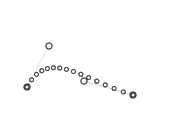
The magic comes from being able to set multiple points for the curve to go through. This is done by picking 2 coordinates randomly in a limited area above and under the curve.
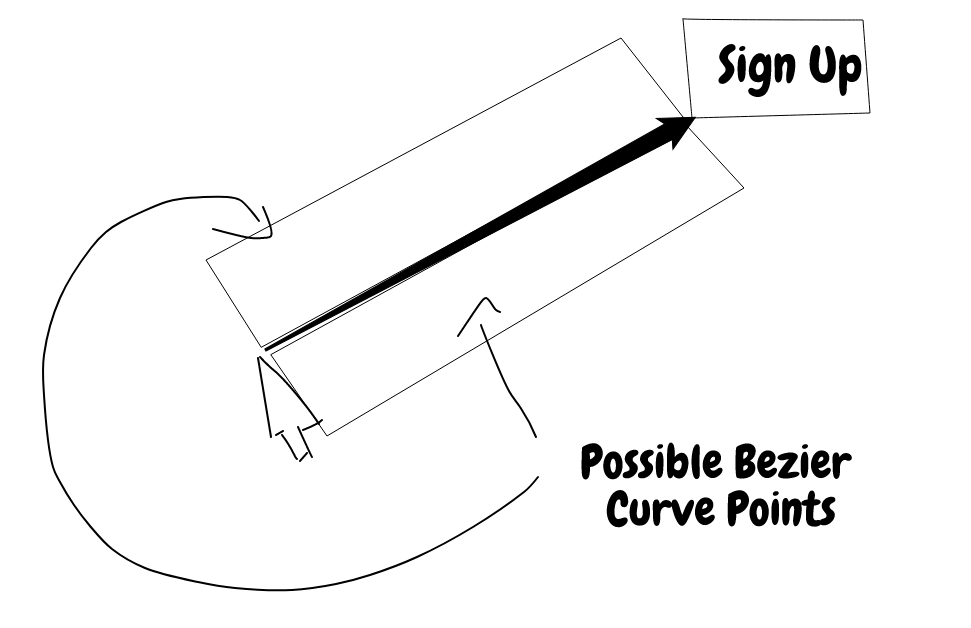
However, we don't want wonky looking cubic curves when using this method because nobody really moves their mouse that way, so only one side of the line is picked when generating random points.
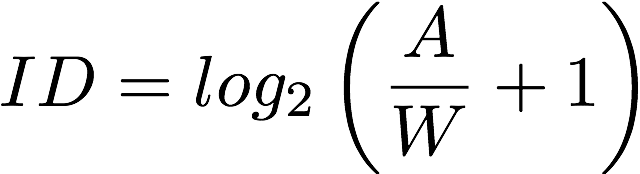 When calculating how fast the mouse should be moving we use Fitts's Law
to determine the amount of points we should be returning relative to the width of the element being clicked on and the distance
between the mouse and the object.
When calculating how fast the mouse should be moving we use Fitts's Law
to determine the amount of points we should be returning relative to the width of the element being clicked on and the distance
between the mouse and the object.
To turn on logging, please set your DEBUG env variable like so:
- OSX:
DEBUG="ghost-cursor:*" - Linux:
DEBUG="ghost-cursor:*" - Windows CMD:
set DEBUG=ghost-cursor:* - Windows PowerShell:
$env:DEBUG = "ghost-cursor:*"
Extension points exported contracts — how you extend this code
WindowWithMouseHelper (Interface)Core symbols most depended-on inside this repo
delayShape
Languages
Modules by API surface
Used by 1 indexed graphs manifest dependencies, hub-wide
For agents
$ claude mcp add ghost-cursor \
  -- python -m otcore.mcp_server <graph>