github.com/Wurst-Imperium/WI-Zoom @v1.7-MC26w14a
Chat with this repoBrowse by type
What it actually does AI analysis from the code graph — generated when you open this
README
WI Zoom (Wurst-Imperium Zoom)
WI Zoom is the zoom from the Wurst Client as a standalone Minecraft mod, letting you zoom in and out with the mouse wheel and providing up to 50x magnification without the need for a spyglass. This mod is fully compatible with OptiFine and Sodium, but unlike OptiFine's zoom, WI Zoom lets the camera move in a logical way, without making it wobble around. WI Zoom supports all of the latest Minecraft versions, including snapshots.

Downloads

Installation
[!IMPORTANT] Always make sure that your modloader and all of your mods are made for the same Minecraft version. Your game will crash if you mix different versions.
Installation using Fabric
- Install Fabric Loader.
- Add Fabric API to your mods folder.
- Add WI Zoom to your mods folder.
Installation using NeoForge
- Install NeoForge.
- Add WI Zoom to your mods folder.
Features
- Up to 50x zoom!
- No spyglass needed!
- Zoom in and out with the mouse wheel!
- No wobbly camera nonsense!
- Dynamic mouse sensitivity! (since v1.1)
- Fully compatible with OptiFine / Sodium!
How to zoom
Hold down the V key to activate the zoom (this keybind can be changed).
While zooming, you can use the mouse wheel to zoom in further.
Changing the zoom keybind
How to change the keybind (click to expand)
In the pause menu, click on "Options...".
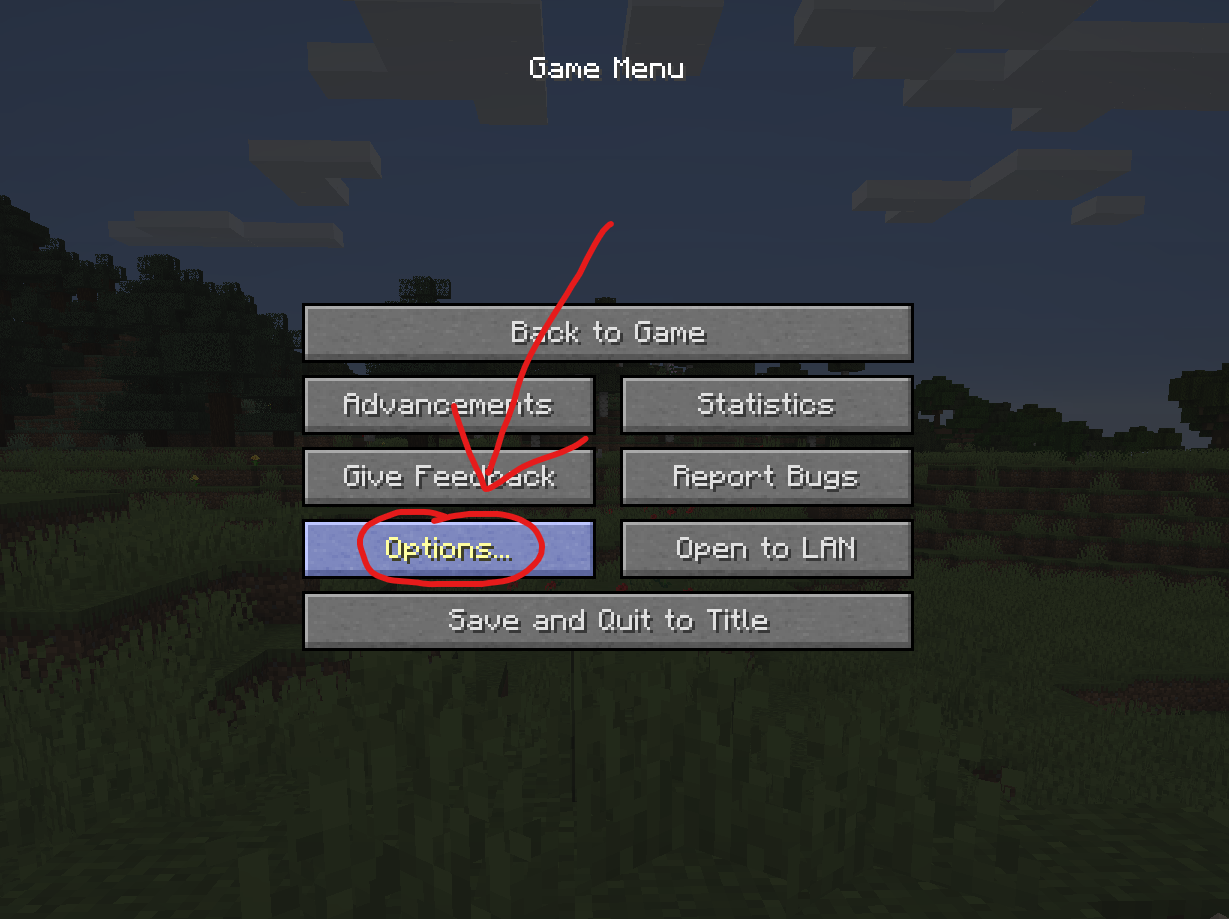
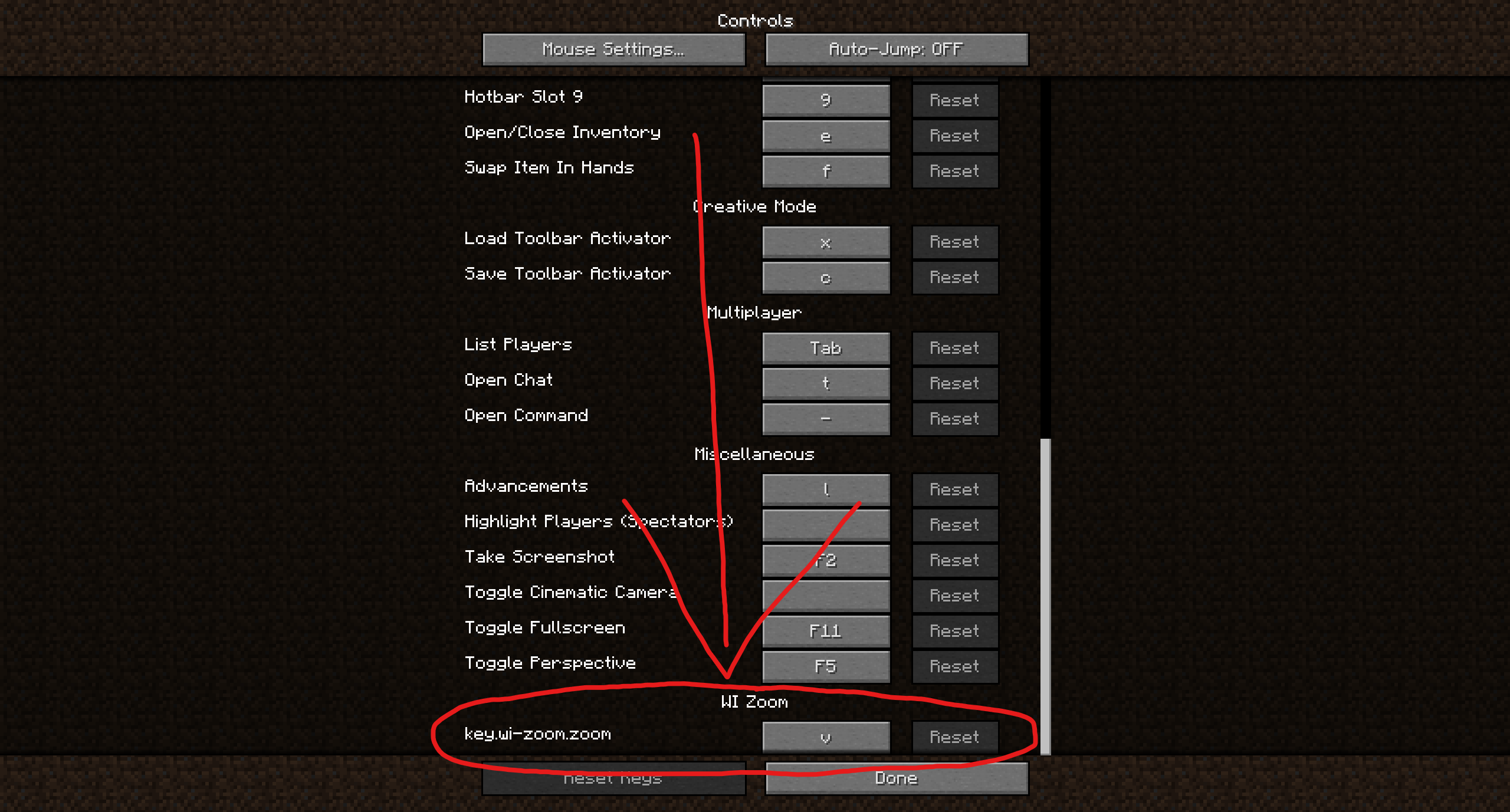
In the Options menu, click on "Controls...".

In the Controls menu, scroll down to the "WI Zoom" section. If you don't have any other mods installed, you will find this section at the very bottom.
Supported languages
- Azerbaijani (Azerbaijan) (since v1.5)
- Chinese (Simplified/Mainland) (since v1.4)
- Chinese (Traditional/Taiwan) (since v1.4)
- Cantonese (Hong Kong) (since v1.4)
- Classical Chinese (since v1.4)
- Dutch (Netherlands) (since v1.5)
- English (US)
- Estonian (Estonia) (since v1.4)
- French (France) (since v1.4)
- German (Germany)
- Kurdish (since v1.5)
- Portuguese (Brazil) (since v1.5)
- Russian (Russia) (since v1.3)
- Turkish (Turkey) (since v1.5)
- Ukrainian (Ukraine) (since v1.5)
Development Setup
[!IMPORTANT] Make sure you have Java Development Kit 25 installed. It won't work with other versions.
Development using Eclipse
- Clone the repository:
pwsh
   git clone https://github.com/Wurst-Imperium/WI-Zoom.git
   cd WI-Zoom
- Generate the sources:
In Fabric versions:
pwsh
   ./gradlew genSources eclipse
In NeoForge versions:
pwsh
   ./gradlew eclipse
-
In Eclipse, go to
Import...>Existing Projects into Workspaceand select this project. -
Optional: Right-click on the project and select
Properties>Java Code Style. Then underClean Up,Code Templates,Formatter, import the respective files in thecodestylefolder.
Development using VSCode / Cursor
[!TIP] You'll probably want to install the Extension Pack for Java to make development easier.
- Clone the repository:
pwsh
   git clone https://github.com/Wurst-Imperium/WI-Zoom.git
   cd WI-Zoom
- Generate the sources:
In Fabric versions:
pwsh
   ./gradlew genSources vscode
In NeoForge versions:
pwsh
   ./gradlew eclipse
(That's not a typo. NeoForge doesn't have vscode, but eclipse works fine.)
-
Open the
WI-Zoomfolder in VSCode / Cursor. -
Optional: In the VSCode settings, set
java.format.settings.urltohttps://raw.githubusercontent.com/Wurst-Imperium/WI-Zoom/master/codestyle/formatter.xmlandjava.format.settings.profiletoWurst-Imperium.
Development using IntelliJ IDEA
I don't use or recommend IntelliJ, but the commands to run would be:
git clone https://github.com/Wurst-Imperium/WI-Zoom.git
cd WI-Zoom
./gradlew genSources idea --no-configuration-cache
Note: IntelliJ IDEA is not yet compatible with Gradle's configuration cache. You will run into issues.
Possible workarounds:
- Turn off args files (this setting). Won't work for some users because of a command length limit.
- Add --no-configuration-cache to all of your Gradle commands.

Core symbols most depended-on inside this repo
Shape
Languages
Modules by API surface
For agents
$ claude mcp add WI-Zoom \
  -- python -m otcore.mcp_server <graph>