github.com/WuerthPhoenix/tornado @1.38.0-1
Chat with this repoWhat it actually does AI analysis from the code graph — generated when you open this
README

Tornado Basics
Tornado is a Complex Event Processor that receives reports of events from data sources such as monitoring, email, and telegram, matches them against pre-configured rules, and executes the actions associated with those rules, which can include sending notifications, logging to files, and annotating events in a time series graphing system.
Tornado is a high performance, scalable application. It is intended to handle millions of events each second on standard server hardware.
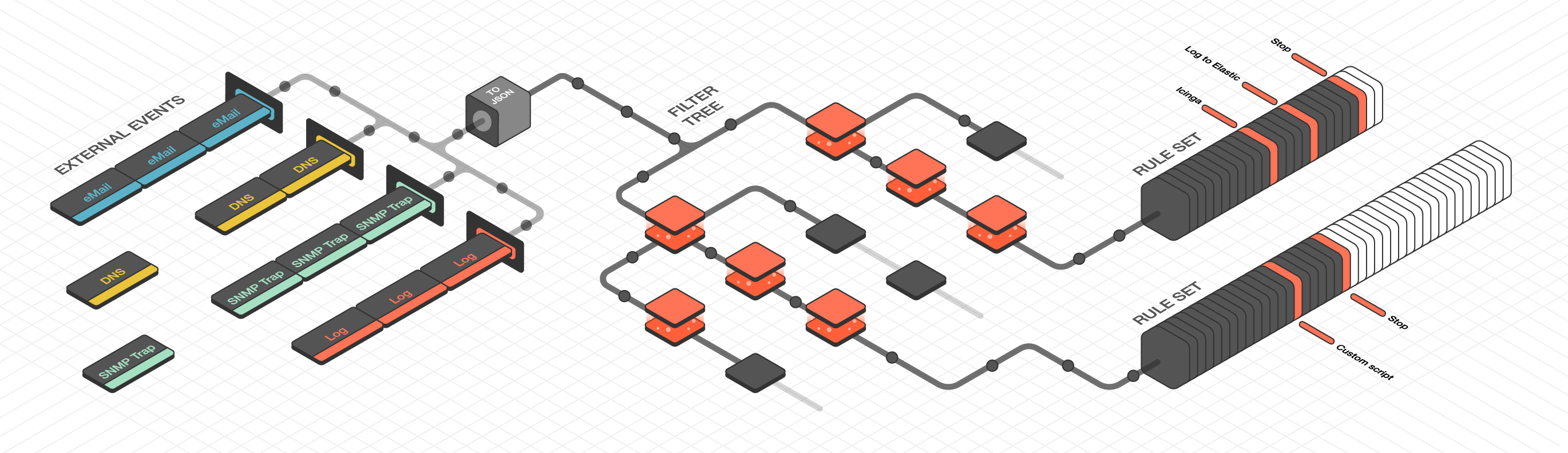
Tornado Architecture
Tornado is structured as a library, with three example binaries included that show how it can be used. The three main components of the Tornado architecture are:
- The Tornado Collector(s), or just Collector(s)
- The Tornado Engine, or Engine
- The Tornado Executor(s), or Executor(s)
The term Tornado refers to the whole project or to a deployed system that includes all three components.
Along with the main components, the following concepts are fundamental to the Tornado architecture:
- A Datasource: A system that sends External Events to Tornado, or a system to which Tornado subscribes to receive External Events.
- An External Event: An input received from a datasource. Its format depends on its source. An example of this is events from rsyslog.
- A Tornado (or Internal) Event: The Tornado-specific Event format.
- A Rule: A group of conditions that an Internal Event must match to trigger a set of Actions.
- An Action: An operation performed by Tornado, usually on an external system. For example, writing to Elastic Search or setting a state in a monitoring system.
Architecturally, Tornado is organized as a processing pipeline, where input events move from collectors to the engine, to executors, without branching or returning.
When the system receives an External Event, it first arrives at a Collector where it is converted into a Tornado Event. Then it is forwarded to the Tornado Engine where it is matched against user-defined, composable Rules. Finally, generated Actions are dispatched to the Executors.
The Tornado pipeline:
Datasources (e.g. rsyslog)
  |
  | External Events
  |
  \-> Tornado Collectors
        |
        | Tornado (or Internal) Events
        |
        \-> Tornado Engine (matches based on Rules)
              |
              | Actions
              |
              \-> Tornado Executors (execute the Actions)
Collectors
The purpose of a Collector is to receive and convert external events into the internal Tornado Event structure, and forward them to the Tornado Engine.
Collectors are Datasource-specific. For each datasource, there must be at least one collector that knows how to manipulate the datasource's Events and generate Tornado Events.
Out of the box, Tornado provides a number of Collectors for handling inputs from snmptrapd, rsyslog, JSON from Nats channels and generic Webhooks.
Because all Collectors are defined with a simple format, Collectors for new event types can easily be added or extended from existing types for:
- Monitoring events
- Email messages
- Telegram
- DNS
- Cloud monitoring (AWS, Azure, Cisco/Meraki, etc.)
- Netflow
- Elastic Stack
- SMS
- Operating system and authorization events
Engine
The Engine is the second step of the pipeline. It receives and processes the events produced by the Collectors. The outcome of this step is fully defined by a processing tree composed of Filters and Rule Sets.
A Filter is a processing node that defines an access condition on the children nodes.
An Iterator is a processing node that can iterate over an array or object from the input event.
A Rule Set is a node that contains an ordered set of Rules, where each Rule determines:
- The conditions a Tornado Event has to respect to match it
- The actions to be executed in case of a match
The processing tree is parsed at startup from a configuration folder where the node definitions are stored in JSON format.
When an event matches one or more Rules, the Engine produces a set of Actions and forwards them to one or more Executors.
Executors
The Executors are the last element in the Tornado pipeline. They receive the Actions produced from the Engine and trigger the associated executable instructions.
An Action can be any command, process or operation. For example it can include:
- Forwarding the events to a monitoring system
- Logging events locally (e.g., as processed, discarded or matched) or remotely
- Archiving events using software such as the Elastic Stack
- Invoking a custom shell script
A single Executor usually takes care of a single Action type.
Compiling and Running Tornado
The Tornado project in its current form is mainly intended for developers who are interested in modifying it in order to address their specific needs. Thus we assume that you already know how to use the external tools such as rsyslog and SNMP traps that you intend to connect to the Collector, and those that the Executors will send actions to. We also do not yet provide user-friendly installable packages such as .rpm's.
Prerequisites
The following prerequisites must be met in order to compile and run Tornado:
- You must have Rust version 1.44 or later installed.
- To build the Tornado executables, the openssl-dev library should be present in your build environment.
- Some tests require Docker to be installed on the localhost.
Repository Structure
The Tornado source code is modularized as a set of reusable, and mostly independent, libraries. This repository contains both the code for the libraries and the code for the Tornado executables that use them.
The way the Tornado executables are built is only one among many possible approaches.
The repository structure is shown here:
src
  |-- collector # The Collector libraries
  |     |-- common # Common code and traits for all Collectors
  |     |-- ... one directory per Collector ...
  |-- common # Common interfaces and message definitions
  |     |-- api    # Global traits required by the Engine, Collectors and Executors
  |     |-- logger # The logger configuration
  |-- executor # The Executor libraries
  |     |-- common # Common code and traits for all Executors
  |     |-- ... one directory per Executor ...
  |-- engine # The Engine libraries
  |     |-- matcher # The core library of the Tornado Engine. It contains the logic that evaluates
  |     |             whether an Internal Event matches a Rule, and to trigger the related Actions.
  |-- network # An abstract service used by components to communicate with each other
  |     |-- common # Common code and traits for the network
  |     |-- ... one directory for each alternate network type ...
  |-- scripts # Command line utilities (not required by Tornado)
  |-- spike # Functional or technical experiments (not required by Tornado)
  |-- tornado # Tornado executables (example uses of the Tornado libraries)
  |     |-- common # Common code and traits for all executables
  |     |-- engine # The Tornado Engine executable with embedded Tornado Executors
  |     |-- email_collector # A Tornado Collector to handle MIME emails
  |     |-- icinga2_collector # A Tornado Collector to subscribe to the Icinga2 API event streams
  |     |-- nats_json_collector # A Tornado Collector to handle generic JSON message from Nats channels
  |     |-- rsyslog_collector # A Tornado Collector to handle rsyslog events
  |     |-- snmptrapd_collector # A Tornado Collector written in Perl to handle snmptrapd events
  |     |-- webhook_collector # A Tornado Collector to handle generic Webhook events
Build Process
To build the source, open a shell where you cloned the repository, change to the src directory, and launch:
$ cargo build
This will build the entire project and produces executable files in the target/debug folder. It may require from 5 to 10 minutes depending on your hardware.
Alternatively, you can perform a release build with:
$ cargo build --release
This will produce smaller, highly optimized executables in the target/release folder. If you intend to run benchmarks, or assess or deploy Tornado in a production environment, this is the way you should built it.
The elements of the Tornado build process can be grouped into three categories:
- Tornado libraries: Everything not in the the "spike" or "tornado" folder. These are common Rust libraries used by Tornado, and can be imported by other projects as well.
- Tornado executables: The crates on the "tornado" folder generate the Tornado executables. These are what you need to run and deploy Tornado. All these executables are suffixed with tornado_.
- Spikes: The crates on the "spike" folder generate executables suffixed with spike_. These are experimental crates that are not part of the basic Tornado architecture.
How to Run Tornado
To run Tornado, follow the configuration instructions of the Tornado executables provided by their respective documentation pages:
- tornado_engine documentation
- tornado_email_collector documentation
- tornado_icinga2_collector documentation
- tornado_rsyslog_collector documentation
- tornado_nats_json_collector documentation
- tornado_webhook_collector documentation
How to Run Tornado Locally with cargo-make
To test Tornado easily in a local environment, you can run it using cargo-make as described here.
The Tornado Project
Tornado is still in a beta phase, thus the next steps in its development are to finish the remaining elements of the architecture. In the longer term, we plan to add additional collectors and executors, and eventually create a graphical interface for rule configuration and integration.
Tornado is implemented in Rust and uses no unsafe code. It is blazingly fast, thread-safe, memory safe, and can process millions of events per second.
Tornado adheres to v2.0.0 of the Semantic Versioning Initiative, and is fully open source.
Contributing
You can contribute to Tornado by reporting bugs, requesting features, or contributing code on GitHub. If you intend to submit a bug, please check first that someone else has not already submitted it by searching with the issue tracker on GitHub.
Check the 'contributing' documentation for more details.
Tornado Crates Documentation Links
Tornado's crate docs are produced according to the Rust documentation standards. The shortcuts below, organized thematically, will take you to the documentation for each module.
Common Traits and Code
The Common API page describes the API and defines the Event and Action structures.
The Logger page describes how Tornado logs its own actions.
Collectors
This crate describes the commonalities of all Collector types.
Describes a collector that receives a MIME email message and generates an Event.
This page illustrates the Collector for JSON events using the JMESPath JSON query language.
Presents the standard JSON collector that deserializes an unstructured JSON string into an Event.
Engine
The Matcher page describes the structure of the rules used in matching.
Executors
This crate describes the commonalities of all Executor types.
This page describes how the Archive executor writes to log files on locally mounted file systems, with a focus on configuration.
The Icinga2 executor forwards Tornado Actions to the Icinga2 API.
The Logger executor simply outputs the whole Action body to the standard log at the info level.
The Executor Script page defines how to configure Actions that launch shell scripts.
Network
This page contains high level traits not bound to any specific network technology.
- [tornado_network_common](network/commo
Extension points exported contracts — how you extend this code
Operator (Interface)Core symbols most depended-on inside this repo
cloneShape
Languages
Modules by API surface
For agents
$ claude mcp add tornado \
  -- python -m otcore.mcp_server <graph>