github.com/WasmEdge/mediapipe-rs @main
Chat with this repoBrowse by type
What it actually does AI analysis from the code graph — generated when you open this
README
MediaPipe-rs
<a href="https://github.com/WasmEdge/mediapipe-rs/actions?query=workflow%3ACI">
  <img src="https://github.com/WasmEdge/mediapipe-rs/workflows/CI/badge.svg" alt="CI status" height="20"/>
</a>
<a href="https://crates.io/crates/mediapipe-rs">
  <img src="https://img.shields.io/crates/v/mediapipe-rs.svg" alt="crates.io status" height="20"/>
</a>
<a href="https://docs.rs/mediapipe-rs">
  <img src="https://img.shields.io/docsrs/mediapipe-rs" alt="doc.rs status" height="20"/>
</a>
A Rust library for MediaPipe tasks for WasmEdge WASI-NN
Introduction
- Easy to use: low-code APIs such as mediapipe-python.
- Low overhead: No unnecessary data copy, allocation, and free during the processing.
- Flexible: Users can use custom media bytes as input.
- For TfLite models, the library not only supports all models downloaded from [MediaPipe Solutions] but also supports [TF Hub] models and custom models with essential information.
Status
- [x] Object Detection
- [x] Image Classification
- [x] Image Segmentation
- [ ] Interactive Image Segmentation
- [x] Gesture Recognition
- [x] Hand Landmark Detection
- [x] Image Embedding
- [x] Face Detection
- [x] Face Landmark Detection
- [ ] Pose Landmark Detection
- [x] Audio Classification
- [x] Text Classification
- [x] Text Embedding
- [ ] Language Detection
Task APIs
Every task has three types: XxxBuilder, Xxx, XxxSession. (Xxx is the task name)
XxxBuilderis used to create a task instanceXxx, which has many options to set.
example: use ImageClassifierBuilder to build a ImageClassifier task.
let classifier = ImageClassifierBuilder::new()
        .max_results(3) // set max result
        .category_deny_list(vec!["denied label".into()]) // set deny list
        .gpu() // set running device
        .build_from_file(model_path)?; // create a image classifier
* Xxx is a task instance, which contains task information and model information.
example: use ImageClassifier to create a new ImageClassifierSession
let classifier_session = classifier.new_session()?;
* XxxSession is a running session to perform pre-process, inference, and post-process, which has buffers to store
mid-results.
example: use ImageClassifierSession to run the image classification task and return classification results:
let classification_result = classifier_session.classify(&image::open(img_path)?)?;
Note: the session can be reused to speed up, if the code just uses the session once, it can use the task's wrapper
function to simplify.
// let classifier_session = classifier.new_session()?;
  // let classification_result = classifier_session.classify(&image::open(img_path)?)?;
  // The above 2-line code is equal to:
  let classification_result = classifier.classify(&image::open(img_path)?)?;
Available tasks
- vision:
- gesture recognition:
GestureRecognizerBuilder->GestureRecognizer->GestureRecognizerSession - hand detection:
HandDetectorBuilder->HandDetector->HandDetectorSession - image classification:
ImageClassifierBuilder->ImageClassifier->ImageClassifierSession - image embedding:
ImageEmbedderBuilder->ImageEmbedder->ImageEmbedderSession - image segmentation:
ImageSegmenterBuilder->ImageSegmenter->ImageSegmenterSession - object detection:
ObjectDetectorBuilder->ObjectDetector->ObjectDetectorSession - face detection:
FaceDetectorBuilder->FaceDetector->FaceDetectorSession - face landmark detection:
FaceLandmarkerBuilder->FaceLandmarker->FaceLandmarkerSession
- gesture recognition:
- audio:
- audio classification:
AudioClassifierBuilder->AudioClassifier->AudioClassifierSession
- audio classification:
- text:
- text classification:
TextClassifierBuilder->TextClassifier->TextClassifierSession
- text classification:
Examples
Image classification
use mediapipe_rs::tasks::vision::ImageClassifierBuilder;

fn main() -> Result<(), Box<dyn std::error::Error>> {
    let (model_path, img_path) = parse_args()?;

    let classification_result = ImageClassifierBuilder::new()
        .max_results(3) // set max result
        .build_from_file(model_path)? // create a image classifier
        .classify(&image::open(img_path)?)?; // do inference and generate results

    // show formatted result message
    println!("{}", classification_result);

    Ok(())
}
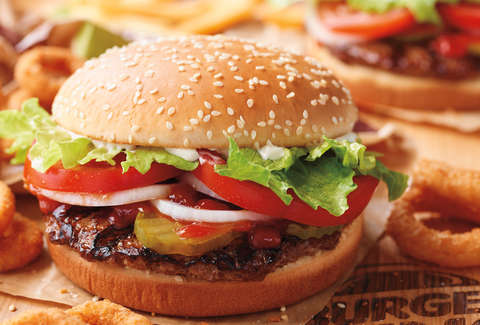
Example input: (The image is downloaded from https://storage.googleapis.com/mediapipe-assets/burger.jpg)
Example output in console:
$ cargo run --release --example image_classification -- ./assets/models/image_classification/efficientnet_lite0_fp32.tflite ./assets/testdata/img/burger.jpg
    Finished release [optimized] target(s) in 0.01s
     Running `/mediapipe-rs/./scripts/wasmedge-runner.sh target/wasm32-wasi/release/examples/image_classification.wasm ./assets/models/image_classification/efficientnet_lite0_fp32.tflite ./assets/testdata/img/burger.jpg`
ClassificationResult:
  Classification #0:
    Category #0:
      Category name: "cheeseburger"
      Display name:  None
      Score:         0.70625573
      Index:         933
Object Detection
use mediapipe_rs::postprocess::utils::draw_detection;
use mediapipe_rs::tasks::vision::ObjectDetectorBuilder;

fn main() -> Result<(), Box<dyn std::error::Error>> {
    let (model_path, img_path, output_path) = parse_args()?;

    let mut input_img = image::open(img_path)?;
    let detection_result = ObjectDetectorBuilder::new()
        .max_results(2) // set max result
        .build_from_file(model_path)? // create a object detector
        .detect(&input_img)?; // do inference and generate results

    // show formatted result message
    println!("{}", detection_result);

    if let Some(output_path) = output_path {
        // draw detection result to image
        draw_detection(&mut input_img, &detection_result);
        // save output image
        input_img.save(output_path)?;
    }

    Ok(())
}
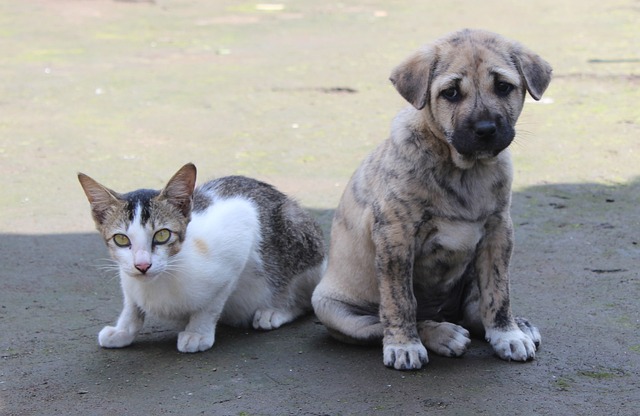
Example input: (The image is downloaded from https://storage.googleapis.com/mediapipe-tasks/object_detector/cat_and_dog.jpg)
Example output in console:
$ cargo run --release --example object_detection -- ./assets/models/object_detection/efficientdet_lite0_fp32.tflite ./assets/testdata/img/cat_and_dog.jpg
    Finished release [optimized] target(s) in 0.00s
     Running `/mediapipe-rs/./scripts/wasmedge-runner.sh target/wasm32-wasi/release/examples/object_detection.wasm ./assets/models/object_detection/efficientdet_lite0_fp32.tflite ./assets/testdata/img/cat_and_dog.jpg`
DetectionResult:
  Detection #0:
    Box: (left: 0.12283102, top: 0.38476586, right: 0.51069236, bottom: 0.851197)
    Category #0:
      Category name: "cat"
      Display name:  None
      Score:         0.8460574
      Index:         16
  Detection #1:
    Box: (left: 0.47926134, top: 0.06873521, right: 0.8711677, bottom: 0.87927735)
    Category #0:
      Category name: "dog"
      Display name:  None
      Score:         0.8375256
      Index:         17
Example output:

Text Classification
fn main() -> Result<(), Box<dyn std::error::Error>> {
    let model_path = parse_args()?;

    let text_classifier = TextClassifierBuilder::new()
        .max_results(1) // set max result
        .build_from_file(model_path)?; // create a text classifier

    let positive_str = "I love coding so much!";
    let negative_str = "I don't like raining.";

    // classify show formatted result message
    let result = text_classifier.classify(&positive_str)?;
    println!("`{}` -- {}", positive_str, result);

    let result = text_classifier.classify(&negative_str)?;
    println!("`{}` -- {}", negative_str, result);

    Ok(())
}
Example output in console (use the bert model):
$ cargo run --release --example text_classification -- ./assets/models/text_classification/bert_text_classifier.tflite
    Finished release [optimized] target(s) in 0.01s
     Running `/mediapipe-rs/./scripts/wasmedge-runner.sh target/wasm32-wasi/release/examples/text_classification.wasm ./assets/models/text_classification/bert_text_classifier.tflite`
`I love coding so much!` -- ClassificationResult:
  Classification #0:
    Category #0:
      Category name: "positive"
      Display name:  None
      Score:         0.99990463
      Index:         1

`I don't like raining.` -- ClassificationResult:
  Classification #0:
    Category #0:
      Category name: "negative"
      Display name:  None
      Score:         0.99541473
      Index:         0
Gesture Recognition
use mediapipe_rs::tasks::vision::GestureRecognizerBuilder;

fn main() -> Result<(), Box<dyn std::error::Error>> {
    let (model_path, img_path) = parse_args()?;

    let gesture_recognition_results = GestureRecognizerBuilder::new()
        .num_hands(1) // set only recognition one hand
        .max_results(1) // set max result
        .build_from_file(model_path)? // create a task instance
        .recognize(&image::open(img_path)?)?; // do inference and generate results

    for g in gesture_recognition_results {
        println!("{}", g.gestures.classifications[0].categories[0]);
    }

    Ok(())
}
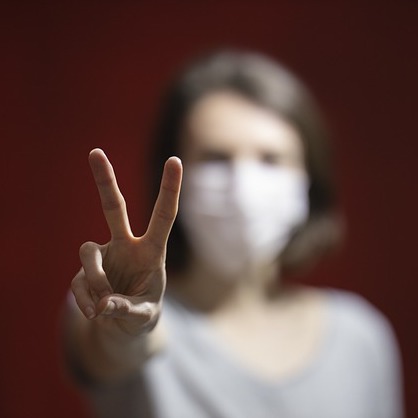
Example input: (The image is download from https://storage.googleapis.com/mediapipe-tasks/gesture_recognizer/victory.jpg)
Example output in console:
$ cargo run --release --example gesture_recognition -- ./assets/models/gesture_recognition/gesture_recognizer.task ./assets/testdata/img/gesture_recognition_google_samples/victory.jpg
    Finished release [optimized] target(s) in 0.02s
     Running `/mediapipe-rs/./scripts/wasmedge-runner.sh target/wasm32-wasi/release/examples/gesture_recognition.wasm ./assets/models/gesture_recognition/gesture_recognizer.task ./assets/testdata/img/gesture_recognition_google_samples/victory.jpg`
      Category name: "Victory"
      Display name:  None
      Score:         0.9322255
      Index:         6
Face Landmarks Detection
use mediapipe_rs::tasks::vision::FaceLandmarkerBuilder;
use mediapipe_rs::postprocess::utils::DrawLandmarksOptions;
use mediapipe_rs::tasks::vision::FaceLandmarkConnections;

fn main() -> Result<(), Box<dyn std::error::Error>> {
    let (model_path, img_path, output_path) = parse_args()?;

    let mut input_img = image::open(img_path)?;
    let face_landmark_results = FaceLandmarkerBuilder::new()
        .num_faces(1) // set max number of faces to detect
        .min_face_detection_confidence(0.5)
        .min_face_presence_confidence(0.5)
        .min_tracking_confidence(0.5)
        .output_face_blendshapes(true)
        .build_from_file(model_path)? // create a face landmarker
        .detect(&input_img)?; // do inference and generate results

    // show formatted result message
    println!("{}", face_landmark_results);

    if let Some(output_path) = output_path {
        // draw face landmarks result to image
        let options = DrawLandmarksOptions::default()
            .connections(FaceLandmarkConnections::get_connections(
                &FaceLandmarkConnections::FacemeshTesselation,
            ))
            .landmark_radius_percent(0.003);

        for result in face_landmark_results.iter() {
            result.draw_with_options(&mut input_img, &options);
        }
        // save output image
        input_img.save(output_path)?;
    }

    Ok(())
}
Example input: (The image is downloaded from https://storage.googleapis.com/mediapipe-assets/portrait.jpg)

Example output in console:
$ cargo run --release --example face_landmark -- ./assets/models/face_landmark/face_landmarker.task ./assets/testdata/img/face.jpg ./assets/doc/face_landmark_output.jpg

    Finished release [optimized] target(s) in 4.50s
     Running `./scripts/wasmedge-runner.sh target/wasm32-wasi/release/examples/face_landmark.wasm ./assets/models/face_landmark/face_landmarker.task ./assets/testdata/img/face.jpg ./assets/doc/face_landmark_output.jpg`

FaceLandmarkResult #0
  Landmarks:
    Normalized Landmark #0:
      x:       0.49687287
      y:       0.24964334
      z:       -0.029807145
    Normalized Landmark #1:
      x:       0.49801534
      y:       0.22689381
      z:       -0.05928771
    Normalized Landmark #2:
      x:       0.49707597
      y:       0.23421054
      z:       -0.03364953
Example output image:

Audio Input
Every audio media which implements the trait AudioData can be used as audio tasks input.
Now the library has builtin implementation to support symphonia, ffmpeg, and raw audio data as input.
Examples for Audio Classification:
```rust use mediapipe_rs::tasks::audio::AudioClassifierBuilder;
[cfg(feature = "ffmpeg")]
use mediapipe_rs::preprocess::audio::FFMpegAudioData;
[cfg(not(feature = "ffmpeg"))]
use mediapipe_rs::preprocess::audio::SymphoniaAudioData;
[cfg(not(feature = "ffmpeg"))]
fn read_audio_using_symphonia(audio_path: String) -> SymphoniaAudioData { let file = std::fs::File::open(audio_path).unwrap(); let probed = symphonia::default::get_p
Extension points exported contracts — how you extend this code
browse all types & interfaces →
Core symbols most depended-on inside this repo
Shape
Languages
Modules by API surface
For agents
$ claude mcp add mediapipe-rs \
  -- python -m otcore.mcp_server <graph>