github.com/Waishnav/devspace @v1.0.3 sqlite
README
<img src="https://raw.githubusercontent.com/Waishnav/devspace/main/docs/assets/devspace-logo-light.png" alt="DevSpace logo" width="140">
DevSpace
Bring a Codex-style coding workflow to ChatGPT.


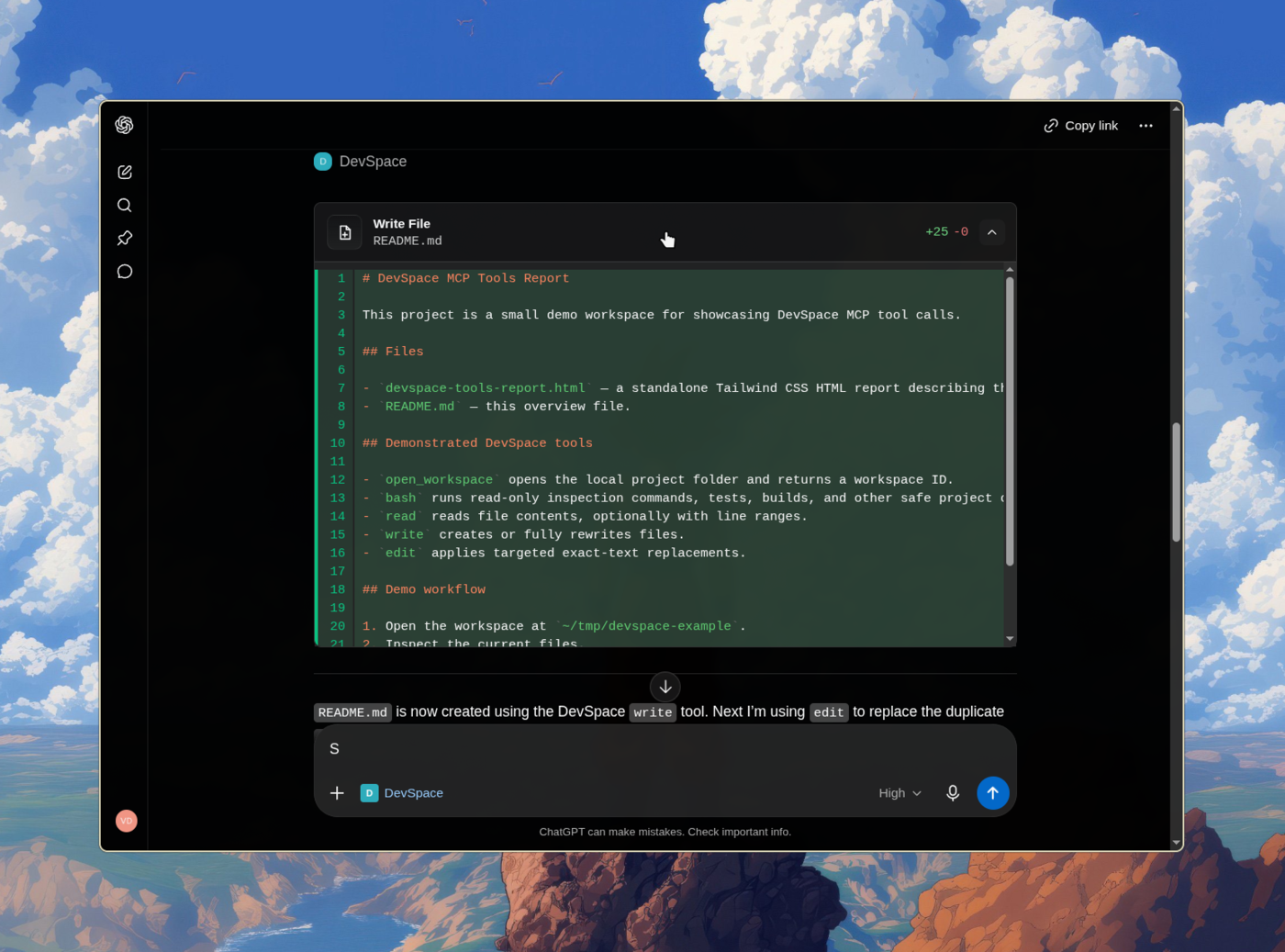
Give ChatGPT a secure connection to your own machine and Turn ChatGPT into Codex
DevSpace is a self-hosted MCP server that lets ChatGPT read, edit, search, and run code in your real local projects — your files, your tools, your terminal — without uploading anything to a third party. You run it on your machine, expose it through a tunnel you control, and approve the connection with a password only you have.
Sponsors and Special Thanks
| Sponsor | About |
|---|---|

|
The ads in your terminal pay you. Rebates adds one optional sponsored footer to your coding agent and pays you cash back for every session in which it is shown. Turn it off at any time. |
DevSpace is open to new sponsors. Get in touch to become one.
Installation
DevSpace requires Node >=22.19 <27.
Install the DevSpace CLI:
npm install -g @waishnav/devspace
Then initialize and start the server:
devspace init
devspace serve
Or run it without a global install:
npx @waishnav/devspace init
npx @waishnav/devspace serve
During setup, DevSpace asks for:
- the local project folders ChatGPT is allowed to open through DevSpace
- the local port, usually
7676 - your public HTTPS base URL from Cloudflare Tunnel, ngrok, Pinggy, Tailscale Funnel, or another reverse proxy
Use the public origin without /mcp during setup:
https://your-tunnel-host.example.com
You will configure your MCP client with the public /mcp URL after setup.
When the client connects, DevSpace opens an Owner password approval page. Enter
the Owner password printed by devspace init. It is also stored in:
~/.devspace/auth.json
Keep that password private.
Connect Your MCP Client
The default local endpoint is:
http://127.0.0.1:7676/mcp
Most users should connect through a public HTTPS tunnel:
https://your-tunnel-host.example.com/mcp
[!NOTE] Using DevSpace as an MCP connector isn't against OpenAI's Usage Policies — it's a standard custom App/connector setup, and writing or running code isn't a restricted use case. But your account is governed by your usage, not by DevSpace. Don't point it at anything that would violate your provider's terms. Used normally, you're fine. (Based on OpenAI's Usage Policies and Service Terms as of June 2026.)
What ChatGPT Can Do
Once connected, ChatGPT can open one of your approved project folders as a workspace. From there, it can inspect the repo, make scoped edits, run commands, and show you what changed.
DevSpace gives ChatGPT tools to:
- read, write, and edit files inside the opened workspace
- search code and inspect directories
- run shell commands for tests, builds, git, and package scripts
- use isolated Git worktrees for parallel coding sessions
- follow project instructions from
AGENTS.mdandCLAUDE.md - discover local agent skills from your skill folders
- show tool cards and optional change summaries in ChatGPT Apps-compatible hosts
Mental Model
DevSpace is remote access to selected local folders.
You decide which roots are allowed. The MCP client still has powerful local capabilities inside an opened workspace, including shell execution. Treat a connected client like a trusted coding partner with access to your machine.
For a normal ChatGPT coding session:
- Start your tunnel.
- Run
devspace serve. - Connect the MCP client to your public
/mcpURL. - Approve the connection with the Owner password.
- Ask ChatGPT to open a project inside one of your allowed roots.
Platform Support
DevSpace supports Linux, macOS, and Windows environments with a Bash-compatible shell.
| Platform | Status | Notes |
|---|---|---|
| Linux | Supported | Requires Node, npm, Git, and Bash. |
| macOS | Supported | Requires Node, npm, Git, and Bash. |
| Windows with Git Bash, WSL, MSYS2, or Cygwin Bash | Supported | Git Bash is the simplest native Windows setup. |
Windows PowerShell or cmd.exe only |
Not supported yet | Install Git Bash or use WSL. |
Run this to inspect your local setup:
devspace doctor
Documentation
Philosophy
Every piece of software is becoming conversational. Natural language is redefining how we interact with tools, workflows, and systems.
My bet is that ChatGPT becomes the operating system for everything. Once we reach AGI, we will simply talk to ChatGPT, and it will prompt, coordinate, and orchestrate sub-agents that set up the right loops for us.
We are not there yet.
DevSpace is one attempt to fast-forward that future: a way for MCP-capable hosts like ChatGPT and Claude to work directly with local project files through explicit, inspectable tools.
Built by Waishnav
I'm Waishnav, I like building opinionated products and tools, and DevSpace is one example of that. This year, I started my journey to build a single-person and multiple-agents company doing multiple millions in revenue. If you want to watch the failures, wins, lessons, and everything in between, come hang out with me on X.
More from me
| Project | About |
|---|---|
 GitCMS
|
Modern CMS and tooling for markdown based content sites — built for agents and humans. Visual editing, editorial workflow, and ChatGPT/Claude content agents, with every post and page stored as files in your repo. Learn more. |
Local Development
For working on DevSpace itself:
npm install --include=dev
npm run dev
npm run typecheck
npm test
npm run build
npm run start
Extension points exported contracts — how you extend this code
RunningServer (Interface)Core symbols most depended-on inside this repo
loadConfigShape
Languages
Modules by API surface
Dependencies from manifests, versioned
For agents
$ claude mcp add devspace \
  -- python -m otcore.mcp_server <graph>