github.com/Vorlonsoft/AndroidRate @1.2.1.Osaka
Chat with this repoWhat it actually does AI analysis from the code graph — generated when you open this
README

AndroidRate 



AndroidRate is a library to help you promote your Android app by prompting users to rate the app after using it for a few days. Project based on Android-Rate by Shintaro Katafuchi.
Contents
- Install
- Usage
- Configuration
- OnClickButtonListener interface
- Custom event requirements
- Clear show dialog flag
- Forced Rate Dialog
- Forced dismiss of the Dialog
- Custom view
- Custom theme
- Custom dialog labels
- Appstores
- Сustom intents
- Check for Google Play
- Sample
- Javadoc Documentation
- Supported Languages
- Already in Use
- Contribute
- License
Install
Latest stable version
You can download library files from JCenter, Maven Central, JFrog Bintray (JCenter mirror), GitHub (main source), GitLab (GitHub mirror) or SourceForge (GitHub mirror).
latestVersion is
Add the following in your app's build.gradle file:
dependencies {
    implementation "com.vorlonsoft:androidrate:${latestVersion}"
}
Latest snapshot version
If you don't want to wait for the next release, you can add the Sonatype's snapshots repository to your project root build.gradle file:
   repositories {
       maven { url "https://oss.sonatype.org/content/repositories/snapshots/" }
   }
Then add the following dependency to your relevant project modules build.gradle files:
dependencies {
    implementation "com.vorlonsoft:androidrate:1.2.2-SNAPSHOT"
}
Usage
Configuration
AndroidRate library provides methods to configure it's behavior. Select the type of configuration that best describes your needs.
Nano configuration
Uses library's defaults.
@Override
protected void onCreate(Bundle savedInstanceState) {
  super.onCreate(savedInstanceState);

  AppRate.with(this).monitor();                  // Monitors app launch times
  AppRate.showRateDialogIfMeetsConditions(this); // Shows the Rate Dialog when conditions are met
}
Micro configuration
Configures basic library behavior only.
@Override
protected void onCreate(Bundle savedInstanceState) {
  super.onCreate(savedInstanceState);

  AppRate.with(this)
      .setInstallDays((byte) 0)                  // default is 10, 0 means install day, 10 means app is launched 10 or more days later than installation
      .setLaunchTimes((byte) 3)                  // default is 10, 3 means app is launched 3 or more times
      .setRemindInterval((byte) 1)               // default is 1, 1 means app is launched 1 or more days after neutral button clicked
      .setRemindLaunchesNumber((byte) 1)         // default is 0, 1 means app is launched 1 or more times after neutral button clicked
      .monitor();                                // Monitors app launch times
  AppRate.showRateDialogIfMeetsConditions(this); // Shows the Rate Dialog when conditions are met
}
Standard configuration
The choice of most corporate developers.
@Override
protected void onCreate(Bundle savedInstanceState) {
  super.onCreate(savedInstanceState);

  AppRate.with(this)
      .setStoreType(StoreType.GOOGLEPLAY) /* default is GOOGLEPLAY (Google Play), other options are AMAZON (Amazon Appstore), BAZAAR (Cafe Bazaar),
                                           *         CHINESESTORES (19 chinese app stores), MI (Mi Appstore (Xiaomi Market)), SAMSUNG (Samsung Galaxy Apps),
                                           *         SLIDEME (SlideME Marketplace), TENCENT (Tencent App Store), YANDEX (Yandex.Store),
                                           *         setStoreType(BLACKBERRY, long) (BlackBerry World, long - your application ID),
                                           *         setStoreType(APPLE, long) (Apple App Store, long - your application ID),
                                           *         setStoreType(String...) (Any other store/stores, String... - an URI or array of URIs to your app) and
                                           *         setStoreType(Intent...) (Any custom intent/intents, Intent... - an intent or array of intents) */
      .setTimeToWait(Time.DAY, (short) 0) // default is 10 days, 0 means install millisecond, 10 means app is launched 10 or more time units later than installation
      .setLaunchTimes((byte) 3)           // default is 10, 3 means app is launched 3 or more times
      .setRemindTimeToWait(Time.DAY, (short) 2) // default is 1 day, 1 means app is launched 1 or more time units after neutral button clicked
      .setRemindLaunchesNumber((byte) 1)  // default is 0, 1 means app is launched 1 or more times after neutral button clicked
      .setSelectedAppLaunches((byte) 1)   // default is 1, 1 means each launch, 2 means every 2nd launch, 3 means every 3rd launch, etc
      .setShowLaterButton(true)           // default is true, true means to show the Neutral button ("Remind me later").
      .set365DayPeriodMaxNumberDialogLaunchTimes((short) 3) // default is unlimited, 3 means 3 or less occurrences of the display of the Rate Dialog within a 365-day period
      .setVersionCodeCheck(true)          // default is false, true means to re-enable the Rate Dialog if a new version of app with different version code is installed
      .setVersionNameCheck(true)          // default is false, true means to re-enable the Rate Dialog if a new version of app with different version name is installed
      .setDebug(false)                    // default is false, true is for development only, true ensures that the Rate Dialog will be shown each time the app is launched
      .setOnClickButtonListener(which -> Log.d(this.getLocalClassName(), Byte.toString(which))) // Java 8+, change for Java 7-
      .monitor();                         // Monitors the app launch times

  if (AppRate.with(this).getStoreType() == StoreType.GOOGLEPLAY) { // Checks that current app store type from library options is StoreType.GOOGLEPLAY
      if (GoogleApiAvailability.getInstance().isGooglePlayServicesAvailable(this) != ConnectionResult.SERVICE_MISSING) { // Checks that Google Play is available
          AppRate.showRateDialogIfMeetsConditions(this); // Shows the Rate Dialog when conditions are met
      }
  } else {
      AppRate.showRateDialogIfMeetsConditions(this);     // Shows the Rate Dialog when conditions are met
  }
}
Default options of the Rate Dialog are as below:
- Google Play launches when you press the positive button. Change via
AppRate#setStoreType(int),AppRate#setStoreType(int, long),AppRate#setStoreType(String...)orAppRate#setStoreType(Intent...). - App is launched 10 or more days later than installation. Change via
AppRate#setTimeToWait(long, short)orAppRate#setInstallDays(byte). - App is launched 10 or more times. Change via
AppRate#setLaunchTimes(byte). - App is launched 1 or more days after neutral button clicked. Change via
AppRate#setRemindTimeToWait(long, short)orAppRate#setRemindInterval(byte). - App is launched 0 or more times after neutral button clicked. Change via
AppRate#setRemindLaunchesNumber(byte). - Each launch (the condition is satisfied if appLaunches %
param== 0). Change viaAppRate#setSelectedAppLaunches(byte). - App shows the Neutral button ("Remind me later"). Change via
setShowLaterButton(boolean). - Unlimited occurrences of the display of the Rate Dialog within a 365-day period. Change via
AppRate#set365DayPeriodMaxNumberDialogLaunchTimes(short). - Don't re-enable the Rate Dialog if a new version of app with different version code is installed. Change via
AppRate#setVersionCodeCheck(boolean). - Don't re-enable the Rate Dialog if a new version of app with different version name is installed. Change via
AppRate#setVersionNameCheck(boolean). - Setting
AppRate#setDebug(boolean)totrueensures that the Rate Dialog will be shown each time the app is launched. This feature is for development only!. - There is no default callback when the button of Rate Dialog is pressed. Change via
AppRate.with(this).setOnClickButtonListener(OnClickButtonListener).
OnClickButtonListener interface
You can implement OnClickButtonListener Interface and use AppRate.with(this).setOnClickButtonListener(OnClickButtonListener) to specify the callback when the button of Rate Dialog is pressed. DialogInterface.BUTTON_POSITIVE, DialogInterface.BUTTON_NEUTRAL or DialogInterface.BUTTON_NEGATIVE will be passed in the argument of OnClickButtonListener#onClickButton.
// Java 7- start
AppRate.with(this).setOnClickButtonListener(new OnClickButtonListener() {
    @Override
    public void onClickButton(final byte which) {
        // Do something
    }
})
// Java 7- end
// Java 8+ start
AppRate.with(this).setOnClickButtonListener(which -> {
    // Do something
})
// Java 8+ end
Optional custom event requirements
You can add additional optional requirements for showing dialog. Each requirement can be added/referenced as a unique string. You can set a minimum count for each such event (for e.g. "action_performed" 3 times, "button_clicked" 5 times, etc.)
AppRate.with(this).setMinimumEventCount(String, short);
AppRate.with(this).incrementEventCount(String);
AppRate.with(this).setEventCountValue(String, short);
Clear show dialog flag
When you want to show the dialog again, call AppRate#clearAgreeShowDialog().
AppRate.with(this).clearAgreeShowDialog();
Forced display of the Rate Dialog
Use this method directly if you want to force display of the Rate Dialog. Call it when some button presses on. Method also useful for testing purposes. Call AppRate#showRateDialog(Activity).
AppRate.with(this).showRateDialog(this);
Forced dismiss of the Rate Dialog
Use this method directly if you want to remove the Rate Dialog from the screen. Call AppRate#dismissRateDialog().
AppRate.with(this).dismissRateDialog();
Set custom view
Call AppRate#setView(View).
LayoutInflater inflater = (LayoutInflater) this.getSystemService(LAYOUT_INFLATER_SERVICE);
View view = inflater.inflate(R.layout.custom_dialog, (ViewGroup) findViewById(R.id.layout_root));
AppRate.with(this).setView(view);
Specific theme
You can use a specific theme to inflate the dialog.
AppRate.with(this).setThemeResId(int);
Custom dialog labels
If you want to use your own dialog labels, override string xml resources on your application.
<resources>
    <string name="rate_dialog_title">Rate this app</string>
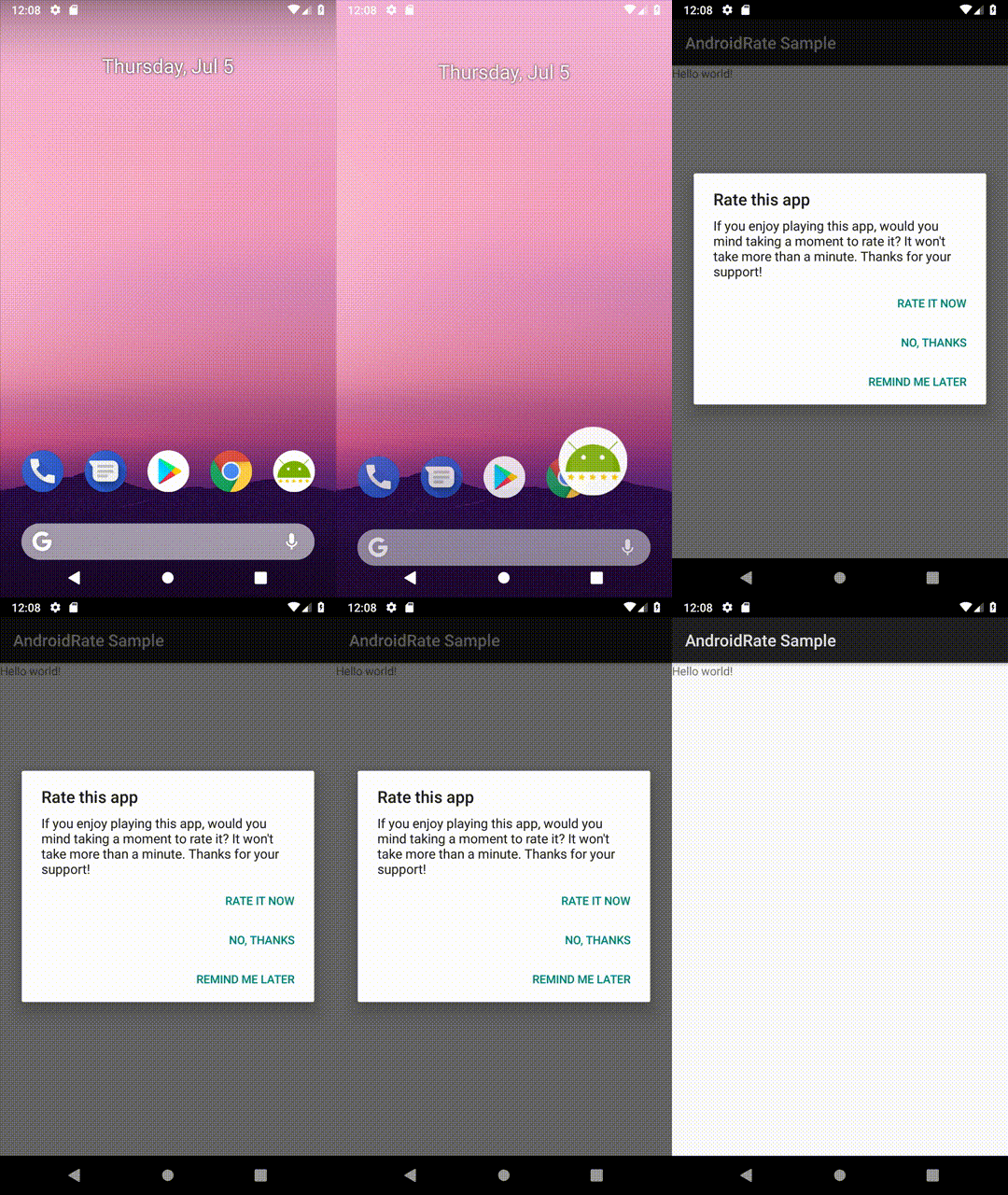
    <string name="rate_dialog_message">If you enjoy playing this app, would you mind taking a moment to rate it? It won\'t take more than a minute. Thanks for your support!</string>
    <string name="rate_dialog_ok">Rate It Now</string>
    <string name="rate_dialog_cancel">Remind Me Later</string>
    <string name="rate_dialog_no">No, Thanks</string>
</resources>
Appstores
You can use different app stores.
Google Play, Amazon Appstore, Cafe Bazaar, Mi Appstore (Xiaomi Market), Samsung Galaxy Apps, SlideME Marketplace, Tencent App Store, Yandex.Store
AppRate.with(this).setStoreType(StoreType.GOOGLEPLAY); // Google Play
AppRate.with(this).setStoreType(StoreType.AMAZON);     // Amazon Appstore
AppRate.with(this).setStoreType(StoreType.BAZAAR);     // Cafe Bazaar
AppRate.with(this).setStoreType(StoreType.MI);         // Mi Appstore (Xiaomi Market)
AppRate.with(this).setStoreType(StoreType.SAMSUNG);    // Samsung Galaxy Apps
AppRate.with(this).setStoreType(StoreType.SLIDEME);    // SlideME Marketplace
AppRate.with(this).setStoreType(StoreType.TENCENT);    // Tencent App Store
AppRate.with(this).setStoreType(StoreType.YANDEX);     // Yandex.Store
Apple App Store
/* Apple App Store, long - your Apple App Store application ID
 * e. g. 284882215 for Facebook (https://itunes.apple.com/app/id284882215) */
AppRate.with(this).setStoreType(StoreType.APPLE, long);
BlackBerry World
/* BlackBerry World, long - your BlackBerry World application ID
 * e. g. 50777 for Facebook (https://appworld.blackberry.com/webstore/content/50777) */
AppRate.with(this).setStoreType(StoreType.BLACKBERRY, long);
Chinese app stores
The first Chinese app store found on the user device will be used, if first fails, second will be used, etc. The Library doesn't check the availability of your application on the app store.
```java /* 19 chinese app stores: 腾讯应用宝, 360手机助手, 小米应用商店, 华为应用商店, 百度手机助手, * OPPO应用商店, 中兴应用商店, VIVO应用商店,
Extension points exported contracts — how you extend this code
DialogManager (Interface)Core symbols most depended-on inside this repo
getPreferencesShape
Languages
Modules by API surface
For agents
$ claude mcp add AndroidRate \
  -- python -m otcore.mcp_server <graph>