github.com/Vanessa219/vditor @v3.11.2 sqlite
README

Easy-to-use Markdown editor, born to adapt to different application scenarios









💡 Introduction
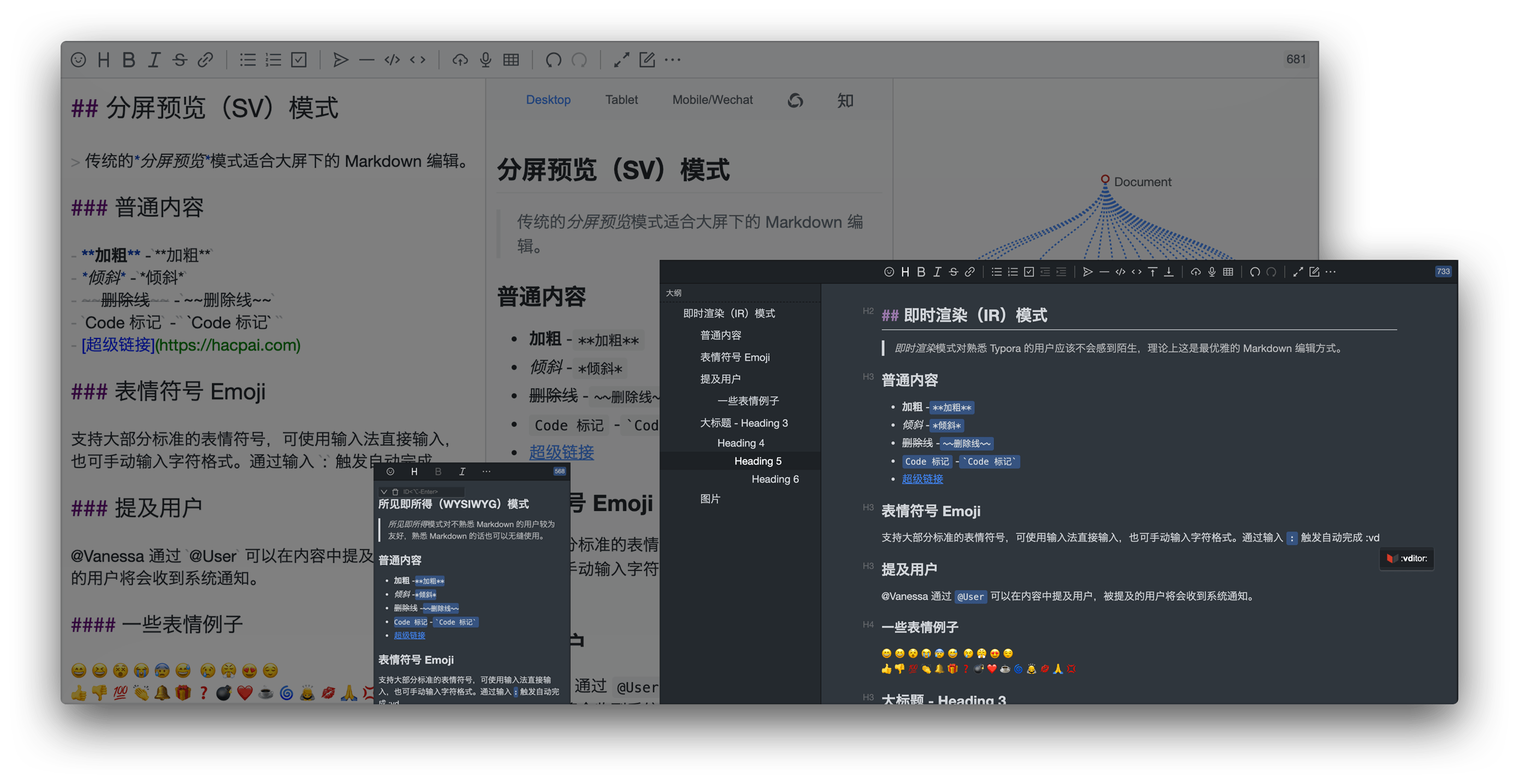
Vditor is a browser-side Markdown editor, Support WYSIWYG, instant rendering (similar to Typora) and split-screen preview mode. It is implemented using TypeScript and supports native JavaScript and frameworks such as Vue, React, Angular, and Svelte..
Welcome to Vditor Official Site to learn more.
🗺️ Background
With the popularization of Markdown typesetting methods, more and more applications begin to integrate the Markdown editor. The current status of mainstream integrable Markdown editors is as follows:
- Some only support split-screen preview, that is, the editing area and preview area are separated
- Some support WYSIWYG and split-screen previews at the same time, but they cannot fully support Markdown syntax typesetting in WYSIWYG mode
- There is almost no instant rendering similar to Typora
These three points correspond to three application scenarios:
- Split screen preview: adapt to the traditional Markdown usage scene, suitable for editing and typesetting on a large screen
- WYSIWYG: Friendly to users who are not familiar with Markdown, users who are familiar with Markdown can also use it seamlessly
- Instant rendering: In theory, this is the most elegant Markdown editing method, allowing users familiar with Markdown to focus more on content creation
Therefore, a Markdown editor that can adapt to application scenarios is essential, it needs to consider:
- Use scenes of traditional Markdown users, providing split screen preview
- Rich text editing users' usage scenarios, providing WYSIWYG
- High-end Markdown users' use scenes, providing instant rendering
Vditor has made efforts in these areas, hoping to make some contributions to the modern general Markdown editing field.
✨ Features
- Support three editing modes: WYSIWYG(wysiwyg), Instant Rendering(ir) and Split View(sv)
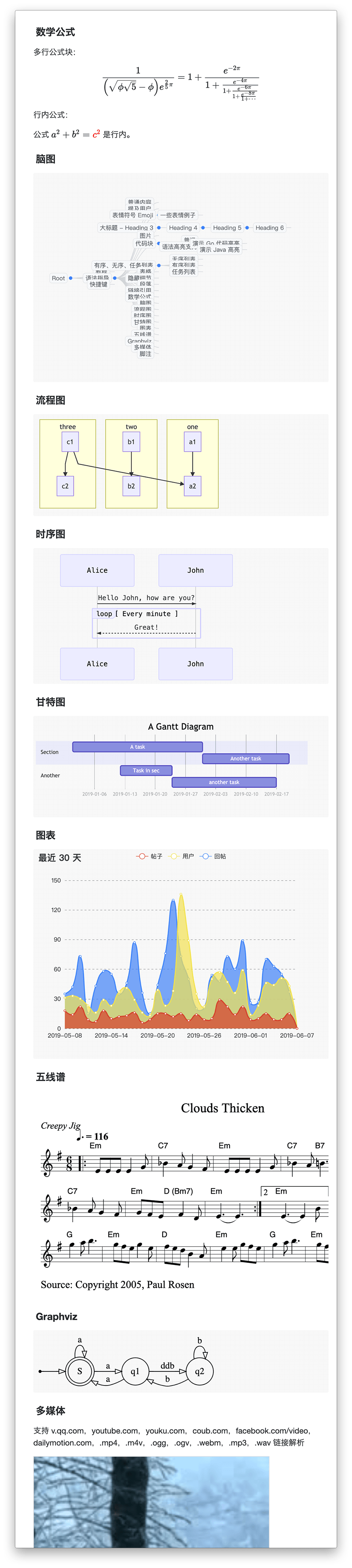
- Support outline, mathematical formulas, mind maps, charts, flowcharts, Gantt charts, timing charts, staffs, multimedia, voice reading, heading anchors, code highlighting and copying, graphviz rendering
- Export, image lazy loading, task list, multi-platform preview, multi-theme switching, copy to WeChat/zhihu function
- Implementation of CommonMark and GFM specifications, formatting and syntax tree viewing of Markdown, and support for 10+ configurations
- The toolbar contains 36+ items of operations. In addition to support for expansion, the shortcut keys, tip, tip positions, icons, click events, class names, and sub-toolbars can be customized
- Extend auto-complete for emoji/@/# and so on
- You can use drag and drop, paste and paste to upload, display real-time upload progress, support CORS cross-domain upload
- Save content in real time to prevent accidental loss
- Recording support, users can directly publish voice
- The markup HTML is automatically converted to Markdown, if the paste contains images of external links, it can be uploaded to the server through the specified interface
- Support main window size drag and drop, character counting
- Multi-theme support, built-in black, white and green three sets of themes
- Multi-language support, built-in Chinese, English, Korean text localization
- Support mainstream browsers, mobile friendly
🔮 Editing Modes
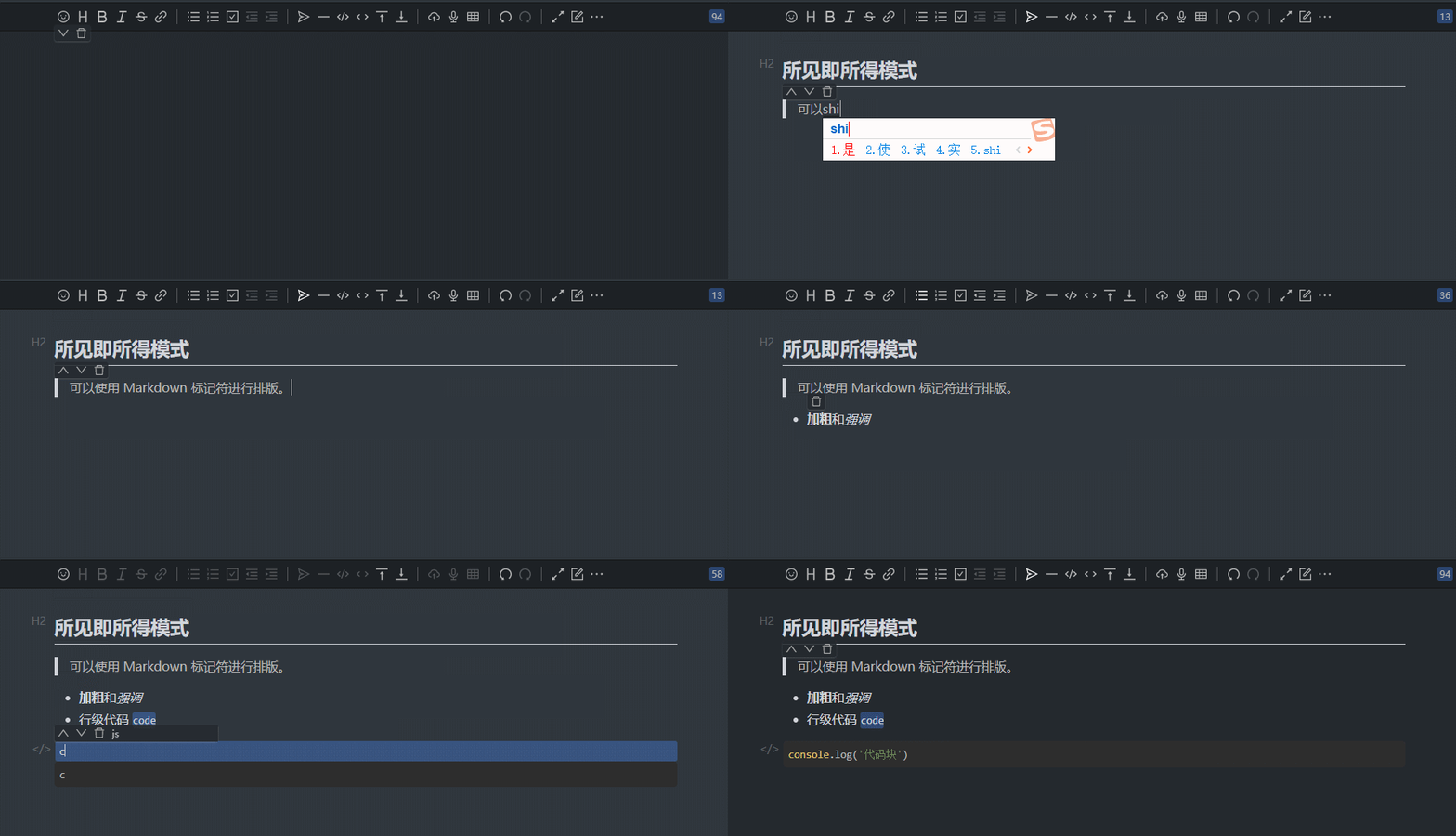
WYSIWYG
WYSIWYG mode is more friendly to users who are not familiar with Markdown, and you can use it seamlessly if you are familiar with Markdown.
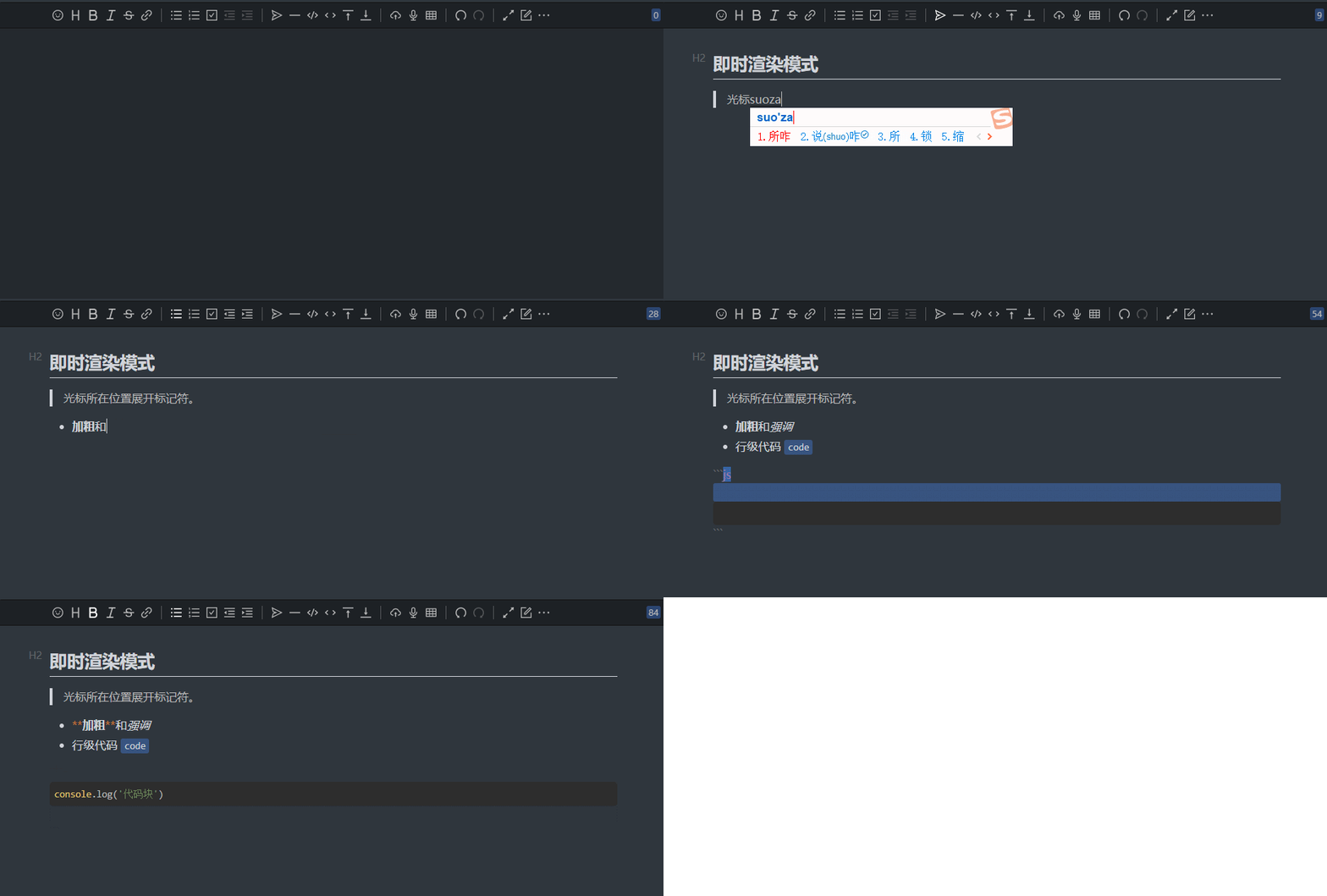
Instant Rendering
Instant Rendering mode should not be unfamiliar to users who are familiar with Typora. In theory, this is the most elegant Markdown editing method.
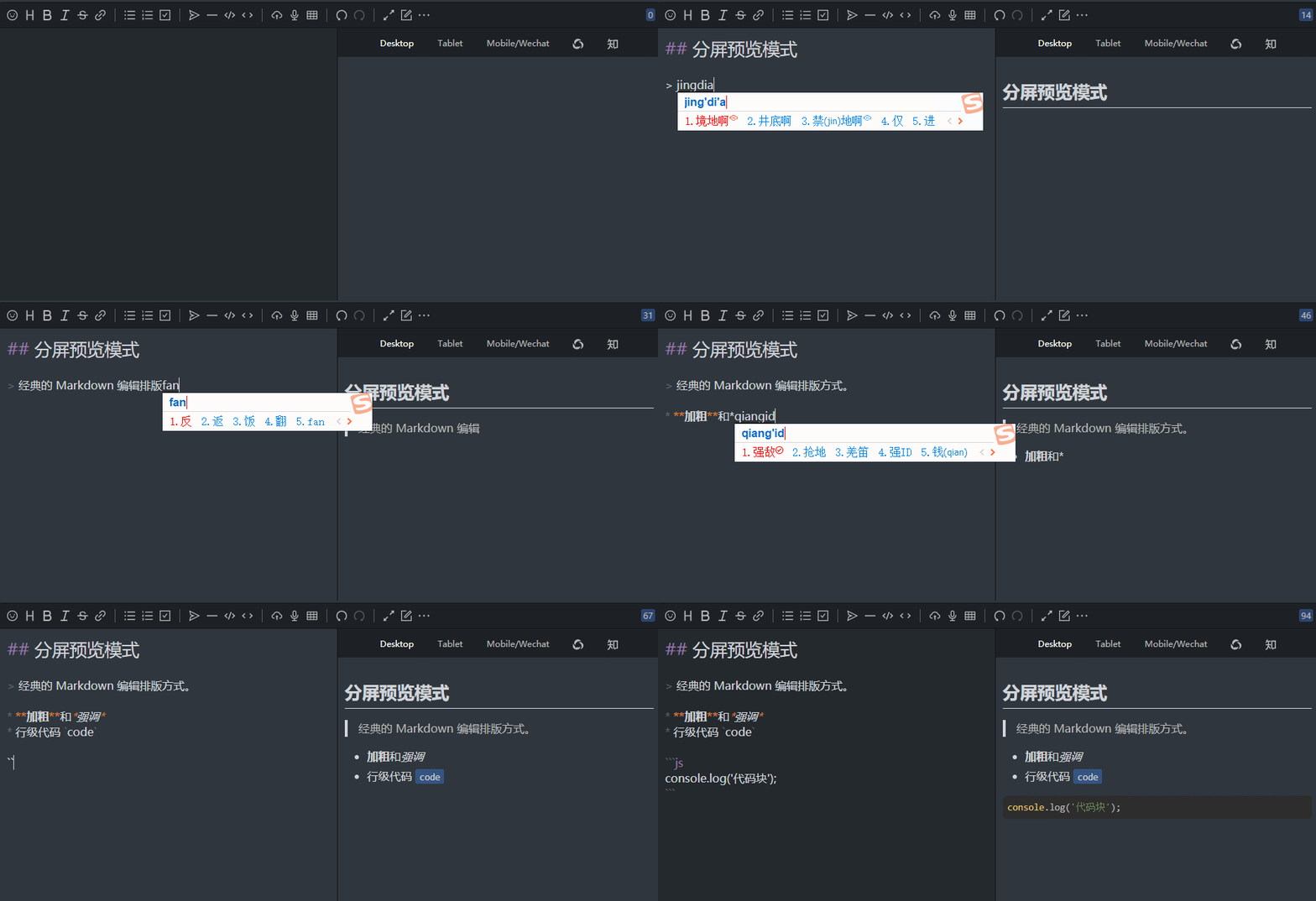
Split View
The traditional Split View mode is suitable for Markdown editing on a large screen.
🍱 Syntax support
- All CommonMark syntax: Thematic breaks, ATX headings, Setext headings, Indented code blocks, Fenced code blocks, HTML blocks, Link reference definitions, Paragraphs, Block quotes, Lists, Backslash escapes, Entity and numeric character references, Code spans, Emphasis and strong emphasis, Links, Images, Raw HTML, Hard line breaks, Soft line breaks, and Textual content.
- All GFM syntax: Tables, Task list items, Strikethrough, Autolinks, XSS filtering
- Common Markdown extended syntax: Footnotes, ToC, Custom Heading ID
- Chart syntax
- Flow chart, sequence diagram, Gantt chart, supported by Mermaid
- Graphviz
- Line chart, pie chart, brain chart, etc., supported by ECharts
- Stave: supported by abc.js
- Math formulas: Math formula blocks, row-level math formulas, supported by MathJax and KaTeX
- YAML Front Matter
- Chinese context optimization
- Insert space between Chinese and Western
- Terminology spelling correction
- Chinese followed by English comma period and other punctuation are replaced with Chinese corresponding punctuation
Most of the above features can be enabled or disabled through the switch configuration, developers can choose to match according to their own application scenarios.
🗃 Showcases
- Sym A modern community (forum/BBS/SNS/blog) platform implemented in Java
- Solo & Pipe B3log distributed community blog end node, welcome to join the next generation community network
- Arya Based on Vue, Vditor, built online Markdown editor
- More cases
🛠️ User Guide
CommonJS
- Install dependencies
npm install vditor --save
- Introduce and initialize objects in the code, you can refer to index.js
import Vditor from 'vditor'
import "~vditor/src/assets/less/index" // Or use dark

const vditor = new Vditor(id, {options...})
HTML script
- Insert CSS and js in HTML, you can refer to demo
<link rel="stylesheet" href="https://unpkg.com/vditor/dist/index.css" />
<script src="https://unpkg.com/vditor/dist/index.min.js"></script>
Demo code
Themes
- Support four sets of black and white themes: and-design, classic, dark, wechat
- Use the less/css developed by yourself to fully customize the style after referring to the existing style
- Theme colors can be customized by modifying variables in index.less
- Adding
class="vditor-reset"(classic theme) orclass="vditor-reset vditor-reset--dark"(black theme) attribute on the content display element can display the content more friendly
API
id
Can be filled with element id or element itselfHTMLElement
⚠️: When filling in the element's HTMLElement, you need to set options.cache.id or set options.cache.enable to false
options
| Explanation | Default | |
|---|---|---|
| i18n | I18n, more details see ITips | - |
| undoDelay | Undo interval | - |
| after | Callback method after editor asynchronous rendering is completed | - |
| height | Total editor height | 'auto' |
| minHeight | Editing area minimum height | - |
| width | Total editor width, supports % | 'auto' |
| placeholder | Tips when the input area is empty | '' |
| lang | I18n type: de_DE, en_US, es_ES, fr_FR, ja_JP, ko_KR, pt_BR, ru_RU, sv_SE, vi_VN, zh_CN, zh_TW | 'zh_CN' |
| input(value: string) | Trigger after input | - |
| focus(value: string) | Trigger after focusing | - |
| blur(value: string) | Trigger after out of focus | - |
| keydown(event: KeyboardEvent) | Trigger after keydown | - |
| esc(value: string) | Trigger after pressing | - |
| ctrlEnter(value: string) | Trigger after pressing ⌘/ctrl+enter | - |
| select(value: string) | Triggered after selecting text in the editor | - |
| unSelect() | Triggered after un selecting text in the editor | - |
| tab | tab key operation string, support \ t and any string |
- |
| typewriterMode | Whether to enable typewriter mode | false |
| cdn | Configure self-built CDN address | https://unpkg.com/vditor@${VDITOR_VERSION} |
| mode | Editing mode: sv, ir, wysiwyg | 'ir' |
| debugger | Whether to display the log | false |
| value | Editor initialization value | '' |
| theme | Theme: classic, dark | 'classic' |
| icon | icon theme: ant, material | 'ant' |
| customRenders: {language: string, render: (element: HTMLElement, vditor: IVditor) => void}[] | Custom render | [] |
| customWysiwygToolbar(type: TWYSISYGToolbar, element: HTMLElement): void | Customizing the toolbar in wysiwyg mode | - |
options.toolbar
- Toolbar, you can use name for shorthand:
toolbar: ['emoji', 'br', 'bold', '|', 'line']. See default src/ts/util/Options.ts - name can be enumerated as:
emoji,headings,bold,italic,strike,|,line,quote,list,ordered-list,check,outdent,indent,code,inline-code,insert-after,insert-before,code-theme,content-theme,export,undo,redo,upload,link,table,record,edit-mode,both,preview,fullscreen,outline,devtools,info,help,br - When
nameis not in the enumeration, you can add a custom button in the following format:
```js new Vditor('vditor', { toolbar: [ { hotkey: '⇧⌘S', name: 'sponsor', tipPosition: 's', tip: '成为赞助者', className: 'right', icon: '
Extension points exported contracts — how you extend this code
ILuteRender (Interface)Core symbols most depended-on inside this repo
QShape
Languages
Modules by API surface
Used by 3 indexed graphs manifest dependencies, hub-wide
Dependencies from manifests, versioned
For agents
$ claude mcp add vditor \
  -- python -m otcore.mcp_server <graph>