github.com/TudbuT/qft @v0.5.6
Chat with this repoWhat it actually does AI analysis from the code graph — generated when you open this
README
qft
QFT is a small application for Quick (and really reliable) Peer-To-Peer UDP file transfer.
If a friend sent you here...
...look at the "Releases" section on the sidebar. You should see a link titled vX.Y.Z. Click on
that, and then choose the right file for your OS: qft for Linux, qft-mac for Mac, and qft.exe
for Windows. Download this file, make it executable in case of Linux or Mac, and then follow your
friend's instructions on how to receive the file they wanted to send you.
Usage:
- Find a public QFT helper (for example tudbut.de:4277)
- On the sender PC, enter
qft sender <helper> <shared-phrase> <filename>. - On the receiver PC, enter
qft receiver <helper> <shared-phrase> <filename>. - Both PCs should start transferring after a short while. If they don't, try again.
OR
- On both PCs, enter qft gui.
- Select mode
- Select file to send and file to save to
- Update the shared phrases and bitrate to match
- Click start
Arguments:
qft helper   <bind-port>
qft sender   <helper-address>:<helper-port> <phrase> <filename> [send-delay] [bitrate] [skip]
qft receiver <helper-address>:<helper-port> <phrase> <filename> [bitrate] [skip]
What helpers do
Helpers are NOT relays for data, they are only used to ESTABLISH the connection.
Helpers are there to help with holepunching. - P1 connects* to helper - P1 sends the phrase to the helper - P1 waits for a response - Some time passes - P2 connects* to the same helper - P2 sends the phrase to the helper - P2 gets P1's public IP and port - P1 gets P2's public IP and port - P1 and P2 disconnect* from the helper - P1 and P2 start a loop (slightly simplified): - fire a packet at eachother multiple times - try to receive as many packets from the other one - if none are received, loop again - if one is received, exit the loop - Connection between P1 and P2 is established.
*UDP is a connection-less protocol, there are no handshakes. The word "connection" is used here as an indicator that data will be exchanged between the "connected" parties. The word "disconnect" is used here as an indicator that no more data will be exchanged between the "previously connected" parties.
Debunking some myths about P2P networking
- "True P2P is only possible without a NAT" - Both my experiments and wikipedia would like to have a word about hole punching. The only issue I have found are some german mobile data providers, but sending large files over mobile data is rarely something you'd want to do - and if so, use something like croc or the magic wormhole, which aren't purely true P2P.
- "Croc is P2P as well, why does this exist?" - Croc is not Peer-to-Peer. Croc uses a relay server to exchange data between the two clients (unless one of the client has a port-forward set up, which is almost never the case). That is Client-to-Server-to-Client, which is not really Peer-to-Peer. Peer-to-Peer means two clients sending their data directly to eachother, without a server. "Peers make a portion of their resources, such as processing power, disk storage or network bandwidth, directly available to other network participants, without the need for central coordination by servers or stable hosts." - Wikipedia
Tips 'n Tricks
- You can add a number to the end of both of your commands (after the filename) to boost transfer speeds (lower = faster), but a too small number might cause unreliability due to local network conditions, VPNs, etc (default is 500). This will modify the delay between packets sent.
- You can also add a number after that. It will modify packet size, and a higher number here has similar effects as a lower one in the previous arg.
- You can run a helper yourself, as the "helper" mode argument suggests. This helper should simply be run on a server which is reachable from all over the web (a cheap VPS will definitely do).
- Helpers don't have to be run on a public server, they work in LAN too, but that way, only computers in the same LAN will be able to use them.
- You can allow streaming (for example when you want to transmit from /dev/stdin) by setting
the
QFT_STREAMenvironmental variable. - To use qfts and qftr aliases on linux or mac, run (replacing
(shell)with your shell name, usually bash or zsh):
echo 'alias qftr="qft receiver tudbut.de:4277"' >> ~/.(shell)rc
echo 'alias qfts="qft sender tudbut.de:4277"' >> ~/.(shell)rc
source ~/.(shell)rc
Cool stuff
- Files are transferred over UDP, but qft has additional reliability measures in place to avoid broken files.
- Unreliable internet connection? No problem! QFT will simply pause transmission until the connection is back! Doesn't work? Check out the "Resume a fully stopped transfer" section!
- Did you know you can hibernate or suspend your computer while it's transferring and it'll continue where it left of, even when only one side is suspended? (Unless your router blocked the port, read the "Resume a fully stopped transfer" section in that case)
- QFT can withstand heavy ~~weather~~ network conditions: 1000ms ping is just as fast as 10ms ping, packet loss/reorder rates of over 10% are tolerated (but can slow speeds down, especially when ping is high).
- It's written in 100% pure Rust.
Resume a fully stopped transfer
You most likely won't need this unless the transfer completely died due to a VERY long pause or a computer restart, but if you do:
Stop qft on both ends and start it again with the [skip] parameter in place (if you didn't specify a bitrate before, the default is 256). It will skip those bytes and continue where you specified.
Troubleshooting
It says Connecting... but doesn't connect
One of your ends didn't correctly connect to the helper. Stop the transfer on both ends and try again.
Croc
Many people have mentioned how this is like croc. It isn't, because croc uses a relay that all your data is sent through. This is a bottleneck and also means that the relay admins are responsible for the content that is sent. The relay also buffers a lot of data, meaning its RAM might fill up if the sender's connection is much faster than the receiver's. Croc being tagged "peer-to-peer" is misleading at best because it rarely uses the P2P capabilities (it requires a port-forward to do P2P, which is rarely done). Read the previous section about P2P myths if you think Croc is always peer-to-peer.
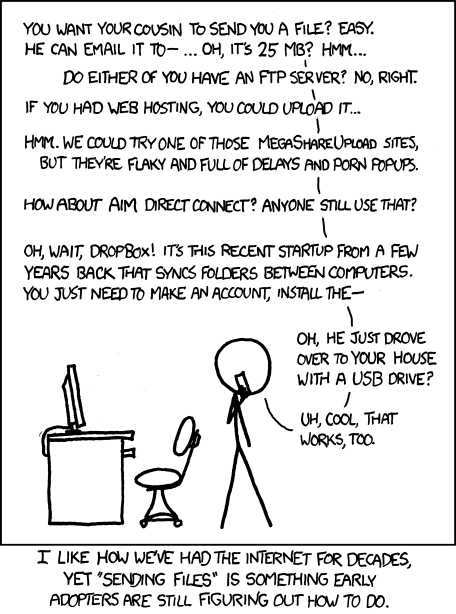
Relevant XKCD
FAQ
What is a helper?
As explained above, it is used to establish the connection between the two partners.
Why is a helper needed?
Your router uses a thing called Network Address Translation. It is required because otherwise, there would be way too many IP addresses in use and the internet would cease to work during busy times. This NAT is also a problem however, because it is a layer between your PC and the open internet. When there is a new incoming connection, the NAT won't know which PC in your LAN to forward the connection to, so the connection is simply rejected. Any Peer-to-Peer software therefore needs a helper server (also called "STUN" server) which both peers will ask for the other's IP address and port. Both peers can then send a bunch of outgoing connections to eachother. If everything goes well, both peers have sent an outgoing with the right timing, causing both NATs to think they are outgoing connections, when actually, they are a sort of combination of incoming and outgoing ones.
TL;DR: P2P networking is impossible without a helper server, because of Routers. Port-forwarding would be required otherwise, which can be hard to set up.
How to make a public/private helper?
Read the 2nd bullet point in the Tips 'n Tricks section.